Read WP WordPress Theme
by pixelwars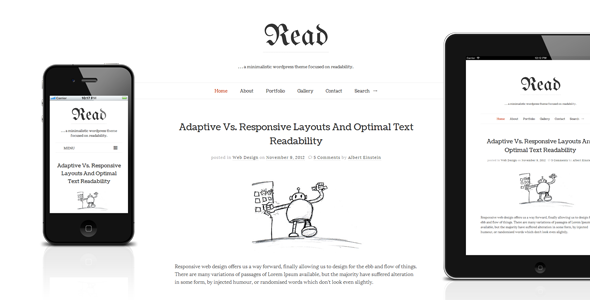
Stuck on your Read WP WordPress theme? Let's fix it.
No endless back-and-forth. Just send us the details and we'll get it done.
No obligation · Replies within 1 hour · Quote within 1 day
Setup · Customization · Bug fixes · WooCommerce integration
About Read WP WP Theme
Read WP is a clean, content-focused WordPress theme by Pixelwars, built specifically for blogs, online magazines, and editorial sites. It prioritises typography and readability above all else, with a minimal layout that keeps the reader’s attention on the text.
The theme ships with multiple post formats, a sticky sidebar, featured image support, and a widgetised homepage that can be assembled without touching code. It’s compatible with Gutenberg and works well with the Classic Editor too.
Performance is a clear priority in the design. Read WP loads fast out of the box, avoids unnecessary scripts, and works cleanly across devices. For anyone running a text-heavy publication, it’s a sensible starting point without a lot of configuration overhead.
Get matched with a Read WP developer in under one day
Tell us about your Read WP project. Small fixes, Read WP theme customization, or a full website build, whatever you need, we've got it covered.
We'll connect you to the right Read WP developers, define the scope, and get everything 100% clear.
You'll get one estimate, hire your preferred developer, and start collaborating.
Finding a qualified Read WP developer on your own takes time you don’t have. Codeable connects you with vetted WordPress specialists who have been tested and reviewed before they’re ever listed. Post your project, receive a fixed estimate within 24 hours, and only move forward if the scope and price make sense. There’s no obligation and no risk. If you need someone who knows Read WP and can deliver clean, maintainable work, this is the straightforward way to get there.
Pros
- Typography and line-height defaults are well-tuned for long-form reading without any adjustments
- Lightweight codebase with minimal third-party dependencies keeps page load times low
- Widgetised homepage makes it easy to arrange content sections without editing templates
- Supports multiple post formats including video, quote, link, and gallery natively
- Gutenberg compatible with clean block rendering and a readable content column width
Cons
- Limited built-in colour palette options; meaningful rebranding requires custom CSS or a child theme
- No built-in mega menu or complex navigation structure for large multi-category publications
- Featured image display behaviour on archive pages is not easily adjusted through the Customizer
- No native dark mode support; adding one requires developer work
- WooCommerce compatibility is minimal and not suitable for sites mixing editorial with e-commerce
Who is Read WP for?
Personal Blog
Read WP works well for solo bloggers who want a clean, distraction-free layout. The single-column reading experience keeps focus on content, and the theme handles long posts, embedded images, and blockquotes cleanly. A Read WP developer can add a newsletter opt-in, related posts section, or author bio block to round out the setup.
Online Literary Magazine
For poetry, fiction, or essay publications, Read WP’s typographic defaults are a strong fit. The theme respects text spacing and doesn’t force content into cluttered grid layouts. A Read WP specialist can extend it with submission forms, contributor profiles, and issue-based archive structures that match editorial workflows.
News and Current Affairs Site
Read WP supports breaking news workflows through its post format options and fast load times. A Read WP developer can add a sticky breaking news bar, category colour coding, and a custom homepage that surfaces recent posts by section. The theme scales to high-volume content with minimal configuration.
Niche Topic Publication
Hobby, health, food, or technology blogs benefit from Read WP’s uncluttered sidebar and flexible widget areas. A Read WP expert can configure topic filters, tag clouds, and contextual ad slots without disrupting the reading experience. The theme keeps niche audiences focused on the content that brought them there.
Author or Journalist Portfolio
Authors and journalists use Read WP to present writing samples, press coverage, and bylines in a professional format. A Read WP developer can add a custom portfolio post type, publication logos, and a press kit download section. The minimal aesthetic supports credibility without visual noise.

Customizing Read WP
Read WP exposes most visual settings through the WordPress Customizer, covering typography, colours, header layout, and sidebar positioning. You can switch between a one-column and two-column layout, adjust accent colours, and control what appears on the homepage without writing any CSS.
That said, deeper customisation requires a Read WP expert. Things like restructuring the post header, adding custom ad placements, modifying the archive layouts, or integrating a newsletter section mid-content all require template edits or a child theme. A Read WP developer can also add custom post types, modify the reading progress bar behaviour, or wire up advanced filtering for category pages.
If the default options aren’t enough for what you’re building, working with a specialist is the faster path.
Recommended plugins for Read WP
Read WP pairs well with caching plugins and image optimisation tools. Because the theme is already lean, the right performance stack can push it to excellent Core Web Vitals scores. See our WordPress performance service for a full breakdown of what’s involved.
For editorial sites that depend on organic traffic, proper schema markup, sitemap configuration, and on-page SEO structure matter. Read WP doesn’t handle all of this natively, so a dedicated SEO setup is worth adding early. Our WordPress SEO service covers exactly that.
Not sure which plugins to use? This WordPress plugins directory covers the most popular options with reviews and setup guides.
Read WP common issues
Read WP homepage not showing latest posts
This usually happens when the WordPress reading settings are set to show a static page instead of the latest posts. Go to Settings > Reading and confirm the homepage is set to display your latest posts, or the correct page is assigned. If the homepage template is pulling from a custom query, check whether a page builder or widget configuration is overriding the default loop. A developer can audit the template hierarchy if the issue persists.
Read WP featured image not displaying on archive pages
Read WP controls featured image display through its theme options panel. Check whether the featured image is enabled for archive and category templates in the Customizer. If the setting is on but images still don’t appear, the issue may be a missing post thumbnail support hook or a plugin conflict. Our WordPress bug fixing service can identify the root cause and resolve it without breaking other layout settings.
Read WP sidebar overlapping content on mobile
Read WP uses a sticky sidebar that can cause overlap issues on smaller screens if the sidebar widget height exceeds the content column. Check the theme’s responsive CSS for sidebar breakpoints. A common fix is adjusting the sidebar’s position behaviour at tablet breakpoints or disabling the sticky class below a certain viewport width. Test with browser dev tools to confirm where the layout breaks, then apply a targeted CSS fix in your child theme.
Read WP custom logo not showing in header
If the custom logo isn’t displaying, first confirm it was uploaded through Appearance > Customize > Site Identity rather than hardcoded elsewhere. Read WP supports custom logos through the standard WordPress custom-logo feature. If the logo is uploaded but not appearing, check for a caching layer or a CSS rule that’s hiding the image. Clearing the cache and checking z-index or display properties in the header template usually resolves this quickly.
Read WP fonts not loading or reverting to defaults
Read WP loads Google Fonts via an enqueued stylesheet. If fonts are reverting to system defaults, the request may be blocked by a privacy plugin, a firewall rule, or a content security policy. Check the browser console for blocked requests. Alternatively, download the fonts and serve them locally through your child theme to eliminate the external dependency entirely. This also improves load time and removes GDPR concerns around third-party font requests.
Read WP comments section missing or not working
If comments are missing, first check that comments are enabled at the post level under Discussion settings and that the individual post has comments turned on. Read WP includes comment template files, but a plugin conflict or a template override can suppress the section. Our WordPress bug fixing service handles comment system diagnostics if the standard settings aren’t resolving the problem.
Read WP social icons not appearing in header or footer
Read WP social icons typically appear through a widget area or a custom menu assigned to a social links location. Go to Appearance > Menus, create a menu with custom links to your social profiles, and assign it to the Social Menu location if the theme registers one. If the icons aren’t rendering as icons rather than plain text links, check whether the theme requires a specific menu class or relies on a font icon library that may not be loading correctly.
Read WP Customizer changes not saving
Customizer changes failing to save are often caused by a REST API conflict, a security plugin blocking the save request, or insufficient file permissions on wp-config.php. Open browser dev tools, go to the Network tab, and trigger a Customizer save to see if the POST request returns an error. Common fixes include whitelisting the Customizer endpoint in your security plugin or checking whether your server’s PHP session handling is interrupting the save process.
Read WP child theme not inheriting parent styles
A Read WP child theme must declare the parent theme in its stylesheet header using the Template field set to the parent theme’s folder name. Styles should be enqueued via functions.php using wp_enqueue_style with the parent stylesheet as a dependency, not imported via @import in style.css. If the child theme isn’t inheriting templates, confirm the folder name in the Template declaration matches the exact directory name of the Read WP parent theme installation. Our WordPress bug fixing service can audit and correct child theme setup issues.
Read WP layout broken after WordPress update
Layout breaks after a WordPress update are usually caused by deprecated template tags, removed hooks, or CSS changes introduced in the update. Check the browser console and PHP error log for specific errors. If Read WP hasn’t been updated by Pixelwars to match the current WordPress version, the safest fix is to apply targeted patches in a child theme rather than editing the parent. A Read WP developer can review the changelog and apply the minimum changes needed to restore the layout.
Read WP FAQ
Yes, Read WP is compatible with the Gutenberg block editor. Blocks render cleanly within the theme’s content column, and the reading width is set to a comfortable measure. Some advanced block patterns may require minor CSS adjustments to align with the theme’s typographic style, but standard text, image, and embed blocks work without modification.
Read WP can technically work alongside page builders like Elementor, but the theme is not designed for it. Using a page builder may conflict with the theme’s layout logic, particularly on the homepage and archive templates. For a heavily customised layout, it’s worth discussing with a Read WP developer whether a page builder or a child theme approach is the better fit for your project.
Read WP has minimal WooCommerce compatibility. Basic product pages will render, but the theme’s styles are not optimised for shop, cart, or checkout templates. If you need a site that combines editorial content with e-commerce, a different theme or a custom WooCommerce template layer built by a Read WP developer would give better results.
Create a folder in wp-content/themes/ with a new name, add a style.css file with the Template field set to the Read WP parent folder name, and add a functions.php file that enqueues the parent and child stylesheets. Upload via FTP or the WordPress theme uploader. Activate the child theme from Appearance > Themes. All customisations go into the child theme to survive parent updates.
Read WP by Pixelwars is available as a free theme from the WordPress theme directory. There is no official premium version with extended features. Any advanced functionality beyond the core theme requires custom development work or compatible plugins added by a Read WP specialist.
AdSense can be added to Read WP through widget areas, which accept HTML and JavaScript ad code. Place ad units in the sidebar widgets, or ask a Read WP developer to add custom ad hook positions within the post template, such as after the first paragraph or between sections, which typically perform better than sidebar placements for editorial sites.
Read WP loads Google Fonts and applies them via CSS. You can change the font by enqueueing a different Google Font in your child theme’s functions.php and overriding the font-family rules in style.css. The Customizer does not include a native font picker, so this change requires some CSS knowledge or assistance from a Read WP developer.
Go to Appearance > Customize to access the homepage layout options. Read WP allows you to configure widget areas that control what appears on the front page. Set your homepage to a static page in Settings > Reading if you want full control over the layout, then use the theme’s widget areas to add featured posts, category sections, and other content blocks.
Read WP does not include a built-in dark mode. Adding one requires a CSS media query targeting prefers-color-scheme or a JavaScript toggle. A Read WP developer can implement a dark mode that respects the theme’s typography variables and switches cleanly across all templates, including the sidebar, header, and comment sections.
You can hire a vetted Read WP developer through Codeable, a WordPress-specialist platform where developers are reviewed before being listed. Post your project, get a fixed estimate within 24 hours, and only proceed if the scope works for you. Get a Free Estimate and connect with a Read WP expert who can handle your specific requirements.
Hire a Read WP Developer for Your Project
Whether you need a Read WP expert to configure the theme from scratch, extend it with custom functionality, or fix something that’s broken, we can match you with the right developer. Work is delivered through Codeable, where every developer is vetted and reviewed. Submit your project details and get a free, no-obligation estimate. Get a Free Estimate and have a developer ready within 24 hours.
You'll need a free Codeable account so developers can ask questions and send their quotes.