Readme WordPress Theme
by pixelwars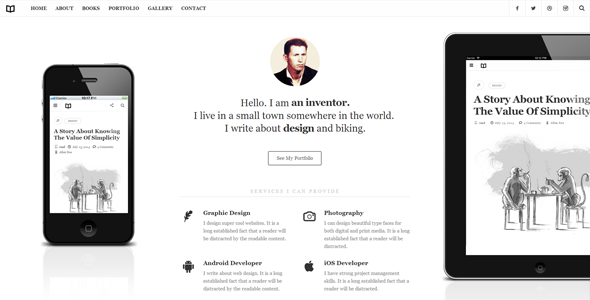
Stuck on your Readme WordPress theme? Let's fix it.
No endless back-and-forth. Just send us the details and we'll get it done.
No obligation · Replies within 1 hour · Quote within 1 day
Setup · Customization · Bug fixes · WooCommerce integration
About Readme WP Theme
Readme is a WordPress theme built by Pixelwars, designed primarily for personal blogs and content-focused websites. It takes a minimal, typography-first approach — clean layouts, generous whitespace, and a reading experience that keeps the focus on your words rather than the surrounding design.
The theme is lightweight out of the box, which helps with load times and Core Web Vitals scores. It supports the WordPress block editor well, making it a practical pick for writers who want flexibility without dealing with a heavy page builder. Readme also includes basic customization options through the WordPress Customizer, covering fonts, colors, header layout, and sidebar positioning. It’s a solid foundation if your priority is readable, well-structured content rather than visual complexity.
Get matched with a Readme developer in under one day
Tell us about your Readme project. Small fixes, Readme theme customization, or a full website build, whatever you need, we've got it covered.
We'll connect you to the right Readme developers, define the scope, and get everything 100% clear.
You'll get one estimate, hire your preferred developer, and start collaborating.
Readme looks simple, but getting it to behave exactly how you want — across devices, with custom templates, integrated plugins, and performance targets — takes real WordPress knowledge. Our developers on Codeable have worked across dozens of minimal WordPress themes and know how to extend Readme without creating maintenance headaches. You get a vetted developer, a clear estimate upfront, and no obligation to proceed. Straightforward from start to finish.
Pros
- Typography-first design keeps reader attention on content without distractions
- Lightweight codebase loads fast with minimal configuration needed
- Clean block editor support makes post formatting straightforward
- Minimal Customizer options reduce decision fatigue for simple sites
- Well-structured template files make child theme development clean and predictable
Cons
- Limited built-in layout options make it restrictive for complex page structures
- WooCommerce pages require custom CSS to match the theme's design properly
- No built-in mega menu or advanced navigation options
- Fewer third-party tutorials and community resources than larger themes
- Sidebar options are basic and lack conditional display controls out of the box
Who is Readme for?
Personal Writing Blog
Readme suits personal bloggers who want their writing to be the focus. The clean layout and strong typographic defaults mean your posts look good without spending hours on design. It handles long-form content well, keeping paragraphs readable and the overall layout distraction-free across screen sizes.
Niche Content Publication
For niche blogs covering a single topic — food, travel, personal finance, tech — Readme’s minimal structure gives you a professional base without excess clutter. Categories, tags, and archive pages work cleanly out of the box, which matters when you’re building a content library over time.
Author Portfolio
Authors using their site as a portfolio or to promote a book benefit from Readme’s editorial feel. It presents writing samples and biography sections without looking like a generic business site. A small amount of customization gets it tailored to match a specific author brand or publisher aesthetic.
Newsletter Companion Site
If you run a newsletter and want a companion WordPress site to host archives or attract new subscribers, Readme is a practical fit. It integrates with Mailchimp, ConvertKit, and similar tools through shortcodes or blocks, and its content-first layout encourages visitors to read rather than bounce.
Developer or Designer Journal
Developers and designers who want a blog to document work, share technical posts, or build a professional presence online often prefer minimal themes. Readme’s clean template structure also makes it easy to extend with custom functionality if you’re comfortable with PHP or working with a developer.

Customizing Readme
Readme keeps its Customizer options focused — you can adjust typography, color schemes, layout width, and navigation placement without touching code. That works well for straightforward setups, but if you need something beyond those defaults, you’ll run into its limits quickly.
Adding a custom post type, tweaking the archive layout, modifying how the header behaves on mobile, or integrating a specific plugin output into the theme templates — these all require direct PHP and CSS work. A Readme expert can handle those modifications cleanly, working inside a child theme to keep your changes safe during updates. Whether it’s a layout adjustment or a full template override, having someone who knows the theme’s structure saves significant time and avoids breaking things unexpectedly.
Recommended plugins for Readme
Readme works well with WooCommerce if you need a small shop alongside your blog, though you may need custom styling to match the store pages to the rest of your site. It’s compatible with popular SEO plugins like Yoast and Rank Math. For performance, pairing it with a caching plugin and an image optimization tool keeps page speed solid. If you want to push further, our WordPress performance service and SEO optimisation service can build on the theme’s lightweight foundation to get measurable gains.
Not sure which plugins to use? This WordPress plugins directory covers the most popular options with reviews and setup guides.
Readme common issues
Readme theme header not showing logo correctly
This usually comes down to the image dimensions not matching what the theme expects, or a Customizer setting being overridden by a caching plugin serving stale CSS. Start by clearing your cache and checking the logo dimensions in the Customizer. If the logo area still behaves incorrectly, the issue is often a conflicting rule in a plugin stylesheet. A WordPress bug fixing review can pinpoint the exact conflict without guesswork.
Readme WordPress theme sidebar not displaying on posts
Readme’s sidebar visibility is controlled by page template selection. If you’re on a full-width template or using a block template that doesn’t include a sidebar region, the widget area won’t appear. Go to the page or post editor, check the template assigned under Page Attributes, and switch to a layout that includes the sidebar. If it’s still missing, check whether your active widgets are published correctly in Appearance > Widgets.
Readme theme mobile menu not working
A broken mobile menu in Readme is usually caused by a JavaScript conflict with another plugin, or the menu not being assigned in Appearance > Menus. First, confirm the correct menu is assigned to the Primary Menu location. Then disable plugins one by one to check for a JS conflict. If the hamburger icon appears but clicking does nothing, a script is likely failing — check your browser console for errors to identify the source.
Readme theme custom CSS not applying after update
Custom CSS added through Appearance > Customize > Additional CSS should persist through theme updates. If it disappeared, check whether you were adding CSS directly to the theme’s stylesheet file rather than through the Customizer — that gets overwritten on every update. Going forward, use a child theme for any CSS changes you want to keep permanently. Our WordPress maintenance service can set this up properly so updates don’t wipe your work.
Readme FAQ
Readme’s lightweight code and clean HTML structure give it a solid SEO foundation. It doesn’t bloat the page with unnecessary scripts, which helps Core Web Vitals scores. Pair it with a plugin like Rank Math or Yoast for meta control, and you’re well set. The theme itself doesn’t hurt SEO — what matters more is your content, site speed, and internal linking strategy.
Readme is compatible with WooCommerce, but it doesn’t include purpose-built shop templates. Product pages, cart, and checkout will use WooCommerce’s default styles, which often clash visually with the theme. Custom CSS or template overrides in a child theme are usually needed to bring the store pages in line with the rest of the site’s design.
Readme works with the native block editor and is the recommended tool for building pages within this theme. Using Elementor is technically possible but tends to produce layout conflicts because Elementor wraps content in its own containers. For a minimal theme like Readme, sticking with blocks keeps things cleaner and faster.
Create a folder in wp-content/themes with a name like readme-child, add a style.css file with the Template header pointing to the parent theme slug, and enqueue the parent stylesheet via functions.php. That’s the basic setup. Any CSS or template file you add to the child theme will override the parent without being lost on updates.
Your WordPress content — posts, pages, images, comments — stays in the database regardless of theme changes. Switching to Readme won’t delete anything. What changes is how that content is displayed. Some formatting that relied on a previous theme’s shortcodes or custom blocks may need adjusting. Our WordPress migration service can handle the transition cleanly if you’re moving between setups.
Hire a Readme WordPress Expert
Need a Readme developer to handle customization, fix a layout issue, or build out a feature the theme doesn’t support by default? We match you with a vetted WordPress expert through Codeable — you get a free estimate within 24 hours, no commitment required. Get your free estimate and describe exactly what you need. We’ll take it from there.
You'll need a free Codeable account so developers can ask questions and send their quotes.