Real Spaces WordPress Theme
by imithemes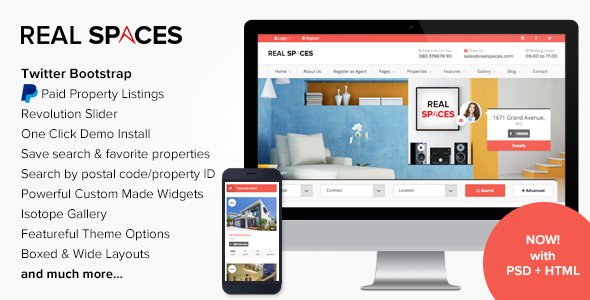
Stuck on your Real Spaces WordPress theme? Let's fix it.
No endless back-and-forth. Just send us the details and we'll get it done.
No obligation · Replies within 1 hour · Quote within 1 day
Setup · Customization · Bug fixes · WooCommerce integration
About Real Spaces WP Theme
Real Spaces is a WordPress real estate theme built by imithemes. It targets property agencies, independent agents, and real estate portals that need a polished, functional site without starting from scratch.
The theme ships with property listing pages, single property templates, advanced search filters, and agent profile pages. It integrates with the Estatik or similar real estate plugins to handle listings, inquiries, and maps.
Built on a clean codebase, Real Spaces supports custom fields for property details like price, area, bedrooms, bathrooms, and location. The design is minimal and photo-forward, which suits high-end residential and commercial listings equally well. It works with Elementor, making layout changes accessible without touching code.
Get matched with a Real Spaces developer in under one day
Tell us about your Real Spaces project. Small fixes, Real Spaces theme customization, or a full website build, whatever you need, we've got it covered.
We'll connect you to the right Real Spaces developers, define the scope, and get everything 100% clear.
You'll get one estimate, hire your preferred developer, and start collaborating.
Real Spaces has enough moving parts, property post types, search filters, map APIs, agent pages, that small configuration mistakes create real problems for visitors and lead generation. Working with a developer who knows the theme saves hours of trial and error.
Through Codeable, you get access to vetted WordPress specialists who have worked with real estate themes like Real Spaces before. You describe your project, get a clear estimate, and only pay if you decide to move forward. No guesswork on cost or quality.
Pros
- Purpose-built real estate templates save significant setup time compared to adapting a generic theme
- Advanced property search with filters for price, bedrooms, location, and property type works out of the box
- Agent profile pages and team sections are included, useful for multi-agent brokerages
- Elementor compatibility means layout changes don't require PHP knowledge for most edits
- Clean, photo-centric design puts property images front and center without visual clutter
Cons
- Plugin dependency for full listing management means compatibility issues can arise after WordPress or plugin updates
- Map integration requires a paid Google Maps API key, which adds ongoing cost that new users often overlook
- Deep customization of search filters requires editing template files, not just the Customizer
- Documentation from imithemes is limited, making troubleshooting harder without developer experience
- No built-in IDX feed support, so MLS integration requires a third-party plugin and additional configuration
Who is Real Spaces for?
Independent Real Estate Agents
A solo agent can use Real Spaces to publish their own listings, display sold properties as social proof, and capture leads through contact forms. The agent profile template handles bio, contact details, and active listings in one place. Combined with a simple CRM plugin, it creates a complete lead management setup without expensive third-party platforms.
Property Management Companies
Property managers handling residential or commercial rentals can use Real Spaces to list available units with full detail pages, floor plans, and inquiry forms. Custom fields for lease terms, available dates, and pet policies can be added. A developer can configure the theme to separate rental and sales listings so visitors find the right category quickly.
Real Estate Agencies and Brokerages
Multi-agent offices benefit from Real Spaces’ team pages and the ability to assign listings to specific agents. Filtering by agent or office location helps buyers find relevant contacts. The theme handles larger listing volumes well when paired with a capable real estate plugin and proper database optimization.
Commercial Property Listings
Commercial brokers can adapt Real Spaces for office, retail, and industrial listings by configuring custom property types and fields relevant to commercial specs like floor area, zoning, and cap rate. The map view works well for showing multiple commercial locations across a metro area.
Holiday and Short-Term Rental Sites
Short-term rental operators can use Real Spaces as the base for a direct booking site, reducing reliance on Airbnb commissions. Paired with a booking plugin, the theme’s property detail layout adapts well to showing amenities, availability calendars, and nightly rates with minimal custom development.

Customizing Real Spaces
Out of the box, Real Spaces gives you a working real estate site. Customization is where it gets specific to your business.
You can adjust the property search widget, modify listing card layouts, set up custom property types, and configure the map provider. Color schemes, typography, and header styles are controlled through the WordPress Customizer. More complex changes, like adding custom taxonomies, building mortgage calculators, or restructuring the property detail page, need developer input.
A Real Spaces expert knows where the theme’s template files sit, how its hooks work, and which changes should be done in a child theme to stay update-safe. That avoids the common mistake of editing core theme files directly and losing work on the next update.
Recommended plugins for Real Spaces
Real Spaces pairs well with plugins that extend real estate functionality. IDX integration, live chat for lead capture, and CRM connections are common additions agents request.
For site speed, image-heavy listing pages need careful optimization. A WordPress performance audit can cut load times significantly on property gallery pages. If you’re targeting local property searches, structured data and on-page work covered by a WordPress SEO service helps listings rank for city and neighborhood queries. WPForms or Gravity Forms handle inquiry and viewing request forms well alongside this theme.
Not sure which plugins to use? This WordPress plugins directory covers the most popular options with reviews and setup guides.
Real Spaces common issues
Real Spaces theme property search not working
Search failures in Real Spaces are usually caused by a conflict between the theme’s search widget and the active real estate plugin, or by incorrect taxonomy configuration. Check that property post types and custom taxonomies are registered correctly. Deactivate other plugins one at a time to isolate conflicts. If the search returns no results despite matching listings existing, the issue is often a mismatch between search field names and registered meta keys. A WordPress bug fixing service can trace this quickly.
Real Spaces map not showing on listing pages
Map display issues in Real Spaces almost always come down to the Google Maps API key. Either the key is missing, has incorrect domain restrictions, or the Maps JavaScript API is not enabled in the Google Cloud Console. Check the theme settings panel for where the API key is entered. Also confirm billing is active on the Google Cloud account, as Maps now requires it even for low usage. If the key is correct and the map still fails, check the browser console for specific API errors.
Real Spaces theme not displaying property images correctly
Image display problems in Real Spaces typically relate to thumbnail size registration. If images appear cropped incorrectly or show placeholder boxes, run a thumbnail regeneration using a plugin like Regenerate Thumbnails after confirming the theme’s registered image sizes match what your uploads expect. Also check that the media library files have correct permissions on the server. Lazy load plugins can sometimes conflict with the theme’s gallery scripts and should be tested by temporarily disabling them.
Real Spaces theme broken after WordPress update
Theme breakage after a WordPress core update usually means a deprecated function or a conflict introduced by the update. First, check if imithemes has released a compatible theme version and update it. If the issue started after a plugin update rather than core, revert that plugin temporarily. For persistent breakage, switching to a default theme briefly confirms whether the issue is theme-specific. Check the PHP error log for specific fatal errors. Ongoing protection through a WordPress maintenance plan catches these issues before they affect live visitors.
Real Spaces FAQ
Yes, Real Spaces supports Elementor. Most page layouts can be edited through the Elementor builder, including the homepage, about pages, and static content sections. Property listing templates and single property pages are controlled by the theme’s PHP templates, so those require code changes rather than the visual builder. A developer can create custom Elementor templates that pull in listing data if needed.
Real Spaces is designed to work with real estate plugins that use custom post types for properties. Estatik is a commonly used pairing. WP Real Estate and Essential Real Estate also work with the theme. The right choice depends on whether you need front-end listing submission, IDX support, or advanced filtering. Test your chosen plugin in a staging environment before deploying to production.
Yes. Real Spaces supports custom property types, so you can create separate categories for rental and for-sale listings. Custom fields for rental-specific details like monthly rent and lease terms can be added through the real estate plugin. Search filters can be configured to let visitors toggle between listing types. Some developer setup is needed to make the distinction clean across listing pages and search results.
Real Spaces does not include native IDX support. To display MLS listings, you need a third-party IDX plugin such as Showcase IDX, iHomefinder, or dsIDXpress. These plugins generate their own pages and embed shortcodes or blocks. Styling the IDX output to match Real Spaces requires custom CSS. The integration works, but expect some visual inconsistency without developer attention to the CSS.
Yes, but listings stored as custom post types migrate with the database, so a proper full-site migration keeps them intact. Property images stored in the media library also need to transfer. If you are moving hosts, a WordPress migration service ensures the database, files, and permalink structure all move correctly so listing URLs continue to work and no data is lost.
Hire a Real Spaces Developer
Whether you need a full Real Spaces setup, a custom listing layout, IDX integration, or a fix for something that stopped working, the right developer makes the difference between a site that converts and one that frustrates buyers.
FoxyConcept works through Codeable to match you with a vetted Real Spaces expert. Get a free estimate with no obligation. You’ll have a clear scope and price before any work starts.
You'll need a free Codeable account so developers can ask questions and send their quotes.