Realar WordPress Theme
by themeholy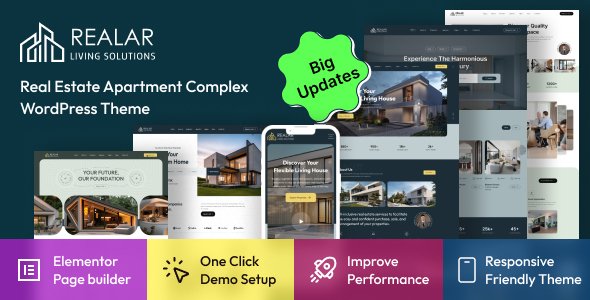
Stuck on your Realar WordPress theme? Let's fix it.
No endless back-and-forth. Just send us the details and we'll get it done.
No obligation · Replies within 1 hour · Quote within 1 day
Setup · Customization · Bug fixes · WooCommerce integration
About Realar WP Theme
Realar is a real estate WordPress theme built by Themeholy. It ships with a property listing system, advanced search filters, Google Maps integration, and agent profile pages. The design targets agencies, individual agents, and property portals that need a structured way to display listings without building everything from scratch.
The theme works with Elementor, which makes layout adjustments accessible without touching code. It includes a custom post type for properties, mortgage calculator widget, and support for both sale and rental listings. IDX/MLS integration is not native but can be added through third-party plugins. Overall, Realar gives real estate businesses a solid starting point that covers the core features most listing sites need on day one.
Get matched with a Realar developer in under one day
Tell us about your Realar project. Small fixes, Realar theme customization, or a full website build, whatever you need, we've got it covered.
We'll connect you to the right Realar developers, define the scope, and get everything 100% clear.
You'll get one estimate, hire your preferred developer, and start collaborating.
Realar is well-built for real estate, but real projects rarely stay within the default feature set. Property portals need custom search logic, booking integrations, or API feeds from external listing databases. Getting those right takes someone who works with WordPress at a code level, not just the theme panel.
Through Codeable, you get matched with a vetted WordPress developer who can scope your project accurately and deliver clean, maintainable work. No agencies, no juniors, no guesswork on rates. Just a developer who can handle Realar from front to back.
Pros
- Built-in property listing system with sale and rental support, no extra plugin needed
- Elementor compatibility makes layout changes straightforward without custom development
- Google Maps integration with property pins is included out of the box
- Agent and agency profile pages are structured and ready to populate on install
- Mortgage calculator widget is included and works without additional setup
Cons
- No native IDX or MLS feed integration — requires a separate paid plugin
- Advanced search filters by custom taxonomy need developer customization to work correctly
- Theme updates can break child theme overrides if customizations were not isolated properly
- Default map clustering is limited and needs custom code for large listing volumes
- Limited built-in multilingual support — WPML or Polylang must be configured manually
Who is Realar for?
Real Estate Agency Website
Realar fits established agencies with multiple agents and a large inventory of listings. The agent profile system, property archive pages, and filtered search give visitors a familiar real estate browsing experience. Agencies can assign listings to individual agents and display contact forms per listing without additional plugins.
Independent Property Agent Portfolio
Solo agents who want a professional online presence without a large budget do well with Realar. The theme handles a smaller listing count cleanly, and the agent bio section works as a personal profile page. Adding a simple lead capture form and connecting it to a CRM keeps the setup lean and functional.
Rental Property Portal
For rental-focused portals, Realar supports price-per-month display and rental-specific property attributes. The search filters can be configured to show rental listings separately. With WP All Import, bulk uploading rental inventory from a spreadsheet saves significant manual entry time for property managers handling dozens of units.
Commercial Real Estate Listings
Commercial listings require different data fields than residential properties. Realar’s custom property fields can be extended with ACF to capture floor area, zoning, parking ratios, and lease terms. A developer can rework the listing template to surface commercial-specific details that residential-focused themes typically leave out.
Property Development Marketing Site
Property developers launching a new build or subdivision use Realar as a marketing site rather than an ongoing listing portal. The theme handles project galleries, floor plan uploads, and inquiry forms well. Adding a custom landing page built in Elementor with a strong call-to-action keeps lead generation focused for a specific development.

Customizing Realar
Out of the box, Realar covers the basics. But most real estate businesses have specific requirements: custom property fields, filtered search by neighborhood, currency formatting, or multilingual support. That is where you usually hit the limits of what the theme settings panel can do.
A Realar expert can extend the property post type with additional custom fields using ACF, rework the search widget logic to query by custom taxonomies, or wire up a third-party CRM for lead capture. If you need the map view to cluster results differently, or want a custom mortgage calculator tied to your local rates, those changes require code. Working with someone who knows the Realar codebase means fewer workarounds and cleaner output that does not break on the next theme update.
Recommended plugins for Realar
Realar pairs well with several plugins that extend its core functionality. WPML or Polylang handle multilingual listings. WP All Import makes bulk property uploads manageable. For lead generation, WPForms or Gravity Forms can replace the default contact widgets.
If site speed is a concern after adding many listings and map assets, a proper WordPress performance setup with image optimization and caching will keep load times under control. For agencies that also want organic traffic from property searches, a structured WordPress SEO strategy with schema markup for listings is worth setting up early.
Not sure which plugins to use? This WordPress plugins directory covers the most popular options with reviews and setup guides.
Realar common issues
Realar theme property search not working correctly
Search problems in Realar are often caused by a conflict between the theme’s query filters and a caching plugin, or by incorrect taxonomy assignment on property posts. Start by disabling the cache for search result pages. If custom fields are not appearing as filter options, check whether those fields are registered correctly against the property post type. A WordPress bug fix can trace the exact query being run and identify where the filter logic breaks down.
Realar Google Maps not showing on listing pages
Missing maps usually come from one of three causes: an invalid or restricted Google Maps API key, a JavaScript conflict from another plugin, or a Content Security Policy header blocking the Maps script. Check the browser console for errors first. Regenerate and restrict the API key to your domain in the Google Cloud Console. If the conflict is plugin-related, deactivating plugins one by one while testing will isolate the culprit.
Realar theme slow loading with many property listings
Realar can slow down significantly when displaying many listings with map assets and large images. The main fixes are server-side caching, lazy loading for property images, and deferring the Google Maps script until user interaction. A proper WordPress performance setup that includes a CDN and optimized database queries for the property post type will typically cut load times by half or more on listing archive pages.
Realar Elementor page builder not loading widgets
Elementor widget loading failures in Realar are usually caused by a version mismatch between the theme and the Elementor plugin, or by a PHP memory limit that is too low. Check the Elementor system requirements page and compare against your server’s PHP version and memory allocation. Updating both the theme and Elementor together — and testing in a staging environment first — resolves most widget loading issues without data loss.
Realar FAQ
Yes. Realar is built with Elementor compatibility in mind. The theme includes custom Elementor widgets for property listings, maps, and agent profiles. You can use the Elementor page builder to modify templates and create custom layouts. For deeper customization beyond what the builder allows, a developer can extend the widgets or build custom Elementor sections specific to your needs.
Realar does not include native IDX or MLS feed support. To pull live listings from an MLS feed, you need a separate IDX plugin such as Showcase IDX or iHomeFinder. These plugins can display listings within Realar’s design, but integration work is usually required to match the styling and ensure the search filters work consistently across both the theme’s listings and the IDX feed.
Yes, but it requires some development work. Realar’s property post type can be extended using Advanced Custom Fields to add fields like HOA fees, pet policy, school district, or any data point specific to your market. The extra fields then need to be connected to the listing template and the search filters. This is a common customization request that a Realar developer can handle cleanly.
Performance drops with large listing databases are common. The main steps are enabling object caching, optimizing property images, lazy loading map assets, and adding a CDN. You should also ensure your WordPress database queries for the property post type are indexed correctly. A dedicated performance optimization pass on a staging copy of the site is the most reliable way to benchmark and fix the issues without disrupting live listings.
Yes. Realar supports both sale and rental listing types. You can set price as per-month for rental properties and filter listings by type in the search widget. For property managers with large rental inventories, bulk import via WP All Import saves time. If you need tenant inquiry workflows or availability calendars, those require additional plugins and some custom development work to integrate cleanly.
Hire a Realar Expert Developer
Whether you need custom property fields, a redesigned listing page, search filter improvements, or a full Realar build from scratch, the right developer makes a significant difference. FoxyConcept connects you with experienced WordPress developers through Codeable. Get a free estimate with no obligation to hire. Describe your project and receive a clear scope and cost within 24 hours. Every developer on the platform is vetted, rated, and has a track record of real project delivery.
You'll need a free Codeable account so developers can ask questions and send their quotes.