Redfolio WordPress Theme
by red_sun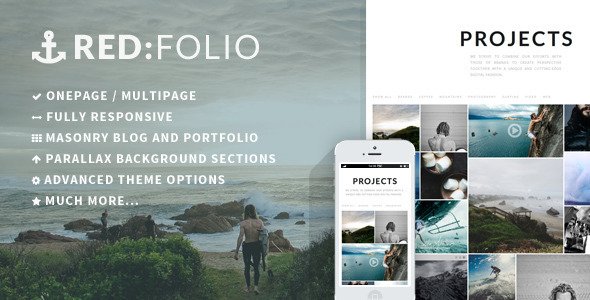
Stuck on your Redfolio WordPress theme? Let's fix it.
No endless back-and-forth. Just send us the details and we'll get it done.
No obligation · Replies within 1 hour · Quote within 1 day
Setup · Customization · Bug fixes · WooCommerce integration
About Redfolio WP Theme
Redfolio is a portfolio WordPress theme built by red_sun. It targets creatives, freelancers, and agencies who need a clean, image-forward site without a heavy page builder dependency. The theme ships with a minimal grid layout, smooth transitions, and a focus on visual hierarchy — letting your work speak first.
It supports custom post types for portfolio items, built-in project filtering, and a one-page layout option. Typography is handled with a small, well-chosen font stack. The theme is reasonably lightweight out of the box and works with standard WordPress block editor, though some features rely on the included options panel.
Redfolio suits photographers, designers, architects, and creative studios who want a professional-looking site without over-engineering it.
Get matched with a Redfolio developer in under one day
Tell us about your Redfolio project. Small fixes, Redfolio theme customization, or a full website build, whatever you need, we've got it covered.
We'll connect you to the right Redfolio developers, define the scope, and get everything 100% clear.
You'll get one estimate, hire your preferred developer, and start collaborating.
Redfolio looks simple until you need something specific. Moving sections, building a custom project archive, fixing mobile layout issues, or integrating a third-party booking tool all require real WordPress knowledge. Through Codeable, you get access to vetted WordPress developers who have worked with portfolio themes like Redfolio. You post your project, get an estimate within 24 hours, and only move forward if the scope and price work for you. No risk, no obligation.
Pros
- Minimal, image-focused design that works well for creative portfolios without visual clutter
- Built-in portfolio post type with category filtering — no extra plugin needed
- One-page layout option simplifies navigation for smaller portfolios
- Lightweight compared to multipurpose themes — fewer scripts loading on each page
- Clean code structure makes child theme customization more predictable
Cons
- Theme options panel is limited — advanced layout changes require template edits
- No built-in mega menu or complex header styles for larger sites
- Portfolio grid options are restricted to a few preset column configurations
- Limited documentation and small support community compared to major theme shops
- Not designed for blog-heavy sites — post layouts are basic and secondary to portfolio
Who is Redfolio for?
Freelance Graphic Designer
Redfolio’s grid layout and project filtering make it easy to organize work by client type or discipline. A freelance designer can group branding, print, and digital projects separately. The minimal design keeps the focus on the work itself. Adding a contact form and a short about section covers everything most clients need before reaching out.
Photography Studio
Photography portfolios need fast image loading and clean presentation. Redfolio handles both reasonably well. The full-width project pages give individual shoots room to breathe. Pair it with an image optimization plugin and a CDN to keep load times acceptable even with high-resolution images. Gallery layout options work for both editorial and commercial work.
Architecture Firm
Architecture firms need a portfolio that communicates scale and precision. Redfolio’s horizontal grid and large featured images suit project showcases. Firms can organize by building type, location, or phase. One limitation: if you need detailed case study pages with technical specs, you’ll likely need custom template work to go beyond the default project layout.
Creative Agency
Small creative agencies with five to fifteen team members can use Redfolio as a lightweight client-facing portfolio site. It handles multi-discipline work well when categories are set up cleanly. It’s not suited for agencies that need a full services section, pricing tables, or complex navigation — those additions require developer involvement to fit within the theme’s structure.
Illustrator or Digital Artist
Illustrators and digital artists often need a simple grid with strong image presentation and minimal distraction. Redfolio fits that well. The theme lets individual pieces stand out without competing design elements. If you sell prints or files, adding WooCommerce works, but expect some styling adjustment to make the shop pages match the portfolio aesthetic.

Customizing Redfolio
Redfolio gives you a theme options panel covering colors, fonts, layout widths, and header styles. Most settings work without touching code. But the moment your project needs something outside those options — custom portfolio filters, a modified grid, a contact section that matches your brand — you need someone who knows the theme’s structure.
A Redfolio expert can rework templates directly, adjust the CSS without breaking the responsive grid, and extend the options panel when needed. Common customization requests include adding animated project previews, custom category filters, a fullscreen hero, and WooCommerce integration for selling prints or digital files.
If you need changes that go beyond the sliders and color pickers, working with a developer familiar with Redfolio saves significant time.
Recommended plugins for Redfolio
Redfolio works well with Contact Form 7 for project inquiry forms and WooCommerce if you sell work directly. Adding an SEO plugin like Yoast or Rank Math is straightforward — see our WordPress SEO service if you need help structuring portfolio metadata.
For speed, image optimization plugins like Smush or ShortPixel pair well with the theme’s grid. If you want to push performance further, our WordPress performance service covers caching, CDN setup, and Core Web Vitals improvements specific to image-heavy layouts like Redfolio.
Not sure which plugins to use? This WordPress plugins directory covers the most popular options with reviews and setup guides.
Redfolio common issues
Redfolio portfolio grid not displaying correctly
Grid display problems in Redfolio are usually caused by a JavaScript conflict with another plugin, or an incorrect image size setting. First, check the browser console for JS errors. Deactivate plugins one by one to isolate the conflict. If the grid worked before a plugin was added, that’s your culprit. Also check that your featured image dimensions match the theme’s registered image sizes — regenerating thumbnails with a plugin like Regenerate Thumbnails often fixes layout inconsistencies. If issues persist, our WordPress bug fixing service can diagnose it properly.
Redfolio theme options not saving
When Redfolio’s theme options panel doesn’t save, the most common causes are a caching plugin writing stale data, a permissions issue on the wp-options table, or a PHP memory limit being hit during the save request. Clear all caches first. Then check your PHP error log for any fatal errors triggered when saving. If you’re using a security plugin that limits admin AJAX requests, whitelist the theme’s option save action. A database permissions issue requires server-level access to resolve.
Redfolio project filter not working after update
Redfolio’s portfolio filter relies on JavaScript to handle category switching without a page reload. After a WordPress or theme update, this script can break if a newer version of jQuery handles certain methods differently. Open the browser console and look for JS errors on the portfolio page. The fix is usually updating the filter script to use jQuery’s current syntax. If you’re not comfortable editing theme JavaScript, a developer can patch this quickly without affecting the rest of the theme.
Redfolio images blurry or wrong size on mobile
Blurry or oversized images in Redfolio on mobile usually mean WordPress is serving the wrong image size for the viewport. Check that your theme’s registered image sizes are being generated correctly — use Regenerate Thumbnails after any theme switch. Also confirm the theme’s image settings in the options panel match your actual image dimensions. If the issue is Retina scaling, you may need to serve 2x images or use a responsive images plugin. For persistent issues, our bug fixing service can audit your image pipeline.
Redfolio FAQ
Redfolio supports the block editor for standard pages and posts. However, portfolio-specific layouts and the theme’s grid system are controlled through its own options panel and custom post type, not Gutenberg blocks. You can use the block editor to write content inside project pages, but the portfolio archive and filtering functionality sit outside the block editor’s control.
WooCommerce can be activated alongside Redfolio without breaking core functionality. The shop, cart, and product pages will use WooCommerce’s default templates, which won’t automatically match Redfolio’s design. Expect to do some CSS work or use a WooCommerce-compatible child theme to align the store pages with the rest of the site’s aesthetic. A developer can handle this integration cleanly.
Redfolio’s options panel includes Google Fonts selection for most text elements. If you need a font outside that list — a self-hosted font or a paid typeface — you’ll need to enqueue it via a child theme’s functions.php file and override the theme’s font CSS. It’s a straightforward change for a developer, but not something the options panel handles natively.
Redfolio works with caching plugins like WP Rocket, W3 Total Cache, and LiteSpeed Cache. The main thing to watch is that portfolio filter JavaScript is excluded from minification if combining scripts causes the filter to break. Most caching plugins let you exclude specific scripts. Test the portfolio page after enabling caching to confirm filters and transitions still work correctly.
Yes, you can migrate an existing site to Redfolio. If you’re moving from another portfolio theme, your pages and posts transfer easily. Portfolio items may need to be re-entered as Redfolio’s custom post type. If you’re moving from a different host or CMS entirely, the process is more involved. Our WordPress migration service handles full site transfers with minimal downtime.
Hire a Redfolio Developer
Whether you need a full Redfolio setup, a specific layout fix, or custom portfolio functionality, our developers can handle it. Work is scoped clearly before anything starts. Get a free estimate and describe what you need — you’ll hear back within 24 hours with a plan and a price. No vague retainers, no surprise invoices. Just a developer who knows WordPress and gets the work done.
You'll need a free Codeable account so developers can ask questions and send their quotes.