Reina WordPress Theme
by Edge-Themes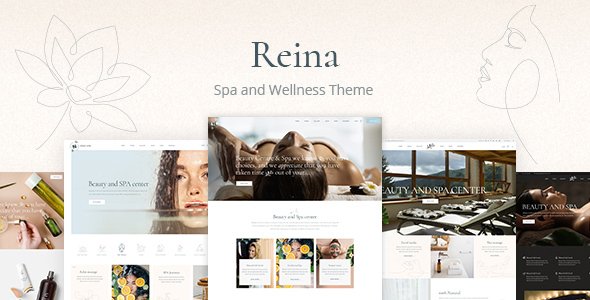
Stuck on your Reina WordPress theme? Let's fix it.
No endless back-and-forth. Just send us the details and we'll get it done.
No obligation · Replies within 1 hour · Quote within 1 day
Setup · Customization · Bug fixes · WooCommerce integration
About Reina WP Theme
Reina is a WordPress theme built by Edge-Themes, designed specifically for beauty salons, spas, hair studios, and wellness businesses. It ships with a set of pre-built demo sites that cover the full range of salon aesthetics, from clean and minimal to dark and luxurious.
The theme is built on Edge-Themes’ own framework, which gives it access to a large library of shortcodes, custom post types, and a header builder. It works with WPBakery Page Builder out of the box, so most layout changes happen visually without touching code.
Reina includes features that matter specifically to salons: appointment booking integration, service list layouts, staff profile pages, price list sections, and gallery grids. It is translation-ready and WPML-compatible, which makes it a practical choice for salons operating in more than one language.
Get matched with a Reina developer in under one day
Tell us about your Reina project. Small fixes, Reina theme customization, or a full website build, whatever you need, we've got it covered.
We'll connect you to the right Reina developers, define the scope, and get everything 100% clear.
You'll get one estimate, hire your preferred developer, and start collaborating.
Reina is not a theme you configure in an afternoon. The Edge-Themes framework has its own logic, and WPBakery adds another layer on top. Small decisions about demo imports, plugin conflicts, or header builder settings can cost hours if you are not familiar with how the theme is structured.
Developers on Codeable have worked inside Reina and Edge-Themes projects before. They know the shortcuts and the pitfalls. Whether you need a full setup from scratch or specific changes to an existing site, you get a developer who has done this before, not someone learning on your project.
Pros
- Pre-built salon and spa demo sites cover a wide range of styles, reducing setup time
- Built-in support for service menus, staff profiles, and price list sections without extra plugins
- WPBakery Page Builder included, so layout changes are visual and do not require code
- WPML-compatible and translation-ready, useful for multilingual salon businesses
- Integrates with popular booking plugins like Bookly and Amelia without conflicts
Cons
- WPBakery adds significant page weight, which hurts load times without extra performance work
- The Edge-Themes panel has hundreds of settings, making it easy to create inconsistencies
- Demo import can fail or import incomplete content depending on hosting configuration
- Shortcodes are tied to WPBakery, so switching page builders later means rebuilding from scratch
- Support from Edge-Themes is limited to comments on ThemeForest, with no live chat option
Who is Reina for?
Hair Salon
Reina’s service list layouts and staff profile pages map directly onto what a hair salon needs online. You can display stylists with photos and bios, list services with prices, and connect a booking plugin so clients book appointments without calling. The gallery grid works well for before-and-after photos and salon interior shots.
Day Spa and Wellness Centre
Several of Reina’s demo sites are built specifically for spas, with soft color palettes, full-width imagery, and treatment menu sections. The theme supports video backgrounds on hero sections, which works well for showing the spa environment. WooCommerce integration lets you sell gift cards or retail products alongside bookings.
Beauty and Nail Studio
Nail studios need a strong visual presentation. Reina’s gallery options and portfolio layouts handle that well. You can build a services page with individual treatment cards showing pricing, and the booking integration keeps the booking process on-site rather than sending clients to a third-party link.
Barbershop
Reina includes darker, more masculine demo styles that suit a barbershop aesthetic without heavy customization. Staff profiles work well for showcasing individual barbers, and the price list section is straightforward to configure. The mobile layout holds up well, which matters since most barbershop clients book from their phones.
Massage and Holistic Therapy Practice
For therapy practices, Reina’s cleaner demo layouts provide a calm, professional look without being clinical. The theme supports custom page templates that work well for listing modalities, practitioner backgrounds, and session pricing. Contact Form 7 integration makes it easy to set up an enquiry form for new clients.

Customizing Reina
Reina gives you a lot of options inside its theme panel, but the sheer volume of settings can slow things down. There are controls for typography, colors, header styles, footer layouts, and sidebar behavior, plus WPBakery elements stacked on top. Without a clear plan, it is easy to end up with inconsistent spacing or layouts that look different across screen sizes.
A Reina expert knows which settings interact with each other and where Edge-Themes’ framework adds CSS that overrides your own. Common tasks like setting up a custom booking flow, creating a service menu that matches the demo, or adjusting mobile header behavior are much faster with someone who has worked inside Reina before.
If your salon site needs a specific layout or you want to move beyond the demo content, working with a Reina expert saves significant time and avoids the trial-and-error that comes with a theme this large.
Recommended plugins for Reina
Reina works with several plugins that extend what it can do out of the box. For booking, it integrates with Bookly and Amelia. WooCommerce support means you can sell products or gift vouchers directly from the site. Contact Form 7 and WPForms both work without conflicts.
For performance, Reina’s reliance on WPBakery and the Edge-Themes framework means page weight can grow quickly. Pairing it with a caching plugin and a CDN helps. You can find specific guidance on that at our WordPress performance service. If visibility matters, our WordPress SEO service covers schema markup and local SEO, both relevant for salon businesses.
Not sure which plugins to use? This WordPress plugins directory covers the most popular options with reviews and setup guides.
Reina common issues
Reina demo import not working or importing blank pages
Demo import failures in Reina are usually caused by server limits. The import file is large and needs enough PHP memory, execution time, and upload size to complete. Check your php.ini or wp-config.php for memory_limit, max_execution_time, and upload_max_filesize. Increase these before retrying. Also confirm that all required plugins listed in the Reina documentation are activated before you run the import. If problems continue, our WordPress bug fixing service can handle this for you.
Reina header not displaying correctly on mobile
Reina’s header builder has separate settings for desktop and mobile. If the mobile header looks wrong, check the Edge-Themes panel under Header and confirm the mobile header type is set explicitly. Some demo setups leave mobile header settings on default, which does not always match the imported design. Also check for custom CSS that targets header elements without a mobile breakpoint, as this often overrides the theme’s built-in responsive behavior.
Reina WPBakery elements showing shortcode instead of content
If WPBakery shortcodes are displaying as raw text, the most common cause is that WPBakery is not activated or is running a version that conflicts with Reina’s bundled copy. Go to Plugins and check whether WPBakery Page Builder is active. If you have a separately purchased version installed alongside the bundled one, deactivate the standalone version and use only the one included with Reina. Reina ships with a specific WPBakery version it is tested against.
Reina theme slowing down WordPress site
Reina loads a large number of scripts and stylesheets by default, many of which may not be used on every page. Start by running a GTmetrix or PageSpeed test to identify the heaviest assets. Minifying CSS and JavaScript, enabling caching, and offloading images to a CDN are the most effective steps. Some Edge-Themes shortcodes load their own scripts globally even when not in use. A developer can conditionally load these. See our WordPress performance service for more detail.
Reina FAQ
Yes, Reina is purpose-built for salons, spas, and beauty businesses. It includes service menus, staff profile pages, price list layouts, gallery grids, and booking plugin compatibility. The demo sites give you a realistic starting point. It does require some setup work to move from demo to a finished, branded site, but the core structure is well-suited to the salon industry.
Reina is built around WPBakery, not Elementor. You can technically install Elementor alongside it, but the theme’s shortcodes, demo content, and most of its custom elements are designed for WPBakery. Trying to rebuild Reina layouts in Elementor means starting from scratch. If you prefer Elementor, a different theme is likely a better fit than forcing compatibility here.
Reina does not include a native booking system. It is designed to work with third-party plugins. Bookly and Amelia are the most commonly used options with Reina and both integrate without major conflicts. After installing your chosen plugin, you embed the booking form using a shortcode on your appointments page. Some configuration is needed to match the form styling to the Reina design.
Not practically. WPBakery is deeply integrated into Reina. The demo content is built with WPBakery elements, and most of the theme’s layout components are WPBakery shortcodes. Removing it would break the imported pages. If you want a theme you can use with the block editor or Elementor only, Reina is not the right choice for that workflow.
Always use a child theme for any CSS or template changes. That way, updating the parent Reina theme does not overwrite your edits. Before updating, back up your site. Changes made inside the Edge-Themes panel are stored in the database and survive theme updates. Changes made directly to theme files will be lost unless you are using a child theme. If you need help setting this up, our WordPress maintenance service covers this.
Hire a Reina WordPress Developer
Need help setting up Reina, customizing a layout, or fixing something that is not working the way it should? We match you with a vetted WordPress developer who has hands-on experience with Edge-Themes and Reina specifically. Post your project, get an estimate within 24 hours, and decide from there. No commitment required. Get a free estimate and see who we can match you with.
You'll need a free Codeable account so developers can ask questions and send their quotes.