Renovate WordPress Theme
by QuanticaLabs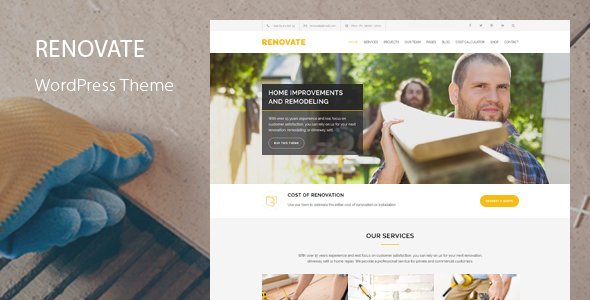
Stuck on your Renovate WordPress theme? Let's fix it.
No endless back-and-forth. Just send us the details and we'll get it done.
No obligation · Replies within 1 hour · Quote within 1 day
Setup · Customization · Bug fixes · WooCommerce integration
About Renovate WP Theme
Renovate is a multipurpose WordPress theme built by QuanticaLabs, designed primarily for construction, renovation, and home improvement businesses. It ships with a visual page builder, pre-built demo pages, and a layout structure built around service-based companies that need to showcase projects, team members, and client testimonials.
The theme includes WPBakery Page Builder, Revolution Slider, and several custom post types for portfolio and services. Demo import is one-click, which speeds up initial setup. QuanticaLabs has a track record of building niche-focused themes, and Renovate reflects that with its industry-specific widgets and homepage layouts. It works well out of the box but typically needs a developer’s touch to align with a specific brand or business workflow.
Get matched with a Renovate developer in under one day
Tell us about your Renovate project. Small fixes, Renovate theme customization, or a full website build, whatever you need, we've got it covered.
We'll connect you to the right Renovate developers, define the scope, and get everything 100% clear.
You'll get one estimate, hire your preferred developer, and start collaborating.
QuanticaLabs themes like Renovate are built for a specific industry, which means the code assumptions don’t always match your exact business setup. A developer who knows the theme’s architecture can modify it without creating update conflicts or breaking the demo content structure. Through Codeable, you get matched with a vetted WordPress developer who has worked with themes like Renovate before. No generalist freelancers, no guesswork on skill level.
Pros
- Ships with WPBakery and Revolution Slider bundled, saving on plugin license costs
- One-click demo import gets a construction or renovation site live quickly
- Custom portfolio and services post types suit project-based businesses well
- Responsive layout holds up on mobile without extra configuration
- QuanticaLabs provides regular updates and a dedicated support forum
Cons
- WPBakery shortcodes create page lock-in, making it hard to switch builders later
- Default page weight is high due to bundled scripts loading on every page
- Theme options panel can feel cluttered with settings that overlap the Customizer
- Portfolio filtering relies on older jQuery-based scripts that occasionally conflict with modern plugins
- Limited block editor support, most layouts still require WPBakery to render correctly
Who is Renovate for?
Construction Companies
Construction firms get the most out of Renovate’s project portfolio, team pages, and service grids. A Renovate developer can extend these with custom fields for project specs, timelines, and locations, giving prospective clients the detail they need before making contact.
Home Renovation Contractors
Home renovation contractors need a clear path from landing page to quote request. Renovate’s pre-built service layouts handle that well. A specialist can wire up a quote form, connect it to a CRM, and set up conversion tracking so you know which pages are driving leads.
Interior Design Studios
Interior design studios benefit from Renovate’s full-width portfolio layouts and image-heavy sections. A Renovate developer can add filterable project categories, lightbox galleries, and before-and-after image sliders that showcase the work without slowing the site down.
Roofing and Plumbing Services
Roofing, plumbing, and similar trades need fast-loading local service pages. A Renovate specialist can create service area pages, add structured data for local SEO, and integrate an emergency contact widget that stays visible on scroll across all devices.
Property Development Firms
Property development firms can use Renovate to present completed developments, current projects, and investment opportunities. A developer can build custom property listing templates, add location maps, and connect the site to an external property database if needed.

Customizing Renovate
Renovate’s customization runs through a combination of the WordPress Customizer, WPBakery’s front-end editor, and a custom theme options panel. You can adjust colors, fonts, header layouts, and footer structure without touching code, but anything beyond surface-level changes usually requires a Renovate expert.
Custom post type styling, adding new service sections, modifying the portfolio grid, or integrating third-party booking and quote plugins all fall into developer territory. A Renovate specialist can also clean up the shortcode-heavy markup WPBakery generates, which helps with both page speed and long-term maintainability. If you need a layout that doesn’t exist in the bundled demos, a Renovate expert will build it without breaking the theme’s existing structure.
Recommended plugins for Renovate
Renovate works with Contact Form 7, WooCommerce for selling products or services, and WPML for multilingual sites. Revolution Slider is bundled, so you don’t need a separate license. For lead generation, WPForms integrates cleanly with the theme’s existing form styling.
Performance is worth addressing early. Renovate loads several scripts by default that aren’t always needed. A developer can conditionally load assets and set up proper caching. See our WordPress performance service for specifics. For organic traffic, pairing Renovate with a solid WordPress SEO setup will put the structured content and schema markup in place that construction and service businesses need.
Not sure which plugins to use? This WordPress plugins directory covers the most popular options with reviews and setup guides.
Renovate common issues
Renovate theme Revolution Slider not displaying correctly
Revolution Slider display issues in Renovate usually come from a version mismatch between the bundled plugin and a separately installed copy. Deactivate one version and ensure only the bundled copy is active. If the slider still breaks, clear any caching plugin and check for JavaScript console errors. A plugin conflict with a lazy-load or script optimization tool is the next most likely cause.
WPBakery shortcodes showing as plain text in Renovate
WPBakery shortcodes appearing as raw text means the plugin is either deactivated or its license isn’t validated for the current domain. Go to WPBakery settings and check activation status. If you migrated the site to a new domain, re-register the bundled license. If the issue persists after activation, a database search for corrupted content may be needed. Our WordPress bug fixing service can trace this quickly.
Renovate theme one-click demo import failing
Demo import failures in Renovate are commonly caused by server memory limits, PHP execution timeouts, or missing required plugins. Set memory_limit to at least 256MB and max_execution_time to 300 in your php.ini or wp-config.php. Install all required plugins before running the import. If it still stalls, import the XML content manually through Tools > Import and set up widgets and settings separately.
Renovate portfolio filter not working
Renovate’s portfolio filter uses Isotope.js, which can conflict with jQuery versions loaded by other plugins. Open the browser console and look for JavaScript errors during filter clicks. A common fix is to force-load jQuery in the footer rather than the header. If another plugin is registering a conflicting jQuery version, a developer can dequeue the duplicate and restore filter functionality without breaking other scripts.
Renovate theme header logo not showing on mobile
If the header logo disappears on mobile in Renovate, check the Customizer under Header settings for a separate mobile logo upload field. If no separate field exists, the issue is likely a CSS max-height or display rule being overridden by a custom stylesheet or page builder inline style. Inspect the logo element on mobile using browser dev tools and identify which rule is hiding it. A targeted CSS fix in the child theme resolves this cleanly.
Renovate theme update breaking layout
Theme updates breaking layouts in Renovate almost always mean customizations were made directly in the parent theme files. Any PHP or CSS changes in the parent theme are overwritten on update. Move all customizations to a child theme before updating. If the layout is already broken, compare the updated template files against a backup to identify what changed. Our WordPress bug fixing service handles post-update recovery.
Contact form not sending emails on Renovate theme
Contact form emails not sending from Renovate sites is rarely a theme issue. It’s almost always a server mail configuration problem. WordPress uses PHP mail by default, which most hosts block to prevent spam. Install an SMTP plugin like WP Mail SMTP and connect it to a transactional email service such as Postmark or SendGrid. Test with the plugin’s built-in diagnostic tool to confirm delivery before going live.
Renovate theme slow loading on mobile
Renovate loads Revolution Slider assets, WPBakery scripts, and several icon fonts on every page by default. On mobile, this creates a significant performance hit. Conditionally load Revolution Slider scripts only on pages that use it. Use a caching plugin with CSS/JS minification enabled. Also consider replacing the default Google Fonts loading method with a locally hosted version. See our WordPress performance service for a full audit approach.
Renovate child theme not inheriting parent styles
A Renovate child theme not picking up parent styles usually means the child theme’s functions.php is enqueueing its own stylesheet without first loading the parent’s. Use wp_enqueue_style with get_template_directory_uri() for the parent and get_stylesheet_directory_uri() for the child, setting the child to depend on the parent handle. Avoid using @import in the child stylesheet as it adds a render-blocking request.
WooCommerce pages not styled correctly in Renovate
WooCommerce pages losing Renovate styling typically happens when the theme doesn’t declare WooCommerce support. Add add_theme_support('woocommerce') to your child theme’s functions.php. For cart and checkout layout issues, Renovate may not have native WooCommerce templates. A developer can create custom WooCommerce template overrides in the child theme that match the site’s existing design without modifying core WooCommerce files.
Renovate FAQ
Yes, QuanticaLabs continues to release updates for Renovate. Update frequency has slowed compared to the theme’s initial launch years, but security patches and compatibility fixes for current WordPress versions are still issued. Always check the changelog before updating on a live site and test on staging first.
Renovate has limited native Gutenberg support. Most of its pre-built layouts depend on WPBakery shortcodes to render correctly. You can use the block editor for basic content pages, but for anything involving the theme’s custom sections or homepage layouts, WPBakery is still required. Full block editor parity is not currently available.
Technically yes, but Renovate’s design language is built around construction and trades. Using it for unrelated industries like retail or hospitality would require significant restyling. A Renovate developer can strip industry-specific elements and rebuild the visual direction, but at that point a more neutral theme might be a better starting point.
After activating Renovate, a notice appears at the top of the WordPress dashboard prompting you to install required and recommended plugins. Click the link, select the plugins you need, and install them in bulk. Revolution Slider and WPBakery are bundled and do not require separate purchases or license keys for use with this theme.
Switching builders mid-project is disruptive. Renovate’s demo content is built entirely in WPBakery, so migrating to Elementor means rebuilding all pages. It’s doable, but plan for it as a full rebuild rather than a conversion. A developer can scope this accurately before you commit to the switch.
Renovate is WPML-compatible, which is the standard for multilingual WordPress sites. You’ll need a WPML license and some configuration work to translate custom post types like portfolio and services. A Renovate specialist familiar with WPML can set up the language switcher and ensure translated pages inherit the correct layouts.
Create a new folder in wp-content/themes/ named something like renovate-child. Add a style.css with the required child theme header referencing Renovate as the template, and a functions.php that enqueues the parent stylesheet. Activate the child theme from the Appearances panel. All custom code and CSS changes go into the child theme from that point forward.
The biggest gains come from conditionally loading Revolution Slider scripts, minifying CSS and JS, hosting Google Fonts locally, and enabling server-side caching. WPBakery also adds inline styles that bloat the HTML. A developer can combine these steps with image optimization and a CDN to bring Renovate’s load time to an acceptable level for Core Web Vitals.
Renovate supports WooCommerce, but it wasn’t designed as a shop theme. Product pages and checkout will work after adding WooCommerce support to the theme, but they’ll need styling work to match Renovate’s design. For a construction business selling materials or branded merchandise alongside services, this setup is manageable with developer help.
Rates vary based on scope. A simple customization task might take two to four hours, while a full Renovate setup with custom layouts and plugin integrations could run several days of work. Through Codeable, you post your project, get a transparent estimate upfront, and only pay if you decide to proceed. There’s no cost to get a quote.
Hire a Renovate WordPress Developer
Whether you need a full Renovate setup, custom layout work, plugin integration, or a site audit, a specialist can handle it without the back-and-forth of an untested hire. Post your project and get a free estimate with no obligation to move forward. Work is scoped before any money changes hands. Get a Free Estimate and describe what you need.
You'll need a free Codeable account so developers can ask questions and send their quotes.