RepairPress WordPress Theme
by ProteusThemes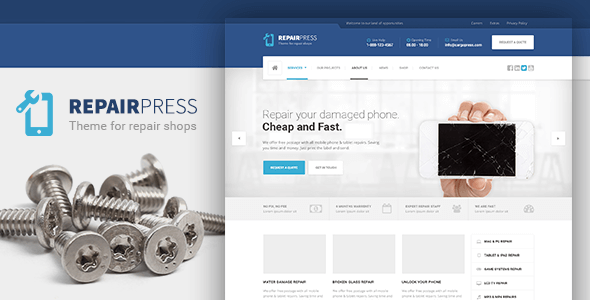
Stuck on your RepairPress WordPress theme? Let's fix it.
No endless back-and-forth. Just send us the details and we'll get it done.
No obligation · Replies within 1 hour · Quote within 1 day
Setup · Customization · Bug fixes · WooCommerce integration
About RepairPress WP Theme
RepairPress is a WordPress theme built by ProteusThemes, designed specifically for repair shops and service-based businesses. It targets phone repair, computer repair, appliance technicians, and similar trades that need a clean, professional web presence without heavy development overhead.
The theme ships with a drag-and-drop page builder, pre-built page templates, a pricing table, service listings, and a contact form setup. It uses the WPBakery Page Builder and includes custom widgets built for repair businesses, such as opening hours, service icons, and call-to-action blocks.
ProteusThemes has a track record of niche business themes with solid documentation. RepairPress follows that pattern: opinionated layout choices that work well out of the box, though they do require configuration time to match your specific branding and service structure.
Get matched with a RepairPress developer in under one day
Tell us about your RepairPress project. Small fixes, RepairPress theme customization, or a full website build, whatever you need, we've got it covered.
We'll connect you to the right RepairPress developers, define the scope, and get everything 100% clear.
You'll get one estimate, hire your preferred developer, and start collaborating.
RepairPress is straightforward to install but time-consuming to customize correctly. ProteusThemes builds themes with specific assumptions about layout and structure, and working against those assumptions without the right knowledge creates maintenance headaches later.
FoxyConcept works with vetted WordPress developers through Codeable. Every developer on the platform has passed a technical screening process. You get a free estimate, a clear scope, and work delivered by someone who has handled ProteusThemes builds before. No guesswork, no freelancer roulette.
Pros
- Pre-built templates designed specifically for repair and service businesses, reducing setup time
- Includes custom widgets for opening hours, pricing tables, and service icons out of the box
- WPBakery Page Builder included, allowing drag-and-drop layout editing without code
- ProteusThemes provides detailed documentation and demo import, making initial setup manageable
- Clean heading structure and mobile-responsive layout that works across devices without extra plugins
Cons
- WPBakery shortcode lock-in makes switching themes later a significant rebuild project
- Local business schema markup is not included and must be added manually or via plugin
- Design feels dated compared to modern block-based themes; heavy on stock imagery assumptions
- Customization beyond the Customizer options requires PHP knowledge or a developer
- No native booking or repair ticket system; third-party integration adds complexity and potential conflicts
Who is RepairPress for?
Phone and Tablet Repair Shops
RepairPress suits phone repair shops well. The service listing blocks handle screen replacement, battery swap, and water damage services clearly. The pricing table widget lets you publish fixed-price repairs, which reduces back-and-forth with customers before they walk in. Adding a WooCommerce quote form extends this further for mail-in repairs.
Computer and Laptop Repair Services
Computer repair businesses need clear service categories and a way to capture diagnostic requests. RepairPress handles the service layout well, and the contact form can be configured as a basic intake form. Pairing it with a plugin like Repair Shopr or a simple Gravity Forms workflow covers most small shop needs without custom development.
Appliance Repair Technicians
Appliance technicians benefit from the opening hours widget and service area description blocks in RepairPress. Local SEO matters here, and the theme’s clean structure supports that with proper plugin setup. The call-to-action sections work well for pushing customers toward phone calls, which is how most appliance repair jobs still get booked.
Auto Glass and Windshield Repair
Auto glass repair is a local, high-urgency service. RepairPress supports prominent phone number placement and a clear services section that fits this niche. The homepage layout can be configured to push mobile-click-to-call buttons above the fold, which directly affects conversion for customers searching on a phone after a crack happens.
Watch and Jewelry Repair Studios
Watch and jewelry repair studios need to convey precision and trust. RepairPress provides enough visual flexibility to present that tone with proper photography and color choices. The pricing table can list common repair types, and a portfolio or gallery section can be added via WPBakery to show before-and-after work examples.

Customizing RepairPress
RepairPress customization runs through the WordPress Customizer, WPBakery Page Builder, and a set of theme-specific options. You can control colors, fonts, header layout, footer columns, and service section structure without touching code.
That said, deeper changes, such as modifying the booking flow, adding custom post types, integrating a repair ticket system, or restructuring the homepage beyond the provided blocks, will need PHP and CSS work.
A RepairPress expert can handle those jobs without breaking the existing design. Whether you need a custom service calculator, a WooCommerce repair quote form, or a child theme to keep updates safe, working with someone who knows the ProteusThemes codebase saves significant time. Custom widget areas and hook-based modifications are the cleanest path for most RepairPress builds.
Recommended plugins for RepairPress
RepairPress works well with several common WordPress plugins. WooCommerce can be added for paid repair bookings or parts sales. RepairShopr or similar job management tools can be embedded via iframe or API integration.
For performance, the theme’s WPBakery shortcodes can bloat page load times. Pairing it with a caching plugin and a CDN makes a real difference. See our WordPress performance services for specifics.
On the SEO side, RepairPress has clean heading structure, but schema markup for local service businesses needs to be added manually or via plugin. Our WordPress SEO service covers that setup end to end.
Not sure which plugins to use? This WordPress plugins directory covers the most popular options with reviews and setup guides.
RepairPress common issues
RepairPress demo content not importing correctly
Demo import failures in RepairPress usually come from server timeout limits or memory restrictions. The XML file is large and needs enough PHP memory and execution time to complete. Check your php.ini limits or ask your host to temporarily raise max_execution_time and memory_limit. If that fails, import content manually using the WordPress importer tool and rebuild widget areas by hand. Our bug fixing service can handle this quickly.
RepairPress page builder layout broken after update
WPBakery layout breaks after updates usually happen when the bundled version of WPBakery inside RepairPress conflicts with a separately installed or updated version. Do not install WPBakery as a standalone plugin if the theme bundles it. Deactivate the standalone plugin and use the theme-bundled version. If layouts are already broken, you may need to rebuild affected pages or restore from a backup. Check our WordPress bug fixing service for help.
RepairPress contact form not sending emails
Email delivery issues in RepairPress are almost always a server-level problem, not a theme issue. WordPress default mail functions rely on PHP mail, which most hosts block or restrict. Install an SMTP plugin like WP Mail SMTP and connect it to a transactional email service such as Mailgun, SendGrid, or your email provider’s SMTP credentials. Test after setup. If the form itself is not submitting, check for JavaScript conflicts in the browser console first.
RepairPress mobile menu not working
Mobile menu failures in RepairPress typically point to a JavaScript conflict with another plugin or a caching issue serving an old script version. Open browser dev tools, check the console for JS errors, and identify the conflicting script. Purge all caches after any change. If you are using a minification plugin, try disabling JS minification and concatenation first, as these commonly break theme-specific scripts in ProteusThemes builds.
RepairPress FAQ
RepairPress was built around WPBakery Page Builder, not the Gutenberg block editor. Basic posts and pages work with the block editor, but the pre-built templates and custom sections are WPBakery-dependent. You can use Gutenberg for blog content, but the main service pages and homepage layout require WPBakery to edit correctly. A full Gutenberg migration would require rebuilding the theme structure.
Technically yes, but it is not practical for the main page templates. WPBakery shortcodes are embedded throughout the demo content. Removing WPBakery leaves visible shortcode text across pages. If you want to run RepairPress without WPBakery, you would need to rebuild your pages using the block editor or another builder, which largely defeats the purpose of the theme’s included layouts.
RepairPress is compatible with WooCommerce. It does not include WooCommerce-specific styling by default, so product and cart pages will use WooCommerce’s own templates with basic theme inheritance. For repair shops selling parts or paid booking slots, WooCommerce works well enough, but you may need minor CSS adjustments to match the RepairPress design on shop pages.
RepairPress does not include a native booking system. You can add one using plugins like Bookly, Amelia, or Simply Schedule Appointments. Each requires configuration to match your services and availability. WPBakery elements can then embed booking forms into your service pages. For more complex setups, such as per-technician scheduling or repair status tracking, custom development is the more reliable path.
You can migrate content to RepairPress, but the layout will not transfer automatically. Text, images, and posts migrate fine using standard WordPress export tools. Page layouts built in another theme or builder will need to be rebuilt in WPBakery. If you are moving from another host as well, see our WordPress migration service for a clean transfer before applying the new theme.
Hire a RepairPress Developer
Need help setting up RepairPress, customizing the layout, or integrating booking and ticketing tools? Our developers work specifically with WordPress and know the ProteusThemes structure well.
Post your project and get matched with a vetted RepairPress expert within 24 hours. Free estimate, no obligation. Get your free estimate here and describe what you need. We handle the rest.
You'll need a free Codeable account so developers can ask questions and send their quotes.