Responsy WordPress Theme
by pixelwars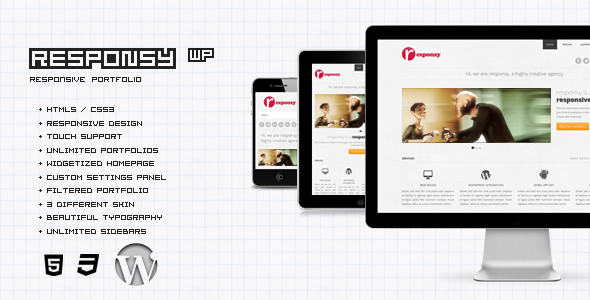
Stuck on your Responsy WordPress theme? Let's fix it.
No endless back-and-forth. Just send us the details and we'll get it done.
No obligation · Replies within 1 hour · Quote within 1 day
Setup · Customization · Bug fixes · WooCommerce integration
About Responsy WP Theme
Responsy is a WordPress theme built by pixelwars, designed for agencies, freelancers, and digital studios that want a clean, professional web presence without a bloated codebase. The theme ships with a drag-and-drop page builder integration, a set of pre-built demo pages, and a layout built around readability and conversion.
The design leans minimal. Typography is handled well out of the box, and the color system makes it straightforward to align the theme with a brand. It supports WooCommerce for light e-commerce needs and integrates with popular contact form plugins without custom coding.
Responsy targets business owners who want something polished without hiring a designer for every page. It covers most standard use cases: services, portfolios, landing pages, and blogs. The codebase is reasonably clean, though some customization depth requires either child theme work or a developer.
Get matched with a Responsy developer in under one day
Tell us about your Responsy project. Small fixes, Responsy theme customization, or a full website build, whatever you need, we've got it covered.
We'll connect you to the right Responsy developers, define the scope, and get everything 100% clear.
You'll get one estimate, hire your preferred developer, and start collaborating.
Pixelwars built Responsy with a solid foundation, but no theme covers every business need by default. If you’re spending time on workarounds, fighting layout issues, or trying to add features the theme doesn’t support natively, it’s time to get a developer involved.
Through Codeable, you get matched with a vetted WordPress developer who has hands-on experience with themes like Responsy. Post your project, get an estimate within 24 hours, and only hire if it makes sense. No commitment required.
Pros
- Clean, minimal design that works well for agencies and service businesses without heavy styling overrides
- Solid WooCommerce compatibility for businesses that need a light storefront alongside their main site
- Pre-built demo content makes initial setup fast and gives a clear starting point for customization
- Outputs reasonably clean HTML, which helps with SEO and avoids common markup issues found in bloated themes
- Responsive layout handles mobile and tablet breakpoints well without needing custom media query work
Cons
- Deep customization requires child theme work or developer involvement, the Customizer options only go so far
- Limited documentation compared to larger theme ecosystems, which makes troubleshooting harder without experience
- Demo content import can be inconsistent, sometimes requiring manual cleanup before the site looks right
- Not ideal for complex e-commerce builds, WooCommerce support is functional but basic
- Update frequency from pixelwars is slower than some competing theme developers, which can create compatibility gaps
Who is Responsy for?
Digital Agency Website
Responsy’s agency-style layouts make it a natural fit for digital studios. The homepage sections cover services, case studies, team, and contact in a structure that already matches how agencies present themselves. With some color and font adjustments, it can reflect a studio’s brand without starting from scratch.
Freelance Portfolio
Freelancers benefit from Responsy’s portfolio templates and clean typography. Project grids display work clearly, and the minimal design keeps focus on the work rather than the theme. It’s a good starting point for developers, designers, or writers who want a professional presence without spending weeks building a site.
Small Business Services Site
Service businesses like plumbers, accountants, or consultants need a site that builds trust fast. Responsy’s layouts cover the basics: services overview, about section, testimonials, and a clear contact path. It converts reasonably well without needing major structural changes or additional landing page plugins.
SaaS or App Landing Page
Landing pages for apps or SaaS products need fast load times and a focused layout. Responsy’s single-column sections and clean code make it usable for this. You’ll likely need some custom CSS or a developer to get it exactly right, but the base is solid and doesn’t fight you on structure.
Consulting or Coaching Practice
Coaches and consultants need a site that communicates credibility and makes booking or contact easy. Responsy handles both. The layout supports bio sections, service descriptions, testimonials, and call-to-action blocks without needing extra plugins to create a professional structure.

Customizing Responsy
Out of the box, Responsy gives you control over colors, fonts, header layout, and footer structure through the WordPress Customizer. That covers maybe 60% of what most site owners actually need. The rest, things like custom section layouts, conditional styling, or third-party plugin integration, requires hands-on work.
A Responsy expert can save you hours here. Instead of fighting with the theme’s built-in options or stacking plugins that conflict, a developer who knows the theme’s structure can build exactly what you need using child theme overrides, custom hooks, or targeted CSS and PHP.
Common customization requests include custom header designs, modified archive templates, WooCommerce product page tweaks, and integrating tools like CRMs or booking systems. These are all achievable with Responsy, but they require someone who understands how the theme is built under the hood.
Recommended plugins for Responsy
Responsy works well with most major WordPress plugins. For forms, Gravity Forms and WPForms both integrate cleanly. WooCommerce support is built in for stores. For SEO, the theme outputs clean markup that plays nicely with Yoast or Rank Math. No duplicate title tags or schema conflicts to worry about out of the gate.
If you need more from your site, you can pair Responsy with performance tools to reduce load times, or add structured SEO work to push rankings. Check out our WordPress performance services and WordPress SEO optimisation for both.
Not sure which plugins to use? This WordPress plugins directory covers the most popular options with reviews and setup guides.
Responsy common issues
Responsy theme header not displaying correctly on mobile
Mobile header issues in Responsy are usually caused by a CSS conflict with a plugin or child theme override. Open your browser’s developer tools on mobile view and check which rule is overriding the header styles. If you’re using a caching plugin, clear the cache first. If the issue appeared after a theme or plugin update, deactivate plugins one by one to isolate the conflict. Persistent layout bugs may need direct code fixes. Our WordPress bug fixing service can resolve this quickly.
Responsy page builder content not showing after update
If page builder content disappeared after a Responsy or plugin update, the most likely cause is a shortcode or block compatibility break. Check whether your page builder plugin is up to date. If you’re using a bundled page builder, it may need to be updated separately from the theme. Switching to the text editor view can show raw shortcodes that stopped rendering. Restoring from a backup is often faster than manually fixing broken content. See our WordPress maintenance service for regular backup coverage.
Responsy theme fonts not loading or reverting to default
Font loading problems in Responsy are often tied to Google Fonts being blocked by a privacy plugin, a Content Security Policy header, or a caching issue serving old CSS. Check your browser console for blocked requests. If you recently switched hosting or added a CDN, font URLs may need to be updated. Some caching plugins also strip font-face declarations. Clear all cache layers and test in a fresh browser session before making code changes.
Responsy demo import failed or imported blank pages
Demo import failures in Responsy are common and usually caused by server memory limits, upload size restrictions, or a timeout during the import process. Try increasing your PHP memory limit to at least 256MB in your wp-config.php file. If the import completes but pages are blank, the issue is likely missing demo media files or a page builder plugin that wasn’t activated before importing. Import in stages if a one-click import keeps failing.
Responsy FAQ
Responsy was built before the full-site editing era, so compatibility with WordPress 6.x depends on the version you’re running. Core functionality generally works, but Gutenberg-specific features like block patterns and global styles may not integrate fully. Always test a theme update on a staging site before applying it to a live site. If you’re running an older version of Responsy, check the pixelwars changelog for compatibility notes.
Responsy works alongside Elementor, but it wasn’t purpose-built for it. You can use Elementor to build page content within the theme’s structure, but some native Responsy sections may conflict visually with Elementor’s full-width containers. Most users either build entirely in Elementor and use Responsy as the frame, or stick with the theme’s built-in builder. Mixing both can create styling conflicts that need manual CSS fixes.
To create a child theme for Responsy, make a new folder in your wp-content/themes directory, add a style.css file with the correct template header pointing to the Responsy parent theme, and create a functions.php file that enqueues the parent stylesheet. Activate the child theme from the WordPress admin. All customizations go into the child theme so updates to Responsy don’t overwrite your changes.
Yes, Responsy includes basic WooCommerce support. Product pages, cart, and checkout render correctly with the theme’s styling. It’s suitable for small to medium stores. For heavily customized WooCommerce builds with complex product types, subscriptions, or custom checkout flows, you’ll likely need developer work to extend Responsy’s WooCommerce templates beyond what the theme provides by default.
Migrating an existing site to Responsy means moving content, not just switching themes. Your current theme’s custom layouts, shortcodes, or page builder content won’t transfer automatically. You’ll need to rebuild pages using Responsy’s templates. Content like posts, pages, and media migrates cleanly. If you’re also changing hosts, our WordPress migration service can handle both at once.
Hire a Responsy Developer
Whether you need a full Responsy build, specific customizations, or fixes for something that’s broken, working with an expert is faster than troubleshooting alone. Our developers know WordPress and theme architecture at a code level, not just the Customizer. Get a free estimate and describe your project. You’ll hear back within 24 hours with a clear scope and price. No obligation to hire.
You'll need a free Codeable account so developers can ask questions and send their quotes.