Retro Portfolio WordPress Theme
by opendept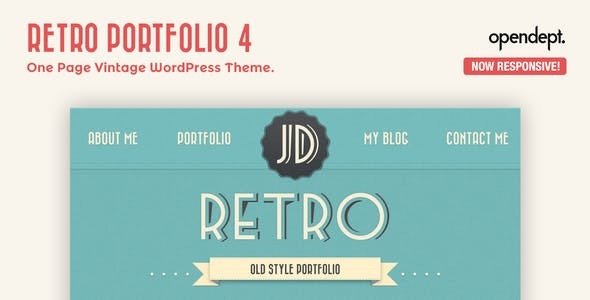
Stuck on your Retro Portfolio WordPress theme? Let's fix it.
No endless back-and-forth. Just send us the details and we'll get it done.
No obligation · Replies within 1 hour · Quote within 1 day
Setup · Customization · Bug fixes · WooCommerce integration
About Retro Portfolio WP Theme
Retro Portfolio is a WordPress theme by opendept built for creatives who want a distinctly vintage aesthetic without sacrificing modern functionality. It ships with a grid-based portfolio layout, customizable typography, and a muted color palette that evokes a mid-century design sensibility.
The theme is built on clean, well-structured code and supports the WordPress block editor, making it manageable for designers and photographers who want control over their content without writing code. It includes dedicated portfolio post types, lightbox support for image galleries, and basic WooCommerce compatibility for selling prints or digital work.
Performance is reasonable out of the box, and the theme follows WordPress coding standards. It works well for solo creatives, small studios, and illustrators looking for a portfolio presence that stands out from the generic minimalist crowd.
Get matched with a Retro Portfolio developer in under one day
Tell us about your Retro Portfolio project. Small fixes, Retro Portfolio theme customization, or a full website build, whatever you need, we've got it covered.
We'll connect you to the right Retro Portfolio developers, define the scope, and get everything 100% clear.
You'll get one estimate, hire your preferred developer, and start collaborating.
Most Retro Portfolio issues, whether layout breaks, plugin conflicts, or customization limits, come down to knowing the theme’s structure well. A vetted Retro Portfolio developer can diagnose problems quickly and build modifications that hold up over time. Through Codeable, you get matched with developers who have been screened for skill and reliability. There are no bidding wars, no guessing about quality. You post your project, get a clear estimate, and decide whether to move forward. No obligation, no upfront cost.
Pros
- Distinctive retro aesthetic that stands out from generic minimalist portfolio themes
- Dedicated portfolio post type with built-in lightbox support for image-heavy work
- Block editor compatible, making content updates manageable without developer help
- Clean, standards-compliant code that holds up well during WordPress core updates
- Basic WooCommerce support allows selling prints or digital files without a separate theme
Cons
- Limited Customizer options mean significant design changes require custom CSS or a child theme
- The retro aesthetic is specific and may feel out of place for clients in corporate or tech sectors
- Portfolio filtering requires a third-party plugin; no built-in AJAX filtering out of the box
- Documentation is sparse, making troubleshooting harder for non-developers
- High-resolution portfolio images can cause slow load times without a dedicated performance setup
Who is Retro Portfolio for?
Photographers
Retro Portfolio gives photographers a grid-based gallery that puts images front and center. The lightbox support works well for full-resolution previews, and the muted tones keep the design from competing with the work. A Retro Portfolio developer can extend it with client proofing tools or password-protected galleries for paid shoots.
Illustrators and Graphic Designers
Illustrators benefit from the theme’s vintage typography and structured grid layout. It creates a visual identity that complements hand-drawn and retro-styled work naturally. A Retro Portfolio specialist can add filterable categories so visitors can browse by style, medium, or project type without leaving the page.
Vintage and Antique Retailers
The theme’s aesthetic maps closely to vintage retail brands. Combined with WooCommerce, it becomes a functional shop for curated antiques or retro goods. A Retro Portfolio expert can configure product pages, category layouts, and checkout flows to match the overall design without breaking the vintage feel.
Filmmakers and Videographers
Filmmakers can use Retro Portfolio to showcase reels, project breakdowns, and stills in a visually cohesive layout. Video embeds slot into the portfolio grid without much configuration. A Retro Portfolio developer can add Vimeo or YouTube integration with custom thumbnail overlays that match the theme’s visual language.
Independent Print Artists
For artists selling limited-edition prints, Retro Portfolio pairs the portfolio presentation with WooCommerce product listings. The retro design reinforces the handcrafted, collectible nature of the work. A Retro Portfolio specialist can set up edition tracking, print size variants, and a checkout flow that stays on-brand throughout.

Customizing Retro Portfolio
Retro Portfolio gives you a solid starting point, but most clients want it to feel unmistakably theirs. That means adjusting the grid columns, swapping the default font stack for something more specific, dialing in the hover effects on portfolio cards, and making sure the color palette actually matches the brand.
A Retro Portfolio expert can go further than the Customizer allows. Custom CSS, child theme development, and block editor tweaks can reshape the layout significantly. If you need a non-standard homepage, a filterable portfolio with AJAX, or custom post type integrations, those changes require hands-on development work rather than theme settings alone.
Working with a Retro Portfolio specialist ensures those modifications are done cleanly, without breaking updates or creating technical debt that causes problems later.
Recommended plugins for Retro Portfolio
Retro Portfolio pairs well with a few targeted plugins. Yoast SEO or Rank Math handles on-page optimization that the theme does not cover natively. For WordPress SEO, structured data for portfolio items and image alt text discipline are particularly important for creatives relying on search traffic.
On the speed side, combining the theme with a caching plugin and an image optimization tool makes a real difference. A proper WordPress performance setup including lazy loading, a CDN, and minified assets keeps page load times competitive, especially on portfolio pages heavy with high-resolution images.
Not sure which plugins to use? This WordPress plugins directory covers the most popular options with reviews and setup guides.
Retro Portfolio common issues
Retro Portfolio theme not showing portfolio items on homepage
This usually happens when the portfolio post type template is not set as the homepage, or when no posts exist in the portfolio post type. Go to Settings > Reading and confirm the correct page is set as the front page. Also check that your portfolio posts are published and assigned to the correct custom post type, not standard posts. If the template is missing, a theme file may have been corrupted during an update.
Retro Portfolio lightbox not working after plugin update
Lightbox conflicts in Retro Portfolio almost always trace back to a jQuery version mismatch or a second plugin loading its own lightbox library. Deactivate plugins one at a time to isolate the conflict. If the lightbox uses an older script, it may need a compatibility fix. For persistent conflicts, the WordPress bug fixing service can identify the exact script collision and resolve it without disabling needed functionality.
Retro Portfolio theme layout broken on mobile
Mobile layout breaks in Retro Portfolio are often caused by custom CSS that lacks media queries, or a page builder overriding the theme’s responsive styles. Open browser dev tools and inspect the element causing the issue. Check for fixed-width values set in the Customizer or inline styles added by a plugin. Removing or scoping those styles usually restores the responsive behavior the theme ships with.
Retro Portfolio custom fonts not loading
Custom fonts failing to load in Retro Portfolio typically points to a Content Security Policy blocking external font requests, or a caching plugin serving a stale stylesheet that references the old font stack. Clear all caches first. If you are hosting fonts locally, confirm the font files are uploaded and the CSS references use correct paths. A child theme enqueuing fonts incorrectly can also cause this issue.
Retro Portfolio WooCommerce shop page not styled correctly
When WooCommerce shop pages look unstyled inside Retro Portfolio, the theme’s WooCommerce template files are likely missing or outdated. Retro Portfolio includes basic WooCommerce support but may not override every template. Copy the relevant WooCommerce templates into your child theme’s woocommerce folder and add targeted CSS. If the issue appeared after a WooCommerce update, a template compatibility review via the WordPress bug fixing service will sort it quickly.
Retro Portfolio header menu not displaying on small screens
A hamburger menu that disappears on mobile in Retro Portfolio usually means the JavaScript handling the toggle is not loading correctly. Check the browser console for JS errors. A plugin blocking script loading or a caching plugin serving a minified JS file with errors is often the cause. Clearing cache and testing with all plugins disabled confirms whether it is a theme or plugin issue. Re-enqueuing the menu script in a child theme is a reliable fix.
Retro Portfolio portfolio grid showing wrong number of columns
The portfolio grid column count in Retro Portfolio is controlled either through the Customizer or a theme option panel. If the setting looks correct but the columns are wrong, custom CSS from a previous developer or a page builder override may be forcing a different column class. Inspect the portfolio container in dev tools and look for a conflicting grid or column-count rule. Remove or override it in your child theme stylesheet.
Retro Portfolio slow loading on pages with many images
Portfolio pages loading slowly in Retro Portfolio almost always come down to uncompressed images and no lazy loading. Install an image optimization plugin like ShortPixel or Imagify and run a bulk optimization pass. Enable lazy loading either through a plugin or via the WordPress native loading attribute. A proper WordPress performance setup with a CDN will compound the gains significantly on image-heavy pages.
Retro Portfolio child theme changes not applying
If child theme changes are not applying in Retro Portfolio, the most common cause is incorrect stylesheet enqueueing. Your child theme’s functions.php must enqueue the parent theme’s stylesheet before the child stylesheet. Verify the wp_enqueue_scripts hook is set up correctly. Also confirm the child theme directory is named correctly and the style.css header references the parent theme’s Template field accurately. Deactivating and reactivating the child theme can also clear a cache-related problem.
Retro Portfolio contact form page returning 404 after migration
A 404 on the contact form page after migration means either the page permalink was not regenerated or the form plugin lost its page assignment. Go to Settings > Permalinks and save without changes to flush rewrite rules. Then check that the contact form plugin’s designated page still exists and is published. If you used a contact form plugin that stores page IDs, those IDs may have changed during migration and need updating in the plugin settings.
Retro Portfolio FAQ
Yes. Retro Portfolio is compatible with the WordPress block editor (Gutenberg). You can build and edit pages using blocks without issues. However, some portfolio-specific layouts work better through the theme’s own templates rather than block-based page construction, so it helps to understand where each approach is most effective.
Retro Portfolio includes basic WooCommerce support. Standard shop, product, and cart pages will function, though some WooCommerce templates may not inherit the full retro styling without additional CSS. A Retro Portfolio developer can extend the WooCommerce integration to match the rest of the design more precisely.
Retro Portfolio does not include built-in AJAX filtering. You can add it using a plugin like Portfolio Filter Gallery or Isotope-based solutions. A Retro Portfolio specialist can integrate filterable categories cleanly into the existing grid without breaking the theme’s visual style or responsive behavior.
Yes. Retro Portfolio registers its own portfolio custom post type, separate from standard WordPress posts. This keeps your portfolio work organized and allows dedicated archive and single-item templates. If you need additional custom post types beyond the built-in one, those require code-level additions to the theme or a plugin.
Font changes in Retro Portfolio are partially handled through the Customizer, depending on the version. For full control over the font stack, including loading custom or Google Fonts, you will need to add code to a child theme. A Retro Portfolio expert can set this up cleanly without affecting theme updateability.
Retro Portfolio follows WordPress coding standards and outputs reasonably clean HTML, which gives it a decent SEO baseline. For structured data, meta tags, and on-page optimization, you will need an SEO plugin. The theme does not include built-in schema markup for portfolio items, which is worth addressing early.
Create a new folder in wp-content/themes named retro-portfolio-child. Add a style.css file with the correct theme header, including a Template field pointing to retro-portfolio. Add a functions.php file that enqueues the parent stylesheet. Activate the child theme from the WordPress dashboard. All custom changes go into the child theme to survive parent theme updates.
Retro Portfolio can be used alongside Elementor or similar builders for standard pages, but the portfolio-specific templates are theme-driven and not designed for page builder overrides. Using a builder to reconstruct portfolio layouts can create conflicts. A Retro Portfolio developer can advise on where page builders help and where they cause problems with this theme specifically.
Yes, migrating an existing portfolio to Retro Portfolio is straightforward for content. Portfolio images, posts, and pages transfer cleanly. Recreating your previous design inside the new theme requires configuration and likely some custom CSS. For a smooth WordPress migration, working with a developer ensures nothing is lost and the new theme is configured correctly from day one.
The most direct route is posting a project on Codeable, where vetted Retro Portfolio developers review your requirements and provide a clear estimate. There is no obligation to hire after receiving the estimate. Alternatively, get a free estimate through FoxyConcept to be matched with a specialist quickly.
Hire a Retro Portfolio Expert
If you need a Retro Portfolio developer for a customization, a bug fix, or a full site build, the fastest route is a free estimate. Describe your project, get matched with a screened WordPress developer who knows the theme, and review the estimate before committing. Get a Free Estimate and have a developer ready within 24 hours.
You'll need a free Codeable account so developers can ask questions and send their quotes.