Revolution WordPress Theme
by fuelthemes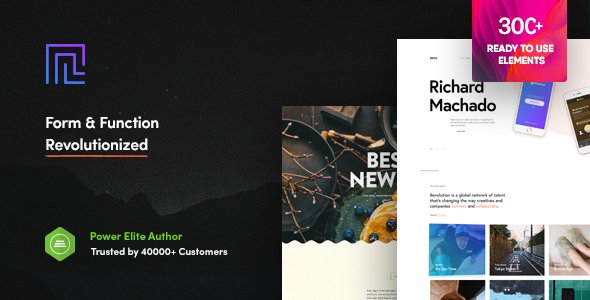
Stuck on your Revolution WordPress theme? Let's fix it.
No endless back-and-forth. Just send us the details and we'll get it done.
No obligation · Replies within 1 hour · Quote within 1 day
Setup · Customization · Bug fixes · WooCommerce integration
About Revolution WP Theme
Revolution is a WordPress theme built by FuelThemes, designed for agencies, portfolios, and creative studios that need a polished, structured layout without relying on a bloated page builder. It ships with a clean grid system, smooth scroll transitions, and a typographic hierarchy that holds up across screen sizes.
The theme leans on standard WordPress customizer controls, keeping setup accessible for non-developers while leaving enough room for custom CSS and template overrides. FuelThemes maintains active updates, which matters for long-term compatibility with WordPress core and Gutenberg. If you need a theme that looks sharp out of the box and scales with your project, Revolution is worth a serious look.
Get matched with a Revolution developer in under one day
Tell us about your Revolution project. Small fixes, Revolution theme customization, or a full website build, whatever you need, we've got it covered.
We'll connect you to the right Revolution developers, define the scope, and get everything 100% clear.
You'll get one estimate, hire your preferred developer, and start collaborating.
Finding a developer who knows Revolution specifically saves time. Generic WordPress freelancers often spend hours figuring out theme structure that a specialist already understands. Through Codeable, every developer is vetted before they take on client work. You post a project, get matched with developers who have relevant experience, and receive an estimate before committing to anything. No bidding wars, no guessing on quality.
Pros
- Clean, minimal codebase that loads fast without optimization plugins
- Strong typographic defaults that work for text-heavy agency and portfolio sites
- Gutenberg-compatible with block editor support built into the layout system
- FuelThemes provides regular updates keeping compatibility with current WordPress versions
- Customizer-based controls make basic changes accessible without touching code
Cons
- Limited layout variety without custom template development for more complex pages
- No built-in mega menu or advanced header options without additional plugin or custom code
- WooCommerce styling requires custom CSS work to match the theme's design language
- Documentation is limited compared to larger commercial theme frameworks
- Fewer third-party tutorial resources available compared to popular themes like Divi or Astra
Who is Revolution for?
Creative Agency
Revolution’s grid structure and clean section layouts work well for agencies presenting case studies, service pages, and team profiles. The typographic hierarchy handles content-heavy pages without visual clutter. A Revolution developer can extend the template system to support custom post types for case studies or client work portfolios.
Freelance Portfolio
Freelancers benefit from Revolution’s fast load times and minimal aesthetic. Project galleries, about pages, and contact forms all fit within the default layout system. Customizing the homepage hero and work grid to reflect a personal brand is a straightforward job for a Revolution specialist with template file experience.
Architecture or Interior Design Studio
The theme’s full-width image sections and whitespace-heavy layout suit studios that lead with visuals. Architecture firms and interior designers can use Revolution’s grid to present project photography cleanly. Custom filterable galleries and project detail templates are common additions a Revolution expert can build on top of the theme.
Digital Product or SaaS Landing Page
SaaS and digital product companies can use Revolution as a landing page base, adding feature sections, pricing tables, and CTA blocks through custom templates or compatible plugins. The clean markup keeps page speed scores high, which matters for conversion-focused pages. A Revolution developer can wire in lead capture tools and analytics without breaking the layout.
Photography or Visual Artist Site
Photographers and visual artists need a theme that stays out of the way of the work. Revolution’s minimal chrome and image-first layout options make it a practical choice. A Revolution specialist can set up custom gallery templates, client proofing integrations, or lightbox configurations that match the site’s visual style.

Customizing Revolution
Out of the box, Revolution gives you color controls, font settings, and layout options through the WordPress Customizer. That covers most surface-level changes. But if you need custom page templates, modified header logic, WooCommerce integration, or a unique section layout, you will need someone who knows the theme’s structure.
A Revolution expert can work directly with the theme’s template files, hook system, and CSS variables to produce changes that survive updates and work consistently across devices. Custom post type support, advanced menu configurations, and third-party plugin compatibility all benefit from a developer who has worked with Revolution before rather than someone guessing at the architecture.
Recommended plugins for Revolution
Revolution pairs well with caching plugins, image optimization tools, and a solid CDN setup. FuelThemes keeps the codebase relatively lean, but as you add content and plugins, performance needs active attention. A structured approach to WordPress performance keeps load times consistent as the site grows.
On the SEO side, Revolution outputs clean markup, but that is just a starting point. Schema, meta management, and crawlability all need deliberate configuration. Pairing the theme with a proper WordPress SEO setup closes the gap between a good-looking site and one that actually ranks.
Not sure which plugins to use? This WordPress plugins directory covers the most popular options with reviews and setup guides.
Revolution common issues
Revolution theme header not showing on mobile
Mobile header issues in Revolution usually come from a CSS conflict with a plugin adding its own header styles, or from a child theme override that does not include responsive breakpoints. Open browser dev tools on mobile emulation and check which rules are overriding the header visibility. If a plugin is injecting inline styles, deactivate plugins one by one to isolate it. If you are stuck, our WordPress bug fixing service can track this down quickly.
Revolution theme fonts not loading after update
After a theme update, font loading failures usually point to an enqueue conflict or a cached stylesheet serving stale CSS. Clear all caching layers first, including server cache, CDN, and browser cache. If the font is loaded via Google Fonts, check whether your site’s Content Security Policy is blocking external requests. A missing or incorrect API key for a premium font provider is another common cause worth checking.
Revolution theme homepage layout broken in Gutenberg
Revolution’s homepage template may rely on a classic template file that does not fully hand off to the block editor. When Gutenberg renders the page, the theme’s layout wrapper may conflict with block markup. Check whether a page template is assigned in the page attributes panel. Switching to the default template and rebuilding with blocks often resolves display issues. A Revolution developer can create a Gutenberg-compatible homepage template that preserves the original design intent.
Revolution theme contact form not sending emails
When the Revolution theme contact form stops sending emails, the issue is almost never the theme itself. WordPress’s default wp_mail function depends on the server’s mail configuration, which is often misconfigured on shared hosting. Install an SMTP plugin like WP Mail SMTP and connect it to a transactional mail provider such as Mailgun or Brevo. Test with the plugin’s built-in diagnostic tool to confirm delivery before going live.
Revolution theme WooCommerce pages unstyled
Revolution does not ship with WooCommerce template files, so shop pages fall back to WooCommerce’s default templates without theme styling applied. You need a child theme that overrides the relevant WooCommerce templates and applies Revolution’s CSS variables to match. This is a common task for a Revolution specialist and produces cleaner results than fighting it with custom CSS alone. Our WordPress bug fixing service handles WooCommerce styling conflicts regularly.
Revolution theme custom CSS not applying after save
Custom CSS not applying after saving in the Customizer is usually a caching issue. If you are running a caching plugin, purge all cached files immediately after saving. Some object caching setups store the Customizer output aggressively, meaning changes do not appear until the cache expires. If the problem persists without caching active, check whether a child theme stylesheet is loading after the parent and overriding your additions with higher-specificity rules.
Revolution theme footer widgets not displaying
Footer widgets in Revolution disappear when the widget area is not registered or when a plugin conflict removes the sidebar registration on certain pages. Go to Appearance and check whether the footer widget area appears in the widget panel. If it does not, a plugin may be conditionally unregistering it. Deactivate plugins in batches to find the culprit. Alternatively, a Revolution developer can register and render a custom footer widget area directly in the theme functions.
Revolution theme images blurry or stretched on retina screens
Blurry or stretched images on high-DPI screens in Revolution usually come from WordPress serving undersized image sizes for the slot the theme uses. Check what image size the theme requests in its template files and make sure WordPress has generated that size for your media. Use the Regenerate Thumbnails plugin after confirming the correct dimensions. For responsive image handling, ensure the theme outputs srcset attributes, which modern WordPress does by default when image sizes are correctly registered.
Revolution theme Customizer changes not saving
Customizer changes failing to save point to a permissions issue, a REST API conflict, or a nonce timeout. Check your browser console for failed POST requests when you click Publish in the Customizer. A 403 error usually means a security plugin is blocking the request. A 401 points to a session or authentication issue. Temporarily disabling your security plugin and retesting isolates the cause. If you need help diagnosing persistent save failures, our WordPress bug fixing service covers this.
Revolution theme slow to load after adding plugins
Revolution is a lightweight theme but plugin accumulation adds HTTP requests, database queries, and render-blocking scripts. Use Query Monitor to identify slow database queries and check which plugins add scripts to every page load. Scripts that do not need to be global should be dequeued on pages where they are not used. Combining this with a caching layer and a CDN brings load times back down without removing functionality.
Revolution FAQ
Revolution is compatible with the Gutenberg block editor and WordPress versions that ship with it. FuelThemes maintains updates that keep block editor support current. That said, some homepage and custom page templates may render differently in the block editor compared to the classic editor. A Revolution developer can adjust templates to work cleanly within the full-site editing flow if needed.
Revolution works with WooCommerce but does not include dedicated WooCommerce templates. Shop pages and product pages will function but default to WooCommerce’s base styling. For a visually consistent store, you need custom template overrides in a child theme. A Revolution specialist can build those templates to match the theme’s design without breaking future updates.
Revolution can technically run alongside Elementor, but it is not built as an Elementor-native theme. Some layout conflicts between Elementor’s containers and Revolution’s own template structure may appear. Using a page builder with Revolution works best when scoped to specific pages rather than applied site-wide, and a Revolution expert can advise on where the boundaries cause friction.
Create a child theme by making a new folder in wp-content/themes, adding a style.css file with the correct Template header pointing to the Revolution parent theme, and a functions.php file that enqueues the parent stylesheet. Any template files or CSS you add to the child theme folder will override the parent without affecting theme update compatibility. This is the right approach before making any code-level changes.
Revolution outputs clean, semantic HTML which is a solid foundation for SEO. It does not bloat the page with unnecessary markup. Pair it with a dedicated SEO plugin for meta management, schema markup, and sitemap generation. The theme alone does not handle those elements. Page speed, which Revolution supports through its lean code, is also a ranking factor worth maintaining as you add plugins.
Always use a child theme before making code-level changes. That way, theme updates from FuelThemes overwrite only the parent theme files and leave your child theme intact. Customizer settings persist across updates automatically. Back up your site before updating and review the FuelThemes changelog to check whether any template files you have overridden in your child theme have changed in the new version.
Yes. FoxyConcept provides Revolution developer services through Codeable’s vetted network. You describe your project, get matched with a specialist, and receive a fixed estimate before any work begins. There is no obligation to hire after the estimate. It is a practical option whether you need a small customization or a full custom build on top of Revolution.
Revolution supports custom post types but does not register any of its own beyond standard WordPress defaults. If your project needs custom post types for portfolio items, team members, or services, a developer needs to register them and create matching single and archive templates within the Revolution theme structure. This is a common extension for agency and portfolio sites using the theme.
Revolution works reliably with WP Mail SMTP for email delivery, Yoast or Rank Math for SEO, WP Rocket or LiteSpeed Cache for performance, and Contact Form 7 or Gravity Forms for forms. These plugins are well-maintained and avoid the conflicts that bloated all-in-one plugins sometimes cause. Keep the plugin count focused on actual requirements rather than adding tools speculatively.
Revolution is compatible with WPML and Polylang for multilingual setups. The theme does not include built-in translation controls, so a dedicated translation plugin handles language switching and content duplication. String translation for theme-specific text requires either a .pot file translation or WPML’s string translation module. A Revolution specialist can configure this correctly from the start to avoid structural issues later.
Hire a Revolution WordPress Developer
Whether you need layout changes, plugin integration, bug fixes, or a full custom build on top of Revolution, working with someone who knows the theme cuts the back-and-forth significantly. FoxyConcept delivers Revolution development through Codeable’s vetted network. Get a Free Estimate and describe what you need. No obligation, no upfront payment, 100% risk-free.
You'll need a free Codeable account so developers can ask questions and send their quotes.