Roam WordPress Theme
by Mikado-Themes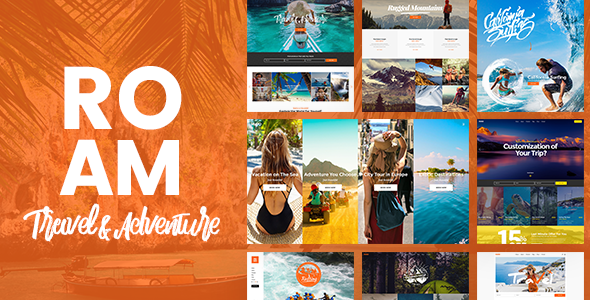
Stuck on your Roam WordPress theme? Let's fix it.
No endless back-and-forth. Just send us the details and we'll get it done.
No obligation · Replies within 1 hour · Quote within 1 day
Setup · Customization · Bug fixes · WooCommerce integration
About Roam WP Theme
Roam is a travel-focused WordPress theme by Mikado-Themes, built for travel bloggers, tour operators, and destination websites. It ships with a clean layout system, multiple header styles, and a set of pre-built demo pages that cover common travel site structures. The theme is built on Mikado’s own framework, which means you get a bundled page builder, custom shortcodes, and a visual options panel baked in from the start.
Roam supports WooCommerce for selling tours or travel gear, integrates with popular booking plugins, and includes portfolio and gallery post types suited for visual storytelling. It’s a well-structured theme for sites that need strong imagery, editorial flexibility, and a clear content hierarchy. If you’re planning a travel-heavy site with multiple content types, Roam gives you a solid starting point without requiring heavy customization from scratch.
Get matched with a Roam developer in under one day
Tell us about your Roam project. Small fixes, Roam theme customization, or a full website build, whatever you need, we've got it covered.
We'll connect you to the right Roam developers, define the scope, and get everything 100% clear.
You'll get one estimate, hire your preferred developer, and start collaborating.
Mikado themes have their own conventions and framework patterns. A developer unfamiliar with how Roam is structured can spend hours on something a specialist solves in minutes. Through Codeable, you get matched with vetted WordPress developers who have hands-on experience with themes like Roam. Post your project, get a free estimate within 24 hours, and only move forward if you’re happy with the proposal. No risk, no guesswork.
Pros
- Strong visual design suited to travel and lifestyle content, with full-width imagery and clean typography built in
- Multiple pre-built demo pages cover travel blogs, tour operators, and agency layouts without starting from scratch
- WooCommerce compatibility is included, making it practical for selling tours, packages, or travel merchandise
- Per-page header and layout controls give editorial flexibility without needing custom code on every template
- Mikado's admin panel is detailed and well-documented, covering most common customization tasks without touching PHP
Cons
- Built on Mikado's proprietary framework, which creates dependency on their update cycle and limits portability
- Bundled page builder and shortcodes mean switching themes later requires significant content migration work
- Default demo setup can be heavy, and performance tuning is needed before the site is production-ready
- Advanced layout changes require familiarity with Mikado's template structure, which differs from standard WordPress conventions
- Support is handled through ThemeForest comments and documentation, with no dedicated live support channel
Who is Roam for?
Travel Blog
Roam’s blog layouts, featured image support, and category structures make it a practical choice for travel bloggers who publish regularly. You can organize content by destination, trip type, or date, and the reading experience holds up well on mobile. A Roam developer can set up custom category templates or author pages tailored to how your content is structured.
Tour Operator Website
Tour operators need listings, booking flows, and clear pricing pages. Roam supports this through WooCommerce and compatible booking plugins like WP Travel Engine. A Roam specialist can configure tour post types, integrate a booking system, and set up availability calendars without forcing the site into a template it wasn’t built for.
Travel Agency
Travel agencies often need a mix of service pages, destination content, team profiles, and a contact or quote form. Roam’s pre-built demo content includes most of these structures. With a Roam expert, you can adapt these layouts to match your service offering and brand rather than shipping a lightly modified demo.
Adventure & Outdoor Brand
Outdoor and adventure brands need strong photography, gear shop capability, and editorial content in one place. Roam handles all three through its gallery post types, WooCommerce integration, and blog system. A developer familiar with the theme can connect product listings to relevant editorial content without duct-taping multiple plugins together.
Destination Guide
Destination guides work best when content is easy to browse by location, category, or activity. Roam supports this through custom taxonomies and its portfolio post type. A Roam specialist can configure the taxonomy structure, build filtered listing pages, and set up map integrations that match how your audience wants to explore content.

Customizing Roam
Out of the box, Roam gives you a lot of options through its admin panel: typography controls, color schemes, header layouts, and per-page settings. That covers most surface-level changes. Where things get more involved is when you need to restructure demo content, modify template files, or build page layouts that go beyond the included demos.
A Roam expert can help you move faster here. Custom post type displays, modified WooCommerce templates, child theme setup, and bespoke header or footer builds all require working knowledge of how Mikado’s framework is structured. If you want a result that doesn’t look like a slightly tweaked demo, working with a Roam specialist makes the difference between a generic site and one that actually fits your brand and audience.
Recommended plugins for Roam
Roam works alongside several plugins that extend what the theme does by default. For travel and content-heavy sites, getting the technical side right matters.
- Caching and performance: Roam’s visual options and bundled scripts can add weight. Pairing it with a caching layer and image optimization keeps load times under control. See our WordPress performance service for help with this.
- SEO plugins: Roam doesn’t handle metadata or schema natively. Yoast SEO or Rank Math fills that gap, and proper setup matters for travel-related search terms. Our WordPress SEO service covers full configuration.
- Booking plugins: WP Travel Engine or Tourmaster work alongside Roam for tour listings and bookings.
- WooCommerce: Built-in support makes selling travel products or packages straightforward.
Not sure which plugins to use? This WordPress plugins directory covers the most popular options with reviews and setup guides.
Roam common issues
Roam theme demo content not importing correctly
Demo import failures with Roam usually come down to server limits, missing required plugins, or import file conflicts. First, check that all required plugins listed in the theme documentation are active. Then increase upload_max_filesize and max_execution_time in your PHP settings before attempting the import again. If the import completes but content is missing, reimporting specific XML files from the demo package usually fills the gaps. For persistent issues, our bug fixing service can diagnose and resolve the problem directly.
Roam theme slow loading after setup
Roam ships with bundled scripts and a visual options framework that adds HTTP requests and page weight if left unconfigured. Start by enabling CSS and JS minification through a caching plugin and disabling any unused Mikado shortcode scripts from the theme options panel. Image sizes registered by the theme can also cause regeneration overhead. If performance is still poor after these steps, a more thorough audit of render-blocking resources and server configuration is the next move. Get help from our team if you’re not seeing results.
Roam header or menu not displaying as expected
Header display problems in Roam are usually tied to conflicting per-page settings or a mismatch between the header type selected in the global options and the one set at page level. Go to the page editor, scroll to the Mikado options box, and check whether a header style has been set there that overrides the global setting. Sticky header issues are often a CSS specificity conflict introduced by a child theme or custom CSS. Check the browser console for errors and compare the active header template file against the parent theme version.
Roam theme not updating or breaking after WordPress update
After a WordPress core update, Roam can break if the theme version is outdated or if custom code in a child theme conflicts with updated WordPress functions. First, check whether a Mikado theme update is available and apply it in a staging environment before pushing to production. If the issue appeared immediately after a core update without a theme update available, isolate whether a specific template file or plugin interaction is the cause. Keep PHP version compatibility in mind as well, since older Mikado theme versions may not fully support newer PHP releases.
Roam FAQ
Yes. Roam is built around travel and lifestyle content. It includes blog layouts, destination-style category templates, and strong support for featured imagery. The reading experience is clean on mobile, and the post formats cover text, gallery, and video without extra plugins. For a travel blog with regular publishing needs, it’s a practical fit out of the box.
Yes. Roam includes built-in WooCommerce compatibility. You can sell tours, travel packages, or physical products. The shop and product page templates are styled to match the theme. For more advanced setups like variable pricing, custom checkout flows, or subscription products, a developer familiar with both Roam and WooCommerce will get you there faster.
Yes. Roam works alongside booking plugins like WP Travel Engine and Tourmaster. These plugins add tour post types, booking forms, availability management, and pricing structures. Integration requires some configuration to match the theme layout, and a Roam specialist can set this up cleanly without layout conflicts or broken templates.
After activating Roam, you’ll be prompted to install the required plugins including the Mikado importer. Once those are active, go to Mikado Options and find the Import section. Select the demo you want and run the import. Make sure your server’s PHP limits are high enough for the import to complete. If anything fails, installing missing plugins first usually resolves it.
For basic changes like colors, fonts, and swapping demo content, the admin panel is enough. You won’t need a developer for that. But if you’re building custom layouts, modifying templates, integrating a booking system, or creating something that doesn’t match the demo structure, a Roam expert will save you significant time and avoid code debt that’s hard to undo later.
Hire a Roam WordPress Developer
Whether you need a full Roam build, a specific customization, or fixes to an existing site, working with a developer who knows the theme saves time and avoids the trial-and-error that comes with unfamiliar code. Our team on Codeable handles Roam projects of all sizes. Get a free estimate and describe what you need. You’ll hear back within 24 hours with a clear proposal and no obligation to proceed.
You'll need a free Codeable account so developers can ask questions and send their quotes.