Royal Event WordPress Theme
by ThemeREX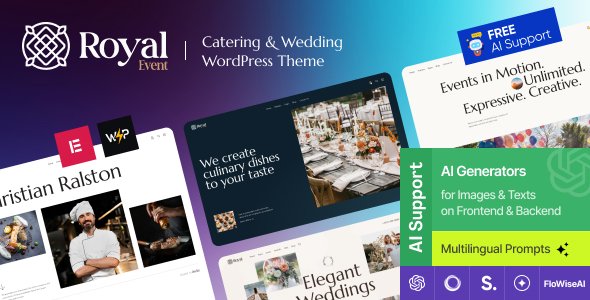
Stuck on your Royal Event WordPress theme? Let's fix it.
No endless back-and-forth. Just send us the details and we'll get it done.
No obligation · Replies within 1 hour · Quote within 1 day
Setup · Customization · Bug fixes · WooCommerce integration
About Royal Event WP Theme
Royal Event is a WordPress theme by ThemeREX built specifically for event planning businesses, wedding venues, party organizers, and corporate event companies. It ships with a dedicated event calendar, ticketing support, and booking functionality out of the box.
The theme is built on ThemeREX’s own framework and works with Elementor, giving you drag-and-drop control over layouts. It includes pre-built demo pages for weddings, corporate events, and private parties, so you’re not starting from a blank canvas.
Royal Event supports WooCommerce for ticket sales, integrates with The Events Calendar plugin, and includes portfolio-style gallery layouts for showcasing past events. It’s a purpose-built theme for event professionals who need more than a generic multipurpose template.
Get matched with a Royal Event developer in under one day
Tell us about your Royal Event project. Small fixes, Royal Event theme customization, or a full website build, whatever you need, we've got it covered.
We'll connect you to the right Royal Event developers, define the scope, and get everything 100% clear.
You'll get one estimate, hire your preferred developer, and start collaborating.
Royal Event is built on ThemeREX’s proprietary framework, which behaves differently from standard themes. Not every WordPress developer knows it well. Through Codeable, you get matched with vetted developers who have hands-on experience with ThemeREX themes specifically.
No guesswork, no wasted hours on the wrong hire. You post your project, get a fixed estimate within 24 hours, and only proceed if you’re comfortable. It’s a low-risk way to get expert work done on a theme that rewards specialist knowledge.
Pros
- Purpose-built for event businesses with dedicated booking and calendar features included
- Ships with multiple pre-built demos covering weddings, corporate events, and private parties
- WooCommerce integration supports ticket sales and deposit payment workflows
- Works with Elementor for visual page building without requiring custom code
- Includes portfolio-style gallery layouts designed specifically for event photo showcasing
Cons
- Built on ThemeREX's proprietary framework, which limits how easily generic WordPress developers can customize it
- Heavy out-of-the-box feature set can slow page load times if not properly configured
- Theme updates can sometimes conflict with customizations made outside a child theme
- Documentation is adequate but not detailed enough for complex custom development scenarios
- Design aesthetic is ornate and wedding-focused, which requires more work to adapt for corporate or minimalist use cases
Who is Royal Event for?
Wedding Planners
Royal Event’s wedding demo is one of its strongest starting points. It includes gallery layouts for real wedding showcases, a service listing section, and a contact form built for consultation inquiries. WooCommerce can handle deposits or package payments directly. Wedding planners get a polished, client-ready site without building every section from scratch.
Corporate Event Companies
Corporate event companies can use Royal Event’s event calendar and ticketing features to manage registrations and schedules. The theme supports multiple event categories, which helps when running different event types under one brand. Some design adjustment is needed to move away from the more ornate default styling toward a cleaner corporate look.
Venue Hire Businesses
Venue hire businesses benefit from Royal Event’s gallery and booking features. You can showcase different spaces with dedicated pages, display availability through the calendar integration, and accept booking inquiries or deposits via WooCommerce. The layout supports multiple venue types within a single site structure without requiring separate installs.
Private Party Organizers
Private party organizers — birthday events, anniversaries, celebrations — can use Royal Event’s service pages and portfolio sections to show past events and packages. The theme handles inquiry forms and can be connected to payment processors for deposits. It works well for solo operators and small agencies managing recurring private event bookings.
Conference and Seminar Organizers
Conference and seminar organizers get the most value from Royal Event’s ticketing and schedule display features. The Events Calendar integration supports multi-day events with speaker listings and session breakdowns. WooCommerce manages paid registrations cleanly. This use case works best when a developer configures the event post types to match the specific conference format.

Customizing Royal Event
Royal Event offers a reasonable amount of built-in customization through the WordPress Customizer and Elementor page builder. You can adjust color schemes, typography, header layouts, and section ordering without touching code.
That said, deeper changes — custom booking flows, unique event category pages, or integration with third-party ticketing platforms — require developer work. A Royal Event expert will know the ThemeREX framework well enough to avoid conflicts with the theme’s own shortcodes and layout engine.
Child theme development is the right approach for any structural modifications. It protects your changes during theme updates and keeps the codebase maintainable. If you need custom post type adjustments or specialized event filtering, a developer familiar with Royal Event will save you significant time.
Recommended plugins for Royal Event
Royal Event pairs well with several plugins that extend its core event features. The Events Calendar Pro adds recurring events and advanced filtering. WooCommerce handles ticket sales and deposit payments directly on-site.
For site speed, image optimization and caching are worth prioritizing — event sites with heavy photo galleries can slow down quickly. See our WordPress performance services for specifics.
If visibility matters — and it does for local event businesses — structured data markup for events can improve search appearance. Our WordPress SEO service covers event schema implementation and local SEO setup.
Not sure which plugins to use? This WordPress plugins directory covers the most popular options with reviews and setup guides.
Royal Event common issues
Royal Event theme booking form not working
Booking form failures in Royal Event are usually caused by a plugin conflict or a missing contact form plugin the theme depends on. Check whether Contact Form 7 or WPForms is active and properly configured. Also verify that your server’s PHP mail function is working — many hosts disable it by default. If the form submits but no email arrives, an SMTP plugin like WP Mail SMTP usually resolves it. For persistent issues, our WordPress bug fixing service can diagnose the root cause.
Royal Event calendar not displaying events correctly
Royal Event relies on The Events Calendar plugin for its calendar functionality. If events aren’t displaying, first confirm the plugin is installed and activated. Check that event posts are published and assigned to the correct category. Permalink conflicts are another common cause — go to Settings > Permalinks and save without changing anything to flush rewrite rules. If you’ve customized calendar templates, a theme update may have overwritten them outside a child theme.
Royal Event theme slow loading on mobile
Royal Event’s mobile performance issues typically come from unoptimized images in event galleries, multiple render-blocking scripts loaded by the ThemeREX framework, and unused CSS from bundled page builder assets. Start by running a GTmetrix or PageSpeed Insights test to identify the biggest offenders. Use a caching plugin, enable lazy loading for images, and consider a CDN. For a full audit and fixes, see our WordPress performance service.
Royal Event Elementor sections not saving properly
Elementor sections not saving in Royal Event are often caused by a PHP memory limit that’s too low, a JavaScript error from a plugin conflict, or an outdated version of Elementor conflicting with the ThemeREX framework. Increase PHP memory to at least 256MB in your wp-config.php file. Deactivate plugins one at a time to find conflicts. Also make sure both Elementor and Royal Event are running their latest versions. If the issue persists, a developer with ThemeREX experience can identify framework-level conflicts quickly.
Royal Event FAQ
Yes, Royal Event is compatible with Elementor. The theme ships with Elementor-based page templates for its demo content and allows visual editing of most page sections. That said, some ThemeREX-specific elements like event shortcodes and booking widgets operate outside Elementor’s control. A developer familiar with both systems can help if you run into layout conflicts between Elementor widgets and native theme components.
Yes. Royal Event integrates with WooCommerce to handle ticket sales, service packages, and deposit payments. Products can be linked to specific events and displayed on event detail pages. Setup requires configuring WooCommerce correctly alongside the theme’s event post types. If you need a custom ticketing flow — variable pricing, group bookings, or promo codes — a developer can extend the default WooCommerce setup to match your needs.
Royal Event can work for corporate event companies, but the default design leans heavily toward weddings and private celebrations. Adapting it for a corporate look requires overriding typography, color schemes, and some layout choices. The event calendar and ticketing features translate well regardless of the event type. Budget time — or developer hours — for the visual adjustments needed to move it away from the ornate default aesthetic.
Migrating a Royal Event site follows the standard WordPress migration process: move the database, files, and update URLs for the new domain. The ThemeREX framework stores some settings in the database rather than the file system, so a full database export is essential — not just the theme files. Using a migration plugin like Migrate Guru or All-in-One WP Migration handles this reliably. For complex setups, our WordPress migration service covers the full process.
As of the latest available information, ThemeREX continues to update Royal Event on ThemeForest. ThemeREX is an active theme developer with a range of maintained products. Before purchasing or building on the theme, check the ThemeForest changelog for the date of the most recent update and read recent buyer reviews to confirm support response times are acceptable for your project needs.
Hire a Royal Event Developer
Need help setting up Royal Event, fixing a layout issue, or building custom event functionality? Our WordPress developers have direct experience with ThemeREX themes and can handle everything from initial configuration to complex customizations.
Work is delivered through Codeable’s vetted developer network. You get a free estimate with no obligation to hire. Post your project and get a free estimate today.
You'll need a free Codeable account so developers can ask questions and send their quotes.