RT-Theme 20 WordPress Theme
by stmcan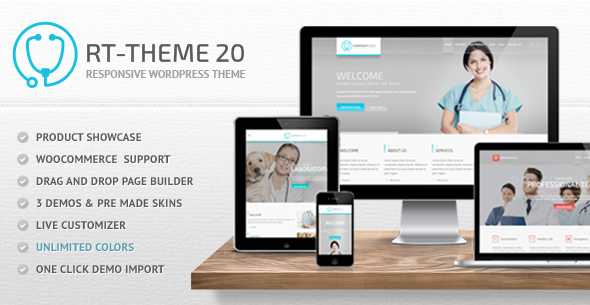
Stuck on your RT-Theme 20 WordPress theme? Let's fix it.
No endless back-and-forth. Just send us the details and we'll get it done.
No obligation · Replies within 1 hour · Quote within 1 day
Setup · Customization · Bug fixes · WooCommerce integration
About RT-Theme 20 WP Theme
RT-Theme 20 is a multipurpose WordPress theme developed by stmcan. It ships with a drag-and-drop page builder, multiple pre-built layouts, and a shortcode library that covers most common site-building needs without requiring additional plugins. The theme supports WooCommerce, custom post types, and a range of header and footer configurations.
It targets agencies, freelancers, and businesses that need a flexible base without starting from scratch. The admin panel gives direct control over typography, colors, layout widths, and sidebar positions. RT-Theme 20 also includes built-in support for Revolution Slider, making it a practical choice for content-heavy or portfolio-style sites that need visual impact on the homepage.
Get matched with a RT-Theme 20 developer in under one day
Tell us about your RT-Theme 20 project. Small fixes, RT-Theme 20 theme customization, or a full website build, whatever you need, we've got it covered.
We'll connect you to the right RT-Theme 20 developers, define the scope, and get everything 100% clear.
You'll get one estimate, hire your preferred developer, and start collaborating.
RT-Theme 20 has enough moving parts that small missteps in customization can create layout or performance issues that are hard to trace. Working with a vetted developer through Codeable means you get someone who has seen these problems before and knows how to fix them efficiently. Post a project, get a free estimate within 24 hours, and only move forward if it makes sense for your budget and timeline. No commitment required.
Pros
- Built-in drag-and-drop page builder reduces reliance on third-party page builder plugins
- Multiple homepage and inner page layouts included out of the box
- Native WooCommerce support with dedicated shop layout options
- Extensive shortcode library covers sliders, tabs, accordions, pricing tables, and more
- Revolution Slider bundled with the theme, saving on plugin licensing costs
Cons
- Admin panel has a steep learning curve for non-technical users due to the number of options
- Page builder output produces non-standard HTML that can complicate future migrations to other builders
- Theme updates from stmcan have slowed over time, which raises compatibility questions with newer WordPress versions
- Heavy default asset loading can hurt page speed scores without manual optimization
- Limited community resources and documentation compared to mainstream themes like Divi or Avada
Who is RT-Theme 20 for?
Creative Agency Portfolio
RT-Theme 20’s portfolio post type and filterable gallery layouts make it a practical choice for agencies showcasing client work. An RT-Theme 20 developer can configure custom taxonomy filters, adjust the grid layout, and tie portfolio entries to case study detail pages, giving prospective clients a clean way to browse work by category or industry.
WooCommerce Online Store
With native WooCommerce support, RT-Theme 20 handles product listings, single product pages, and checkout without requiring a separate shop theme. An RT-Theme 20 specialist can customize the product template, adjust the cart layout, and integrate payment gateways or shipping plugins to match how the store actually needs to operate.
Corporate Business Site
The theme’s multiple header styles, full-width section support, and clean typography options suit corporate sites that need to look structured and trustworthy. An RT-Theme 20 expert can build out service pages, team sections, and contact forms that align with brand guidelines without relying on additional page builder plugins.
Freelancer or Consultant Site
Freelancers and consultants need a site that communicates clearly and converts visitors. RT-Theme 20’s layout flexibility supports a focused one-page or multi-page structure with pricing tables, testimonials, and call-to-action sections built in through shortcodes, cutting the time needed to get a professional site live.
Magazine or Blog
RT-Theme 20 includes blog layout options that support standard, masonry, and list views. For content-heavy sites, an RT-Theme 20 developer can configure category archives, set up custom sidebar placements per post type, and adjust the typography hierarchy so editorial content is easy to read across devices.

Customizing RT-Theme 20
Customizing RT-Theme 20 goes well beyond flipping switches in the admin panel. The theme’s shortcode system is extensive, but building complex layouts or matching a specific brand identity often requires editing child theme files, overriding template parts, or writing custom CSS that accounts for the theme’s own specificity rules.
A qualified RT-Theme 20 expert can handle tasks like restructuring the page builder output, integrating third-party plugins cleanly, or adapting WooCommerce templates to fit a custom storefront design. If you need pixel-accurate results or want to extend the theme beyond its default capabilities, working with an RT-Theme 20 specialist saves significant time and avoids breaking existing functionality in the process.
Recommended plugins for RT-Theme 20
RT-Theme 20 pairs with a number of tools that expand its default feature set. WooCommerce integration is built in, so adding product pages and checkout flows is straightforward. Revolution Slider handles animated hero sections. For sites that need more than good looks, pairing the theme with a proper caching setup and image optimization improves load times noticeably. See the WordPress performance service for specifics on what that involves.
On the discoverability side, RT-Theme 20’s structure supports clean URL output and schema markup when configured correctly, which feeds into broader WordPress SEO work.
Not sure which plugins to use? This WordPress plugins directory covers the most popular options with reviews and setup guides.
RT-Theme 20 common issues
RT-Theme 20 layout broken after WordPress update
WordPress core updates can shift how themes render certain block-level elements, especially if the theme isn’t being actively updated by stmcan. After an update, broken layouts are usually caused by deprecated template tags or CSS conflicts introduced in newer WordPress versions. A developer can audit the child theme files, patch the affected template parts, and test across browsers. For faster resolution, the WordPress bug fixing service covers exactly this type of post-update breakage.
RT-Theme 20 page builder not loading in admin
If RT-Theme 20’s built-in page builder fails to load in the WordPress admin, the most common causes are a JavaScript conflict with another active plugin, a PHP version mismatch, or a corrupted theme file. Start by disabling plugins one at a time to isolate the conflict. If that doesn’t resolve it, check the browser console for JS errors. Persistent issues may need a developer to review server logs and theme code directly. The WordPress bug fixing service can handle this efficiently.
RT-Theme 20 slow loading on mobile
RT-Theme 20 loads multiple CSS and JavaScript files by default, and Revolution Slider adds to that weight. On mobile, this creates noticeable delays. Start by enabling browser caching and compressing images. Deferring non-critical scripts and removing unused shortcode assets through the theme panel also helps. For measurable gains, a developer can audit which assets load on which pages and configure a proper caching and minification setup tailored to how the theme outputs its files.
RT-Theme 20 Revolution Slider not displaying on homepage
Revolution Slider not displaying on the homepage is usually tied to one of three things: the slider isn’t published inside the Revolution Slider plugin, the shortcode in the theme panel is missing or incorrect, or a caching plugin is serving a version of the page before the slider was added. Verify the slider status inside the plugin, copy the exact shortcode, and clear all cache layers. If the slider still doesn’t appear, check whether a JavaScript error is preventing it from initializing.
RT-Theme 20 FAQ
RT-Theme 20 was built for older WordPress versions and stmcan’s update cadence has slowed. It can run on recent WordPress installs, but you may encounter deprecated function warnings or minor display issues. A developer can patch compatibility problems in a child theme without modifying the parent theme files, which keeps things manageable when updates do come through.
RT-Theme 20 has its own built-in page builder, so running Elementor or WPBakery alongside it is technically possible but creates conflicts in practice. Most developers recommend sticking with one builder. If you want to move to Elementor, a full rebuild of the affected pages is cleaner than trying to run both systems in parallel on the same site.
Create a new folder in your themes directory, add a style.css with a Template: rt-theme20 header, and a functions.php that enqueues the parent stylesheet. Activate the child theme from the WordPress admin. Any template files or CSS you add to the child theme folder will override the parent without affecting core theme files during updates.
Yes. RT-Theme 20 includes built-in WooCommerce support with dedicated shop page templates. Product listing pages, single product layouts, and the cart and checkout pages all render within the theme’s design framework. An RT-Theme 20 specialist can further customize these templates if the default WooCommerce output doesn’t match your required storefront design.
Migrating away from RT-Theme 20 is possible but requires careful planning. Content created with the theme’s shortcodes will appear as raw shortcode text in a new theme. A developer can parse and rebuild that content in the new theme’s format. The database, media files, and posts move cleanly. For help with the technical side of a move, see the WordPress migration service.
Hire an RT-Theme 20 Developer
Whether you need a full site build, a targeted customization, or a fix for something that stopped working, an experienced RT-Theme 20 developer can scope the work quickly and deliver clean results. FoxyConcept works through Codeable, so every developer is vetted before they touch your project. Get a free estimate and see exactly what your project involves before committing to anything.
You'll need a free Codeable account so developers can ask questions and send their quotes.