RyanCV WordPress Theme
by bslthemes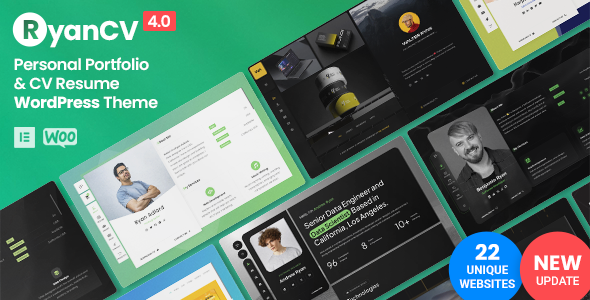
Stuck on your RyanCV WordPress theme? Let's fix it.
No endless back-and-forth. Just send us the details and we'll get it done.
No obligation · Replies within 1 hour · Quote within 1 day
Setup · Customization · Bug fixes · WooCommerce integration
About RyanCV WP Theme
RyanCV is a WordPress resume and CV theme developed by bslthemes. It targets professionals, freelancers, and job seekers who want a personal site that functions as a living resume. The theme ships with a clean one-page layout, multiple color schemes, and sections purpose-built for skills, experience, portfolio, and testimonials.
Built on Bootstrap, RyanCV loads quickly out of the box and works across devices without much configuration. The admin panel gives non-technical users enough control to update content without touching code. It integrates with popular plugins and supports both single-page and multi-page structures. For anyone who needs a professional online presence fast, RyanCV is a focused, practical choice that stays out of the way.
Get matched with a RyanCV developer in under one day
Tell us about your RyanCV project. Small fixes, RyanCV theme customization, or a full website build, whatever you need, we've got it covered.
We'll connect you to the right RyanCV developers, define the scope, and get everything 100% clear.
You'll get one estimate, hire your preferred developer, and start collaborating.
Most RyanCV issues come down to customization that goes past what the options panel allows, or conflicts introduced by plugin updates. Fixing those without breaking the rest of the site takes someone who knows WordPress at the code level.
Codeable connects you with vetted WordPress developers who have worked with themes like RyanCV before. There is no guesswork about who you are hiring. You post your project, get a clear estimate, and decide whether to proceed. No commitment required upfront.
Pros
- Clean one-page resume layout that works well straight out of the box
- Multiple pre-built color schemes reduce initial setup time
- Dedicated sections for skills, timeline, portfolio, and testimonials built into the theme structure
- Responsive Bootstrap base performs reliably on mobile without extra configuration
- Lightweight compared to multi-purpose themes, which keeps load times manageable
Cons
- Theme Options panel is limited, so anything beyond basic color and font changes requires custom code
- Portfolio section lacks filtering and sorting features without plugin additions
- Blog functionality is minimal and not well-suited for content-heavy publishing
- Section order is fixed in the default setup, reordering requires developer intervention
- Updates from bslthemes can break custom CSS if changes are not made in a child theme
Who is RyanCV for?
Freelance Designers
Freelance designers need a portfolio that also functions as a CV. RyanCV handles both without requiring a separate portfolio plugin. A RyanCV developer can extend the gallery section to display case studies with custom post types, giving potential clients a clearer picture of past work and process rather than just finished images.
Software Developers
Software developers often want to list skills, link to GitHub, and show project history in one place. RyanCV’s skills bars and timeline sections cover this well. A RyanCV specialist can add custom fields for tech stacks, link portfolio items to live repos, and clean up the contact section to route enquiries to a professional inbox.
Marketing Professionals
Marketing professionals need a site that ranks for their own name. RyanCV provides the structure, but a RyanCV expert combined with proper SEO setup makes the difference. Adding schema markup for a person entity, optimising meta descriptions, and building out a light blog section turns a resume page into a discoverable personal brand hub.
Recent Graduates
Recent graduates entering the job market benefit from a polished online presence that stands out from PDF resumes. RyanCV gives them a professional URL to include in applications. A RyanCV developer can customise the theme to emphasise education, internships, and projects rather than years of experience, making the layout relevant to their actual situation.
Consultants and Coaches
Consultants and coaches need a site that builds trust and drives enquiries. RyanCV’s testimonials and services sections support this directly. A RyanCV specialist can integrate a booking plugin, add a lead capture form above the fold, and connect the site to a CRM so inbound enquiries are tracked without manual effort.

Customizing RyanCV
RyanCV includes a Theme Options panel that covers colors, typography, layout switches, and section visibility. Most visual changes are manageable without code, but deeper customization quickly requires a RyanCV expert. Custom color palettes beyond the presets, reordering sections, adding new portfolio categories, or integrating third-party contact forms all need hands-on work.
A skilled RyanCV developer can extend the theme with child theme modifications, custom CSS overrides, and PHP adjustments that stay upgrade-safe. If you need a layout that reflects your specific personal brand rather than a slightly tweaked default, working with a RyanCV specialist saves significant time. bslthemes provides documentation, but real customization work goes well beyond what the docs cover.
Recommended plugins for RyanCV
RyanCV pairs well with several plugins that extend its usefulness beyond a static resume page. Yoast SEO or Rank Math help structure your personal brand for search, and a WordPress SEO specialist can ensure your schema markup is set up correctly for person and job profiles.
For speed, combining RyanCV with a caching plugin and a CDN makes a real difference, especially on shared hosting. A WordPress performance service can handle image optimization, lazy loading, and Core Web Vitals tuning. Contact Form 7 or WPForms slots in cleanly for enquiry forms. WooCommerce is not a natural fit for this theme.
Not sure which plugins to use? This WordPress plugins directory covers the most popular options with reviews and setup guides.
RyanCV common issues
RyanCV contact form not sending emails
This is almost always a server-side mail configuration issue rather than a theme fault. RyanCV uses PHP mail by default, which many hosts block. Install an SMTP plugin such as WP Mail SMTP and configure it with your mail provider credentials. Check spam folders first to rule out delivery without sending failure. If the form itself is broken, check browser console for JavaScript errors that may be blocking form submission.
RyanCV portfolio images not displaying correctly
Portfolio image issues in RyanCV usually trace back to thumbnail sizes not being regenerated after the theme was activated. Run the Regenerate Thumbnails plugin to rebuild image sizes. If images are still cropped incorrectly, check that the media settings match what the theme expects. A WordPress bug fixing service can diagnose conflicts between RyanCV’s image handling and your current media configuration quickly.
RyanCV skills section percentage bars not animating
Skills bar animations in RyanCV are triggered by a scroll event using JavaScript. If they are not firing, check whether a caching plugin is serving a broken or outdated version of the theme’s JS file. Clear all caches and test in an incognito window. Also check the browser console for script errors. If a page builder or another plugin is loading conflicting jQuery versions, that will stop the animation from initialising.
RyanCV theme update broke my layout
Theme updates from bslthemes can overwrite customizations made directly in the theme files. If your layout broke after an update, the fix depends on where your changes lived. If you were editing theme files directly rather than using a child theme, those changes are gone. Restore from a backup and move your CSS into a child theme or the Additional CSS panel. A WordPress bug fixing specialist can recover and migrate your customizations properly.
RyanCV mobile menu not opening on iOS
iOS mobile menu issues in RyanCV typically come from touch event handling in Bootstrap’s navigation JavaScript. Check whether the click or tap event is binding correctly by testing in Chrome DevTools mobile emulator. Also check for CSS z-index conflicts with a sticky header or a cookie notice plugin. Clearing caches and disabling plugins one at a time will isolate the source. A CSS fix with a small JavaScript patch usually resolves it.
RyanCV custom colors not saving in options panel
If custom colors are not saving in RyanCV’s options panel, the most common cause is a caching layer intercepting the save request or a permissions issue with the wp-options table. Disable your caching plugin temporarily and try saving again. Also check for PHP errors in the debug log that might indicate a conflict with another plugin writing to the same option keys. If the problem persists after clearing cache, a database check is the next step.
RyanCV Google Fonts not loading
Google Fonts failing to load in RyanCV can be caused by browser privacy settings blocking external requests, a Content Security Policy header on the server, or a performance plugin inlining and breaking the font URL. Check the Network tab in browser DevTools to see if the font request is blocked or returning an error. If you need to self-host fonts for privacy compliance or speed, enqueue them via a child theme and remove the external call from the theme options.
RyanCV page loading slowly
RyanCV is a lightweight theme but can slow down with unoptimised images, no caching, and multiple third-party scripts. Start by compressing images with ShortPixel or Imagify. Add a caching plugin like WP Rocket or W3 Total Cache. Check which scripts are loading unnecessarily and defer or remove them. For a structured performance audit covering Core Web Vitals, consider a WordPress bug fixing and performance service that can identify the specific bottlenecks.
RyanCV social icons not showing
Missing social icons in RyanCV are usually caused by icon font files failing to load, which can happen after a plugin blocks external font requests or a caching issue corrupts the CSS path. Check in browser DevTools whether the icon font CSS file is returning a 404. Also verify that the social links are actually saved in the theme options panel, since empty fields hide the icon output entirely. Re-saving the options after a theme update often restores them.
RyanCV child theme changes not applying
If child theme changes are not applying in RyanCV, first confirm the child theme is active in Appearance > Themes. Then check that the child theme’s style.css has the correct Template header pointing to the parent theme folder name exactly as it appears in the filesystem. If you are overriding template files, the file names and folder structure must mirror the parent exactly. CSS added to the child theme will only work if the parent stylesheet is being enqueued properly in functions.php.
RyanCV FAQ
Yes. RyanCV is built specifically for resume and CV use cases. It includes sections for work history, skills, education, portfolio, and testimonials. The one-page layout works well for personal branding. For anything beyond the default structure, a RyanCV developer can extend it to match your specific needs without switching themes.
RyanCV is not built for Elementor. You can technically install Elementor alongside it, but the theme’s custom sections and options panel operate independently of the page builder. Mixing both usually creates layout conflicts. A RyanCV specialist can advise whether a page builder is the right approach for your specific customization goals or whether custom CSS and PHP is cleaner.
RyanCV supports multi-page structures. The default setup is one-page, but you can create separate pages for portfolio, contact, and blog using standard WordPress templates. Navigation can be updated to link to individual pages. A RyanCV developer can configure the routing and ensure the design stays consistent across all pages.
WordPress handles the blog separately from the theme’s custom sections. Create a static front page pointing to your resume content, then assign a separate page as the posts page in Settings > Reading. RyanCV’s blog templates are functional but minimal. If you plan to publish regularly, a developer can style the blog archive and single post pages to match your resume design.
Yes. RyanCV is built on Bootstrap, which handles responsive layouts across screen sizes. The navigation collapses to a mobile menu on smaller screens and the content sections stack cleanly. That said, heavily customised versions may need additional responsive CSS to maintain consistency, which a RyanCV developer can handle in a child theme.
Create a folder in wp-content/themes with a name like ryancv-child. Add a style.css file with the Theme Name and Template headers, then a functions.php file that enqueues the parent stylesheet. Activate the child theme from Appearance > Themes. All your custom CSS and PHP overrides go into the child theme so they survive parent theme updates.
Yes. A RyanCV specialist through Codeable can handle everything from minor styling adjustments to full custom section builds. You post your project, receive a fixed-price estimate, and decide whether to proceed. There is no obligation to hire. Get a Free Estimate to see what your specific changes would cost.
RyanCV is translation-ready, meaning all strings are wrapped in WordPress translation functions. You can translate it using Loco Translate or WPML for a multilingual setup. WPML integration with RyanCV’s custom sections requires some configuration work that a RyanCV developer can set up correctly to avoid duplicate content or broken layouts across language versions.
Migrating a RyanCV site follows the standard WordPress migration process. Export the database, copy the files including themes, plugins, and uploads, then update the site URL in the database on the new host. A plugin like Duplicator or All-in-One WP Migration handles most of this. For a clean, verified migration see the WordPress migration service for professional help.
RyanCV does not include a built-in maintenance mode. Use a plugin like WP Maintenance Mode or Coming Soon Page by SeedProd to show a holding page while you work on the site. These plugins integrate cleanly with RyanCV and do not affect the theme’s styling. For ongoing site management, a WordPress maintenance plan covers updates, backups, and uptime monitoring.
Hire a RyanCV Developer for Custom Work
Whether you need a RyanCV expert to rebuild a broken layout, add custom sections, or optimise site speed, the right developer makes the difference between a site that looks generic and one that actually represents you well. Describe your project and get matched with a specialist who has done this before. Get a Free Estimate and see exactly what the work involves before committing.
You'll need a free Codeable account so developers can ask questions and send their quotes.