Safeguard WordPress Theme
by pixity-themes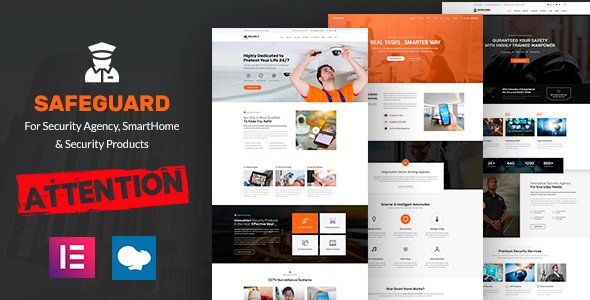
Stuck on your Safeguard WordPress theme? Let's fix it.
No endless back-and-forth. Just send us the details and we'll get it done.
No obligation · Replies within 1 hour · Quote within 1 day
Setup · Customization · Bug fixes · WooCommerce integration
About Safeguard WP Theme
Safeguard is a WordPress theme by Pixity Themes built for security companies, private investigators, guard agencies, and related services. It ships with a clean, professional layout that signals trust from the first scroll. The design leans heavily on dark tones, bold typography, and structured service sections that help visitors understand what you offer without digging.
Out of the box, Safeguard includes a customizable hero section, service blocks, a testimonials area, team member profiles, and a contact form setup. It works with Elementor, so page building is drag-and-drop. WooCommerce compatibility is included if you sell products or memberships. The theme is translation-ready, which matters if you serve clients across different regions. Overall, it is a solid starting point for any security-related business that needs a credible online presence without custom development from scratch.
Get matched with a Safeguard developer in under one day
Tell us about your Safeguard project. Small fixes, Safeguard theme customization, or a full website build, whatever you need, we've got it covered.
We'll connect you to the right Safeguard developers, define the scope, and get everything 100% clear.
You'll get one estimate, hire your preferred developer, and start collaborating.
Most security and investigation businesses do not have time to troubleshoot theme conflicts or figure out why the mobile header looks broken. A vetted Safeguard developer through Codeable handles that directly. Whether you need a full site build on the Safeguard framework or targeted fixes to an existing setup, working with someone who knows the theme saves hours of trial and error. Estimates are free. You only hire if the fit is right.
Pros
- Pre-built layout designed specifically for security and guard service businesses, saving significant setup time
- Elementor compatibility means most content edits require no code knowledge
- Dark, authoritative design conveys trust without custom graphic work
- WooCommerce ready for selling security packages, memberships, or equipment
- Translation-ready structure supports multilingual security businesses out of the box
Cons
- Design options in the Customizer are limited compared to multipurpose themes
- Heavy reliance on Elementor means switching page builders later is disruptive
- Default demo content is generic and requires significant copy and image replacement
- No built-in booking or appointment system, requiring a third-party plugin
- Theme documentation from Pixity Themes is thin, making advanced customization harder to self-serve
Who is Safeguard for?
Security Guard Companies
Safeguard fits guard companies well. The service section layout handles shift coverage, licensing details, and inquiry forms cleanly. A developer can add a quote request flow specific to contract guard work, with fields for site size, hours needed, and security level. The dark design matches what clients in this sector expect from a professional provider.
Private Investigation Agencies
Private investigators need a site that projects discretion and professionalism. Safeguard’s layout supports service listings, case type descriptions, and a contact form set up for confidential inquiries. A developer can restrict indexed content and add privacy-first form handling so leads are captured without exposing sensitive intake data publicly.
CCTV and Alarm Installation Services
Installation businesses benefit from Safeguard’s service blocks and portfolio-style sections. Each service, CCTV, alarms, access control, can get its own page linked from the homepage grid. Adding a product catalog via WooCommerce lets clients browse equipment packages. A developer can build a custom quote builder that calculates costs based on property size or camera count.
Cybersecurity Consultants
Cybersecurity consultants need a site that reads as technical and credible. Safeguard’s structured layout handles service tiers, client case studies, and compliance focus areas. A developer can integrate a blog section for thought leadership content, which feeds directly into SEO for terms like penetration testing or vulnerability assessment services.
Personal Protection and Bodyguard Services
Personal protection agencies work on referral and reputation. Safeguard supports team profile sections where operatives can be listed with credentials and experience. A developer can add a confidential inquiry form with encrypted submission handling. The theme’s visual weight signals serious capability, which matters when clients are assessing trustworthiness before making contact.

Customizing Safeguard
Safeguard gives you a reasonable set of controls through the WordPress Customizer, covering colors, fonts, header layout, and footer content. You can adjust the hero text, upload your logo, and toggle sections on or off. That handles the basics, but most businesses hit a wall quickly when they need something more specific.
If you want a custom intake form for security consultation requests, a filtered portfolio of past projects, or a client portal integration, you will need a Safeguard expert who knows the theme structure well. Child theme development protects your changes from updates. Custom post types can be added for services or case studies. A developer can also strip out unused features to improve load time and match your brand more precisely than the default options allow.
Recommended plugins for Safeguard
Safeguard pairs well with several plugins depending on what your site needs. Elementor Pro unlocks popup builders and form widgets that work inside the theme layout. For lead capture, WPForms or Gravity Forms slot in without conflicts. If you offer guard training or certification courses, LifterLMS or LearnDash can extend Safeguard into a learning platform.
Booking plugins like Amelia or Simply Schedule Appointments work for consultation scheduling. For speed, combining a caching plugin with proper image optimization makes a measurable difference. You can read more about that on the WordPress performance page. If organic search matters to your business, pairing Safeguard with a solid SEO setup covered in WordPress SEO optimisation is worth the investment.
Not sure which plugins to use? This WordPress plugins directory covers the most popular options with reviews and setup guides.
Safeguard common issues
Safeguard theme header menu not showing on mobile
Mobile menu issues in Safeguard usually come from a JavaScript conflict with another plugin or a custom script added to the header. Start by deactivating plugins one by one and testing after each. If the menu returns, the last deactivated plugin is the conflict source. Also check that the menu is assigned to the correct location under Appearance > Menus. If the issue persists after conflict testing, a developer can inspect the theme’s nav walker and fix it directly. See WordPress bug fixing for help.
Elementor sections overlapping in Safeguard theme
Overlapping sections in Elementor within Safeguard typically trace back to z-index conflicts or incorrect section padding settings. Open the affected section in Elementor, check the Advanced tab for custom positioning set to absolute or fixed, and reset it to default. Also check if a custom CSS snippet is overriding layout rules. Clearing the Elementor cache after changes often resolves display inconsistencies. If the overlap only appears on a specific screen size, the column structure likely needs responsive overrides applied at the breakpoint level.
Safeguard WordPress theme contact form not sending emails
When the Safeguard contact form stops sending emails, the problem is almost always server-side mail delivery, not the form itself. WordPress uses PHP mail by default, which many hosts block. Install an SMTP plugin like WP Mail SMTP and connect it to a transactional mail service such as Mailgun, SendGrid, or your Google Workspace account. Test the connection using the plugin’s built-in tool. Also check spam folders on the receiving end. If leads are still missing, a developer can audit the full mail path and add logging to catch failures. Check WordPress maintenance for ongoing monitoring options.
Safeguard theme slow to load on mobile
Safeguard can run slow on mobile if the theme loads large images, unused Elementor assets, or unoptimized scripts. Start by running a PageSpeed Insights test to identify the specific bottlenecks. Compress images using a plugin like ShortPixel or Imagify. Enable lazy loading if it is not already active. Reduce render-blocking scripts by configuring a caching plugin such as WP Rocket. If Elementor is loading its full CSS library on every page, a developer can configure per-page asset loading to cut the payload significantly. More detail is available on the WordPress performance page.
Safeguard FAQ
Yes, Safeguard is well-suited to small and mid-size security businesses. The pre-built layout covers services, testimonials, team, and contact sections without needing to build from scratch. Costs stay low if you only need light customization. For a more tailored result, a Safeguard developer can adapt the theme to your specific service area and branding without a full custom build.
Yes, Safeguard is compatible with Elementor. The theme is built to work with the Elementor page builder, so you can edit sections visually without touching code. Elementor Pro extends that with additional widgets and popups. Be aware that building heavily in Elementor creates a dependency on it, so switching builders later would require rebuilding page content from scratch.
Basic customization in Safeguard is accessible without coding. The WordPress Customizer handles colors, fonts, and logo changes. Elementor manages layout edits. Where coding becomes necessary is for structural changes, custom functionality, or fixing conflicts that the visual editor cannot address. For anything beyond standard setup, working with a vetted Safeguard developer is faster and more reliable.
Download the Safeguard theme zip file from ThemeForest after purchase. In your WordPress dashboard, go to Appearance > Themes > Add New > Upload Theme. Select the zip file and click Install Now. Activate the theme once installed. From there, import the demo content if Pixity Themes provides an importer, then replace placeholder text and images with your own content. A developer can handle this setup cleanly if you want it done right the first time.
Yes, the Safeguard theme itself moves with your WordPress installation when you migrate to a new host. The theme files, settings, and Elementor data all transfer as part of the standard migration process. What requires attention is the database, file permissions on the new server, and permalink settings after the move. For a clean transfer with no downtime, see the WordPress migration service for professional help.
Hire a Safeguard WordPress Developer
Need a Safeguard developer who can build, customize, or fix your site without the back-and-forth? FoxyConcept works through Codeable, which means you get a vetted WordPress professional, not a generalist marketplace hire. Describe your project and get a free estimate with no obligation. Get your free estimate here and have a developer matched to your project within 24 hours.
You'll need a free Codeable account so developers can ask questions and send their quotes.