Sarraty WordPress Theme
by A-Works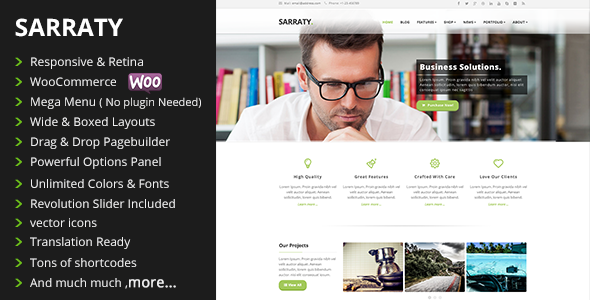
Stuck on your Sarraty WordPress theme? Let's fix it.
No endless back-and-forth. Just send us the details and we'll get it done.
No obligation · Replies within 1 hour · Quote within 1 day
Setup · Customization · Bug fixes · WooCommerce integration
About Sarraty WP Theme
Sarraty is a multipurpose WordPress theme built by A-Works. It is designed for creative agencies, portfolios, and business websites that need a clean, modern layout without heavy page builder dependencies. The theme ships with pre-built demo templates, giving new sites a solid starting point without hours of manual setup.
Built on a well-structured codebase, Sarraty supports Elementor and works with most standard WordPress plugins. It focuses on visual presentation, offering flexible header options, smooth scroll effects, and customisable section layouts. For studios, freelancers, or small businesses that want a polished site without custom development, Sarraty covers the essentials. That said, more advanced projects will likely need a developer to extend or adapt it beyond the default settings.
Get matched with a Sarraty developer in under one day
Tell us about your Sarraty project. Small fixes, Sarraty theme customization, or a full website build, whatever you need, we've got it covered.
We'll connect you to the right Sarraty developers, define the scope, and get everything 100% clear.
You'll get one estimate, hire your preferred developer, and start collaborating.
Most theme issues come down to customisation that goes past what the settings panel allows. A developer who knows Sarraty’s template structure can make changes cleanly, without breaking updates or creating technical debt. Through Codeable, you get access to vetted WordPress developers who have worked across dozens of themes including Sarraty. You post your project, get an estimate within 24 hours, and only proceed if it makes sense. No risk, no pressure. Explore our WordPress development services to see what is possible.
Pros
- Clean, minimal design suited to creative and business sites without heavy visual clutter
- Ships with pre-built demo content that speeds up initial site setup significantly
- Elementor compatibility means layout editing is visual and accessible for non-developers
- Lightweight compared to many multipurpose themes, which helps with page load times
- Flexible header and footer options cover most standard site structures without custom code
Cons
- Documentation is limited, making it harder to troubleshoot without developer experience
- Deep customisation quickly requires editing template or child theme files directly
- WooCommerce styling is basic and needs work for anything beyond a simple product catalogue
- Support response times from A-Works can be slow compared to larger theme vendors
- Demo import does not always replicate exactly what is shown in the preview across different setups
Who is Sarraty for?
Creative Agency Portfolio
Sarraty’s grid-based portfolio layouts and smooth scroll effects make it a natural fit for creative agencies. Project showcases look clean without needing custom design work. Agencies can present case studies, team pages, and service sections using the built-in demo structures, then customise from there.
Freelance Designer or Photographer
Photographers and freelance designers benefit from Sarraty’s focus on full-width imagery and minimal interface chrome. The theme keeps attention on the work itself. Portfolio filtering and gallery sections work well for visual professionals who want a clean online presence without managing a complex build.
Small Business Brochure Site
For local businesses or service providers, Sarraty covers the core pages a brochure site needs: home, services, about, and contact. The layouts are professional without being generic. It is a practical starting point that can be launched quickly and refined over time without a large initial investment.
Digital Marketing Studio
Digital marketing studios can use Sarraty’s flexible section layouts to present case studies, client results, and service offerings clearly. The theme handles content-heavy pages well and gives enough layout control through Elementor to match most studio brand guidelines with standard customisation.
Startup Landing Page
Startups launching a single product or service will find Sarraty’s clean landing page templates useful. Feature sections, testimonials, and CTA blocks are all part of the demo library. A focused landing page can be configured quickly, which matters when speed to launch is a priority.

Customizing Sarraty
Sarraty gives you a reasonable amount of control through the WordPress Customizer and Elementor. You can adjust colours, typography, header styles, and section layouts without touching code. The pre-built demos help you get a feel for what the theme can do out of the box.
Where it gets more involved is custom post types, WooCommerce styling, third-party plugin integration, or changes that go beyond the theme options panel. A Sarraty expert can handle those tasks cleanly, whether that means modifying template files, adding custom CSS, or building new page sections that match your brand. If the standard options are not giving you the result you need, working with a specialist is faster than trying to force it yourself.
Recommended plugins for Sarraty
Sarraty works well with the plugins most WordPress sites already rely on. WooCommerce support makes it usable for small shops. Contact Form 7 and WPForms integrate without layout issues. For performance, pairing Sarraty with a caching plugin and optimised image delivery makes a real difference. Learn more on our WordPress performance page.
If SEO is a priority, combining Sarraty with Yoast or Rank Math is straightforward. Check our WordPress SEO service for more. WPML support means multilingual sites are possible too.
Not sure which plugins to use? This WordPress plugins directory covers the most popular options with reviews and setup guides.
Sarraty common issues
Sarraty demo import not working
Demo import failures in Sarraty are usually caused by server-side limits on upload size or execution time. Check your PHP settings: max_execution_time should be at least 300 seconds and upload_max_filesize at least 64MB. If the import still fails, try importing XML content manually via WordPress Tools rather than the theme’s one-click importer. If errors persist, a developer can diagnose the server environment quickly. Visit our WordPress bug fixing service for help.
Sarraty header not displaying correctly on mobile
Mobile header issues in Sarraty are often caused by conflicting CSS from a plugin or child theme, or incorrect breakpoint settings in the Customizer. Start by checking the mobile menu settings under Appearance > Customize. Clear your cache after any changes. If the problem only appears on specific devices, it may be a viewport meta tag issue. A developer can isolate the conflict and apply a targeted fix without affecting desktop layouts.
Sarraty Elementor sections not loading
When Sarraty sections built with Elementor fail to load, the most common causes are a plugin conflict or an outdated version of Elementor itself. Deactivate plugins one at a time to identify the conflict. Make sure both Elementor and Sarraty are running their latest versions. If you see a blank section or a spinner that does not resolve, the issue is often a failed AJAX request, which can be diagnosed in the browser console.
Sarraty custom fonts not applying site-wide
Custom fonts in Sarraty that fail to apply globally are usually a Customizer caching issue or a conflict with an SEO or performance plugin that is minifying CSS. First, clear all caches including any server-level cache. If using a performance plugin, exclude the font CSS from minification. If fonts are loaded via Google Fonts, check for a content security policy blocking external requests. Persistent issues may require a direct edit to the theme’s typography output.
Sarraty FAQ
Yes, Sarraty is built with Elementor compatibility in mind. You can use Elementor Free or Pro to edit page layouts visually. Most of the demo templates are Elementor-based. For more advanced Elementor customisation within Sarraty, a developer can extend what the visual editor alone cannot do.
Sarraty includes basic WooCommerce support. Standard shop, product, and cart pages will work. However, the WooCommerce styling is minimal and is likely to need adjustments if you are building a serious store. A developer can style templates to match your brand and improve the checkout experience beyond what the defaults offer.
Create a new folder in wp-content/themes/ named sarraty-child. Add a style.css file with the correct theme header referencing Sarraty as the parent, then add a functions.php to enqueue the parent stylesheet. Activate the child theme via Appearance > Themes. All customisations should go in the child theme to survive updates.
Migrating an existing site to the Sarraty theme involves exporting your content, setting up Sarraty on a staging environment, and rebuilding your page layouts using Sarraty’s templates. Content itself transfers easily. Layout and styling will need rebuilding. Our WordPress migration service can handle the process without data loss or downtime.
Sarraty is generally compatible with WPML for building multilingual sites. You will need the WPML plugin installed and configured separately. Some theme strings may need registering manually via WPML’s String Translation module. Testing each translated page template is recommended before going live to catch any layout inconsistencies.
Hire a Sarraty Expert Developer
Need help customising Sarraty, fixing a layout issue, or building something the theme does not support out of the box? Our developers know WordPress themes inside out. Work is scoped clearly, delivered on time, and backed by Codeable’s vetted developer network. Get a free estimate with no obligation to hire. You will hear back within 24 hours.
You'll need a free Codeable account so developers can ask questions and send their quotes.