Satelite WordPress Theme
by ClaPat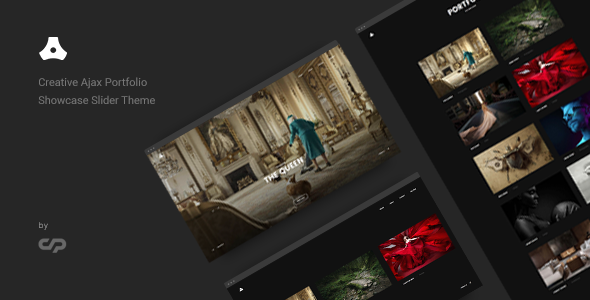
Stuck on your Satelite WordPress theme? Let's fix it.
No endless back-and-forth. Just send us the details and we'll get it done.
No obligation · Replies within 1 hour · Quote within 1 day
Setup · Customization · Bug fixes · WooCommerce integration
About Satelite WP Theme
Satelite is a WordPress theme built by ClaPat, designed with a clean grid-based layout and a strong visual focus. It suits sites that lead with imagery, whether that’s portfolios, photography, or editorial projects. The theme is lightweight by default, loading fast without unnecessary scripts weighing it down.
ClaPat built Satelite with flexibility in mind. The homepage supports full-width featured sections, customisable widget areas, and a structured post grid. Typography is well-spaced and readable out of the box. Navigation is minimal, keeping the focus on content rather than chrome.
It works well with the WordPress block editor, though some layout options still rely on theme-specific settings rather than block controls. Overall, Satelite is a solid starting point for content-forward sites that want a professional look without heavy page builder dependency.
Get matched with a Satelite developer in under one day
Tell us about your Satelite project. Small fixes, Satelite theme customization, or a full website build, whatever you need, we've got it covered.
We'll connect you to the right Satelite developers, define the scope, and get everything 100% clear.
You'll get one estimate, hire your preferred developer, and start collaborating.
Satelite is straightforward for standard use, but custom work takes real knowledge of how ClaPat structured the templates and hooks. A developer who has worked with the theme before won’t spend time figuring out the basics. Through Codeable, you get matched with vetted WordPress developers who know themes like Satelite inside out. You post your project, get an estimate within 24 hours, and only move forward if it makes sense. No risk, no obligation.
Pros
- Lightweight codebase with fast default load times
- Clean grid-based layout that works well for visual content
- Good typography defaults with readable spacing
- Compatible with the WordPress block editor without major conflicts
- Minimal design keeps focus on content rather than decorative elements
Cons
- Limited built-in layout options compared to multipurpose themes
- WooCommerce shop pages require custom CSS to match the theme style
- Some layout controls sit in theme settings rather than block editor options
- Documentation from ClaPat is sparse, making advanced customisation harder without developer knowledge
- Not ideal for complex multi-section landing pages without additional development work
Who is Satelite for?
Photography Portfolio
Satelite’s full-width image support and grid layout make it a strong fit for photographers. Featured images display prominently, and the clean design keeps attention on the work rather than the interface. Adding a gallery plugin like Envira gives you more control over how collections are presented without clashing with the theme’s structure.
Editorial Blog
The theme’s readable typography and post grid layout suit long-form writing sites well. Category archives display cleanly, and the minimal header keeps navigation unobtrusive. Satelite handles text-heavy content without feeling cluttered, making it a practical choice for writers who want a clean reading experience without building from scratch.
Creative Agency
Small creative agencies can use Satelite as a base for a portfolio and services site. The homepage sections support featured project showcases, and a child theme lets a developer add service pages and contact flows that match the brand. It won’t replace a fully custom build, but it’s a cost-effective starting point.
Online Magazine
Satelite’s grid archive layout handles multi-category content well. Each post thumbnail displays at consistent size, making the front page feel organised even with mixed content. Adding a custom widget area to the sidebar gives editors space for featured posts, newsletter signups, or ad placements without disrupting the main layout.
Personal Brand Site
For consultants, freelancers, or creators building a personal brand, Satelite offers a professional-looking site without excess complexity. The theme handles a bio, blog, and contact page setup cleanly. With minor CSS customisation, you can match the design to your personal palette and make the site distinctly yours.

Customizing Satelite
Satelite gives you a reasonable set of options through the WordPress Customizer. You can adjust colours, fonts, header layout, and widget placement without touching code. That covers most surface-level changes, but anything beyond that requires direct PHP or CSS edits.
If you need a custom homepage layout, modified archive templates, WooCommerce integration, or a child theme built for long-term maintainability, you’ll want a Satelite expert. A developer who knows the theme’s structure can make targeted changes without breaking updates or creating technical debt.
Working with a Satelite specialist also means you get proper child theme setup, clean CSS overrides, and template customisation that holds up. DIY edits to parent theme files get overwritten on every update, so having a developer handle this properly saves time and frustration later.
Recommended plugins for Satelite
Satelite pairs well with several plugins depending on your project needs. For galleries and portfolio grids, Envira Gallery or FooGallery slot in cleanly. Contact Form 7 and WPForms both integrate without styling conflicts.
WooCommerce can be added, though you may need custom CSS to bring the shop pages in line with the theme’s design. For SEO, a dedicated plugin like Yoast or Rank Math works well alongside the theme. If site speed is a priority, consider a WordPress performance audit to pair with any caching or image optimisation plugins you add.
Not sure which plugins to use? This WordPress plugins directory covers the most popular options with reviews and setup guides.
Satelite common issues
Satelite theme header not displaying correctly after update
Header display issues after a theme update usually point to cached styles conflicting with new code. Start by clearing your browser cache and any server-side or plugin cache. If the problem persists, check whether you edited the parent theme files directly. Those changes get overwritten on update. The fix is to move your customisations into a child theme. If you need help sorting this out properly, our WordPress bug fixing service can diagnose and resolve it quickly.
Satelite WordPress theme custom CSS not applying
If custom CSS added through the Customizer or a plugin isn’t applying, the most common cause is specificity. Satelite’s default styles may have higher specificity than your rules. Use browser dev tools to inspect the element and check which CSS is winning. Adding a more specific selector or using the parent class from the theme’s markup usually fixes it. Avoid using !important throughout, as it creates maintenance problems down the line.
Satelite theme WooCommerce product pages look unstyled
Satelite doesn’t include built-in WooCommerce templates, so product pages, cart, and checkout will inherit base WooCommerce styles without theme-specific adjustments. You’ll need to add CSS that targets WooCommerce classes and matches Satelite’s colour and typography settings. For a clean integration, a developer can copy the relevant WooCommerce template files into a child theme and style them properly so they update safely going forward.
Satelite theme mobile menu not working
A mobile menu that won’t open or toggle is usually caused by a JavaScript conflict with another plugin. Open your browser console and look for JS errors on the page. Common culprits include optimisation plugins that concatenate or defer scripts incorrectly. Try disabling plugins one by one to isolate the conflict. If the issue appeared after adding a caching or minification plugin, exclude the theme’s main JS file from processing and retest.
Satelite FAQ
Yes, Satelite is available as a free theme from ClaPat through the WordPress theme repository. There is no premium version listed at the time of writing. Being free means there is no dedicated support channel, so for customisation or troubleshooting help you’ll need to rely on community forums or hire a developer who knows the theme.
WooCommerce can be installed and will function with Satelite, but the theme doesn’t include custom WooCommerce templates. That means shop pages, product listings, and the checkout will use default WooCommerce styling, which may not match the rest of your site. Custom CSS or a developer-built child theme is the right way to handle a consistent look across your store.
Satelite will technically allow Elementor to be installed, but the theme’s own layout system and Elementor’s full-width sections can conflict, particularly on the homepage. Page builders work best with themes designed specifically to support them. If you want to use Elementor heavily, consider whether Satelite is the right base or whether a developer should build out the templates manually instead.
Creating a child theme for Satelite involves making a new theme folder with a style.css that references Satelite as the parent theme, plus a functions.php that enqueues the parent stylesheet. Any custom CSS or template overrides then go in the child theme. This protects your changes from being wiped on updates. A developer can set this up properly in under an hour.
Satelite works with the WordPress block editor for standard content editing. You can use blocks for post and page content without issues. However, the theme’s homepage and archive layouts are controlled through its own settings rather than full-site editing templates, so you won’t have block-level control over the overall page structure unless a developer adds that functionality.
Hire a Satelite Developer
Whether you need a child theme, a custom layout, WooCommerce integration, or help fixing a specific issue, a Satelite developer can get it done cleanly. FoxyConcept works through Codeable, connecting you with vetted WordPress professionals. Get a free estimate and have a developer review your project within 24 hours. No pressure, no commitment until you’re ready to proceed.
You'll need a free Codeable account so developers can ask questions and send their quotes.