Savory WordPress Theme
by Elated-Themes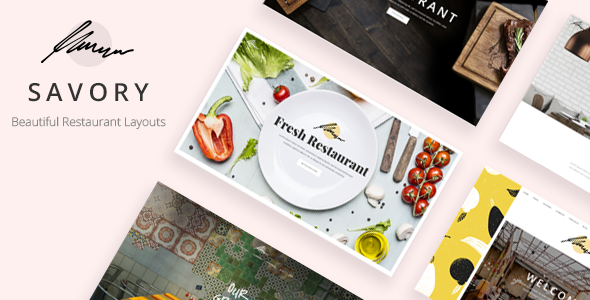
Stuck on your Savory WordPress theme? Let's fix it.
No endless back-and-forth. Just send us the details and we'll get it done.
No obligation · Replies within 1 hour · Quote within 1 day
Setup · Customization · Bug fixes · WooCommerce integration
About Savory WP Theme
Savory is a food and recipe WordPress theme by Elated-Themes, built for food bloggers, culinary magazines, and restaurant sites. It ships with a recipe index, category filtering, and a clean editorial layout that puts photography front and centre. The theme is built on Elated’s own framework, which means a full-featured admin panel, multiple header styles, and a bundled Visual Composer page builder. It supports WooCommerce for selling cookbooks or meal plans, and integrates with popular recipe plugins. Out of the box, Savory covers most needs for a food-focused site without heavy customisation. That said, the bundled framework adds a learning curve, and making Savory behave exactly as you want often requires a developer who knows Elated’s codebase well.
Get matched with a Savory developer in under one day
Tell us about your Savory project. Small fixes, Savory theme customization, or a full website build, whatever you need, we've got it covered.
We'll connect you to the right Savory developers, define the scope, and get everything 100% clear.
You'll get one estimate, hire your preferred developer, and start collaborating.
Elated-Themes builds feature-heavy frameworks, and Savory is no exception. When something breaks or a customisation doesn’t behave as expected, generic WordPress advice rarely helps. You need someone who has worked inside Elated’s panel before. Through Codeable, you get matched with vetted WordPress developers who know Savory’s architecture, can write clean child theme code, and won’t introduce new problems while fixing existing ones. Every project starts with a free estimate and carries no obligation to hire.
Pros
- Built specifically for food and recipe sites with dedicated recipe index and category filtering
- Extensive Elated theme options panel gives granular control over layout, typography, and colour without code
- WooCommerce-ready for selling cookbooks, meal plans, or digital recipe downloads
- Multiple header styles and demo layouts mean faster initial setup for different food blog formats
- Regular updates from Elated-Themes maintain compatibility with current WordPress and WooCommerce versions
Cons
- Elated's proprietary framework creates vendor lock-in and makes switching themes more complex
- Bundled Visual Composer adds page weight and can conflict with more modern block-based workflows
- Theme options panel has a steep learning curve for users unfamiliar with Elated's framework
- Global script loading across the framework can hurt page speed scores without targeted optimisation
- Support is limited to Elated's own forums, which can be slow for urgent or complex issues
Who is Savory for?
Food Bloggers
Savory’s recipe index, category pages, and photography-first layouts make it a natural fit for individual food bloggers. A Savory developer can configure custom recipe post types, set up category filtering, and connect a structured data plugin so recipes appear in Google’s rich results. The result is a site that works as hard on search visibility as it does on presentation.
Recipe Magazines
Multi-author food magazines need more than a single-column blog. Savory’s editorial grid layouts and multiple post format support handle that well. A Savory specialist can set up author profiles, category-specific landing pages, and advertising placements without disrupting the theme’s structure. Combined with a caching setup, the site stays fast under higher traffic loads.
Cooking Class Instructors
Cooking instructors selling online classes or in-person courses can use Savory’s WooCommerce integration to handle bookings and digital downloads. A Savory developer can build a course or event listing section, wire up payment gateways, and create a clean checkout flow that matches the rest of the site’s design without relying on conflicting page builder blocks.
Restaurant Groups
Restaurant groups with multiple locations need consistent branding across separate menus, location pages, and reservation flows. Savory’s layout flexibility supports this, and a Savory expert can build custom menu post types, integrate OpenTable or similar booking tools, and handle the multi-location structure in a way that keeps the admin manageable for non-technical staff.
Food Product Shops
Specialty food brands selling products like spice blends, sauces, or baked goods benefit from Savory’s editorial style paired with WooCommerce. A Savory developer can set up product pages that feel editorial rather than purely transactional, integrate subscription or bundle plugins, and build a homepage that balances content and commerce without the design looking cluttered.

Customizing Savory
Customising Savory goes beyond the standard WordPress Customizer. Most settings live inside Elated’s theme options panel, which controls typography, colour schemes, header behaviour, and sidebar layouts. Getting the recipe index to match a specific design, or adjusting how categories display on archive pages, usually requires digging into the framework’s logic. A Savory expert can set up custom post type templates, modify the bundled shortcodes, and integrate third-party plugins without breaking the theme’s structure. If you need child theme development, custom recipe layouts, or want to extend the WooCommerce functionality that Savory supports, working with a Savory developer saves significant time and avoids conflicts introduced by trial-and-error edits inside the theme options.
Recommended plugins for Savory
Savory works well alongside plugins that fill gaps the theme leaves open. For recipe SEO, structured data plugins like WP Recipe Maker or Tasty Recipes add schema markup that improves search visibility. Pair that with proper technical SEO work covered in WordPress SEO optimisation to get the most out of recipe rich results. On the performance side, Savory’s framework loads several scripts globally, so image optimisation, caching, and script deferral matter more than on lighter themes. A full audit is covered in WordPress performance services. WooCommerce, WPML for multilingual recipe sites, and a dedicated email opt-in plugin round out a typical Savory build.
Not sure which plugins to use? This WordPress plugins directory covers the most popular options with reviews and setup guides.
Savory common issues
Savory theme recipe index not showing all posts
This usually points to a query limit set inside Elated’s theme options, a pagination conflict with the recipe index template, or a category assignment issue on the posts themselves. Check the theme’s blog or archive settings panel first, then inspect whether the posts are assigned to the correct custom taxonomy. If the problem appeared after a theme or plugin update, a WordPress bug fixing service can isolate the conflict and restore the full index without data loss.
Savory theme slow loading speed after update
Savory’s Elated framework loads scripts and styles globally, so a performance drop after an update often means a new asset was added without conditional loading. Run a waterfall test to identify which files are blocking render. Deferring non-critical JavaScript, enabling server-side caching, and optimising images loaded by the theme’s sliders usually recovers most of the lost speed. If the issue is deeper in the framework, a WordPress bug fixing specialist can audit the specific update changes.
Savory Visual Composer not working or missing content
Visual Composer bundled with Elated themes is a licensed version tied to the theme. If the theme license lapses or the plugin version falls out of sync after a WordPress core update, the builder can stop rendering content correctly. First, confirm the theme is on the latest version from Elated’s repository. Then deactivate and reactivate the bundled VC plugin. If content shows as raw shortcode, the plugin is not active. Avoid installing a separate standalone VC licence, as that causes conflicts with the theme’s bundled copy.
Savory theme header layout broken on mobile
Broken mobile headers in Savory usually trace back to a custom CSS override that didn’t include responsive breakpoints, or a header style selected in the theme panel that conflicts with a sticky header script. Open the browser’s dev tools at the mobile breakpoint and check which CSS rule is overriding the nav container width or burger menu trigger. If the issue appeared after adding custom code, remove it and test. Elated’s panel has separate mobile header settings that are easy to overlook during initial setup.
Savory FAQ
Savory is still a practical choice for food blogs if you want a design-focused, recipe-ready theme without building from scratch. It covers the core needs: recipe index, category filtering, and photography layouts. The main limitation is its reliance on Elated’s framework, which adds complexity. For simpler sites, lighter themes may be easier to manage long-term. A Savory specialist can help you decide if it fits your specific setup.
Yes. Savory is WooCommerce compatible and supports product pages, cart, and checkout. Elated-Themes has tested it against current WooCommerce versions. That said, the default WooCommerce templates may not fully match Savory’s editorial design out of the box. A Savory developer can style the shop pages to fit the rest of the site and configure products like cookbooks or meal plans correctly.
Savory was built around Visual Composer and Elated’s shortcode system. It works in the block editor for basic content but the theme’s own page templates and custom sections rely on the bundled VC. Full Gutenberg compatibility is limited. If you prefer a block-first workflow, a Savory developer can set up a hybrid approach, but expect some constraints compared to themes built natively for the block editor.
Plugins like WP Recipe Maker, Tasty Recipes, or Cooked install as standard WordPress plugins and work alongside Savory’s templates. The recipe plugin handles structured data and print layouts; Savory handles the visual design around it. A Savory expert can style the recipe card output to match your theme’s typography and colour scheme so it feels like a native part of the design rather than a plugin insert.
Your posts, categories, and media carry over cleanly in a WordPress migration. What changes is the design layer. If your current theme uses different custom fields or a different recipe plugin, you’ll need to remap that content to Savory’s structure. For a smooth transition without content loss, consider a WordPress migration service handled by a developer who knows both environments.
Hire a Savory Developer for Your Food or Recipe Site
Whether you need a full Savory setup, a design overhaul, or a specific fix that’s been sitting on your list, a specialist gets it done faster and cleaner than general WordPress support. From custom recipe layouts to WooCommerce integration, a Savory expert handles the work without the back-and-forth. Get a Free Estimate and describe your project. No commitment required.
You'll need a free Codeable account so developers can ask questions and send their quotes.