Savoy WordPress Theme
by NordicMade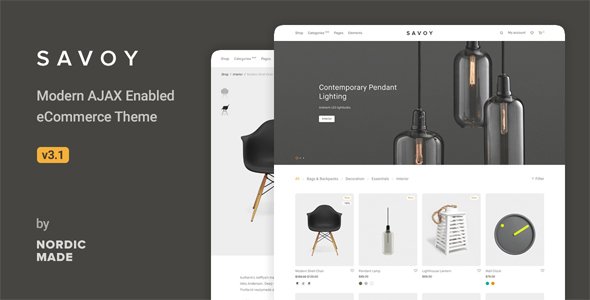
Stuck on your Savoy WordPress theme? Let's fix it.
No endless back-and-forth. Just send us the details and we'll get it done.
No obligation · Replies within 1 hour · Quote within 1 day
Setup · Customization · Bug fixes · WooCommerce integration
About Savoy WP Theme
Savoy is a minimalist WooCommerce theme built by NordicMade. It targets fashion, lifestyle, and luxury product stores that need clean layouts without visual clutter. The theme ships with an AJAX-powered shop, a full-screen image display, and a distraction-free checkout flow designed to keep buyers moving toward purchase.
NordicMade built Savoy around a single principle: the product is the focus. Typography is tight, whitespace is generous, and the color palette stays neutral by default. It supports variable products, lookbooks, and a slide-out cart without needing additional plugins for those features.
Performance is reasonable out of the box for a WooCommerce theme, though like any feature-rich theme it benefits from proper caching and image optimization. Savoy works with the WordPress Customizer and includes its own settings panel for shop-specific options.
Get matched with a Savoy developer in under one day
Tell us about your Savoy project. Small fixes, Savoy theme customization, or a full website build, whatever you need, we've got it covered.
We'll connect you to the right Savoy developers, define the scope, and get everything 100% clear.
You'll get one estimate, hire your preferred developer, and start collaborating.
Savoy looks simple. The codebase is not. NordicMade uses custom template hooks and a JavaScript-heavy shop experience that behaves differently from standard WooCommerce themes. Debugging AJAX cart issues, fixing broken lookbook layouts, or integrating a third-party plugin requires someone who understands both WooCommerce internals and how Savoy layers on top of them.
On Codeable, vetted Savoy developers review your project, provide a free estimate, and only start work when you approve. No bidding, no guesswork on quality.
Pros
- AJAX-powered shop and cart work out of the box without extra plugins
- Clean minimalist design that puts product photography first
- Lookbook feature built into the theme, no page builder required
- Full-screen product image display with smooth gallery navigation
- Regularly updated by NordicMade with WooCommerce compatibility patches
Cons
- Limited layout flexibility compared to page-builder-based WooCommerce themes
- AJAX features can conflict with certain caching plugins if not configured correctly
- Customizer options are minimal; deeper changes require PHP or child theme work
- Not suited for stores with complex category structures or heavy filtering needs
- Support is theme-only; plugin conflicts are left to the store owner to resolve
Who is Savoy for?
Fashion Boutiques
Savoy suits fashion boutiques well. The full-screen product images and clean category pages let clothing photography speak without interference. The lookbook feature gives brands a way to show outfits in context without building custom pages. A Savoy developer can extend this with custom collection landing pages that match the brand’s seasonal direction.
Luxury Skincare and Beauty
Skincare and beauty brands need packaging to look sharp. Savoy’s whitespace-heavy product pages do that without much setup. The distraction-free checkout flow also tends to reduce drop-off for impulse purchases. A Savoy specialist can add ingredient lists, custom tabs, and trust badge placements without breaking the theme’s visual balance.
Interior Design and Home Goods
Home goods stores benefit from Savoy’s neutral palette and editorial-style lookbooks. Furniture and decor photography sits well in the full-screen gallery format. The theme handles variable products like size and material options cleanly. A Savoy expert can configure room-scene lookbooks that link directly to shoppable product pages.
Independent Jewelry Stores
Jewelry stores need high-quality close-up image displays and simple navigation. Savoy delivers both. The AJAX cart keeps buyers on the product page rather than bouncing them to a separate cart view. A Savoy developer can add custom engraving or personalization fields and wire them into the order data without disrupting the checkout flow.
Photography Print Shops
Print shops selling photography or art prints need the product to fill the screen. Savoy’s gallery layout handles that well. Edition sizes, paper types, and framing options map cleanly onto WooCommerce variable products within the theme. A Savoy specialist can add certificate of authenticity fields and download delivery for digital editions.

Customizing Savoy
Savoy gives you a solid starting point, but most store owners need changes that go beyond the built-in Customizer options. A Savoy expert can modify the lookbook layout, rework the product card hover states, adjust the AJAX filter behavior, or rebuild the homepage sections to match a specific brand direction.
Common customization requests include custom product badge styling, changes to the slide-out cart markup, integration with size guide plugins, and tweaks to the mobile navigation. These are straightforward for a developer who knows the theme’s template structure but time-consuming to figure out alone.
If you need Savoy to behave differently from its defaults, working with a Savoy specialist means you get clean, maintainable code rather than a pile of CSS hacks in a child theme.
Recommended plugins for Savoy
Savoy works with most major WooCommerce extensions, but adding plugins always carries integration risk. Payment gateways, subscription plugins, and review tools generally load without issues. The heavier the extension, the more likely you are to see conflicts with Savoy’s AJAX cart or product filtering.
Before installing a bundle of plugins, it is worth auditing what each one adds to page load. A poorly configured stack can slow your store significantly. Review your WordPress performance setup to make sure Savoy is running at its best before adding more functionality. For stores that rely on organic traffic, pairing Savoy with a solid WordPress SEO strategy will do more for revenue than most visual changes.
Not sure which plugins to use? This WordPress plugins directory covers the most popular options with reviews and setup guides.
Savoy common issues
Savoy AJAX cart not working after plugin update
AJAX cart failures in Savoy usually come from a JavaScript conflict introduced by a recently updated plugin. Open your browser console and look for JS errors on the shop page. Deactivate plugins one at a time to isolate the conflict. Caching plugins are a common culprit. Clear all caches after each deactivation. If the cart was working before and now isn’t, check whether WooCommerce or a payment plugin updated at the same time.
Savoy lookbook images not displaying correctly on mobile
Lookbook image display problems on mobile are often caused by incorrect image dimensions or a CSS conflict with a mobile optimization plugin. Check that your uploaded lookbook images meet the recommended dimensions in the Savoy documentation. Also inspect the lookbook container in mobile dev tools to see if any plugin is injecting CSS that overrides the theme’s responsive rules. Regenerating thumbnails with a plugin like Regenerate Thumbnails can also resolve this.
Savoy product page showing wrong image on variant switch
When a Savoy product page shows the wrong image after switching a variant, the issue is usually a mismatch between the variation image assignment in WooCommerce and Savoy’s gallery script. Go to each product variation in the product editor and confirm an image is assigned to every variation. If images are assigned correctly, the problem may be a JS conflict. This type of issue is faster to trace with help from a WordPress bug fixing specialist who knows Savoy’s variation handling.
Savoy slide-out cart not opening on click
If the Savoy slide-out cart does not open when clicking the cart icon, a JavaScript error is almost certainly blocking the event listener. Open the browser console on the storefront and check for errors. Common causes include a minification plugin mangling Savoy’s scripts or a theme update that introduced a JS conflict. Disable script minification temporarily to test. Also check that no other plugin is registering a conflicting click handler on the cart icon selector.
Savoy theme breaking after WooCommerce update
Savoy breaking after a WooCommerce update is a known risk with any theme that uses custom WooCommerce templates. NordicMade maintains update compatibility, but there is often a lag. First check the Savoy changelog to see if a patch has been released. If you are running a child theme with overridden WooCommerce templates, those templates may need to be updated manually. Compare them against the new WooCommerce template files. For persistent issues, a WordPress bug fixing service can handle the template reconciliation quickly.
Savoy homepage sections not saving in Customizer
Savoy homepage sections not saving in the Customizer is usually a PHP error happening silently in the background. Enable WP_DEBUG in your wp-config.php and try saving again to see if an error is logged. Conflicts with caching plugins or security plugins that block AJAX requests can also cause this. Try saving with all non-essential plugins deactivated. If the issue started after a WordPress core update, check whether Savoy has released a compatibility patch.
Savoy product filter not updating results
If Savoy’s product filter is not updating results, the AJAX request is likely failing. Check the browser network tab for a failed request when you apply a filter. A 403 or 500 response points to either a security plugin blocking the request or a PHP error. Permalink settings can also affect AJAX filtering. Go to Settings, then Permalinks, and resave without changing anything. This flushes rewrite rules and often resolves filter failures without any code changes.
Savoy checkout page layout broken
A broken Savoy checkout page layout is often caused by a payment plugin injecting unstyled HTML into the checkout form. Inspect the broken area in dev tools to identify which plugin added the element. Most payment plugins have their own CSS that can conflict with Savoy’s checkout styles. A child theme stylesheet fix targeting the specific element is usually the cleanest solution. If the layout broke after a WooCommerce update, the checkout template in your child theme may need to be refreshed. Get help from a WordPress bug fixing service if the conflict is complex.
Savoy font not loading on frontend
If Savoy fonts are not loading on the frontend, the most common cause is a Content Security Policy set by a security or hosting plugin that blocks Google Fonts requests. Check the browser console for blocked resource errors. If CSP is the issue, add fonts.googleapis.com and fonts.gstatic.com to the allowed origins. Another cause is a performance plugin that dequeues font stylesheets. Check your plugin settings for any font optimization or preloading rules that might be stripping the Savoy font enqueue.
Savoy child theme styles not applying
If your Savoy child theme styles are not applying, confirm that the child theme’s stylesheet is correctly enqueuing the parent theme stylesheet using wp_enqueue_scripts in functions.php. Using @import in style.css is unreliable in WordPress. Also check that the child theme is active and that the Template header in style.css matches the parent theme folder name exactly, which is case-sensitive. If styles apply in some areas but not others, your selectors may be losing to higher-specificity rules from Savoy’s own stylesheet.
Savoy FAQ
NordicMade updates Savoy regularly to stay compatible with new WooCommerce releases. That said, there is sometimes a short gap between a major WooCommerce release and the corresponding Savoy patch. Always check the theme changelog before updating WooCommerce on a live store. Running a staging site for major updates is the safest approach.
Savoy is not designed around page builders. It has its own homepage and shop sections managed through the Customizer. Elementor can technically be used on individual pages, but it will not integrate with Savoy’s shop templates. For heavily customized layouts, working with a Savoy developer who modifies the theme templates directly produces cleaner results than forcing a page builder into the mix.
Savoy is built specifically for WooCommerce. While you can install it without WooCommerce active, most of the theme’s design and functionality assumes a shop context. Using it for a purely editorial or portfolio site would mean losing most of what makes Savoy useful, and you would likely be working against its structure rather than with it.
Create a new folder in wp-content/themes with a name like savoy-child. Inside it, add a style.css file with the correct Theme Name and Template headers, then add a functions.php file that enqueues both the parent and child stylesheets using wp_enqueue_scripts. Activate the child theme from the WordPress admin. Any template or style overrides go into the child theme folder.
Savoy does not include multi-currency support natively. Currency switching depends on a WooCommerce plugin like CURCY or the official WooCommerce Payments multi-currency feature. These plugins generally work with Savoy, but you may see minor display issues in the cart or checkout that require a small CSS or template fix to resolve cleanly.
Savoy does not have a built-in size guide feature. The most common approach is to use a size guide plugin that adds a popup or tab to the product page. Plugins like WooCommerce Size Guide work reasonably well with Savoy. For a fully branded implementation that matches Savoy’s visual style, a Savoy specialist can build a custom size guide directly into the product template.
Savoy produces clean HTML and loads reasonably fast for a WooCommerce theme, which is a good baseline for SEO. It does not include schema markup or meta tag management, so you will need an SEO plugin like Yoast or Rank Math. Page speed also matters for rankings, and Savoy benefits from proper image optimization and caching configuration.
Yes. A Savoy developer can handle anything from small CSS tweaks to full template rebuilds. The fastest way to find a vetted Savoy specialist is through Codeable, where you post your project, get a free estimate within 24 hours, and only proceed when you are happy with the scope and cost. Get a Free Estimate to get started.
Savoy supports WooCommerce digital product downloads without any special configuration. The product page layout and checkout flow work the same for digital and physical products. If you need to restrict download access, send license keys, or handle software delivery, you will need a WooCommerce extension. Most download-focused extensions are compatible with Savoy.
Migrating an existing WooCommerce store to Savoy involves installing the theme, rebuilding homepage and shop layouts in the Customizer, and checking all product templates for display issues. Product data itself does not change. The visual work of matching your existing store’s look inside Savoy’s structure is where most of the time goes. A WordPress migration specialist can handle the transition cleanly.
Hire a Savoy Developer
Need a Savoy expert to customize your store, fix a bug, or build out a new feature? Post your project and get matched with a vetted developer within 24 hours. Free estimate, no obligation. Get a Free Estimate and describe what you need. Work is delivered through Codeable, so quality is guaranteed before you pay anything.
You'll need a free Codeable account so developers can ask questions and send their quotes.