SeaFood Company WordPress Theme
by ThemeREX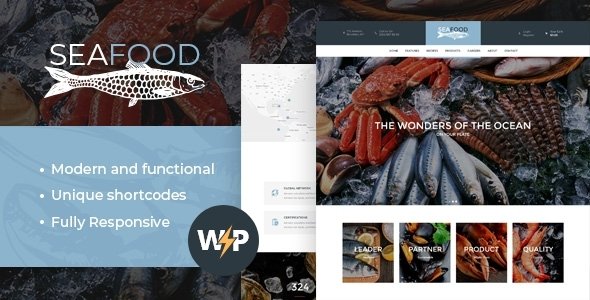
Stuck on your SeaFood Company WordPress theme? Let's fix it.
No endless back-and-forth. Just send us the details and we'll get it done.
No obligation · Replies within 1 hour · Quote within 1 day
Setup · Customization · Bug fixes · WooCommerce integration
About SeaFood Company WP Theme
SeaFood Company is a WordPress theme built by ThemeREX, designed specifically for seafood restaurants, fish markets, and ocean-themed food businesses. It ships with a visually strong layout that puts food photography front and center, supported by full-width headers, menu sections, and booking functionality.
The theme runs on ThemeREX’s own framework and includes the Elementor page builder, which makes layout editing accessible without touching code. It also bundles several premium plugins like Revolution Slider and the ThemeREX Addons plugin, adding real value out of the box.
If you run a seafood restaurant, a fish delivery service, or any coastal food brand, SeaFood Company gives you a focused starting point rather than a generic business theme. It is actively maintained and compatible with WooCommerce for online ordering setups.
Get matched with a SeaFood Company developer in under one day
Tell us about your SeaFood Company project. Small fixes, SeaFood Company theme customization, or a full website build, whatever you need, we've got it covered.
We'll connect you to the right SeaFood Company developers, define the scope, and get everything 100% clear.
You'll get one estimate, hire your preferred developer, and start collaborating.
SeaFood Company has enough moving parts, ThemeREX Addons, Revolution Slider, Elementor, and optional WooCommerce, that getting everything configured correctly takes real experience. A developer who knows the theme avoids the trial-and-error that wastes hours on layout conflicts or plugin clashes.
Through Codeable, you get matched with vetted WordPress developers who have worked with ThemeREX themes before. You can post your project, get a free estimate, and decide whether to proceed. No contracts, no pressure. Just a clear scope and someone who knows what they are doing.
Pros
- Purpose-built for seafood and coastal food businesses, so the demo content and layouts actually match your niche
- Bundles Elementor, Revolution Slider, and ThemeREX Addons, reducing the number of premium plugins you need to buy separately
- WooCommerce compatible out of the box, making online ordering or a fish market product catalog straightforward to set up
- Includes dedicated templates for menus, reservations, and team sections that food businesses use regularly
- Actively maintained by ThemeREX with ongoing updates and support documentation available
Cons
- ThemeREX Addons plugin creates theme dependency, making it harder to switch themes later without rebuilding content
- The settings panel has a steep learning curve compared to themes built purely on Elementor or the Customizer
- Heavy bundled assets can slow the site down if performance is not actively optimized after setup
- Demo import does not always work cleanly on all hosting environments, often requiring manual cleanup
- Limited third-party tutorials available compared to more popular themes, so troubleshooting often means reading ThemeREX documentation directly
Who is SeaFood Company for?
Seafood Restaurant Website
The theme was built for this use case. Full-width food photography headers, structured menu sections, and a reservation-ready layout make it a direct fit for a restaurant website. You can add OpenTable or a booking plugin without major layout work, and the dish post types keep your menu manageable in the WordPress backend.
Fish Market or Fishmonger Online Store
With WooCommerce enabled, SeaFood Company works as a product catalog or full fish market store. You can list fresh catches, set up variable pricing by weight, and use the visual layouts to present products in a way that matches the brand. A developer can configure product pages to match the theme’s style rather than defaulting to plain WooCommerce templates.
Seafood Delivery Service
A seafood delivery business needs clear product pages, a simple checkout, and fast load times. SeaFood Company’s WooCommerce compatibility handles the commerce side, while the visual design communicates freshness and quality. Pair it with a local SEO setup and you have a solid base for capturing delivery-area search traffic.
Coastal Catering Business
Catering businesses need to show menus, take inquiries, and build credibility quickly. SeaFood Company’s gallery sections, testimonial layouts, and contact forms fit that model well. The theme handles event-style catering pages without needing a separate events plugin for most use cases.
Ocean-Themed Food Blog or Recipe Site
The theme’s visual weight and typography work for a content-heavy food blog. Recipe posts, ingredient guides, and location-based seafood content all sit comfortably in the layout. You would want to adjust the default structure since it leans toward restaurants, but the design foundation is strong enough to repurpose.

Customizing SeaFood Company
SeaFood Company offers a solid set of customization options through the WordPress Customizer and Elementor, but getting the most out of it usually requires someone who knows the ThemeREX framework well. Color schemes, typography, header styles, and section layouts are all adjustable, but the options can feel buried if you are not familiar with how ThemeREX structures its settings panels.
A SeaFood Company expert can set up your menu pages, integrate OpenTable or a reservation plugin, configure WooCommerce for online orders, and make the design match your actual brand rather than the demo. Custom post types for dishes, staff, and specials are built into the theme and need proper setup to work cleanly.
If you want the demo removed and your own content structured correctly from the start, working with someone who knows this theme well saves significant time.
Recommended plugins for SeaFood Company
SeaFood Company works well with several additions that extend its core functionality. WooCommerce turns it into a working online ordering or delivery platform. A dedicated reservation plugin like OpenTable or Bookly slots in cleanly given the theme’s layout structure.
For site speed, image optimization and caching plugins are important since the theme relies heavily on large food photography. Improving WordPress performance matters especially on mobile, where load time affects bounce rates directly.
If you plan to rank in local search, pairing the theme with proper WordPress SEO work is worth doing early, particularly for location-based searches like “seafood restaurant near me.”
Not sure which plugins to use? This WordPress plugins directory covers the most popular options with reviews and setup guides.
SeaFood Company common issues
SeaFood Company theme demo import not working
Demo import failures on ThemeREX themes are usually caused by PHP memory limits, upload size restrictions, or a timeout on the server. Start by increasing php_memory_limit to at least 256MB and max_execution_time to 300 seconds in your php.ini or via your host’s control panel. If the import still fails partway through, try importing XML content manually via Tools > Import after running the theme setup wizard. If issues persist, a WordPress bug fixing service can complete the setup cleanly.
SeaFood Company Revolution Slider not displaying correctly
Revolution Slider display issues in SeaFood Company usually come from a version conflict between the bundled slider version and a separately installed or updated copy. Go to Plugins and make sure you are only running one instance of Revolution Slider. Deactivate any standalone version and use the one bundled with the theme. Also clear your caching plugin and browser cache after changes. If slides appear but styling is wrong, check that the slider’s source files are loading without 404 errors in your browser console.
SeaFood Company Elementor layout broken after update
Elementor layout breaks after a theme or plugin update in SeaFood Company are often caused by ThemeREX Addons widgets losing their registered properties. First, update ThemeREX Addons to the latest version available in your theme dashboard. Then go to Elementor > Tools and run the “Regenerate CSS” option. If specific widgets are missing, deactivate and reactivate the ThemeREX Addons plugin. Persistent layout issues may need a developer to review widget registration conflicts directly.
SeaFood Company WooCommerce pages not matching theme style
When WooCommerce pages like cart, checkout, and product archives do not match the SeaFood Company theme style, it usually means the theme’s WooCommerce template overrides are not active or a plugin conflict is loading default WooCommerce CSS. Check that the theme is fully activated and that no child theme is missing its WooCommerce template folder. Also confirm that no other plugin is dequeuing the theme’s styles on shop pages. A proper WooCommerce integration within SeaFood Company often needs manual template work to match the visual design exactly.
SeaFood Company FAQ
Yes. SeaFood Company was designed with restaurants in mind. It includes menu sections, reservation-ready layouts, staff profiles, and food photography templates. It is more focused than a general business theme, which means less cleanup work if you are actually running a seafood or coastal food business. For setup help, get a free estimate from a developer who knows the theme.
Yes, SeaFood Company supports WooCommerce. You can use it to sell seafood products, set up an online ordering system, or run a fish market store. The default WooCommerce templates may need styling adjustments to fully match the theme’s design. A developer can make those templates consistent with the rest of the site without breaking theme updates.
SeaFood Company uses Elementor as its primary page builder, combined with the ThemeREX Addons plugin which adds custom widgets and shortcodes. Revolution Slider is also bundled for the main header and banner sections. Most layout editing happens in Elementor, but some theme-specific sections are controlled through the ThemeREX options panel in the WordPress Customizer.
Technically yes, but it takes more work. The demo content, color palette, and section types are built around seafood and coastal food. Using it for an unrelated business means replacing most of the visual language, which can take longer than starting with a more neutral theme. It makes most sense for any food, hospitality, or coastal lifestyle brand.
SeaFood Company does not include a built-in reservation system but is compatible with plugins like Bookly, OpenTable’s embed widget, or WP Amelia. You add the plugin, then place the booking form into any page or section using a shortcode or Elementor widget. Layout adjustments are usually needed to make the form match the theme’s style. A developer can handle the integration cleanly.
Hire a SeaFood Company WordPress Developer
If your SeaFood Company site needs a full setup, design adjustments, WooCommerce integration, or something is broken and needs fixing, we can help. All work is delivered through Codeable, a network of vetted WordPress developers. You describe your project, get a free estimate within 24 hours, and only proceed if it makes sense for you. Get your free estimate here and tell us exactly what you need.
You'll need a free Codeable account so developers can ask questions and send their quotes.