SeaShell WordPress Theme
by meks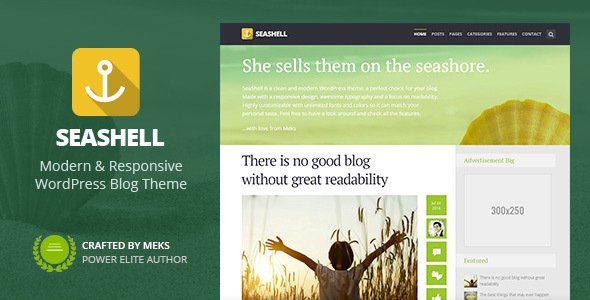
Stuck on your SeaShell WordPress theme? Let's fix it.
No endless back-and-forth. Just send us the details and we'll get it done.
No obligation · Replies within 1 hour · Quote within 1 day
Setup · Customization · Bug fixes · WooCommerce integration
About SeaShell WP Theme
SeaShell is a WordPress theme by Meks built for lifestyle, travel, and personal blogs. It has a clean, editorial layout with a strong focus on featured imagery and readable typography. The theme ships with Meks-built widgets, social sharing tools, and a customizable header area. It works well out of the box, especially for bloggers who want a polished look without heavy setup. SeaShell supports the WordPress Customizer for live previewing changes, and it integrates with popular plugins like Jetpack and WooCommerce. The layout is responsive across devices and the codebase is structured around standard WordPress conventions, making it straightforward to extend or modify. For sites that rely heavily on visual storytelling, SeaShell gives you a solid foundation to build on.
Get matched with a SeaShell developer in under one day
Tell us about your SeaShell project. Small fixes, SeaShell theme customization, or a full website build, whatever you need, we've got it covered.
We'll connect you to the right SeaShell developers, define the scope, and get everything 100% clear.
You'll get one estimate, hire your preferred developer, and start collaborating.
Meks builds clean, well-structured themes, but every site has requirements that go beyond the defaults. Whether you need layout changes, plugin integration, or a full child theme built from scratch, working with a vetted SeaShell developer saves time and avoids messy workarounds. Through Codeable, you get matched with a developer who has hands-on WordPress experience and can scope your project accurately before any work begins. No guesswork, no generic solutions.
Pros
- Clean editorial layout that works well for image-heavy blogs without extra configuration
- Built-in Meks widgets add social sharing, author info, and post sliders without requiring third-party plugins
- Consistent Meks codebase makes it predictable to customize or extend
- WordPress Customizer integration allows live previewing of color, font, and layout changes
- WooCommerce compatible out of the box for bloggers who want to sell products or services
Cons
- Limited layout variety — the column and grid options are fairly fixed without custom development
- Customizer controls are basic; deeper changes require PHP and CSS edits
- No built-in mega menu or complex navigation support
- Typography options are limited compared to themes that use Google Fonts selectors or type scale controls
- Not suited for heavily structured content like directories, portfolios with filters, or membership sites without significant rework
Who is SeaShell for?
Travel Blog
SeaShell’s featured image-forward layout suits travel content well. Large header images and clean post grids let destination photography lead the experience. A SeaShell developer can extend the setup with custom category templates, map embeds, or trip archive structures that match how a travel blogger actually organizes content.
Lifestyle and Wellness Site
Wellness and lifestyle sites need a calm, readable layout — SeaShell delivers that. The theme handles long-form editorial content cleanly. A SeaShell specialist can adjust the typography scale, add custom sidebar widgets, or build a landing page for services, newsletters, or digital products alongside the blog.
Food and Recipe Blog
Recipe blogs benefit from SeaShell’s clean post layout and image support. With the right plugin integration, a SeaShell developer can add recipe schema markup, ingredient formatting, and print-friendly templates. The theme’s grid layout works well for category-based browsing by cuisine, diet type, or meal category.
Personal Journal or Diary Blog
For personal blogs focused on writing over visuals, SeaShell keeps the focus on text without feeling sparse. The sidebar widget areas and author bio section are useful for building reader connection. A SeaShell expert can tune the reading experience, adjust post metadata display, and set up an email opt-in flow.
Photography Blog
SeaShell handles photography content well given its emphasis on large imagery. A SeaShell developer can configure full-width post templates, lightbox integration, and gallery layouts that keep image quality front and center. It works as a hybrid blog and portfolio for photographers who publish regular written content alongside their work.

Customizing SeaShell
SeaShell gives you a decent set of Customizer options, but most meaningful changes require someone who knows the theme’s template structure. A SeaShell expert can modify the header layout, adjust the post grid behavior, rework the sidebar, or alter font and color settings beyond what the default controls expose. Meks themes use a consistent coding pattern, which makes targeted customization relatively clean. If you need custom post templates, a unique homepage layout, or changes to how category pages display, those require direct PHP and CSS work. Child theme development is the right approach here to keep your changes upgrade-safe. A SeaShell developer can also wire up custom fields or restructure the widget areas to better fit your content strategy.
Recommended plugins for SeaShell
SeaShell pairs well with performance and SEO plugins, but they need proper configuration to work effectively with the theme. On the speed side, image-heavy layouts like SeaShell’s benefit from lazy loading, caching, and a CDN setup. See our WordPress performance service if your site feels slow under real traffic. For search visibility, metadata handling, schema markup, and breadcrumb integration all matter and can be set up properly alongside the theme. Our WordPress SEO service covers that end-to-end. Both areas are worth addressing early rather than retrofitting later.
Not sure which plugins to use? This WordPress plugins directory covers the most popular options with reviews and setup guides.
SeaShell common issues
SeaShell theme header image not displaying correctly
Header image display issues in SeaShell usually come down to incorrect image dimensions or a conflict with a caching plugin serving a stale version. First, check the recommended header dimensions in the Customizer and re-upload a correctly sized image. Clear all cache layers after uploading. If the problem persists after that, there may be a CSS conflict introduced by a plugin or a child theme override. Our WordPress bug fixing service can identify the exact cause and resolve it without disrupting the rest of your layout.
SeaShell WordPress theme not showing featured images on archive pages
Missing featured images on SeaShell archive pages often trace back to the theme’s image size registration not matching what was uploaded. Run a thumbnail regeneration using a plugin like Regenerate Thumbnails after any theme switch or image size change. If images still don’t appear, the issue may be in the archive template itself or a filter added by another plugin. Our WordPress bug fixing service can trace the problem to its source and fix it properly.
SeaShell theme breaking after WordPress update
SeaShell breaking after a WordPress core update is typically caused by a deprecated function in the theme or a plugin that conflicts with updated WordPress behavior. Check the site’s error log first to identify the specific function or file throwing the error. If you’re running the parent theme without a child theme, updates from Meks may have overwritten previous customizations. Always run updates on a staging copy first, and keep a backup before applying any core or theme updates to production.
SeaShell Meks widgets not loading or showing blank
Blank or non-loading Meks widgets in SeaShell are often caused by a JavaScript error on the page, a plugin conflict, or an outdated widget registration after a WordPress update. Open your browser console and check for JS errors pointing to a specific plugin or script. Deactivate plugins one at a time to isolate the conflict. If the widgets were working before a recent change, rolling back that change is the fastest diagnostic step. Confirm your SeaShell theme version is current, as Meks does release compatibility fixes.
SeaShell FAQ
SeaShell is available as a free theme in the WordPress theme directory. Meks also offers a range of premium themes, but SeaShell itself does not have a paid version with additional features. The free version includes the full feature set as released by Meks, with no locked functionality behind a paywall.
SeaShell is not built with Elementor or page builder compatibility as a primary focus. You can use Elementor on individual pages, but the theme’s styling may conflict with builder-generated layouts. For structured page builder integration, a SeaShell developer can handle the CSS overrides needed to make them work together cleanly without breaking the default blog layout.
SeaShell declares WooCommerce support and will display shop pages without a broken layout. It is not a dedicated WooCommerce theme, so the cart, product, and checkout pages use basic WooCommerce templates. For a more polished shop experience, a SeaShell specialist can style the WooCommerce templates to match the rest of the site.
Create a child theme by making a new folder in wp-content/themes/, adding a style.css file with the correct Template: seashell header, and a functions.php that enqueues the parent stylesheet. Activate the child theme from the WordPress dashboard. All customizations go into the child theme to survive SeaShell parent theme updates from Meks.
Meks continues to maintain its theme portfolio, but update frequency varies by theme. Check the SeaShell listing on WordPress.org for the last updated date and compatibility with the current WordPress version. If the theme hasn’t been updated recently and you’re running a current version of WordPress, test thoroughly before relying on it for a production site.
Hire a SeaShell WordPress Developer
If your SeaShell site needs customization, fixes, or new functionality, working with an experienced developer is the fastest path forward. Post your project and get a free estimate with no obligation to hire. A SeaShell developer will review your requirements and give you a clear scope before anything starts. Get a Free Estimate and have your project reviewed within 24 hours.
You'll need a free Codeable account so developers can ask questions and send their quotes.