Sense WordPress Theme
by bkninja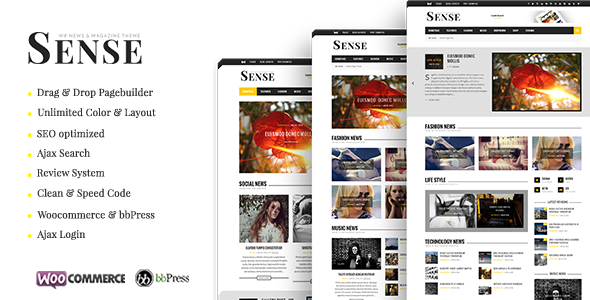
Stuck on your Sense WordPress theme? Let's fix it.
No endless back-and-forth. Just send us the details and we'll get it done.
No obligation · Replies within 1 hour · Quote within 1 day
Setup · Customization · Bug fixes · WooCommerce integration
About Sense WP Theme
Sense is a WordPress theme developed by bkninja, built for clean, minimal websites that put content first. It suits personal blogs, portfolio sites, and small business pages where readability and whitespace matter more than visual complexity.
The theme ships with a straightforward layout system, Google Fonts support, and customizer-based controls that let you adjust colors, typography, and header styles without touching code. It is block-editor compatible and works with most popular plugins out of the box.
Sense is lightweight by design. Page load times stay low without extra optimization work, which makes it a practical starting point for anyone who wants a fast, clean site. It does not try to do everything, and that restraint is part of its appeal. If you need a simple, well-structured theme that stays out of the way, Sense is worth a close look.
Get matched with a Sense developer in under one day
Tell us about your Sense project. Small fixes, Sense theme customization, or a full website build, whatever you need, we've got it covered.
We'll connect you to the right Sense developers, define the scope, and get everything 100% clear.
You'll get one estimate, hire your preferred developer, and start collaborating.
Sense is simple to start with, but custom work still requires real WordPress knowledge. Whether you need a child theme, custom templates, or plugin integration, a qualified developer will get it done properly the first time.
Through Codeable, you get matched with vetted WordPress professionals who have hands-on experience with themes like Sense. Every developer on the platform has passed a strict vetting process. You post your project, get a clear estimate, and only move forward if you are happy with the terms. No risk, no obligation.
Pros
- Lightweight codebase keeps page load times fast without extra optimization
- Clean, minimal design that works well for content-focused sites
- Full compatibility with the WordPress block editor
- Customizer controls cover colors, fonts, and layout without code
- Low visual complexity makes it easy to maintain long-term
Cons
- Limited built-in layout options compared to multipurpose themes
- WooCommerce styling is basic and needs manual CSS work
- No bundled demo content or starter templates
- Advanced customization requires a child theme or developer involvement
- Smaller community and fewer third-party tutorials than major theme brands
Who is Sense for?
Personal Blog
Sense is a natural fit for personal blogs. The typography-first layout keeps reading comfortable, and the minimal chrome means posts stay in focus. You can set up categories, adjust font sizes, and have a clean, fast blog running in under an hour. No unnecessary widgets or sidebars cluttering the reading experience.
Freelance Portfolio
Freelancers who want a simple portfolio without page-builder overhead will find Sense practical. A custom page template or a few Gutenberg columns can display project samples cleanly. The light footprint means the site loads fast, which matters when a client is deciding whether to reach out.
Small Business Brochure Site
Small businesses that need a few pages covering services, contact details, and a brief about section do not need a heavy theme. Sense handles that scope well. A developer can add a contact form, Google Map embed, and basic SEO setup quickly, keeping the site manageable for a non-technical owner.
Writer or Author Website
Authors benefit from Sense because the design stays out of the way of the writing. You can feature book covers using the block editor, add a bio page, and link to purchase options without the theme fighting your content. The clean layout also makes press pages and event listings easy to format.
Photography Showcase
Photographers who want a simple showcase without a heavy gallery plugin can use Sense with the native WordPress gallery block or a lightweight plugin like FooGallery. The minimal frame puts images front and center. A developer can adjust grid spacing and image sizing to match your preferred visual presentation.

Customizing Sense
Out of the box, Sense gives you decent control through the WordPress Customizer. You can adjust the site identity, color palette, font choices, and basic layout settings without writing a line of code. That covers most needs for a simple site.
Beyond those defaults, customization requires either child theme development or direct code edits. If you want a custom header, unique post layouts, WooCommerce styling, or anything that deviates from the base design, you will need a developer.
A Sense expert can build a child theme that preserves your changes through updates, add custom page templates, and integrate third-party tools cleanly. Working with someone who knows the theme structure saves time and avoids the trial-and-error that comes with unfamiliar code. If your project has grown past what the Customizer offers, getting a Sense expert involved is the logical next step.
Recommended plugins for Sense
Sense pairs well with block-based plugins like Kadence Blocks or Spectra for building richer page layouts without a full page builder. WooCommerce installs cleanly if you need a simple shop, though the default styling is minimal and will likely need adjustment.
For SEO, a plugin like Rank Math or Yoast slots in without conflicts. If site speed matters to you, combining Sense with a caching plugin and a CDN keeps load times low. You can read more about WordPress performance optimization and WordPress SEO to get the most from those setups.
Not sure which plugins to use? This WordPress plugins directory covers the most popular options with reviews and setup guides.
Sense common issues
Sense theme header not displaying correctly after update
Header display issues after an update usually point to cached styles or a conflict with a customizer setting that changed in the new version. Start by clearing your browser cache and any server-side cache plugin. If the problem persists, open the Customizer and check your header settings. A missing image or a color value stored in the old format can cause the header to collapse. If you are running custom CSS, compare it against the updated stylesheet. For persistent issues, the WordPress bug fixing service can diagnose the root cause quickly.
Sense WordPress theme custom CSS not applying
Custom CSS added through the Customizer should apply immediately, but a caching layer often prevents you from seeing changes. Clear all caches first. If you are using a child theme, check that the child theme stylesheet is loading correctly and that your CSS selector specificity is high enough to override the parent theme. Avoid adding custom CSS directly to the parent theme files, as updates will wipe those changes. If styles still will not apply, a developer can inspect the DOM and identify conflicting rules.
Sense theme mobile menu not working
A broken mobile menu in Sense usually comes from a JavaScript conflict with another plugin or a theme script that failed to load. Open your browser console and look for JS errors when the page loads on mobile. Disabling plugins one at a time can isolate the conflict. Also check that jQuery is loading without errors, as Sense relies on it for menu toggle behavior. If the menu worked before a plugin update, rolling that plugin back is a fast way to confirm the source. Ongoing issues are worth escalating to a developer.
Sense theme layout broken after installing WooCommerce
Sense does not include dedicated WooCommerce templates, so the plugin falls back to its own default styling, which can clash with the theme layout. Common problems include a broken shop grid, misaligned cart buttons, and checkout pages that do not respect the theme width. The fix is to add WooCommerce-specific CSS in a child theme stylesheet or to use a plugin like WooCommerce customizer extensions. For a cleaner long-term solution, a developer can build proper WooCommerce template overrides inside a child theme.
Sense FAQ
Sense by bkninja is available through the WordPress theme directory as a free theme. There is no premium version with paid upgrades, so what you download is the full release. Support is provided through the WordPress.org forums, though response times vary. For dedicated help, working with a freelance WordPress developer is usually faster.
WooCommerce will install and activate on a Sense-powered site without errors, but the theme does not include custom WooCommerce templates. That means shop pages use default WooCommerce styling, which may not match your design. Basic stores work fine. For anything beyond a simple product listing, you will want a developer to add proper template overrides in a child theme.
Creating a child theme for Sense follows the standard WordPress process. Create a new folder in your themes directory, add a style.css file with the correct template header referencing the Sense parent theme, and create a functions.php that enqueues the parent stylesheet. Upload the folder, activate the child theme, and all your custom CSS and template changes will survive parent theme updates.
Yes, Sense is compatible with the WordPress block editor. You can build pages and posts using native Gutenberg blocks without conflicts. The theme does not include custom block patterns or a full-site editing setup, so it works as a classic theme with block editor support rather than a block theme built on the site editor.
Sense works for small business sites that need a few clean pages covering services, contact information, and company background. It is not designed for complex business sites with multiple custom post types, membership areas, or large product catalogs. For straightforward brochure-style business sites, it is a practical and fast-loading option.
Hire a Sense WordPress Developer
Need help customizing Sense, fixing a layout issue, or building something the default theme cannot do? A vetted WordPress developer can handle it. Post your project through our free estimate form and get matched with a Sense developer within 24 hours. You get a clear quote before any work begins, and there is no obligation to hire. It is a straightforward way to get reliable WordPress help without the guesswork.
You'll need a free Codeable account so developers can ask questions and send their quotes.