Shaka WordPress Theme
by ProteusThemes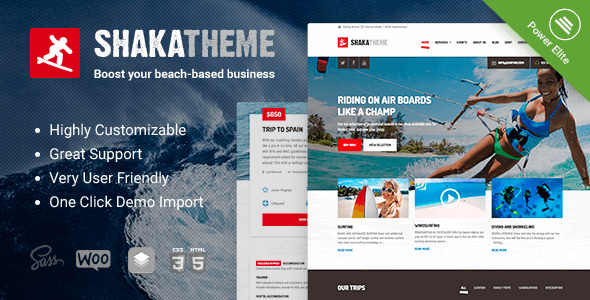
Stuck on your Shaka WordPress theme? Let's fix it.
No endless back-and-forth. Just send us the details and we'll get it done.
No obligation · Replies within 1 hour · Quote within 1 day
Setup · Customization · Bug fixes · WooCommerce integration
About Shaka WP Theme
Shaka is a WordPress theme built by ProteusThemes, designed specifically for surf shops, outdoor retailers, and action sports businesses. It ships with a WooCommerce-ready layout, bold visual sections, and a homepage builder that lets you arrange content blocks without touching code.
The theme uses the WPBakery Page Builder and includes several pre-built demo pages that cover shop listings, product pages, and a blog. Typography leans toward a casual, lifestyle aesthetic that fits surf, skate, and beach brands well.
ProteusThemes built Shaka with a clear niche in mind. That focus shows in the demo content, widget areas, and the overall design language. If you run an outdoor retail site or surf school, Shaka gives you a solid starting point without forcing you to strip away design choices that don’t fit your brand.
Get matched with a Shaka developer in under one day
Tell us about your Shaka project. Small fixes, Shaka theme customization, or a full website build, whatever you need, we've got it covered.
We'll connect you to the right Shaka developers, define the scope, and get everything 100% clear.
You'll get one estimate, hire your preferred developer, and start collaborating.
Shaka looks straightforward until you need something outside the demo. WPBakery customisation, WooCommerce template overrides, and plugin conflicts all take time to sort correctly. A developer who knows the theme can set things up right the first time.
FoxyConcept connects you with vetted WordPress specialists through Codeable. Every developer on the platform has passed a strict vetting process. You get a free estimate before any work starts, and there’s no obligation to proceed. It’s a low-risk way to get professional help fast.
Pros
- Purpose-built for surf and outdoor retail, so the design fits without heavy restyling
- WooCommerce integration is built in from the start, including shop and product page templates
- WPBakery Page Builder included, which makes rearranging homepage sections manageable without code
- Multiple pre-built demo pages covering shop, blog, and landing page layouts
- ProteusThemes provides documentation and dedicated support for the theme
Cons
- WPBakery Page Builder creates shortcode lock-in, making it harder to switch themes later
- The niche design focus means significant restyling is needed for non-surf or non-outdoor brands
- Large hero images and bundled scripts can slow the site if performance isn't actively managed
- Limited layout flexibility compared to block-based themes built for the Gutenberg editor
- ProteusThemes support quality and update frequency have been inconsistent for some users
Who is Shaka for?
Surf Shop
Shaka was built with surf retail in mind. The WooCommerce templates, product grid layouts, and visual style all fit a surf shop without heavy customisation. You can list boards, wetsuits, and accessories cleanly using the default shop structure and add product categories that match your inventory.
Outdoor Gear Retailer
For outdoor gear stores selling hiking, climbing, or water sports equipment, Shaka’s bold imagery sections and WooCommerce setup provide a workable foundation. The homepage builder lets you feature product categories, seasonal promotions, and brand stories. Some restyling is needed to move away from the surf-specific colour palette.
Surf School or Lessons
Surf schools need clear calls to action, schedule information, and instructor profiles. Shaka includes staff and testimonial custom post types that cover most of this. You can build a booking-friendly layout using WPBakery sections and add a third-party booking plugin without major conflicts in most setups.
Action Sports Brand
Skate, snowboard, or wakeboard brands can use Shaka’s visual structure to present products and lifestyle content. The theme’s large image sections and clean product layouts work for action sports, though you’ll want a developer to adjust typography and colours to match a brand that isn’t surf-specific.
Beach or Lifestyle Blog
Content-focused beach and outdoor lifestyle blogs fit Shaka’s aesthetic well. The blog templates are clean, image-forward, and readable on mobile. If your site mixes editorial content with affiliate product links or a small shop, Shaka handles both without requiring a separate theme for each function.

Customizing Shaka
Out of the box, Shaka covers the basics through the WordPress Customizer. You can change colours, fonts, header layout, and footer columns without editing files. WPBakery Page Builder handles most page-level layouts, so you can rearrange sections, swap images, and adjust text directly on the canvas.
Beyond that, deeper customisation gets more technical. Custom post types for staff, testimonials, and portfolio items need proper configuration. WooCommerce templates sometimes require child theme overrides to match your exact design. A Shaka expert can handle this cleanly, set up a child theme from the start, and make sure updates don’t overwrite your changes. If you want a site that looks distinct rather than like every other Shaka demo, working with a developer is the faster path.
Recommended plugins for Shaka
Shaka works well with WooCommerce for product listings and checkout. Adding WooCommerce extensions like Product Bundles or Variation Swatches can improve the shopping experience for gear retailers.
For speed, image optimisation and caching are important since Shaka uses large hero images throughout. A proper performance setup keeps load times under control. Learn more about WordPress performance optimisation.
If search visibility matters, pairing Shaka with a solid SEO configuration helps your product and category pages rank. See our WordPress SEO service for details.
Not sure which plugins to use? This WordPress plugins directory covers the most popular options with reviews and setup guides.
Shaka common issues
Shaka theme WooCommerce product page not displaying correctly
Product page display issues in Shaka usually come from WooCommerce template version mismatches. When WooCommerce updates its templates, the versions bundled in older themes fall out of sync. Check the WooCommerce status screen under Tools for any outdated template warnings. The fix is to update the templates either directly in the theme files or, better, through a child theme. If you’re not comfortable editing PHP templates, our bug fixing service can sort this cleanly.
Shaka WordPress theme slow loading on mobile
Shaka uses full-width hero images and loads WPBakery scripts on every page, which adds weight on mobile connections. Start by enabling lazy loading for images, optimising hero images to WebP, and removing unused WPBakery scripts on pages that don’t need the builder. A caching plugin with mobile-specific rules also helps. If mobile scores are still poor after these steps, a full performance audit will identify what’s still blocking render.
WPBakery layout broken after Shaka theme update
WPBakery layout breaks after a theme update usually mean a shortcode or CSS class changed between versions. Check if you’re running Shaka on a child theme. If not, updates can overwrite custom CSS you added directly to the parent theme. Restore from a backup first, then migrate your customisations into a child theme before reapplying the update. Going forward, always test updates on a staging site before pushing to production.
Shaka theme header menu not working on mobile
Mobile menu problems in Shaka are often caused by a JavaScript conflict with another plugin, or a CSS z-index issue where the menu renders behind another element. Open the browser console on mobile (or use a desktop responsive view) and check for JS errors on page load. Deactivate plugins one at a time to isolate a conflict. If the menu toggle simply doesn’t respond, the jQuery dependency may not be loading correctly.
Shaka FAQ
Shaka includes WooCommerce templates, but older versions may have outdated template files that cause display issues on newer WooCommerce releases. Always check the WooCommerce system status screen after updating. If outdated templates are flagged, they need to be updated manually or through a child theme. Running the latest version of both WooCommerce and Shaka together reduces the risk of compatibility problems.
Most of Shaka’s demo pages are built with WPBakery shortcodes. Without WPBakery active, those pages will display raw shortcode text instead of formatted content. You can rebuild pages using the Gutenberg editor, but it requires recreating layouts from scratch. If you want to move away from WPBakery, a developer can migrate your content without losing your design structure.
Shaka was not built for Elementor and does not include Elementor-specific templates. You can install Elementor alongside Shaka, but you’ll need to rebuild page layouts manually and may run into styling conflicts between the theme’s CSS and Elementor’s output. For a fully Elementor-based build, a theme built around Elementor is usually a cleaner starting point.
ProteusThemes continues to sell and support Shaka, but update frequency has slowed compared to more actively developed themes. Check the theme’s changelog on ThemeForest or ProteusThemes’ site before purchasing to see how recently it was updated. For an existing Shaka site, keeping WordPress core and plugins current matters more than waiting on theme updates.
Shaka’s demo content is installed through the ProteusThemes one-click demo importer, available as a separate plugin from their documentation. After installing and activating Shaka, install the companion plugin, then go to Appearance > Demo Content and select the demo you want. Make sure required plugins like WPBakery and WooCommerce are active first, or the import may fail or produce incomplete results.
Hire a Shaka WordPress Developer
Need help setting up Shaka, customising the layout, or fixing a specific issue? FoxyConcept works through Codeable, so you’re matched with a vetted WordPress developer who knows WooCommerce and ProteusThemes builds. Post your project and get a free estimate within 24 hours. No commitment required.
Get a free estimate today and describe what you need. A developer will review your project and come back with a clear quote.
You'll need a free Codeable account so developers can ask questions and send their quotes.