ShiftUp WordPress Theme
by Mikado-Themes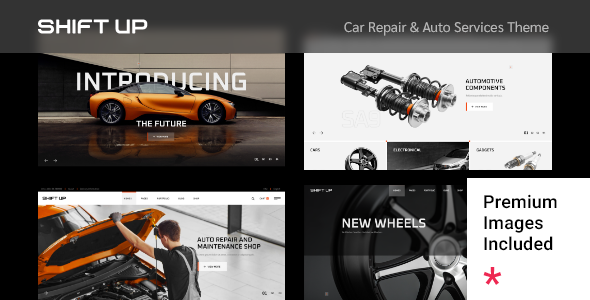
Stuck on your ShiftUp WordPress theme? Let's fix it.
No endless back-and-forth. Just send us the details and we'll get it done.
No obligation · Replies within 1 hour · Quote within 1 day
Setup · Customization · Bug fixes · WooCommerce integration
About ShiftUp WP Theme
ShiftUp is a multi-purpose WordPress theme built by Mikado-Themes, the team behind popular themes like Elated and Bridge. It ships with the Elementor page builder, giving you a visual drag-and-drop editing experience without touching code.
The theme includes a library of pre-built demo sites covering business, agency, portfolio, and creative niches. You import a demo in a few clicks, then swap in your content. Typography controls, header layouts, and color schemes are all adjustable from the Customizer.
ShiftUp is built on a clean codebase and comes with WooCommerce support out of the box, making it a practical choice for businesses that need a professional site with optional shop functionality. Regular updates from Mikado-Themes keep it compatible with current WordPress and plugin versions.
Get matched with a ShiftUp developer in under one day
Tell us about your ShiftUp project. Small fixes, ShiftUp theme customization, or a full website build, whatever you need, we've got it covered.
We'll connect you to the right ShiftUp developers, define the scope, and get everything 100% clear.
You'll get one estimate, hire your preferred developer, and start collaborating.
Most ShiftUp issues come down to one thing: the theme can do what you need, but the path to get there isn’t obvious from the documentation. A developer who has worked with Mikado-Themes’ products knows where the hooks are, how the theme’s options interact with Elementor, and which customizations are better handled in a child theme versus a plugin.
Through Codeable, you can post your project and get matched with a vetted WordPress developer who knows ShiftUp specifically. No guesswork, no generic freelancers. Get a free estimate and see exactly what your project will cost before committing.
Pros
- Elementor integration means visual editing without learning shortcodes or custom builders
- Large demo library with diverse niches, most importable in under five minutes
- Mikado-Themes provides regular updates and maintains compatibility with current WordPress versions
- WooCommerce support is built in, not bolted on as an afterthought
- Extensive header and footer layout options with sticky, transparent, and scroll-triggered behavior
Cons
- Demo sites look polished but require substantial content replacement work to avoid looking generic
- The theme options panel is large and can be confusing to navigate without prior Mikado-Themes experience
- Default page load includes several scripts that need trimming for good Core Web Vitals scores
- Some advanced layout features only work with specific Elementor widget combinations, which isn't documented clearly
- Child theme is required for any PHP-level changes, which adds setup time for developers new to the theme
Who is ShiftUp for?
Creative Agency
ShiftUp’s animated section transitions and full-width layouts suit agency sites that need to show off client work. The portfolio post type supports filtering, and Elementor makes it easy to build case study pages without a custom theme. A developer can extend this with custom project meta fields and filterable grids.
Online Store
Built-in WooCommerce support means your product pages, cart, and checkout work without a separate WooCommerce theme. ShiftUp’s styling carries through to shop pages, keeping the visual consistency intact. Add a wishlist plugin or custom product builder and a ShiftUp developer can wire it in without breaking the existing layout.
Freelance Portfolio
The portfolio demos and masonry grid options make ShiftUp a practical base for freelancers. You get a professional layout that presents work clearly, with contact forms and about sections that don’t require design skills to set up. Custom work types and filtering can be added by a developer to handle specialized portfolios.
Corporate Business Site
ShiftUp’s corporate demo includes team sections, service pages, testimonials, and a blog layout that covers most business site requirements. The header options support logo placement and navigation styles that work across industries. A developer can integrate CRM forms, booking plugins, or custom analytics tracking as needed.
Fitness or Wellness Brand
The full-width hero sections, bold typography options, and video background support in ShiftUp suit fitness studios and wellness brands. Class schedules, trainer profiles, and booking integrations can be built on top of the theme. A ShiftUp developer familiar with booking plugins can set this up in a fraction of the time a custom build would take.

Customizing ShiftUp
ShiftUp gives you a lot of control without requiring a developer, but there are limits. Elementor handles most layout changes well, and the theme’s own options panel covers headers, footers, typography, and colors. That gets most sites 80% of the way there.
The remaining 20% is where things get specific. Custom post type setups, WooCommerce checkout modifications, conditional header logic, and pixel-precise layout adjustments often require PHP or custom CSS knowledge.
A ShiftUp expert can build on what the theme already does well rather than working around it. Whether you need a custom Elementor widget, a unique mega menu, or a tailored demo import that matches your brand from day one, working with someone who knows ShiftUp and Mikado-Themes’ conventions saves significant time.
Recommended plugins for ShiftUp
ShiftUp works well with the standard WordPress plugin ecosystem. For forms, Contact Form 7 and WPForms both integrate cleanly. WPML handles multilingual setups without breaking layouts.
WooCommerce is supported natively, but adding product filters, subscription billing, or custom checkout flows will need extra plugins and potentially some integration work.
For speed, ShiftUp benefits from proper caching and image optimization. The theme loads several assets by default, so a WordPress performance audit is worth running before launch. If organic traffic matters, pairing ShiftUp with a solid WordPress SEO setup will make a measurable difference.
Not sure which plugins to use? This WordPress plugins directory covers the most popular options with reviews and setup guides.
ShiftUp common issues
ShiftUp theme not displaying correctly after WordPress update
This usually means a conflict between the theme and a plugin updated alongside WordPress, or a PHP version change on the server. Start by deactivating all plugins except Elementor and the Mikado companion plugin, then check if the layout restores. If it does, reactivate plugins one at a time to find the conflict. If the issue persists, check your server’s PHP version against Mikado-Themes’ current requirements. A WordPress bug fixing service can isolate this faster if you need the site back up quickly.
ShiftUp Elementor widgets missing or broken
Missing Elementor widgets from ShiftUp almost always point to the Mikado Elementor companion plugin being deactivated or out of sync with the current theme version. Go to Plugins, confirm the companion plugin is active and up to date. If widgets still don’t appear, clear Elementor’s cache under Elementor > Tools > Regenerate CSS. A version mismatch between Elementor Pro and the companion plugin can also cause this, so check both changelogs for known incompatibilities.
ShiftUp demo import not working or incomplete
Failed demo imports with ShiftUp are typically caused by server limits, specifically max execution time, memory limit, or upload file size. Ask your host to temporarily increase these values, or use a host that meets WordPress recommended specs. Running the import on a staging site first reduces risk. If the import completes but content looks wrong, check that all required plugins were activated before importing. The Mikado-Themes documentation lists the exact plugin requirements for each demo.
ShiftUp site loading slowly with poor performance scores
ShiftUp loads several CSS and JavaScript files by default, which affects Time to First Byte and Largest Contentful Paint. Start by enabling a caching plugin and a CDN. Then audit which theme scripts are loading on pages that don’t need them. Elementor’s own asset loading settings also matter here. Disabling Google Fonts loading if you’re self-hosting fonts makes a noticeable difference. A full WordPress performance optimization review will give you a prioritized list of what to fix.
ShiftUp FAQ
ShiftUp is manageable for beginners who are comfortable with Elementor, but the theme options panel has a steep learning curve. The demo import process is straightforward, and most content changes can be made visually. Where beginners tend to get stuck is in layout adjustments that require understanding how the theme’s options interact with Elementor’s section settings. A developer can set up the initial build so day-to-day editing stays simple.
ShiftUp’s core demos and Elementor integration work with the free version of Elementor. Some advanced features, particularly dynamic content, popups, and form styling, require Elementor Pro. Mikado-Themes builds their companion widgets to work alongside Elementor rather than depending on the Pro version, so you won’t hit a hard wall without it. That said, most professional sites built on ShiftUp benefit from having Pro available.
Yes. ShiftUp includes WooCommerce support with styled product pages, cart, and checkout that match the theme’s design. It handles standard shop setups well. For more complex requirements like subscription products, custom checkout fields, or product configurators, you’ll need additional plugins and likely a developer to integrate them cleanly without overriding ShiftUp’s WooCommerce templates.
Always use a child theme before making any code-level customizations to ShiftUp. Changes made directly to the parent theme will be overwritten on update. CSS added through the Customizer or Elementor is stored in the database and survives updates. Before updating, back up your site, check the Mikado-Themes changelog for breaking changes, and test the update on a staging environment first. A WordPress maintenance plan can handle this process regularly.
ShiftUp is WPML-compatible. Mikado-Themes has tested the theme with WPML, and the Elementor integration works across language versions. You’ll need WPML’s String Translation module to translate theme-specific strings in the options panel. Some custom post types built with Mikado’s companion plugin may need additional WPML configuration. A developer familiar with both ShiftUp and WPML can set up the translation structure correctly from the start.
Hire a ShiftUp Developer
If your ShiftUp site needs custom functionality, a design that goes beyond the demo, or help fixing something that broke after an update, a specialist is the fastest route to a working result.
Post your project through FoxyConcept and get matched with a vetted ShiftUp developer via Codeable within 24 hours. Free estimate, no obligation. Start here and describe what you need.
You'll need a free Codeable account so developers can ask questions and send their quotes.