Shopping WordPress Theme
by Opal_WP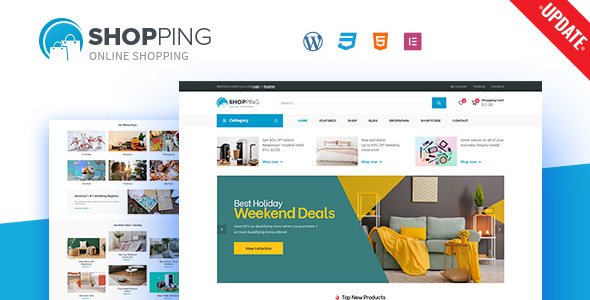
Stuck on your Shopping WordPress theme? Let's fix it.
No endless back-and-forth. Just send us the details and we'll get it done.
No obligation · Replies within 1 hour · Quote within 1 day
Setup · Customization · Bug fixes · WooCommerce integration
About Shopping WP Theme
Shopping is a WooCommerce theme built by Opal_WP, a developer known for polished storefront designs and deep WooCommerce integration. The theme targets online retailers who want a clean, conversion-focused layout without starting from scratch.
It ships with multiple homepage demos covering fashion, electronics, furniture, and general retail. Each demo is importable in one click. The theme uses Elementor as its primary page builder, so most layout changes happen visually without touching code.
Under the hood, Shopping supports product filtering via AJAX, a sticky header with a mini cart, and a mobile-optimised navigation. WooCommerce extensions like wishlist, compare, and quick view come bundled. It is a capable base for a mid-to-large product catalogue that needs to look professional from day one.
Get matched with a Shopping developer in under one day
Tell us about your Shopping project. Small fixes, Shopping theme customization, or a full website build, whatever you need, we've got it covered.
We'll connect you to the right Shopping developers, define the scope, and get everything 100% clear.
You'll get one estimate, hire your preferred developer, and start collaborating.
Shopping has enough moving parts that issues surface quickly once real products and traffic arrive. An experienced developer knows where the theme cuts corners and how to fix them before they cost you sales.
Through Codeable, you get matched with vetted WordPress developers who have worked on WooCommerce stores specifically. No freelancer roulette, no chasing replies. Post your project, get an estimate within 24 hours, and decide whether to proceed. There is no obligation. See our WordPress development services for more on what is possible.
Pros
- One-click demo import covers multiple retail niches including fashion, electronics, and furniture
- Bundled quick view, compare, and wishlist features save you the cost of separate plugins
- Elementor integration means most layout changes are visual and do not require a developer
- AJAX product filtering works out of the box without additional plugin setup
- Sticky header with mini cart keeps the shopping experience accessible during page scroll
Cons
- Theme updates from Opal_WP have historically been infrequent, which creates compatibility risk with newer WooCommerce versions
- Bundled plugins like Opal Widgets add page weight and cannot always be cleanly disabled without layout breakage
- Documentation is thin, making advanced customisation difficult without developer help
- Child theme is not included, so direct theme edits get overwritten on updates
- Support response times from Opal_WP on ThemeForest can be slow during peak periods
Who is Shopping for?
Fashion and Apparel Store
Shopping’s fashion demo ships with lookbook-style sections, size selector layouts, and product carousels built for apparel browsing. A developer can extend this with custom size guide popups, colour swatch filtering, and Instagram feed integration to match how modern fashion stores operate and convert.
Electronics and Tech Retail
The electronics demo includes specification tables, comparison functionality, and a structured category hierarchy suited to tech products. With some customisation, you can add tabbed product specs, brand filtering, and compatibility notices that buyers of electronics specifically look for before purchasing.
Home Furniture and Decor
Shopping’s furniture demo uses wide-image layouts and room-setting photography sections that work well for high-consideration purchases. A developer can add room visualiser integrations, custom delivery estimate fields, and fabric or finish variant selectors that standard WooCommerce variable products do not handle cleanly by default.
Health and Beauty Products
Health and beauty stores need ingredient transparency, bundle pricing, and subscription options. Shopping handles the visual side well. A developer can wire up WooCommerce Subscriptions, add custom ingredient or allergen fields to product pages, and build loyalty or reward point display sections into the account area.
Multi-Vendor Marketplace
With Dokan or WCFM installed, Shopping can act as the front-end for a multi-vendor marketplace. The theme’s flexible header and category structure support vendor pages and product filtering across sellers. A developer is typically needed to align vendor dashboard styles with the Shopping theme’s design system.

Customizing Shopping
Shopping gives you a solid starting point, but most stores need changes that go beyond swapping colours and fonts. A Shopping expert can adapt the demo layouts to your actual product catalogue, brand guidelines, and checkout flow.
Common customisation work includes building custom product card layouts in Elementor, adjusting the category mega menu for deep product hierarchies, and modifying WooCommerce templates for a unique single-product page experience.
Performance tuning is also frequently needed. The theme ships with several scripts enabled by default, and a Shopping expert can strip out what you do not use. If you need custom size guides, subscription products, or a tailored checkout, bespoke PHP and CSS work will be required beyond what Elementor can handle.
Recommended plugins for Shopping
Shopping works well with most major WooCommerce plugins. YITH WooCommerce Wishlist and WooCommerce Subscriptions integrate cleanly. For search, FiboSearch or SearchWP will outperform the default WooCommerce search on larger catalogues.
For site speed, pairing Shopping with a caching plugin and a CDN makes a measurable difference. See our WordPress performance service for more detail on that.
If organic traffic matters to your store, structured data, breadcrumbs, and clean canonical URLs are worth setting up properly. Our WordPress SEO service covers the full setup for WooCommerce stores.
Not sure which plugins to use? This WordPress plugins directory covers the most popular options with reviews and setup guides.
Shopping common issues
Shopping theme WooCommerce product page layout broken after update
This usually happens when WooCommerce updates its template files and the Shopping theme’s overrides fall out of sync. Go to WooCommerce > Status > Tools > Update WooCommerce Database first. If the layout is still broken, check which template files the theme overrides under Appearance > Theme Check or via the WooCommerce system status. A developer can update those override files to match the current WooCommerce version. Our WordPress bug fixing service covers exactly this type of issue.
Shopping theme Elementor widgets not loading on homepage
This is typically caused by a plugin conflict or a failed Elementor data regeneration. Go to Elementor > Tools > Regenerate CSS and Data first. If widgets still fail to load, deactivate plugins one by one to isolate the conflict, starting with caching and optimisation plugins. If the issue appeared after a theme or Elementor update, the Opal Widgets plugin bundled with Shopping may need updating separately from the ThemeForest dashboard.
Shopping theme AJAX filter not working on category page
Shopping’s AJAX filtering relies on the WooCommerce Product Filter or a compatible plugin being active and correctly configured. Check that the filter widget is assigned to the correct sidebar and that pretty permalinks are enabled under Settings > Permalinks. Caching plugins frequently break AJAX requests by serving cached responses. Exclude the shop and category URLs from your cache. If the issue persists, a JavaScript console error will usually point to the specific conflict.
Shopping theme checkout page CSS broken or unstyled
Checkout styling breaks most often when a CSS optimisation plugin minifies or combines stylesheets in the wrong order. Disable CSS minification for the checkout page in your performance plugin settings. Also check whether a custom child theme stylesheet is missing declarations that the parent theme expects. If no child theme exists and direct edits were made, an update may have wiped them. Consider using the WordPress maintenance service to keep theme files safely managed going forward.
Shopping FAQ
Generally yes, but compatibility depends on which version of Shopping you have installed. Opal_WP releases updates for major WooCommerce versions, though update frequency has been inconsistent. Always check the ThemeForest changelog before updating WooCommerce on a live store. Running a staging copy first is the safest approach. If your checkout or product pages break after a WooCommerce update, the theme’s template overrides are the most likely cause.
The demo content and homepage layouts are built specifically for Elementor, so removing it means rebuilding those pages. The WooCommerce shop, archive, and product pages do not require Elementor and will work with the default theme templates. If you want to use a different builder like Beaver Builder or Bricks, a developer would need to rebuild the key page templates to match the Shopping theme’s design intentions.
After activating the Shopping theme, go to Appearance > Import Demo Data. The theme includes the One Click Demo Import plugin or a built-in importer depending on the version. Select your preferred demo, then import content, widgets, and settings. Make sure WooCommerce and all required plugins are active first. Demo import on a fresh WordPress install gives the cleanest result. Importing over an existing site can conflict with existing content.
Shopping has clean markup and loads WooCommerce structured data correctly for product schema. However, page speed needs attention out of the box since the theme loads several scripts by default. Title tags and meta descriptions require an SEO plugin like Rank Math or Yoast. For a fully optimised store, breadcrumb schema, canonical URLs, and XML sitemaps all need explicit configuration. The theme alone does not handle all of that automatically.
Shopping does not bundle WooCommerce Subscriptions, but it is compatible with it as an add-on. The subscription product type will display correctly on product pages using the theme’s standard templates. Some styling adjustments may be needed for the subscription pricing display and the My Account subscription management area. A developer can handle those CSS and template tweaks if the default output does not match your design.
Hire a Shopping Theme Expert or Developer
Whether you need a full store build, a single feature added, or ongoing fixes, a dedicated Shopping developer can handle it. Work is delivered through Codeable, so every developer is vetted and reviewed. You post your project, receive a free estimate, and only pay if you decide to move forward. No risk, no commitment upfront. Get a free estimate today and describe exactly what your store needs.
You'll need a free Codeable account so developers can ask questions and send their quotes.