ShoppyStore WordPress Theme
by magentech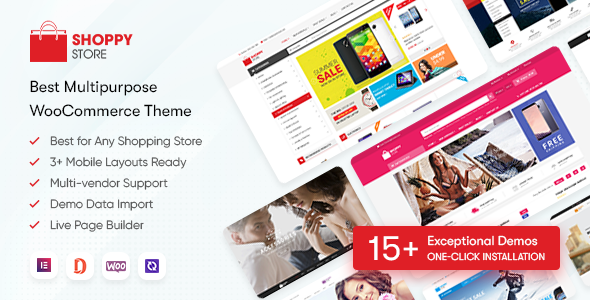
Stuck on your ShoppyStore WordPress theme? Let's fix it.
No endless back-and-forth. Just send us the details and we'll get it done.
No obligation · Replies within 1 hour · Quote within 1 day
Setup · Customization · Bug fixes · WooCommerce integration
About ShoppyStore WP Theme
ShoppyStore is a WooCommerce theme built by Magentech, designed for multi-category online stores. It ships with a drag-and-drop page builder, multiple homepage layouts, and product display options suited to electronics, fashion, furniture, and general merchandise stores.
The theme includes Ajax cart, wishlist, product quick view, and a sticky header out of the box. It also supports RTL languages and has translation-ready files, making it a practical choice for stores targeting international audiences.
ShoppyStore is built on Bootstrap and uses custom widgets to populate the homepage sections. Setup is relatively straightforward for developers familiar with WooCommerce, though non-technical users often need help configuring the demo content correctly and getting the layout to match what they see in the preview.
Get matched with a ShoppyStore developer in under one day
Tell us about your ShoppyStore project. Small fixes, ShoppyStore theme customization, or a full website build, whatever you need, we've got it covered.
We'll connect you to the right ShoppyStore developers, define the scope, and get everything 100% clear.
You'll get one estimate, hire your preferred developer, and start collaborating.
ShoppyStore has a learning curve, especially around demo import, widget configuration, and WooCommerce integration. Small mistakes here cost time and can break the storefront for customers.
FoxyConcept connects you with vetted WordPress and WooCommerce developers through Codeable. Every developer on the platform has passed a rigorous screening process. You get a fixed estimate before any work starts, and you only pay if you decide to move forward. No risk, no wasted time.
Pros
- Ships with multiple pre-built homepage layouts covering fashion, electronics, furniture, and general stores
- Ajax-powered cart, wishlist, and quick view are included without needing extra plugins
- Mega menu builder supports category images and multi-column layouts
- RTL support and translation-ready files make it viable for multilingual and international stores
- Compatible with major YITH and WooCommerce extension plugins without significant conflicts
Cons
- Demo import is unreliable and often requires manual widget reconfiguration after the import completes
- Mobile layout has spacing and overflow issues on certain product grid configurations that need CSS fixes
- Theme options panel is not intuitive, and some settings are buried or poorly labeled
- Updates from Magentech have slowed down, raising questions about long-term theme maintenance
- Documentation is sparse, and support responses from the developer can be slow on ThemeForest
Who is ShoppyStore for?
Electronics & Gadgets Store
ShoppyStore’s product tab system and mega menu work well for electronics stores with large category trees. You can organize brands, product types, and featured items into structured navigation. The quick view and product comparison features reduce friction for buyers comparing specs across multiple items.
Fashion & Apparel Shop
The theme includes lookbook-style product displays and a size guide widget, both useful for fashion stores. Product image galleries support multiple views per product. The wishlist and recently viewed widgets match the browsing behavior typical of apparel shoppers spending time on the site before purchasing.
Home & Furniture Retailer
Furniture stores benefit from ShoppyStore’s full-width product imagery options and category banner layouts. You can build rich homepage sections that spotlight individual collections. The theme handles large product images well when properly optimized, which matters for furniture where visual quality drives purchasing decisions.
General Marketplace Store
For multi-category stores selling across several product types, ShoppyStore’s widget-based homepage lets you promote different departments independently. Flash sale timers, featured category grids, and brand sliders can all run on the same page. It is built for stores with broad catalogs and mixed customer intent.
Health & Beauty eCommerce
Health and beauty stores need clear product presentation and trustworthy layouts. ShoppyStore supports review displays, ingredient tabs, and promotional banners. The Ajax add-to-cart and quick view reduce steps in the purchase flow, which helps with conversion for repeat-purchase categories like skincare and supplements.

Customizing ShoppyStore
ShoppyStore gives you a solid starting point, but most store owners end up needing custom work to get it performing exactly as intended. Common customization requests include modifying the mega menu structure, adjusting the homepage widget zones, creating custom product tab layouts, and tweaking the mobile breakpoints where the default theme falls short.
If you want to extend ShoppyStore beyond its default options, such as adding a custom product filter, integrating a third-party plugin cleanly, or rebuilding a section to match your brand, a ShoppyStore expert can do that without breaking the existing layout.
We handle everything from minor style changes to full WooCommerce functionality builds on top of the ShoppyStore framework. No guesswork, no trial and error on a live site.
Recommended plugins for ShoppyStore
ShoppyStore works alongside most major WooCommerce plugins. Common additions include YITH WooCommerce plugins for wishlists, compare, and ajax filters, as well as WooCommerce Subscriptions for recurring billing stores.
For performance, the theme benefits from proper image optimization, caching configuration, and a CDN setup. See our WordPress performance service if your ShoppyStore site is loading slowly.
If you are running content alongside your store, pairing ShoppyStore with solid on-page SEO work makes a measurable difference. Our WordPress SEO service covers both the technical and content sides.
Not sure which plugins to use? This WordPress plugins directory covers the most popular options with reviews and setup guides.
ShoppyStore common issues
ShoppyStore demo import not working correctly
ShoppyStore’s one-click demo import frequently fails to pull in all widget data and homepage sections. This is a known issue caused by timeouts during XML import on servers with limited resources. The fix involves manually importing content in stages, reconfiguring widgets after the import, and reassigning menus and homepage templates. If you are stuck, our WordPress bug fixing service can sort this out quickly.
ShoppyStore homepage widgets not showing content
Empty homepage sections in ShoppyStore usually mean the widgets were not assigned to the correct sidebar during setup, or the demo import did not complete properly. Check Appearance > Widgets and confirm each homepage widget area has content assigned. Some widget settings also require specific category or product IDs that do not carry over from the demo. Manual reconfiguration is usually required.
ShoppyStore mobile layout broken or overlapping elements
ShoppyStore has known CSS issues on mobile, particularly with the product grid padding, horizontal scroll on category pages, and the sticky header overlapping content on small screens. These require targeted CSS overrides in the child theme. If you have not set up a child theme, any changes made directly to the theme files will be lost on the next update. Fix the structure before adding custom CSS.
ShoppyStore slow loading speed on WooCommerce store
ShoppyStore loads several scripts and style files by default, many of which are not needed on every page. A slow store is usually caused by unminified assets, large uncompressed images in the homepage sliders, and no caching in place. Start by enabling a caching plugin, compressing images, and deferring non-critical scripts. Our WordPress performance service covers a full audit and fix.
ShoppyStore FAQ
ShoppyStore is built for WooCommerce but update frequency from Magentech has slowed. Compatibility with the latest WooCommerce versions is not guaranteed without testing. Before updating WooCommerce on a live store running ShoppyStore, test the upgrade on a staging environment first to catch any conflicts with cart, checkout, or product display functionality.
ShoppyStore ships with its own page builder widgets rather than native Elementor or WPBakery support. You can install Elementor alongside it, but the homepage sections built with ShoppyStore’s widget system sit outside the Elementor editor. Most developers choose to rebuild the homepage using one builder consistently rather than mixing both systems.
ShoppyStore includes translation-ready files and RTL support, which makes it compatible with WPML for multilingual stores. Setup requires translating string files and configuring language switcher placement in the theme. Some widget labels and custom text strings need manual entry in WPML’s string translation panel to appear correctly in secondary languages.
The most reliable approach is to use a staging environment with enough PHP memory and execution time to handle the import without timing out. Set memory to at least 256MB and max execution time to 300 seconds before running the importer. After import, manually check each widget area and reassign any menus that did not carry over from the demo.
Update activity from Magentech on ShoppyStore has been inconsistent in recent years. The theme still functions but may fall behind on WooCommerce compatibility over time. If long-term support matters to your project, factor this into your decision. A developer can patch compatibility issues as they arise. Our WordPress maintenance service covers ongoing updates and monitoring.
Hire a ShoppyStore Developer
Whether you need help with the initial setup, a layout that does not match the demo, or a custom feature built on top of ShoppyStore, we can help. FoxyConcept works through Codeable to match you with a developer who has hands-on WooCommerce and ShoppyStore experience.
Get a free estimate with no obligation to hire. Describe your project and get a clear price back, usually within 24 hours.
You'll need a free Codeable account so developers can ask questions and send their quotes.