Silicon WordPress Theme
by MadrasThemes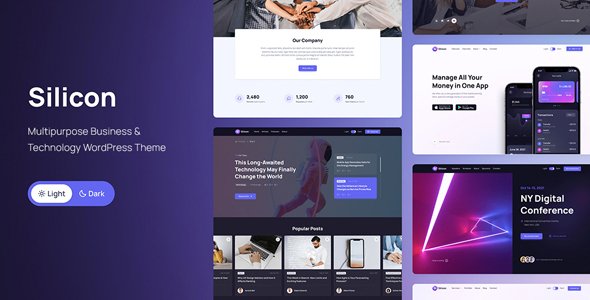
Stuck on your Silicon WordPress theme? Let's fix it.
No endless back-and-forth. Just send us the details and we'll get it done.
No obligation · Replies within 1 hour · Quote within 1 day
Setup · Customization · Bug fixes · WooCommerce integration
About Silicon WP Theme
Silicon is a premium WordPress theme built by MadrasThemes, designed specifically for SaaS products, tech startups, and software companies. It ships with a large library of pre-built demo pages covering landing pages, pricing tables, app showcases, and more. Built on Bootstrap 5, it gives developers a solid structural foundation without heavy bloat.
The theme integrates with Elementor, making page building accessible to non-developers, while still giving developers clean code to work with. It includes dark and light mode support, animated sections, and icon packs suited to tech-focused brands. Silicon is actively maintained, with regular updates that keep it compatible with current WordPress and WooCommerce releases. If you are launching a SaaS product or marketing a software tool and want a polished starting point without building from scratch, Silicon is one of the more practical choices available on ThemeForest.
Get matched with a Silicon developer in under one day
Tell us about your Silicon project. Small fixes, Silicon theme customization, or a full website build, whatever you need, we've got it covered.
We'll connect you to the right Silicon developers, define the scope, and get everything 100% clear.
You'll get one estimate, hire your preferred developer, and start collaborating.
Silicon has a lot of moving parts. Between its Elementor integration, Bootstrap 5 base, and large demo library, knowing which parts to use and which to skip takes experience. A developer who has worked with Silicon before will not spend your budget figuring out the basics.
Through Codeable, you get matched with vetted WordPress developers who know themes like Silicon well. No agencies, no junior freelancers. Estimates are free and there is no obligation to hire. If you want the theme built properly the first time, that is the right place to start.
Pros
- Large library of SaaS and tech-focused demo pages ready to import
- Built on Bootstrap 5, giving developers a familiar and well-documented framework
- Native dark and light mode support without needing additional plugins
- Actively updated by MadrasThemes with consistent WordPress and WooCommerce compatibility
- Includes tech-specific UI components like feature grids, app mockup sections, and pricing toggles
Cons
- Demo content replacement is time-consuming and not intuitive for non-developers
- Heavy reliance on Elementor means performance can degrade without proper optimization
- Bootstrap customization requires touching source files, which complicates updates
- Some demo sections use static images that need significant rework for real products
- Documentation covers basics but leaves advanced customization scenarios underexplained
Who is Silicon for?
SaaS Product Landing Pages
Silicon was built for SaaS. Its pricing table components, feature comparison layouts, and CTA section designs map directly onto what a SaaS landing page needs. Teams use it to build conversion-focused pages without starting from zero. A developer can wire up trial signup forms, integrate with tools like HubSpot or Mailchimp, and configure the layout around your actual product copy.
Mobile App Showcase Sites
The theme includes app mockup frames, device screenshot sections, and store badge blocks designed for mobile app marketing. If you are promoting an iOS or Android app, Silicon gives you the visual scaffolding. A developer can customize the mockup sections to use your actual screenshots and connect download links to the right app store destinations.
Software Company Websites
Software companies with multiple products or service tiers benefit from Silicon’s multi-page demo structures. You can build out separate pages for each product line, a dedicated support section, and a documentation hub. The theme handles the visual consistency across pages, while a developer manages the navigation logic and content architecture.
Tech Startup Marketing Sites
Tech startups often need to launch fast with a professional presence. Silicon’s pre-built demos cut the design phase significantly. A developer can import a relevant demo, replace content with your actual messaging, configure your domain and hosting, and get you live without weeks of custom design work. It is a practical approach for early-stage companies watching spend.
Digital Agency Portfolio Sites
Digital agencies use Silicon to build their own portfolio and service pages, or to deliver sites for tech-adjacent clients. The theme’s component variety means you can assemble distinct page layouts without repetition. Agencies appreciate the Bootstrap foundation because it fits into existing development workflows and makes handoff to in-house teams straightforward.

Customizing Silicon
Silicon comes with a lot out of the box, but getting it to match your exact brand usually takes real development work. Swapping demo content for your own, adjusting the color system, and modifying Bootstrap variables all require hands-on knowledge. Default layouts rarely fit a specific product without editing.
A Silicon expert can handle the parts that slow teams down: custom Elementor widgets, header and footer restructuring, pricing page logic, and WooCommerce integration for software sales. If you need features the theme does not include natively, such as custom onboarding flows or gated content sections, a developer can build those directly into your Silicon setup without breaking update compatibility. Working with someone who knows the theme saves significant time compared to trial and error.
Recommended plugins for Silicon
Silicon works well alongside a focused set of plugins. WooCommerce handles software license sales or subscriptions. WPForms or Gravity Forms manages lead capture and demo requests. For performance, pairing Silicon with a caching plugin and a CDN keeps load times tight. See our WordPress performance service if speed is a priority.
For search visibility, Silicon’s clean HTML structure gives you a good base, but you still need proper SEO configuration. Our WordPress SEO service covers that. Plugins like Loco Translate help if you are targeting multiple language markets, which is common for SaaS products with international audiences.
Not sure which plugins to use? This WordPress plugins directory covers the most popular options with reviews and setup guides.
Silicon common issues
Silicon theme demo import not working
Demo import failures in Silicon are usually caused by server memory limits, PHP timeout settings, or a missing required plugin. Check that Elementor and any Silicon-specific plugins listed in the theme documentation are installed first. Increase memory_limit to at least 256MB in your wp-config.php. If the import still stalls, try importing XML content manually and then importing widgets and settings separately. If you keep hitting errors, our WordPress bug fixing service can resolve it directly.
Silicon WordPress theme slow loading after setup
Silicon’s Elementor-heavy demos load a lot of assets by default. Start by auditing which scripts and stylesheets are loading on each page. Disable Elementor’s Google Fonts loading if you are self-hosting fonts. Use a caching plugin and enable CSS and JS minification. Lazy load images, particularly the large hero and mockup sections Silicon uses frequently. If performance is still poor after those steps, the issue may be unoptimized images from the demo content that need manual replacement.
Silicon theme Elementor widgets not showing
Missing Silicon widgets in Elementor usually means a required companion plugin is not activated. MadrasThemes ships Silicon with a plugin that registers its custom Elementor elements. Go to Plugins, find the Silicon Core or Silicon Elementor Addons plugin, and make sure it is active. If it is active and widgets are still missing, deactivate and reactivate it. A version mismatch between the theme and the plugin after an update can also cause this, so check that both are on their latest versions.
Silicon theme header not displaying correctly on mobile
Mobile header problems in Silicon are often tied to custom CSS overriding the Bootstrap responsive classes, or to Elementor responsive settings that were not configured for tablet and mobile breakpoints. Open the header template in Elementor and check the responsive visibility settings on each section and column. If you edited CSS directly without scoping it to desktop breakpoints, those rules may be collapsing the mobile menu or hiding elements at smaller screen sizes. Test in Elementor’s mobile preview before checking on a real device.
Silicon FAQ
Silicon is manageable for non-developers if you stick close to the demo layouts and use Elementor’s visual editor. However, anything beyond swapping text and images, such as restructuring sections, adjusting the Bootstrap grid, or modifying the header, will require developer help. The theme is better described as developer-friendly with a usable interface for content editors once the initial build is done.
Yes, Silicon includes WooCommerce compatibility. The theme styles core WooCommerce pages including the shop, product, cart, and checkout. It is commonly used for selling software licenses, digital products, and subscriptions. For more complex store setups, such as tiered pricing or license key delivery, additional plugins and developer configuration are needed beyond what the theme provides by default.
Silicon is built around Elementor. Most of its demo content and custom components are Elementor-based, so using it without Elementor means losing the majority of what makes the theme useful. You could technically use it with the block editor for basic pages, but the Silicon-specific widgets and layouts would not be available. If you prefer a block editor workflow, Silicon is probably not the right theme choice.
The safest approach is to use a child theme for all CSS and template changes. Never edit the parent theme files directly. Before updating, back up your site and check the MadrasThemes changelog for any breaking changes. If you have used Elementor to build pages, those are stored in the database and survive theme updates. Custom PHP modifications in parent theme files will be overwritten.
Silicon is compatible with WPML. MadrasThemes has tested the theme with WPML for multilingual setups, which makes it a reasonable option for SaaS products targeting multiple language markets. You will need WPML installed and configured separately. Some Silicon-specific strings may need to be registered manually in WPML’s string translation module to appear in the translation interface.
Hire a Silicon WordPress Developer
Whether you need a full Silicon build from a demo import, a specific feature added, or existing customizations cleaned up, a specialist will get it done faster and cleaner than generalist approaches. Our developers have direct experience with MadrasThemes products and Bootstrap-based WordPress builds.
Get a free estimate through Codeable. Describe your project, receive a quote within 24 hours, and decide from there. No commitment required.
You'll need a free Codeable account so developers can ask questions and send their quotes.