Simple Article WordPress Theme
by GoodLayers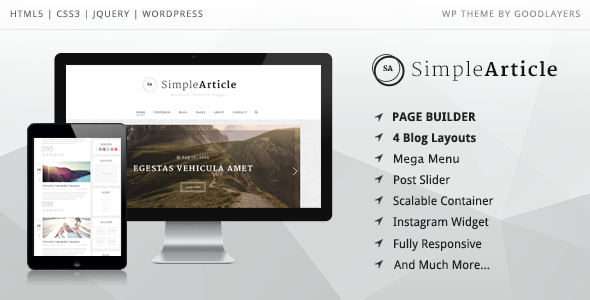
Stuck on your Simple Article WordPress theme? Let's fix it.
No endless back-and-forth. Just send us the details and we'll get it done.
No obligation · Replies within 1 hour · Quote within 1 day
Setup · Customization · Bug fixes · WooCommerce integration
About Simple Article WP Theme
Simple Article is a WordPress theme built by GoodLayers, a developer known for clean, publication-focused designs. The theme is aimed at bloggers, writers, and content-heavy sites that want a readable, distraction-free layout without sacrificing flexibility.
It ships with GoodLayers’ PageBuilder, giving you drag-and-drop control over page structure. Typography options are strong, which matters for article-driven sites. The theme supports multiple post formats, custom widgets, and has a responsive layout that holds up on mobile without much tweaking.
It sits in a crowded space of blogging themes, but Simple Article earns its place by keeping the focus on content presentation. If your site lives or dies by how readable your posts are, this theme is worth a serious look. Setup is straightforward, and the GoodLayers documentation covers most common scenarios.
Get matched with a Simple Article developer in under one day
Tell us about your Simple Article project. Small fixes, Simple Article theme customization, or a full website build, whatever you need, we've got it covered.
We'll connect you to the right Simple Article developers, define the scope, and get everything 100% clear.
You'll get one estimate, hire your preferred developer, and start collaborating.
GoodLayers themes have their own framework, and Simple Article is no different. If you run into layout issues, need custom templates, or want to extend the theme beyond its defaults, you need someone who has worked inside that system before.
Through Codeable, you get matched with vetted WordPress developers who know GoodLayers themes. No job boards, no guessing. You post your project, get a clear estimate, and decide if you want to move forward. No obligation at any point.
Pros
- Clean typography defaults that work well for long-form articles out of the box
- GoodLayers PageBuilder included, no extra page builder plugin required
- Multiple demo layouts available for one-click import to speed up setup
- Responsive layout handles mobile reading well without custom CSS fixes
- Well-structured code makes it easier for developers to add child theme customizations
Cons
- GoodLayers PageBuilder is proprietary, so switching themes means rebuilding page layouts
- Not ideal for WooCommerce stores beyond basic product listing pages
- Advanced header customization requires CSS or developer help outside the panel options
- Demo content import can bring in placeholder images that need replacing before launch
- Theme updates have been infrequent, which may raise compatibility concerns with newer WordPress versions
Who is Simple Article for?
Personal Blog
Simple Article works well for solo bloggers who want their writing front and center. The typography is readable, the layout stays out of the way, and you can set up a clean homepage showing recent posts without any custom development. It handles categories and tags well, which matters once your archive starts growing.
Online Magazine
For a multi-author magazine site, Simple Article gives you the post format support and layout flexibility you need. Featured images display cleanly, and the grid-based listing pages scale well as content volume increases. A developer can configure author pages and category templates to match your editorial structure.
Niche News Site
If you’re running a niche news site covering a specific industry, Simple Article keeps the focus on content discovery. The sidebar widget areas work well for recent posts, popular articles, and newsletter signups. The clean markup also gives search engines a clear structure to crawl, which helps with indexing news content quickly.
Portfolio with Writing Samples
Writers who want to display a portfolio alongside long-form samples will find Simple Article handles both without conflict. You can create dedicated portfolio pages using the PageBuilder while keeping the blog section in standard article format. The result is a site that reads professionally without looking like a template.
Corporate Thought Leadership Blog
Companies publishing thought leadership content benefit from Simple Article’s credibility-focused design. The theme presents content in a way that feels editorial rather than promotional. It’s easy to maintain by non-technical staff, and the clean structure supports internal linking strategies that drive readers deeper into the site.

Customizing Simple Article
Most customization in Simple Article happens through the WordPress Customizer and the GoodLayers PageBuilder. You can adjust header layouts, sidebar positions, font pairings, and color schemes without touching code. The theme includes several pre-built demo layouts you can import and modify as a starting point.
For anything beyond the built-in options, you’ll want a Simple Article expert who knows GoodLayers’ framework. Custom post templates, non-standard header structures, or deeper WooCommerce integration all require PHP and CSS work that goes beyond what the settings panel offers.
Child theme setup is straightforward, and GoodLayers provides hooks in the right places to make modifications cleaner. A developer familiar with Simple Article can get you from a stock install to a fully customized site without rebuilding things from scratch.
Recommended plugins for Simple Article
Simple Article pairs well with popular plugins without much conflict. WooCommerce works for simple shop setups, though the theme isn’t primarily built for ecommerce. Yoast SEO and Rank Math both integrate cleanly. Contact Form 7 and WPForms drop in without layout issues.
For performance, caching plugins like WP Rocket work well alongside the theme. If your site is image-heavy, pairing it with proper image optimization is worth doing early. You can read more about WordPress performance tuning to get the most out of your setup.
For SEO, the theme’s clean markup gives you a solid base. Extending that with a dedicated WordPress SEO service covers the gaps the theme itself can’t address.
Not sure which plugins to use? This WordPress plugins directory covers the most popular options with reviews and setup guides.
Simple Article common issues
Simple Article theme not loading styles after WordPress update
This usually points to a stylesheet path issue or a PHP conflict introduced in the update. Start by clearing your cache and checking the browser console for 404 errors on CSS files. If you’re running a child theme, verify the parent theme path in your child theme’s stylesheet header. If the issue persists after a cache clear, deactivate plugins one by one to isolate a conflict. For a faster fix, our WordPress bug fixing service can diagnose and resolve this quickly.
GoodLayers PageBuilder content not displaying correctly in Simple Article
PageBuilder display issues in Simple Article often happen when the GoodLayers plugin is out of sync with the theme version, or when a caching plugin is serving stale output. First, make sure both the theme and the GoodLayers plugin are on their latest versions. Then clear all caches, including server-side if applicable. If shortcodes are rendering as raw text, the PageBuilder plugin may have been deactivated. Reactivating it usually resolves that immediately.
Simple Article header layout broken on mobile
Mobile header breaks in Simple Article typically come from custom CSS that wasn’t written with responsive breakpoints in mind, or from a menu that’s too wide for smaller screens. Open Chrome DevTools and check which CSS rules are overriding the mobile styles. The theme’s built-in mobile menu should activate below 768px. If it isn’t, check whether a custom CSS rule is setting the desktop nav to display block at all screen sizes.
Simple Article demo import failing or showing blank pages
Demo import failures in Simple Article are usually caused by memory limits, file upload size restrictions, or a timeout during the import process. In your wp-config.php, increase WP_MEMORY_LIMIT to at least 256M. Also check your server’s max_execution_time and upload_max_filesize settings in php.ini. If you’re on shared hosting, contact your host to increase these temporarily. If the import completes but pages are blank, check whether required plugins were installed before running the import.
Simple Article FAQ
GoodLayers has slowed down update releases for Simple Article compared to their newer themes. The theme still functions on current WordPress versions, but you should check the changelog before purchasing or upgrading. If you’re concerned about long-term compatibility, having a developer on hand to apply fixes when needed is a practical approach. Our WordPress maintenance service can cover this.
Simple Article is built around the GoodLayers PageBuilder, which is included with the theme. You can technically install Elementor on top of it, but you’ll have two page builders running simultaneously, which creates conflicts and performance overhead. Most developers recommend staying within the GoodLayers system or replacing it entirely with Elementor and a compatible base theme.
Simple Article can display WooCommerce products, but it wasn’t designed as an ecommerce theme. Basic shop pages work, but product archive layouts, cart pages, and checkout styling will need custom CSS to look polished. If ecommerce is a primary goal, a theme built specifically for WooCommerce will save you significant development time and avoid ongoing styling issues.
Create a new folder in wp-content/themes with your child theme name. Inside it, add a style.css file with the correct Template header pointing to simple-article, and a functions.php file that enqueues both the parent and child stylesheets. This keeps your customizations safe during theme updates. GoodLayers documents this process, and any WordPress developer can set it up in under 30 minutes.
Simple Article produces reasonably clean HTML markup, which gives search engines a clear structure to parse. It doesn’t include schema markup by default, but adding that through a plugin like Rank Math is straightforward. The theme is lightweight enough that it doesn’t create performance problems on its own. Pair it with an SEO plugin and good content practices and you have a solid foundation.
Hire a Simple Article Developer
If you need a Simple Article expert for a custom build, design changes, or to fix something that’s broken, we can help. Work is handled through Codeable, where every developer is vetted and reviewed. You get a clear estimate before anything starts, and there’s no pressure to commit.
Get a free estimate and describe what you need. You’ll hear back within 24 hours.
You'll need a free Codeable account so developers can ask questions and send their quotes.