Simple & Elegant WordPress Theme
by withemes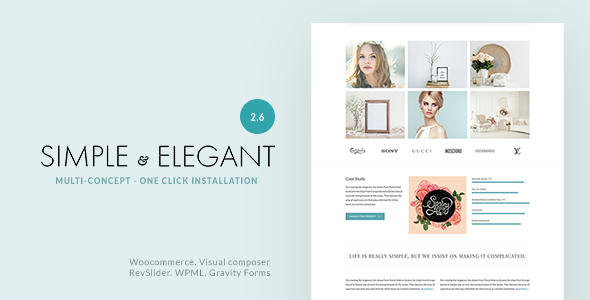
Stuck on your Simple & Elegant WordPress theme? Let's fix it.
No endless back-and-forth. Just send us the details and we'll get it done.
No obligation · Replies within 1 hour · Quote within 1 day
Setup · Customization · Bug fixes · WooCommerce integration
About Simple & Elegant WP Theme
Simple & Elegant is a free WordPress theme developed by WiThemes. It is built for blogs, personal sites, and small business pages that need a clean, readable layout without a lot of setup overhead. The theme follows a minimalist design philosophy: light backgrounds, clear typography, and a straightforward two or three column structure depending on your sidebar preference.
It ships with basic widget areas, a custom header option, and support for featured images. The code is lightweight, which helps with load times on shared hosting. Simple & Elegant suits users who want a decent-looking site out of the box without touching CSS or hiring a developer. That said, anyone who wants to go beyond the defaults will hit the limits of the free version fairly quickly.
Get matched with a Simple & Elegant developer in under one day
Tell us about your Simple & Elegant project. Small fixes, Simple & Elegant theme customization, or a full website build, whatever you need, we've got it covered.
We'll connect you to the right Simple & Elegant developers, define the scope, and get everything 100% clear.
You'll get one estimate, hire your preferred developer, and start collaborating.
Simple & Elegant is easy to set up but harder to extend on your own. If you need a customized layout, WooCommerce integration, or specific design changes, working with a developer who knows the theme saves you hours of troubleshooting. Through Codeable, you get matched with a vetted WordPress expert within 24 hours. Every project starts with a free estimate and there is no obligation to hire. It is a straightforward way to get professional work done on a fixed scope.
Pros
- Lightweight code keeps page load times low on basic hosting
- Free to use with no upsell prompts inside the admin panel
- Clean typography makes long-form blog content easy to read
- Compatible with most major WordPress plugins out of the box
- Simple setup means a new site can be live in under an hour
Cons
- Customization options in the Customizer are limited compared to modern themes
- No built-in page builder support or block-based template editing
- WooCommerce shop pages require additional CSS to look presentable
- No dedicated support channel since it is a free theme with no premium tier
- Design looks dated compared to themes released in the last two years
Who is Simple & Elegant for?
Personal Blog
Simple & Elegant fits a personal blog well. The default layout puts content first, sidebar second, and the typography is clean enough that posts are comfortable to read on desktop and mobile. There is no bloat. If you write regularly and want readers focused on your words rather than design elements, this theme handles that without any configuration.
Small Business Website
A small business that needs a basic online presence, contact information, and a few service pages can use Simple & Elegant as a starting point. It is not designed for complex business sites, but for a local service provider or freelancer who wants something professional and fast, it covers the basics. A developer can extend it with a custom homepage and contact form integration.
Portfolio Site
Creatives who keep things simple can use this theme as a portfolio base. Featured images display cleanly in the blog loop, which works for image-heavy posts. For a more structured portfolio layout with custom post types and grid displays, a WordPress developer would need to modify the theme templates or add a portfolio plugin.
Non-Profit or Community Page
Non-profits and community groups often need a readable, accessible site on a tight budget. Simple & Elegant costs nothing and runs efficiently. It supports donation plugin embeds and event listings through standard plugins. The understated design works in formal contexts where an elaborate layout would feel out of place.
Niche Content Site
Sites built around a specific topic, like recipe blogs, travel journals, or hobby guides, benefit from the content-forward structure. Simple & Elegant keeps navigation minimal and keeps the reader on the post. Adding category widgets and a search bar in the sidebar rounds out the experience for a reader who wants to explore related content.

Customizing Simple & Elegant
Out of the box, Simple & Elegant gives you the WordPress Customizer for basic changes: site title, background color, header image, and widget placement. That covers a lot of ground for a simple blog. But if you need a custom layout, specific fonts, WooCommerce styling, or a homepage that does not look like a standard post feed, you will need to write custom CSS or edit the template files directly.
A Simple & Elegant expert can handle that work cleanly without breaking the theme during updates. Child theme setup, layout modifications, custom post types, and plugin integration are all common requests. Having someone who already knows the WiThemes codebase saves time and avoids the trial-and-error that comes with editing unfamiliar PHP templates on a live site.
Recommended plugins for Simple & Elegant
Simple & Elegant works with most standard WordPress plugins. For contact forms, WPForms and Contact Form 7 both slot in without issues. Yoast SEO and Rank Math are compatible for on-page optimization. WooCommerce can be added, but the default theme styling does not cover shop pages well, so expect to add custom CSS.
For performance, pairing the theme with a caching plugin like WP Rocket or LiteSpeed Cache makes a noticeable difference. Learn more about WordPress performance tuning and SEO optimization to get the most from a lightweight theme like this one.
Not sure which plugins to use? This WordPress plugins directory covers the most popular options with reviews and setup guides.
Simple & Elegant common issues
Simple & Elegant theme header image not showing
If your header image is not appearing, first check that the image meets the recommended dimensions set in the theme. Go to Appearance, then Customizer, then Header Image and confirm the file is uploaded correctly. If the Customizer shows the image but the front end does not, a caching plugin may be serving an old version of the page. Clear your cache, then hard reload the browser. If the problem persists, a theme file conflict may need investigation through the WordPress bug fixing service.
Simple & Elegant sidebar not displaying on mobile
Simple & Elegant was not built with a fully responsive sidebar in mind. On narrow screens, the sidebar often drops below the main content or disappears depending on the CSS breakpoints in the theme. This is a known structural limitation. Fixing it requires editing the theme stylesheet to adjust the column behavior at mobile widths. To avoid losing changes during theme updates, set up a child theme first, then apply the responsive CSS there.
Simple & Elegant theme not compatible with WooCommerce
WooCommerce works from a plugin standpoint, but Simple & Elegant has no dedicated WooCommerce template files. That means product pages, cart, and checkout will use default WooCommerce styling which often clashes with the theme. The fix is to add a woocommerce.css file in a child theme or override specific WooCommerce templates. A developer familiar with WiThemes can handle this without disrupting the rest of the site layout.
Simple & Elegant custom CSS not applying after update
If custom CSS added through the Customizer is not showing after a theme update, check whether the CSS was saved in the theme options rather than the Additional CSS field in the Customizer. CSS stored in theme options can be wiped on update. Moving all custom CSS into the Customizer Additional CSS field or a child theme stylesheet will prevent this from happening again. Always back up your CSS before running theme updates.
Simple & Elegant FAQ
Yes. Simple & Elegant is a free WordPress theme available in the official WordPress theme directory. There is no premium version or paid upgrade. WiThemes released it as a fully free product. That also means there is no dedicated support forum or paid support channel, so troubleshooting relies on community resources or hiring a developer directly.
Simple & Elegant was developed by WiThemes. They are a theme developer with several free themes listed in the WordPress.org theme repository. WiThemes does not appear to offer a premium support plan for this theme, so maintenance and customization work is typically handled independently or through a third-party WordPress developer.
Elementor can be installed alongside Simple & Elegant, but the theme was not designed with page builder compatibility in mind. You may see styling conflicts on builder-edited pages. The theme does not include full-width page templates that page builders typically require for clean output. A child theme with a blank page template is usually the workaround.
Simple & Elegant does not include a font selection option in the Customizer. To add a custom font, you need to enqueue the font via functions.php in a child theme and update the CSS to apply it to headings and body text. Google Fonts are the most common choice. If you are not comfortable editing PHP files, a developer can set this up quickly.
Yes. Migrating to a different theme does not affect your content since posts, pages, and media are stored in the database independently of the theme. You may need to reconfigure widgets and menus after switching. If you are also moving to a new host, check out the WordPress migration service for a smoother transition.
Hire a Simple & Elegant WordPress Developer
Need changes to your Simple & Elegant site? Whether it is a layout fix, a new feature, plugin integration, or a full redesign within the theme, a specialist can turn it around faster than going it alone. Get a free estimate through Codeable and connect with a vetted Simple & Elegant developer within 24 hours. No commitment required. Describe your project, get a clear quote, and decide from there.
You'll need a free Codeable account so developers can ask questions and send their quotes.