Skylab WordPress Theme
by MegaTheme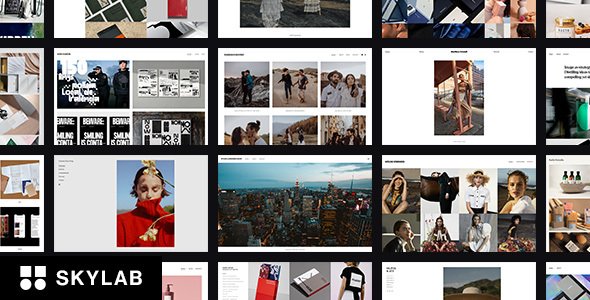
Stuck on your Skylab WordPress theme? Let's fix it.
No endless back-and-forth. Just send us the details and we'll get it done.
No obligation · Replies within 1 hour · Quote within 1 day
Setup · Customization · Bug fixes · WooCommerce integration
About Skylab WP Theme
Skylab is a WordPress theme by MegaTheme built for creative agencies, portfolios, and digital studios. It ships with a visual drag-and-drop page builder, multiple pre-built demo layouts, and a header/footer builder that covers most layout needs without writing a line of code.
The theme leans on clean markup and modular sections, which keeps pages easy to manage. MegaTheme updates Skylab regularly, and compatibility with WooCommerce and major plugins is maintained across releases.
Where Skylab stands out is in its demo variety. Each demo targets a specific industry and can be imported with one click. That makes initial setup fast, though getting the details right often takes more work than the demo suggests. For teams wanting a polished result without starting from scratch, Skylab is a practical starting point.
Get matched with a Skylab developer in under one day
Tell us about your Skylab project. Small fixes, Skylab theme customization, or a full website build, whatever you need, we've got it covered.
We'll connect you to the right Skylab developers, define the scope, and get everything 100% clear.
You'll get one estimate, hire your preferred developer, and start collaborating.
Finding a qualified Skylab developer on your own takes time you probably don’t have. Codeable connects you with vetted WordPress specialists who know MegaTheme’s architecture and can handle anything from a quick fix to a full custom build.
Every project on Codeable starts with a free estimate. No commitment, no risk. You describe the work, get matched with a developer within 24 hours, and decide from there. If you need a Skylab specialist who can deliver reliable results, that’s the fastest way to find one.
Pros
- One-click demo import gets a working site live in minutes
- Built-in header and footer builder with multiple layout options
- WooCommerce integration is solid with dedicated product page controls
- Regular updates from MegaTheme with good plugin compatibility
- Modular section-based layout makes page structure easy to edit
Cons
- Default script loading is heavy and needs optimization for fast scores
- Some Customizer options only apply to specific demo templates, not globally
- Page builder shortcodes can create lock-in if you switch themes later
- Documentation is shallow for advanced customization and child themes
- Mobile layout adjustments often require manual CSS rather than panel controls
Who is Skylab for?
Creative Agency
Skylab’s agency-focused demos include multi-page layouts with service sections, team grids, and case study templates. A Skylab developer can adapt these to match your brand identity, add custom animations, and wire up a contact form that feeds directly into your CRM.
Freelance Portfolio
The portfolio grid options in Skylab support filtering by category, which works well for freelancers showing work across multiple disciplines. A Skylab specialist can extend this with custom post types, lightbox galleries, and project detail pages that match your personal style.
Digital Product Store
Skylab’s WooCommerce templates cover product listings, cart, and checkout pages with styling that matches the rest of the theme. A developer can customize product page layouts, add upsell sections, and configure tax and shipping display to meet your store’s specific requirements.
Photography Studio
Full-width image sections and gallery blocks make Skylab a practical base for photography studios. A Skylab expert can set up high-resolution image galleries with lazy loading, build a booking inquiry form, and configure password-protected client galleries for private delivery.
SaaS Landing Page
Skylab includes hero sections, feature grids, pricing tables, and testimonial blocks that suit SaaS landing pages well. A developer can build a single-page layout with scroll-triggered sections, integrate a trial signup form, and connect it to your email marketing platform.

Customizing Skylab
Skylab’s Customizer panel covers typography, colors, spacing, and layout controls, but the real depth is inside the page builder. Each section and element has its own settings panel, so you can fine-tune padding, backgrounds, and responsive behavior at the block level.
A Skylab expert can go further: custom CSS, child theme development, and hook-based modifications let you reshape the theme without breaking updates. Common customization requests include custom header layouts, unique post type templates, and adjustments to the WooCommerce product pages that the default options don’t reach.
If you’ve hit a wall with the built-in controls, or the demo layout doesn’t match your brand, working with a Skylab specialist saves significant time and avoids the trial-and-error that comes with modifying theme files directly.
Recommended plugins for Skylab
Skylab works well with Elementor Pro, WooCommerce, and WPML for multilingual setups. For performance, pairing it with a caching plugin and a CDN is recommended since the theme loads several scripts by default. A developer can audit and defer non-critical assets to cut load times significantly. See our WordPress performance service for details.
On the SEO side, Skylab is compatible with Yoast SEO and Rank Math, but schema setup and breadcrumb configuration benefit from specialist attention. Our WordPress SEO optimisation service covers technical SEO improvements that extend beyond what the theme provides out of the box.
Not sure which plugins to use? This WordPress plugins directory covers the most popular options with reviews and setup guides.
Skylab common issues
Skylab theme not loading fonts correctly
Font loading issues in Skylab usually trace back to a Google Fonts API change or a caching plugin serving stale CSS. First, clear all caches including server-side, plugin, and browser. Check the Typography settings in the Customizer to confirm the correct font family is selected. If fonts still fail, inspect the network tab in your browser’s developer tools to identify blocked requests. A firewall or CSP rule is often blocking the Google Fonts domain.
Skylab page builder layout broken after update
After a Skylab or page builder update, layouts can break due to outdated element data or a conflict with a plugin that hooks into the builder’s output. Start by clearing the page builder cache from its settings panel. If that doesn’t resolve it, deactivate other plugins one at a time to isolate the conflict. For persistent layout corruption, a developer can restore the pre-update page builder data from a backup. Visit our WordPress bug fixing service if you need hands-on help.
Skylab demo import not working
Demo imports failing in Skylab are usually caused by PHP memory limits or upload size restrictions on the server. The XML file and media imports require adequate resources to complete. Check your php.ini or wp-config.php for memory_limit and upload_max_filesize values and increase them if needed. Some hosts block external HTTP requests, which breaks the media import step. Contact your host to whitelist outbound requests, or import content and media separately using the built-in WordPress importer.
Skylab mobile menu not opening
When Skylab’s mobile menu stops responding, the cause is almost always a JavaScript conflict. A plugin adding its own jQuery instance or a script loading in the wrong order can block the menu toggle. Open your browser console and look for JS errors on mobile viewport. Deactivate recently added plugins to find the conflict. If the menu worked before a theme update, compare the header template files in a child theme to the updated parent theme to spot the regression.
Skylab WooCommerce product page styling missing
Missing WooCommerce styles in Skylab typically happen after a WooCommerce major version update that changes template structure. Skylab’s bundled WooCommerce templates may be outdated and override the new markup. Go to WooCommerce > Status > Tools and run the template update check. Copy outdated templates into your child theme’s woocommerce folder and apply the upstream changes. Our WordPress bug fixing service handles WooCommerce template conflicts for Skylab specifically.
Skylab header overlapping page content
A Skylab header overlapping content is a CSS positioning issue, most often triggered when the transparent header option is enabled but the page content doesn’t have matching top padding. Go to the Header Builder settings and check if the sticky or transparent header mode is active. Add a top margin or padding to the first section on affected pages via the page builder’s section settings. If this affects all pages globally, add a CSS rule targeting the main content wrapper with padding-top equal to the header height.
Skylab custom CSS not saving
Custom CSS not saving in Skylab usually points to a caching problem or a permissions issue with the uploads directory. After adding CSS in the Customizer’s Additional CSS panel, publish the changes and immediately clear all caches. If the styles still don’t appear, check whether your browser is loading a cached version of the stylesheet. For persistent issues, verify that wp-content/uploads/customizer is writable. Using a child theme’s style.css is a more reliable method for custom CSS that needs to persist across updates.
Skylab images not displaying on homepage
Images not displaying on Skylab’s homepage often means the wrong image was set in the section settings or image URLs changed after a site migration. Open the affected section in the page builder and reselect the background image. If images are broken site-wide after a domain or host change, run a search-replace on the database to update old URLs. The Better Search Replace plugin handles this safely. If thumbnails are missing, run wp media regenerate via WP-CLI to rebuild attachment sizes.
Skylab contact form not sending emails
Skylab contact forms not sending emails is a server mail delivery problem, not a theme issue. Most shared hosts restrict the PHP mail() function. Install an SMTP plugin such as WP Mail SMTP and connect it to a transactional email service like Mailgun or SendGrid. Once configured, use the plugin’s test email feature to verify delivery. If emails send from the test but not from the form, check the form plugin’s from address. It must match an authenticated domain on your SMTP account. See our WordPress bug fixing service for email delivery troubleshooting.
Skylab slow page speed on mobile
Skylab loads multiple CSS and JS files by default, which hurts mobile performance scores. Start by enabling script minification and combination through a plugin like LiteSpeed Cache or WP Rocket. Use the browser developer tools to identify render-blocking resources and defer them where possible. Compress images using a plugin with WebP conversion. Skylab’s page builder adds inline styles per element, so a developer can audit and consolidate these. Removing unused demo assets that weren’t cleaned up after import also makes a measurable difference.
Skylab FAQ
Skylab is a multipurpose WordPress theme developed by MegaTheme. It includes a drag-and-drop page builder, multiple one-click demo layouts, and a header/footer builder. It targets creative agencies, portfolios, and business sites. The theme is sold through ThemeForest and includes 6 months of support from the developer on purchase.
Yes, Skylab includes WooCommerce support with styled templates for shop, product, cart, and checkout pages. The styling integrates with the overall theme design. For heavily customized stores, a Skylab developer can extend the WooCommerce templates inside a child theme to match specific layout or functionality requirements without losing theme update compatibility.
Skylab includes a one-click demo importer accessible from the theme panel in the WordPress dashboard. Select the demo you want, click import, and the process pulls in pages, media, widgets, and settings. Your server needs adequate PHP memory and upload limits for the import to complete. Increase memory_limit to at least 256MB before starting.
Skylab’s demo content is built entirely within its bundled page builder, so removing the builder would leave raw shortcode content on your pages. You can technically use the Gutenberg block editor for new pages, but existing pages built in the visual builder won’t convert automatically. Starting fresh with Gutenberg is possible but means rebuilding all content.
The fastest way is to post a project on Codeable, where vetted Skylab specialists review your requirements and send estimates within 24 hours. There’s no obligation to hire. You can also get a free estimate here and describe your project before committing to anything.
Skylab ships with its own bundled page builder rather than being built specifically for Elementor. You can install Elementor alongside Skylab and use it for new pages, but the demo content uses the theme’s native builder. Running both builders on the same site adds page weight, so a developer can help you consolidate to one approach if needed.
Always use a child theme for customizations. With a child theme in place, updating Skylab from the WordPress dashboard overwrites only the parent theme files and leaves your modifications untouched. Without a child theme, custom CSS and template edits are lost on every update. If you haven’t set up a child theme yet, do it before the next update.
Skylab’s code structure is reasonably clean and compatible with Yoast SEO and Rank Math. It supports meta tags, Open Graph, and structured data through those plugins. The theme itself doesn’t generate schema automatically, so plugin-based configuration is needed. For technical SEO work beyond plugin setup, see our WordPress SEO optimisation service.
Yes, Skylab can be migrated to a new host without issue. The process involves moving the database and files, updating the site URL in the database, and reconfiguring any server-specific settings. If your Skylab site uses absolute image URLs in the page builder, a search-replace step is required after migration. Our WordPress migration service covers this fully.
Skylab loads multiple scripts and stylesheets that aren’t always needed on every page. The page builder also adds inline CSS per element. Common fixes include enabling caching, deferring render-blocking scripts, converting images to WebP, and removing unused demo assets. A performance audit from a Skylab developer can identify the specific bottlenecks on your site. See our WordPress performance service for more.
Hire a Skylab Developer
Whether you need layout customization, a bug fixed, or a full Skylab build from a demo import to launch, our developers have done it before. Work is scoped clearly, delivered through Codeable, and backed by a satisfaction guarantee.
Post your project and get a free estimate with no obligation to hire. Get a Free Estimate and describe what you need. A Skylab expert will review it and respond within 24 hours.
You'll need a free Codeable account so developers can ask questions and send their quotes.