Slide One WordPress Theme
by GoodLayers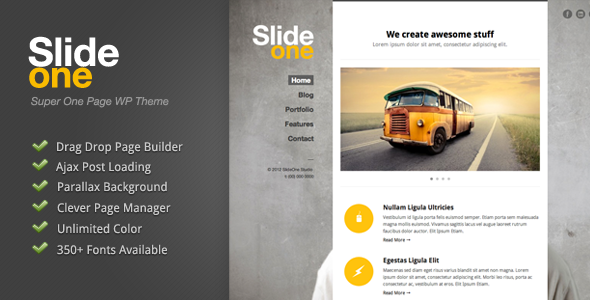
Stuck on your Slide One WordPress theme? Let's fix it.
No endless back-and-forth. Just send us the details and we'll get it done.
No obligation · Replies within 1 hour · Quote within 1 day
Setup · Customization · Bug fixes · WooCommerce integration
About Slide One WP Theme
Slide One is a WordPress theme by GoodLayers built around full-screen, section-based layouts with smooth scroll navigation. It’s designed for agencies, portfolios, and creative studios that want a bold single-page presentation with animated transitions between sections.
GoodLayers ships Slide One with their proprietary page builder, a set of pre-built demo layouts, and built-in support for Revolution Slider. The theme handles parallax backgrounds, video sections, and icon-based features without needing third-party plugins for the basics.
It targets businesses that prioritise visual impact over blog-heavy content structures. If your goal is a clean, scroll-driven one-page site that loads fast and looks polished out of the box, Slide One is a practical starting point worth examining closely.
Get matched with a Slide One developer in under one day
Tell us about your Slide One project. Small fixes, Slide One theme customization, or a full website build, whatever you need, we've got it covered.
We'll connect you to the right Slide One developers, define the scope, and get everything 100% clear.
You'll get one estimate, hire your preferred developer, and start collaborating.
Slide One customisation moves quickly when someone already knows the GoodLayers builder’s limitations. The developers available through Codeable have hands-on experience with the theme’s section system, animation hooks, and options panel. You post your project, receive a scoped estimate within 24 hours, and only proceed if the scope and price work for you. No retainers, no guesswork on cost.
Pros
- Full-screen section layouts look polished without heavy custom CSS
- GoodLayers page builder handles parallax and video backgrounds natively
- Revolution Slider is bundled, saving on an additional licence
- Pre-built demo content imports quickly and covers common use cases
- WooCommerce compatibility allows product sections alongside portfolio content
Cons
- GoodLayers builder is proprietary and creates content lock-in if you switch themes
- Theme options panel is separate from the WordPress Customizer, which confuses new users
- Limited native blog layout options given the single-page focus
- Updates can require manual child theme checks to avoid overwriting customisations
- Support response times from GoodLayers can be slow during busy periods
Who is Slide One for?
Creative Agency Portfolio
Agencies use Slide One’s section-based layout to present services, case studies, and team members in a single scroll-driven experience. Each section acts as a standalone visual block. A Slide One expert can map your existing brand assets into the GoodLayers builder and configure smooth transitions between service categories without custom JavaScript from scratch.
Freelance Designer Showcase
Freelancers need a portfolio that loads fast and makes work the focus. Slide One’s full-screen image sections handle this well. A Slide One specialist can configure project filtering, custom hover states on portfolio items, and a contact section that feeds directly into your preferred CRM or email tool without breaking the layout on mobile.
Product Launch Landing Page
Single-product launches benefit from Slide One’s ability to layer video backgrounds, feature breakdowns, and pricing sections into one continuous page. A Slide One developer can integrate WooCommerce checkout within the layout, add countdown timer plugins to specific sections, and ensure the page passes Core Web Vitals before your launch date.
Photography Studio Site
Photography sites need full-bleed images and minimal interface clutter. Slide One delivers both. A Slide One specialist can configure gallery sections with lightbox support, lazy loading for large image sets, and a booking form embedded directly into the contact section. Performance tuning is essential here given the image volume.
Startup One-Page Website
Early-stage startups often need a fast, credible web presence without a large budget. Slide One’s demo layouts cover the standard hero, features, pricing, and contact structure. A Slide One developer can adapt a relevant demo to your brand, connect your email marketing tool, and have a professional site live within a tight timeline.

Customizing Slide One
The GoodLayers page builder gives you drag-and-drop control over section order, background types, typography, and colour schemes. Most visual changes are handled through theme options rather than the WordPress Customizer, which has a learning curve for users coming from other themes.
A Slide One expert can accelerate setup significantly. Custom section templates, non-standard navigation styles, and third-party plugin integration all require code-level work that goes beyond what the builder exposes. This includes custom post type integration, GSAP animation overrides, and header modifications.
Child theme development is strongly recommended before making any code changes. A Slide One developer will structure the project so your customisations survive theme updates without being wiped on the next version push from GoodLayers.
Recommended plugins for Slide One
Slide One integrates cleanly with WooCommerce for product showcase sections, making it usable for small shop fronts alongside portfolio content. Contact Form 7 and WPForms both work within the GoodLayers builder rows without layout conflicts.
For performance, image-heavy full-screen sections need proper lazy loading and caching configuration. A specialist can tune this through our WordPress performance optimisation service.
If you’re driving organic traffic to your one-page site, structured data and on-page SEO setup are essential. That work is covered through our WordPress SEO optimisation service.
Not sure which plugins to use? This WordPress plugins directory covers the most popular options with reviews and setup guides.
Slide One common issues
Slide One sections not displaying correctly after update
Post-update display issues in Slide One are usually caused by CSS conflicts between the updated theme files and customisations written directly into the parent theme’s stylesheet. Check whether a child theme was in use before the update. If not, the custom CSS has likely been overwritten. Restore from a backup, move all custom styles into a child theme, then re-apply the update. For persistent layout breaks, our WordPress bug fixing service can diagnose and restore the layout efficiently.
GoodLayers page builder content missing or broken on Slide One
Missing GoodLayers builder content usually means the builder’s shortcodes are rendering as plain text, which happens when the theme is deactivated temporarily or the builder plugin is disabled. Go to Appearance and confirm Slide One is the active theme. Then check that the GoodLayers page builder plugin is active under Plugins. If content still appears broken after both checks, a database shortcode conflict may exist and needs manual inspection. Our WordPress bug fixing service covers this kind of data-level diagnosis.
Slide One navigation not scrolling to correct section
Navigation scroll offset errors in Slide One are typically caused by a fixed header height that doesn’t match the offset value set in theme options. Open the theme options panel, find the header offset or scroll offset field, and adjust the pixel value to match your actual header height. If you’re using a custom header height set via CSS, the JavaScript scroll calculation won’t pick it up automatically and needs a small script override to read the correct computed height.
Slide One site slow loading on mobile
Mobile slowness on Slide One sites is almost always tied to full-resolution images loaded into full-screen section backgrounds without responsive image handling. Use a plugin like Imagify or ShortPixel to compress and convert images to WebP. Set mobile-specific background images in the GoodLayers section settings rather than relying on CSS scaling of desktop images. Also disable Revolution Slider on mobile if the slider isn’t essential for smaller screens, as it adds significant script weight.
Slide One FAQ
GoodLayers has maintained Slide One with periodic updates, though the release cadence is slower compared to larger theme shops. Before purchasing or building on Slide One, check the ThemeForest changelog for the date of the last update. For existing sites, always test updates on a staging environment first. A Slide One specialist can handle update management as part of ongoing maintenance work.
Slide One is built around the GoodLayers page builder and its section system. Replacing it with Elementor would mean rebuilding every page from scratch inside Elementor and abandoning the GoodLayers layout engine entirely. Some developers do this intentionally to reduce long-term lock-in, but it’s a significant rebuild project rather than a simple swap. A Slide One developer can advise on whether the migration is worth the cost for your specific site.
After activating Slide One, go to GoodLayers Theme Options and look for the demo importer section. Select the demo closest to your target layout and run the import. This pulls in pages, media, menus, and settings. Make sure your server’s PHP memory limit is at least 256MB before importing, as large demo packages can fail on lower limits. Back up your database before running any demo import.
Slide One functions on WordPress 6.x for most use cases, but compatibility depends on the specific version of the theme installed. The GoodLayers builder predates the Block Editor and doesn’t integrate with it, so the classic editor workflow is still required. Test thoroughly on a staging site before updating a live Slide One installation to a new major WordPress version.
Slide One developer rates through Codeable typically range based on project scope. A small fix or configuration task will cost less than a full custom build from a demo. Codeable provides a free scoped estimate before any commitment, so you know the cost before work begins. Get a Free Estimate to see what your specific project would cost with a vetted Slide One specialist.
Hire a Slide One Developer
Whether you need a full Slide One build from a demo, a specific section redesigned, or an existing site fixed and extended, a vetted developer can scope the work accurately from day one. Projects are posted through Codeable, matched to specialists with GoodLayers experience, and covered by a satisfaction guarantee. Get a Free Estimate to start with no obligation to hire.
You'll need a free Codeable account so developers can ask questions and send their quotes.