Sofani WordPress Theme
by YoloTheme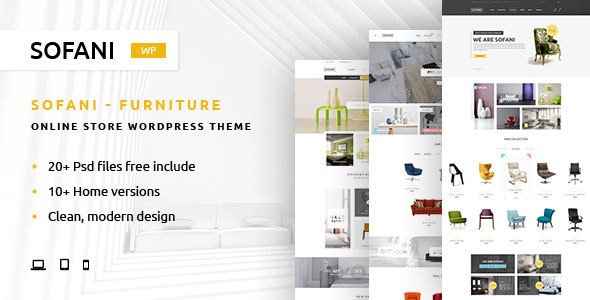
Stuck on your Sofani WordPress theme? Let's fix it.
No endless back-and-forth. Just send us the details and we'll get it done.
No obligation · Replies within 1 hour · Quote within 1 day
Setup · Customization · Bug fixes · WooCommerce integration
About Sofani WP Theme
Sofani is a WordPress theme built by YoloTheme, designed for furniture stores, interior design studios, and home decor shops. It ships with a clean, minimal layout that puts product photography front and center. Built on WooCommerce, it supports product filtering, AJAX cart, wishlist functionality, and a polished checkout experience out of the box.
The theme uses Elementor as its page builder, giving you drag-and-drop control over every section. YoloTheme packages Sofani with multiple pre-built demos covering different furniture store styles, so you can import a full site in minutes and start customizing from there. It also includes a mobile-first layout, meaning product pages and category grids display well on phones and tablets without extra configuration.
If you run an ecommerce store in the home goods space, Sofani is a solid starting point with enough built-in features to avoid heavy plugin dependency.
Get matched with a Sofani developer in under one day
Tell us about your Sofani project. Small fixes, Sofani theme customization, or a full website build, whatever you need, we've got it covered.
We'll connect you to the right Sofani developers, define the scope, and get everything 100% clear.
You'll get one estimate, hire your preferred developer, and start collaborating.
YoloTheme builds quality themes, but documentation only takes you so far. When a layout breaks, a WooCommerce hook conflicts, or a client needs something the demo does not include, you need a developer who knows the theme well. Through Codeable, FoxyConcept connects you with vetted WordPress developers who have hands-on Sofani experience. No guesswork, no junior freelancers, no wasted time explaining basics. Just focused work from someone who knows exactly what they are looking at.
Pros
- Ships with multiple furniture and home decor demo sites that import in one click
- Built-in Elementor integration with custom widgets specific to WooCommerce product layouts
- Includes AJAX product filtering, quick view, and wishlist support without extra plugins
- Mobile-first design keeps product grids and checkout clean on smaller screens
- Actively maintained by YoloTheme with regular updates for WooCommerce compatibility
Cons
- Heavy reliance on Elementor makes switching page builders difficult later
- Some bundled plugins like WPBakery are included but redundant if you use Elementor only
- Demo content import can fail on slower or restricted hosting environments
- Custom product page layouts often require PHP template knowledge to achieve cleanly
- Theme options panel is not always intuitive, especially for users unfamiliar with YoloTheme's structure
Who is Sofani for?
Furniture Retail Stores
Sofani suits furniture retailers well. The WooCommerce integration handles large product catalogs with variable options like size, material, and finish. Category pages support grid and list views, product filtering keeps browsing manageable, and the checkout flow is clean. For stores selling beds, sofas, tables, or storage units online, the theme covers the essentials without needing major customization upfront.
Interior Design Studios
Interior design studios can use Sofani as a portfolio and service site with a small shop attached. The clean layout highlights photography effectively, and Elementor lets you build project showcase pages without touching code. If you also sell curated products or mood board items, WooCommerce handles that alongside your service pages without the two sections feeling visually disconnected.
Home Decor and Lifestyle Shops
Home decor shops with a broad SKU range benefit from Sofani’s filtering and category structure. Candles, textiles, wall art, ceramics, and seasonal items can all be organized clearly. The product card design gives enough space for imagery and pricing without cluttering the page. Promotional banners and featured collections can be set up using Elementor widgets included with the theme.
Lighting and Accessories Brands
Lighting brands and accessory shops fit Sofani’s aesthetic well. The minimal layout does not compete with product photography, and the quick view feature lets customers preview items without leaving a category page. If you sell products with multiple configurations, the variable product setup in WooCommerce works cleanly with Sofani’s default product page templates.
B2B Wholesale Furniture Suppliers
B2B furniture suppliers can adapt Sofani with catalog mode enabled, hiding prices or checkout for non-registered users. The theme supports request-a-quote plugins and account-based pricing with the right WooCommerce extensions. Some PHP customization is usually needed to handle wholesale flows properly, but the base theme gives you a professional storefront to build from rather than starting blank.

Customizing Sofani
Customizing Sofani goes well beyond swapping colors and fonts. You can adjust header layouts, product card styles, mega menu structures, and homepage sections directly inside Elementor. The theme also has its own options panel for global typography, sidebar behavior, and WooCommerce-specific settings like catalog mode or product badges.
That said, some changes require working with child themes, custom CSS, or PHP template overrides, especially if your store has specific layout requirements outside the demo designs. A Sofani expert can handle these cleanly without breaking future updates or introducing visual inconsistencies across devices.
If you need custom product page layouts, unique filtering logic, or brand-specific design work that goes beyond what the demo offers, working with an experienced Sofani developer saves significant time and avoids trial-and-error with unfamiliar code.
Recommended plugins for Sofani
Sofani works well with standard WooCommerce extensions like YITH Wishlist, WooCommerce Subscriptions, and product bundle plugins. For search, integrating FiboSearch or SearchWP improves the default product search significantly.
On the performance side, pairing Sofani with a caching plugin and image optimization tool matters, since furniture sites tend to be image-heavy. You can read more about that on our WordPress performance page. If organic traffic is a priority, combining Sofani with a proper SEO setup is worth exploring via our WordPress SEO service.
Not sure which plugins to use? This WordPress plugins directory covers the most popular options with reviews and setup guides.
Sofani common issues
Sofani homepage not loading after demo import
This usually happens because the demo import timed out partway through, leaving pages without assigned templates. First, check whether the homepage is set correctly under Settings > Reading. If the page exists but shows blank, open it in Elementor and check for missing widgets or failed dynamic content. Regenerating the Elementor CSS cache often fixes display issues after imports on restricted hosting. If the problem persists, a WordPress bug fix can diagnose and resolve it cleanly.
Sofani product filter not working or showing no results
Sofani’s AJAX filtering depends on the correct WooCommerce attribute setup and widget configuration. If filters return no results, check that product attributes are assigned properly on individual products. Also confirm the filter widget is pointing to the correct taxonomy. Plugin conflicts with caching tools are another common cause since AJAX requests get served cached responses. Disabling cache temporarily and testing narrows this down quickly. A developer can trace the exact conflict if basic checks do not resolve it.
Sofani mobile menu not opening or overlapping content
Mobile menu issues in Sofani are often caused by JavaScript conflicts with other plugins or a z-index problem introduced by a custom CSS change. Open browser developer tools on mobile view and check the console for JS errors. Also inspect the menu container for positioning or overflow issues. If a recently added plugin broke it, deactivating plugins one by one identifies the conflict. For header layout changes that affected the mobile breakpoint, reverting or adjusting Elementor header settings usually fixes the overlap.
Sofani Elementor widgets missing after theme update
After a Sofani update, custom Elementor widgets provided by the theme can disappear if the theme’s widget registration file changed. First, clear Elementor’s cache under Elementor > Tools > Regenerate Files. If widgets are still missing, check whether the theme update reset a child theme override. Deactivating and reactivating the theme sometimes re-registers widgets correctly. If you have a child theme, confirm it is still inheriting functions properly. Persistent issues after an update are worth flagging to YoloTheme support with your WordPress and Elementor version details.
Sofani FAQ
YoloTheme maintains Sofani with regular updates that track WooCommerce releases. In most cases it stays compatible, but major WooCommerce version jumps occasionally introduce template mismatches on product or cart pages. Always test updates on a staging site first. If something breaks after a WooCommerce update, the fix is usually a template override update in your child theme or a patch from YoloTheme.
Sofani is built around Elementor and the demo content assumes you are using it. You can technically use the theme without Elementor, but you lose the drag-and-drop page building and the custom widgets that handle things like product sliders and featured categories. Most Sofani users keep Elementor active. Removing it means rebuilding page layouts manually with the block editor or another builder.
Sofani is listed as WPML compatible by YoloTheme. Most theme strings and WooCommerce elements can be translated through WPML’s string translation tool. Some custom widget labels may need manual registration in WPML’s configuration. For stores needing full multilingual support, testing WPML against your specific Sofani setup and installed plugins before going live is the right approach.
After activating Sofani, go to Appearance > Import Demo in your WordPress dashboard. Choose a demo, then follow the import steps. Your hosting environment needs adequate PHP memory and execution time limits for the import to complete without errors. Recommended minimums are 256MB memory and a 300-second max execution time. If the import fails partway, increase these limits in your hosting panel and retry.
Yes, you can migrate an existing WooCommerce store to Sofani, but it involves more than just activating the theme. Product data migrates fine since it lives in the database. The main work is rebuilding page layouts, headers, and custom templates inside Sofani’s structure. If your current site has custom functionality, a developer should review compatibility before switching. See our WordPress migration service for help with the full process.
Hire a Sofani Expert Developer
Whether you need a full Sofani setup from scratch, a custom WooCommerce feature added to an existing store, or a stubborn layout issue fixed, FoxyConcept can match you with the right developer fast. Work is handled through Codeable, so quality is vetted before anyone touches your site.
Get a free estimate with no obligation to hire. You will hear back within 24 hours.
You'll need a free Codeable account so developers can ask questions and send their quotes.