SquaDrone WordPress Theme
by BoldThemes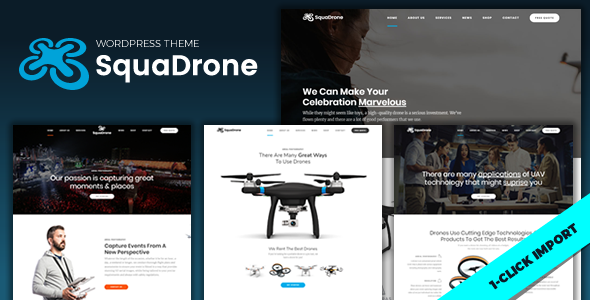
Stuck on your SquaDrone WordPress theme? Let's fix it.
No endless back-and-forth. Just send us the details and we'll get it done.
No obligation · Replies within 1 hour · Quote within 1 day
Setup · Customization · Bug fixes · WooCommerce integration
About SquaDrone WP Theme
SquaDrone is a WordPress theme built by BoldThemes, designed specifically for drone companies, aerial photography services, and UAV-related businesses. It ships with a bold visual style that puts high-resolution imagery and video front and center, which makes sense for an industry where visuals sell the service.
The theme is built on BoldThemes’ own framework and includes a drag-and-drop page builder, pre-built demo content, and a set of custom widgets. You get sections for services, portfolio galleries, pricing tables, team members, and testimonials out of the box. It is WooCommerce compatible, so you can sell drone products or booking packages directly from your site. SquaDrone is also translation-ready and WPML compatible, which matters if you are targeting international clients or operating across multiple markets.
Get matched with a SquaDrone developer in under one day
Tell us about your SquaDrone project. Small fixes, SquaDrone theme customization, or a full website build, whatever you need, we've got it covered.
We'll connect you to the right SquaDrone developers, define the scope, and get everything 100% clear.
You'll get one estimate, hire your preferred developer, and start collaborating.
BoldThemes builds solid themes, but their framework has its own quirks. If you hit a layout issue, need a custom section, or want to integrate something that is not in the demo, a generic developer will spend hours just learning the structure. A developer who already knows SquaDrone and the BoldThemes framework skips that ramp-up entirely. Through Codeable, you get matched only with vetted WordPress developers, so you are not guessing about quality. Post your project, get an estimate, and decide from there.
Pros
- Purpose-built for drone and aerial photography businesses with relevant pre-built sections
- Ships with full demo content you can import and adapt quickly
- WooCommerce compatible for selling packages or drone products
- WPML ready for multilingual drone service sites targeting international markets
- Built-in portfolio layouts designed for showcasing aerial photo and video work
Cons
- BoldThemes' custom framework adds complexity compared to themes built on standard builders like Elementor
- The heavy visual style can slow down load times if images are not properly optimised
- Limited layout flexibility outside the demo structure without custom development
- Updates can occasionally break customised sections if you have modified theme files directly
- Smaller community and fewer third-party tutorials compared to mainstream themes
Who is SquaDrone for?
Drone Photography Business
SquaDrone’s portfolio grid and full-width image sections work well for photographers who need to show clients exactly what they deliver. You can organise work by location, service type, or industry. The pricing table section helps clients choose between packages without needing to call first.
UAV Inspection Services
Inspection companies need to communicate technical credibility. SquaDrone’s services section and icon-based feature blocks let you lay out what you inspect, the equipment you use, and how you deliver reports. Adding a contact or quote form is straightforward with standard WordPress form plugins.
Aerial Videography for Events
Wedding, real estate, and corporate event videographers can use SquaDrone’s video background header and portfolio sections to demonstrate their reel immediately. The testimonials block adds social proof, and WooCommerce lets you take bookings or deposits directly through the site.
Drone Equipment Retailer
With WooCommerce built in, SquaDrone can function as a product store for drones, parts, and accessories. The theme’s visual weight suits high-spec product photography. You can combine shop pages with service and about sections if you run both retail and flight services.
Drone Training School
Training providers can use the courses section to list programmes, publish instructor profiles using the team member block, and take enrolments through a form or WooCommerce product. The FAQ and testimonials sections help answer common questions and build trust with prospective students.

Customizing SquaDrone
SquaDrone gives you a reasonable amount of control through the WordPress Customizer, including typography settings, color schemes, header layouts, and footer options. The built-in page builder handles most layout work without touching code.
That said, deeper customization, like modifying the booking flow, building out a custom portfolio filter, or integrating third-party drone scheduling software, will need hands-on development work. A SquaDrone expert knows the BoldThemes framework well enough to extend it without breaking the demo structure or conflicting with theme updates. If you want the site to match a specific brand or workflow rather than just a tweaked demo, working with someone who has built on this theme before saves a lot of back-and-forth.
Recommended plugins for SquaDrone
SquaDrone works well with WooCommerce if you want to sell aerial photography packages or drone equipment. It also supports contact form plugins like Contact Form 7 and WPForms for quote requests.
For booking functionality, plugins like Bookly or WP Simple Booking Calendar can be added, though they may need styling to match the theme. If you are concerned about site speed, particularly with the heavy imagery SquaDrone is designed for, check out our WordPress performance service. For search visibility, our WordPress SEO service can help drone businesses rank for local and service-based queries.
Not sure which plugins to use? This WordPress plugins directory covers the most popular options with reviews and setup guides.
SquaDrone common issues
SquaDrone demo import not working in WordPress
Demo import failures on SquaDrone are usually caused by server limits on PHP memory, max execution time, or upload file size. Check with your host to raise memory_limit to at least 256MB and max_execution_time to 300 seconds. You also need all required plugins activated before importing. If the importer still stalls, try importing content in smaller batches or manually via the WordPress importer tool. Our bug fixing service can handle this if you are stuck.
SquaDrone header layout broken after update
Header layout breaks after a SquaDrone update usually mean a conflict between a customised header template and the updated theme files. If you edited theme files directly rather than using a child theme, those changes get overwritten on update. Check your header settings in the Customizer first. If the layout is still off, compare your current header.php with the updated version and re-apply your changes in a child theme going forward. A developer can restore your header without losing your custom work.
SquaDrone portfolio filter not displaying correctly
SquaDrone portfolio filter issues are often caused by a JavaScript conflict with another plugin, or by incorrect category assignment on portfolio posts. Check the browser console for JS errors first. Deactivate plugins one by one to isolate any conflict. Make sure portfolio items are assigned to at least one portfolio category, as uncategorised items can behave inconsistently with the filter scripts BoldThemes uses in this theme.
SquaDrone site loading slowly with images
SquaDrone is image-heavy by design, so slow load times are common without proper setup. Start by compressing all uploaded images using a plugin like ShortPixel or Imagify. Enable lazy loading, use a caching plugin, and serve images through a CDN. Video backgrounds also add significant weight, so host video on an external service rather than uploading directly to WordPress. For a full audit, see our WordPress performance service.
SquaDrone FAQ
BoldThemes updates SquaDrone periodically to maintain WordPress compatibility. Before updating WordPress core, check the BoldThemes changelog to confirm the current SquaDrone version has been tested against your target WordPress release. Running a staging site before updating production is the safest approach, especially if you have made any customisations to the theme.
SquaDrone uses the BoldThemes Visual Composer, not Elementor. You can technically install Elementor alongside it, but mixing two page builders on the same site causes conflicts and inconsistent output. If you want to build with Elementor, you are better off choosing a theme built for it rather than trying to force it into SquaDrone.
Yes, SquaDrone is WooCommerce compatible. You can use it to sell drone services, packages, or physical products. The theme includes basic WooCommerce styling, though the shop pages may need some CSS work to fully match your design. A developer can tighten up the integration if the default styling does not meet your needs.
Create a new folder in your themes directory named squadrone-child. Add a style.css with the correct template header referencing SquaDrone as the parent, then create a functions.php that enqueues the parent stylesheet. Activate the child theme from the WordPress dashboard. All your customisations then go into the child theme, so they survive SquaDrone updates.
You can migrate an existing WordPress site to SquaDrone, but it involves rebuilding your page layouts using BoldThemes’ page builder since your current content structure likely will not map cleanly to the new theme. Text and media transfer over fine, but layout and design work needs to be redone. Our migration service can help plan and execute this without data loss.
Hire a SquaDrone Developer
Need help setting up SquaDrone, customising a layout, or fixing something that is not working as expected? We match you with developers who have hands-on experience with BoldThemes and SquaDrone specifically. No generalists, no guesswork. Get a free estimate and see what your project would cost before you commit to anything. There is no obligation to hire.
You'll need a free Codeable account so developers can ask questions and send their quotes.