Starto WordPress Theme
by ThemeGoods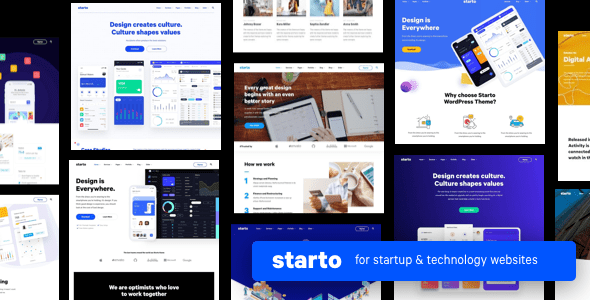
Stuck on your Starto WordPress theme? Let's fix it.
No endless back-and-forth. Just send us the details and we'll get it done.
No obligation · Replies within 1 hour · Quote within 1 day
Setup · Customization · Bug fixes · WooCommerce integration
About Starto WP Theme
Starto is a multipurpose WordPress theme by ThemeGoods, built on their in-house Goya framework. It targets startups, SaaS products, and app landing pages. The design leans minimal with bold typography and clean section layouts that load fast without heavy configuration.
The theme ships with a visual drag-and-drop page builder, pre-built demo pages, and a header builder that handles sticky navigation without plugins. It also includes pricing tables, testimonial sliders, and a blog layout out of the box.
Starto is a reasonable pick for small product teams who want a polished launch page quickly. It does not require Elementor or WPBakery, which keeps the codebase lighter than many competing themes in its category. ThemeGoods actively maintains it with updates through Envato.
Get matched with a Starto developer in under one day
Tell us about your Starto project. Small fixes, Starto theme customization, or a full website build, whatever you need, we've got it covered.
We'll connect you to the right Starto developers, define the scope, and get everything 100% clear.
You'll get one estimate, hire your preferred developer, and start collaborating.
Starto looks straightforward until you need to deviate from the demo. Custom integrations, unique layouts, or performance issues require someone who knows how ThemeGoods themes are structured. FoxyConcept connects you with vetted WordPress developers through Codeable. Every developer on the platform is screened, so you are not taking a risk on an unknown freelancer. Post your project once, get estimates within 24 hours, and only hire if you are satisfied. No commitment required to start.
Pros
- Ships with a built-in header and footer builder, no extra plugin needed
- Clean minimal design suited to startup and SaaS landing pages
- Bundles Revolution Slider, saving the standalone license cost
- Does not depend on Elementor or WPBakery, keeping the codebase lighter
- Actively maintained by ThemeGoods with regular Envato updates
Cons
- Goya framework is proprietary, making deep customization harder without theme-specific knowledge
- WooCommerce support is limited and requires extra development for serious shops
- Demo import can be slow and occasionally requires manual cleanup
- Page builder markup can inflate page size on complex layouts
- Support response times through Envato can lag compared to dedicated theme clubs
Who is Starto for?
SaaS Product Landing Pages
Starto’s pricing tables, feature blocks, and call-to-action sections map directly to what a SaaS product page needs. You can build a credible, fast-loading landing page without custom development. The minimal layout keeps focus on conversion rather than decoration, which suits trial signups and demo bookings well.
Mobile App Promotion Sites
The theme includes screenshot mockup sections and icon-based feature lists that work well for app landing pages. You can showcase iOS and Android screenshots, list key features, and link to store badges without additional plugins. A developer can extend this with custom animations or device frame integrations if needed.
Startup or Venture Launch Sites
Startups often need a credible web presence fast. Starto’s demo pages are close to production-ready, so you can import a layout and adjust copy within a day. It handles investor-facing content, team sections, and contact forms cleanly. It is a practical starting point before a fully custom build makes sense.
Digital Agency Portfolios
Agencies can use Starto’s portfolio blocks and case study layouts to present work. The grid options handle image-heavy content without performance penalties if images are optimized correctly. Header customization lets you maintain brand consistency. It works best for small to mid-sized agencies rather than large multi-service firms.
Freelance or Consultancy Websites
Consultants and freelancers need a site that communicates credibility without complexity. Starto’s testimonial sections, service blocks, and contact forms cover the basics. Setup time is low, and the design avoids looking like a generic template. A Starto developer can add booking integrations or custom intake forms if the defaults fall short.

Customizing Starto
Starto’s customizer gives you control over fonts, colors, header styles, and section spacing. Most visual changes are handled through the live preview panel, which updates without saving. That works well for tweaking layouts before publishing.
For anything beyond surface-level changes, like restructuring demo layouts, building custom post types, or connecting third-party APIs, you will need a Starto expert who knows the Goya framework. Custom CSS can get messy when the theme’s utility classes conflict with your overrides.
Header and footer builder options are built in, which removes one common plugin dependency. However, WooCommerce shop page customization requires extra work since Starto was not primarily designed for ecommerce. A developer familiar with the theme can shortcut that work significantly.
Recommended plugins for Starto
Starto works with Contact Form 7, WooCommerce, and WPML for multilingual setups. The theme bundles Revolution Slider and some icon packs, which adds value at the base price.
For performance, the bundled builder can generate bloated markup on complex pages. Pairing Starto with proper caching and image optimization is worth doing early. See our WordPress performance service for that.
If you need search visibility beyond the theme’s basic meta options, dedicated SEO configuration will help. Our WordPress SEO service covers schema, speed tuning, and technical audits that work alongside any theme.
Not sure which plugins to use? This WordPress plugins directory covers the most popular options with reviews and setup guides.
Starto common issues
Starto demo import not working
Demo import failures in Starto usually come down to server memory limits or PHP execution timeouts. Set memory_limit to at least 256MB and max_execution_time to 300 in your php.ini or wp-config.php. Also confirm all required plugins listed during import are activated first. If the import still fails, try importing XML data manually through WordPress’s built-in importer. Our bug fixing service can resolve persistent import issues quickly.
Starto header not sticking on scroll
Starto’s sticky header is controlled through the header builder inside theme options. Go to Theme Options > Header and check that the sticky header toggle is enabled for your active header layout. If it appears enabled but still does not work, a JavaScript conflict from another plugin is the likely cause. Deactivate plugins one by one to isolate the conflict. A caching plugin serving an old script version can also cause this.
Starto custom CSS not applying correctly
Starto loads its own utility classes that can override custom CSS added in the customizer or a child theme stylesheet. Always use a child theme for custom styles. Increase specificity by targeting the element’s parent container alongside the element itself. Also check that any caching plugin is cleared after saving changes. If styles appear in the editor but not on the live site, a minification or file caching issue is likely the cause.
Starto page builder layout broken after update
After a Starto or plugin update, saved page builder layouts sometimes lose their structure due to shortcode or block rendering changes. First, check the browser console for JavaScript errors and clear all caches. If a specific section is broken, rebuild it from scratch using the current version’s elements rather than pasting old shortcode. Always back up your database before updating the theme. Our WordPress bug fixing service handles post-update layout problems efficiently.
Starto FAQ
Starto uses ThemeGoods’ own Goya page builder rather than Elementor. It is not designed to run alongside Elementor, and mixing the two is not recommended. If you need Elementor specifically, you would be better served by a different theme. A developer can advise whether your project requirements can be met within Starto’s native builder before committing to a switch.
Starto includes basic WooCommerce compatibility for simple product listings. It works for small shops with standard product pages. However, it was not built with ecommerce as a primary use case, so checkout styling and account pages require manual CSS work. For anything beyond a basic catalog, custom development or a dedicated WooCommerce theme is a more practical choice.
The Goya builder is deeply integrated into Starto’s layout system. You can use the Gutenberg editor for basic content blocks, but most of the demo layouts and theme sections rely on the builder’s shortcodes. Removing the builder entirely would break those pages. If you prefer Gutenberg-first workflows, Starto is not the best fit for that approach.
Always use a child theme for customizations so updates to the parent theme do not overwrite your changes. Settings saved in the customizer or theme options panel generally persist through updates. Before updating, back up your site. If you have made direct edits to parent theme files without a child theme, those changes will be lost. Our WordPress maintenance service includes safe update management.
Starto produces clean HTML output and loads reasonably fast on simple pages, which supports basic SEO. It does not include built-in schema markup or advanced meta controls. You will need a dedicated plugin like Yoast or Rank Math for proper SEO management. Page speed on complex layouts can also need tuning. See our WordPress SEO service for structured setup.
Hire a Starto Developer
Need help customizing Starto, fixing a layout issue, or building on top of the theme’s existing structure? Our vetted WordPress developers have hands-on experience with ThemeGoods themes and can handle anything from small tweaks to full custom builds.
Get a free estimate with no obligation to hire. You will hear back within 24 hours.
You'll need a free Codeable account so developers can ask questions and send their quotes.