Steeler WordPress Theme
by 7iquid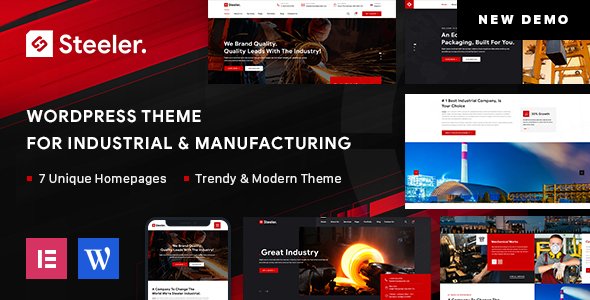
Stuck on your Steeler WordPress theme? Let's fix it.
No endless back-and-forth. Just send us the details and we'll get it done.
No obligation · Replies within 1 hour · Quote within 1 day
Setup · Customization · Bug fixes · WooCommerce integration
About Steeler WP Theme
Steeler is a WordPress theme built by 7iquid, designed for businesses and creative agencies that want a clean, structured layout without sacrificing flexibility. It ships with a modular page structure, meaning sections can be rearranged without touching code. The theme leans on strong typography choices and grid-based content blocks that work well for service-based companies, portfolios, and corporate sites.
7iquid built Steeler with performance in mind. The codebase is lean, CSS is organised, and the theme does not load unnecessary scripts by default. Out of the box, you get responsive layouts, widget-ready areas, and basic WooCommerce support. It is a practical starting point for developers and a manageable option for business owners who want something professional without a steep learning curve.
Get matched with a Steeler developer in under one day
Tell us about your Steeler project. Small fixes, Steeler theme customization, or a full website build, whatever you need, we've got it covered.
We'll connect you to the right Steeler developers, define the scope, and get everything 100% clear.
You'll get one estimate, hire your preferred developer, and start collaborating.
Most WordPress themes look simple until you try to do something specific. Steeler is no different. The Customizer gets you so far, then you hit a wall. That is when having an experienced developer matters. Through Codeable, FoxyConcept connects you with vetted WordPress specialists who have worked with themes like Steeler across dozens of project types. No guesswork, no junior developers learning on your budget. You get someone who can read the theme’s structure, identify the fastest path to your goal, and deliver clean, maintainable work.
Pros
- Lean codebase that does not bloat page load with unused scripts
- Modular section layout makes page building manageable without a page builder plugin
- Clean typography defaults that work for both corporate and creative sites
- WooCommerce compatible out of the box with minimal styling conflicts
- Responsive across devices without requiring manual breakpoint adjustments for standard layouts
Cons
- Limited template variety means unique page types require custom development
- Customizer options are basic and do not cover advanced layout control
- Documentation from 7iquid is sparse, which makes troubleshooting harder for non-developers
- No built-in mega menu support, which is a gap for large navigation structures
- Update frequency from 7iquid has been inconsistent, raising long-term maintenance questions
Who is Steeler for?
Corporate Service Companies
Steeler’s grid-based layout and structured section design makes it a practical fit for corporate service companies. The theme handles service listing pages, team sections, and contact-driven layouts cleanly. A developer can extend it with custom post types for case studies or testimonials without breaking the existing design logic.
Creative Agency Portfolios
Creative agencies benefit from Steeler’s typography control and modular content blocks. Portfolio grids can be built using custom post types or filterable gallery plugins that sit within the theme without visual clashing. The clean base means agency branding takes centre stage rather than fighting default theme styles.
Small Business Websites
Small businesses running service-led websites find Steeler manageable. The Customizer handles basic brand colours and fonts, and the theme structure supports a straightforward homepage, services page, about section, and contact form setup. It does not overcomplicate what is essentially a five-page business site.
WooCommerce Product Stores
Steeler’s WooCommerce compatibility makes it viable for small product stores. Category pages and product templates render without significant layout conflicts. For stores needing a customised checkout, product filtering, or upsell sections, developer work is needed, but the foundation is stable enough to build on.
Freelancer and Consultant Sites
Freelancers and consultants need a site that looks professional without demanding ongoing maintenance effort. Steeler delivers a clean starting point. A one-time developer session can set up a homepage, a services or skills section, a contact form, and a blog, leaving the client able to manage content updates independently after launch.

Customizing Steeler
Steeler gives you access to the WordPress Customizer for most visual changes: colours, fonts, header layout, and footer configuration. However, deeper modifications, like custom post type templates, unique landing page structures, or heavily branded section designs, will require developer input.
A Steeler expert can extend the theme cleanly without leaving a mess of inline styles or child theme hacks. Work done correctly means updates will not break your site and new features slot in logically. Whether you need a custom mega menu, a filterable portfolio grid, or a tailored WooCommerce checkout flow, working with someone who knows Steeler specifically saves significant time and avoids common conflicts with 7iquid’s original structure.
Recommended plugins for Steeler
Steeler pairs well with popular plugins, but compatibility is worth checking before installing. Contact Form 7, WooCommerce, and Yoast SEO all work without major issues. If you want to improve load times, combining Steeler with a caching plugin and a CDN is straightforward. For sites targeting search visibility, there is dedicated WordPress SEO support available. Performance-focused builds using Steeler can also benefit from structured WordPress performance optimisation to tighten Core Web Vitals scores and reduce render-blocking assets.
Not sure which plugins to use? This WordPress plugins directory covers the most popular options with reviews and setup guides.
Steeler common issues
Steeler theme header not displaying correctly on mobile
Mobile header issues in Steeler usually trace back to a CSS conflict with a recently installed plugin or a custom stylesheet that overrides the theme’s responsive breakpoints. Open your browser’s developer tools, inspect the header element on mobile view, and look for conflicting styles. If a plugin is adding its own header CSS, deactivate plugins one by one to isolate it. For ongoing layout issues, WordPress bug fixing support can resolve this quickly.
Steeler WordPress theme menu not working after update
Menu failures after a WordPress or theme update typically come from a corrupted menu assignment or a JavaScript conflict. Go to Appearance > Menus and confirm your menu is still assigned to the correct location. Then check your browser console for JavaScript errors. If a script is failing to load, it may block the mobile menu toggle. Clearing your cache after each change is essential before testing again.
Steeler theme WooCommerce shop page layout broken
WooCommerce layout breaks in Steeler often happen after a WooCommerce major version update that changes template file structure. Steeler’s bundled WooCommerce templates may be outdated. Go to WooCommerce > Status > Tools and check for outdated templates. The fix usually involves updating those template files in your child theme to match the current WooCommerce version. A developer can do this without losing your existing shop styling.
Steeler theme custom CSS not applying in WordPress Customizer
Custom CSS entered in the WordPress Customizer not applying is usually a caching problem or a specificity issue. Start by clearing all cache layers: WordPress cache plugin, server-side cache, and your browser. If the styles still do not apply, the selector you are using may not be specific enough to override Steeler’s existing styles. Add a more specific selector or use the browser inspector to find the exact selector the theme uses and match or beat its specificity.
Steeler FAQ
7iquid’s update history for Steeler has been inconsistent. Before building a long-term project on it, check the theme’s changelog and last update date on ThemeForest. If updates have stalled, it is worth factoring in ongoing maintenance costs to keep the site compatible with new WordPress versions. A WordPress maintenance plan can cover this gap.
Steeler can be used alongside Elementor, but results vary. The theme has its own layout logic and Elementor adds its own container structure, which can create CSS conflicts on certain page types. A developer can resolve most of these conflicts, but using both together adds complexity. If full page builder control is your priority, a theme built specifically for Elementor may be a cleaner choice.
Yes, Steeler includes basic WooCommerce compatibility. Product pages, cart, and checkout render without major layout breaks on a standard setup. Customising the shop layout beyond defaults, such as custom product tabs, filtering sidebars, or branded checkout pages, will require developer work to keep styling consistent with the rest of the theme.
Create a child theme by making a new folder in your themes directory, adding a style.css file with the correct header referencing Steeler as the parent theme, and a functions.php file that enqueues the parent stylesheet. Activate the child theme in WordPress. All custom code and template overrides go into the child theme, keeping your changes safe when the parent theme updates.
Migrating an existing site to Steeler is possible but involves rebuilding page layouts to match the theme’s structure. Content, posts, and media transfer fine, but your current design will not carry over automatically. A WordPress migration service can handle the technical move while a developer rebuilds the front-end inside Steeler’s framework to match your design requirements.
Hire a Steeler WordPress Developer
If you need changes made to your Steeler site, whether that is a layout fix, a new feature, or a full custom build on top of the theme, we can match you with a developer who knows what they are doing. Post your project and get a free estimate within 24 hours. No obligation to hire. Get your free estimate here and describe exactly what you need. Developers review your brief and come back with a clear quote, so you know what you are committing to before any work begins.
You'll need a free Codeable account so developers can ask questions and send their quotes.