Stockie WordPress Theme
by colabrio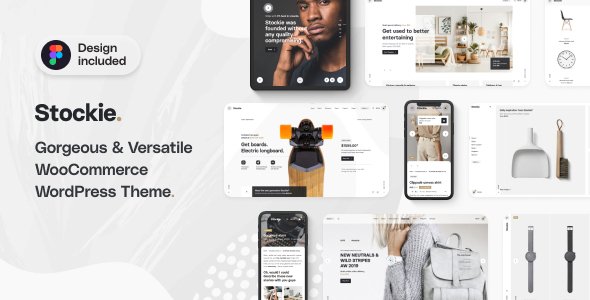
Stuck on your Stockie WordPress theme? Let's fix it.
No endless back-and-forth. Just send us the details and we'll get it done.
No obligation · Replies within 1 hour · Quote within 1 day
Setup · Customization · Bug fixes · WooCommerce integration
About Stockie WP Theme
Stockie is a WordPress theme built by Colabrio, designed specifically for stock photography and digital media marketplaces. It pairs with WooCommerce to handle digital product sales, license tiers, and download management out of the box. The theme ships with a clean grid-based layout built to showcase large image portfolios without clutter.
Stockie includes demo content, multiple homepage layouts, and tight integration with Elementor. It targets photographers, illustrators, and digital asset creators who want a polished storefront without building from scratch. The admin panel gives reasonable control over typography, colour schemes, and layout options. It is a niche theme with a focused purpose, which is both its strength and its limitation.
Get matched with a Stockie developer in under one day
Tell us about your Stockie project. Small fixes, Stockie theme customization, or a full website build, whatever you need, we've got it covered.
We'll connect you to the right Stockie developers, define the scope, and get everything 100% clear.
You'll get one estimate, hire your preferred developer, and start collaborating.
Stockie sits at the intersection of WooCommerce, Elementor, and digital media, which means problems are rarely straightforward. A developer who only knows one of those layers will miss issues in the others. On Codeable, every developer is vetted and rated, so you are matched with someone who has handled Colabrio themes and WooCommerce digital stores before. No junior developers, no trial and error at your expense.
Pros
- Purpose-built for digital asset and stock photography stores, so WooCommerce integration is tighter than a generic theme
- Includes multiple pre-built demo layouts that reduce initial setup time significantly
- Elementor compatibility means most visual changes can be made without touching code
- Grid and masonry layouts handle large image catalogues cleanly with minimal configuration
- Colabrio provides regular updates and documentation specific to the theme's WooCommerce features
Cons
- Outside its niche, Stockie is inflexible, adapting it for non-media products requires significant workarounds
- Heavy reliance on Elementor means performance can suffer without proper optimisation
- Advanced license management features require additional plugins that are not bundled
- Limited community resources compared to mainstream themes like Divi or Astra, so troubleshooting takes longer
- Child theme setup is necessary for safe customisation, but the documentation on this is thin
Who is Stockie for?
Stock Photography Marketplace
Stockie was built for this. Photographers selling individual images or subscription-based access to a catalogue get a layout that puts the work front and centre. Grid density, watermarking plugin support, and WooCommerce product variations for license types all fit naturally into the theme structure without heavy modification.
Vector and Illustration Downloads
Illustrators and graphic designers selling EPS, SVG, or AI files need clean preview functionality and clear license communication. Stockie’s product page layout supports this well. A Stockie developer can extend the preview lightbox and add custom metadata fields for file formats, dimensions, and included variations.
Music and Audio Asset Store
Audio producers selling loops, samples, or full tracks benefit from Stockie’s digital download setup. Adding an audio preview player requires a compatible plugin, but the theme’s product grid adapts to non-image media with some developer input. Waveform preview integration is a popular customisation request for this use case.
Digital Art and NFT Portfolio Shop
Artists selling limited digital prints or linking to NFT platforms need a store that feels premium. Stockie’s clean layout and large image treatment suits this well. A Stockie specialist can integrate external wallet or marketplace links alongside the WooCommerce product listing to give buyers multiple purchase paths.
Video Footage and Motion Graphics Store
Video creators selling footage clips or motion graphics packs need thumbnail grids with preview capability. Stockie handles this with the right video preview plugin in place. A developer familiar with the theme can wire up preview thumbnails, file format selectors, and resolution-based pricing tiers through WooCommerce product attributes.

Customizing Stockie
Out of the box, Stockie covers the basics: colour palettes, font selection, header styles, and grid density. For anything beyond that, you will need to get into custom CSS or child theme development. A Stockie expert can unlock meaningful customisation without breaking the theme’s update path.
Common customisation requests include custom license display logic, modified checkout flows for digital products, bespoke category filtering, and homepage sections that go beyond the included templates. Elementor handles most visual edits, but WooCommerce template overrides and hook-based modifications require a developer who knows the Colabrio codebase. A Stockie specialist can also help you build a consistent brand identity across product pages, landing pages, and email templates.
Recommended plugins for Stockie
Stockie works best when paired with the right plugins. For digital product sales, WooCommerce with the Digital Downloads extension is the starting point. Adding a proper caching layer and image optimisation plugin makes a real difference given the volume of high-resolution assets these stores typically serve. A WordPress performance audit is worth running once your catalogue grows past a few hundred products.
For discoverability, structured data for digital products and image SEO need attention. Schema markup for product pages, proper alt text handling, and sitemap configuration are all areas where a WordPress SEO specialist can add measurable value to a Stockie-powered store.
Not sure which plugins to use? This WordPress plugins directory covers the most popular options with reviews and setup guides.
Stockie common issues
Stockie theme WooCommerce products not displaying correctly
Product display issues in Stockie are usually caused by a mismatch between the theme’s template files and WooCommerce’s current version. When WooCommerce updates, it sometimes deprecates template hooks that Stockie relies on. Check the WooCommerce system status for outdated template files. If the theme’s product templates are flagged, a WordPress bug fixing specialist can update them in a child theme to match the current WooCommerce structure without touching the parent theme.
Stockie grid layout broken after WordPress update
Grid layout breaks after a WordPress core update typically point to a JavaScript conflict or a CSS change introduced by the update. Open the browser console and look for JS errors on the affected page. Plugin conflicts, particularly with caching or optimisation plugins that concatenate scripts, are a common cause. Disable plugins one at a time to isolate the issue. If the break appeared after a Stockie update rather than a WordPress update, check the theme changelog for template changes. A WordPress developer can patch this quickly once the conflict source is identified.
Stockie digital download not working after purchase
Failed digital downloads after a completed purchase usually come down to WooCommerce download permissions settings or a server-level file access issue. Go to WooCommerce settings, then the Products tab, and check that download method is set correctly for your hosting environment. Redirect and X-Accel-Redirect methods can fail on certain hosts. Also verify that the downloadable file URL is accessible and that it has not moved since the product was set up. Regenerating download permissions from the order screen is a quick first test.
Stockie homepage Elementor sections not loading
Elementor sections failing to load on the Stockie homepage are often caused by a plugin version mismatch or a failed Elementor data migration after an update. Try regenerating Elementor CSS from the Elementor menu under Tools. If sections show as broken widgets, the Elementor data structure may need rebuilding. Check whether the issue persists with all plugins disabled except Elementor and Stockie. A conflict with a third-party Elementor addon is also a frequent cause and can be ruled out by deactivating addons individually.
Stockie FAQ
Yes, Stockie is built around WooCommerce’s digital download functionality. It handles single file sales, product variations for license types, and download management without needing a separate plugin for basic use. For more advanced licence enforcement or subscription-based access, additional WooCommerce extensions are required. A Stockie developer can help configure these for your specific product model.
Stockie is compatible with Elementor and uses it for page building across most of its demo layouts. The homepage, product archive pages, and inner pages are all editable through Elementor. Some theme-specific sections, such as the product grid template, are controlled through theme settings rather than Elementor directly. A Stockie specialist can clarify which parts are editable where.
Technically yes, but it is not ideal. Stockie’s design language and layout assumptions are built around image-heavy digital products. Using it for a service business, blog, or physical product store means working against the theme’s defaults rather than with them. For non-media projects, a more flexible base theme would be a better starting point.
Create a new folder in your wp-content/themes directory, add a style.css file with the correct Template header pointing to stockie, and include a functions.php that enqueues the parent theme stylesheet. This gives you a safe place to add custom CSS and PHP without losing changes on theme updates. Colabrio’s documentation covers the basics, and a Stockie developer can set this up properly if needed.
Colabrio has maintained Stockie with compatibility updates alongside WooCommerce and WordPress releases. Update frequency is reasonable for a niche commercial theme. Check the ThemeForest changelog for the most recent update date before purchasing. Themes in active development get security and compatibility fixes; those without recent updates carry more risk on newer WordPress versions.
Hire a Stockie Developer for Your WordPress Project
Whether you need a full Stockie setup, a customisation that the theme panel cannot handle, or a fix for something that broke after an update, a dedicated Stockie developer will get it done cleanly. Work is scoped before anything starts, so you know exactly what you are paying for. Get a Free Estimate and describe your project. You will hear back within 24 hours with a clear proposal and no obligation to proceed.
You'll need a free Codeable account so developers can ask questions and send their quotes.