Streamlab WordPress Theme
by gentechtreedesign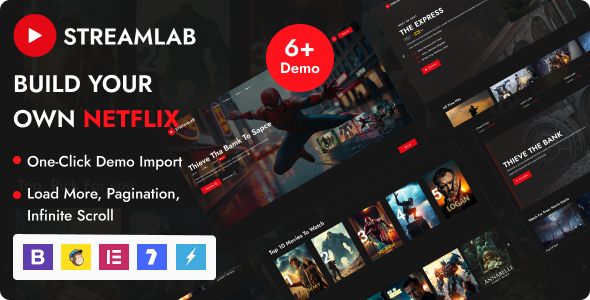
Stuck on your Streamlab WordPress theme? Let's fix it.
No endless back-and-forth. Just send us the details and we'll get it done.
No obligation · Replies within 1 hour · Quote within 1 day
Setup · Customization · Bug fixes · WooCommerce integration
About Streamlab WP Theme
Streamlab is a WordPress theme built by gentechtreedesign, targeting live streamers, content creators, and gaming personalities who need a professional online home base. It ships with a bold, dark-first aesthetic that fits Twitch and YouTube creator branding without heavy customisation out of the box.
The theme includes pre-built page templates for stream schedules, sponsor showcases, donation links, and social channel integration. Widget areas are placed strategically for stream status displays and latest video embeds. Built on a clean codebase, Streamlab works with Elementor and the block editor, so you are not locked into one builder. It suits solo creators and small esports teams equally well.
Get matched with a Streamlab developer in under one day
Tell us about your Streamlab project. Small fixes, Streamlab theme customization, or a full website build, whatever you need, we've got it covered.
We'll connect you to the right Streamlab developers, define the scope, and get everything 100% clear.
You'll get one estimate, hire your preferred developer, and start collaborating.
Streamlab is straightforward to install but harder to push beyond its defaults without touching code. If you need custom functionality, a unique layout, or integrations the theme does not support natively, working with a vetted developer saves time and avoids breaking things.
Through Codeable, you get matched with a WordPress developer who has worked with themes like Streamlab before. You post your project, receive a free estimate, and only move forward if the scope and price make sense. No commitment required upfront. Work with experienced WordPress developers who know what they are doing.
Pros
- Dark-first design suits gaming and streaming brands without needing extensive visual changes
- Pre-built templates for stream schedules, sponsor sections, and donation CTAs save setup time
- Compatible with Elementor and the WordPress block editor, so you are not forced into one page builder
- Dedicated widget areas designed for stream status displays and latest video embeds
- Lightweight enough to maintain good performance scores when paired with a basic caching setup
Cons
- Documentation from gentechtreedesign is limited, making advanced customisation harder to self-serve
- Default typography options are narrow and often need overriding to match established creator branding
- No built-in membership or subscriber-only content functionality, requiring third-party plugins
- Mobile menu behaviour can be inconsistent on some Android browsers without CSS fixes
- Theme updates are infrequent, which can create compatibility gaps with newer WordPress core versions
Who is Streamlab for?
Solo Twitch Streamers
Streamlab’s layout defaults work well for individual streamers who want a single-page hub covering their schedule, social links, and donation or subscription CTAs. The dark aesthetic fits Twitch branding without needing a designer. Adding a live stream embed and a channel update feed takes minutes with the included widget areas.
Esports Teams
Small esports teams can use Streamlab to publish team rosters, tournament results, and sponsor logos. The theme’s section-based homepage structure supports this kind of multi-block content display. A developer can extend it with custom post types for players and match records, keeping the data structured and easy to update.
YouTube Gaming Channels
Creators who post primarily to YouTube benefit from Streamlab’s video embed support and latest-content widget areas. The theme handles thumbnail-heavy layouts without visual clutter. Pairing it with Embed Plus for YouTube gives you playlist display, channel subscriber counts, and live status indicators in the sidebar.
Game Review Blogs
Writers covering game reviews need a clean archive structure and readable single-post layouts. Streamlab’s dark colour scheme suits gaming content aesthetically, and the theme handles category pages well. Adding a custom review rating system or structured data markup for SEO requires developer input but is straightforward to implement.
Gaming Podcast Hosts
Gaming podcast hosts need episode archives, audio player integration, and show note pages. Streamlab’s flexible page templates support this with the right plugin stack. Seriously Simple Podcasting or Podlove Publisher both work cleanly alongside the theme. A custom homepage section highlighting the latest episode takes minimal development work.

Customizing Streamlab
Streamlab gives you a solid starting point, but most creators need it shaped around their specific brand. That means custom colour palettes, typography that matches existing channel art, and homepage layouts that put the right content front and centre.
More involved changes, like adding a merchandise store with WooCommerce, building a members-only content area, or wiring up a live stream status API, require developer-level work. A Streamlab expert can handle those jobs without breaking the theme’s core structure or creating maintenance headaches later.
Custom post types for game reviews, team rosters, or tournament brackets are common requests. Getting them to display correctly within Streamlab’s template hierarchy takes PHP knowledge and familiarity with how gentechtreedesign structured the theme’s files.
Recommended plugins for Streamlab
Streamlab pairs well with WooCommerce for merch shops, MemberPress or Restrict Content Pro for subscriber-only areas, and WPForms for fan contact forms. For embeds, Embed Plus for YouTube and Twitch Sidebar Widget both slot in cleanly.
If your site starts attracting real traffic from stream announcements or video content, caching and image optimisation become important quickly. A proper WordPress performance setup keeps load times low during traffic spikes. For creators building searchable content around game guides or reviews, a structured WordPress SEO strategy will extend your reach beyond your existing audience.
Not sure which plugins to use? This WordPress plugins directory covers the most popular options with reviews and setup guides.
Streamlab common issues
Streamlab theme header not displaying correctly on mobile
Mobile header issues in Streamlab are usually caused by a CSS conflict with a plugin or a custom style rule overriding the theme’s responsive breakpoints. Start by deactivating plugins one at a time to isolate the conflict. If the issue persists, check the theme’s header.php for any hardcoded width values. Using browser DevTools to inspect the header element at mobile viewport size will show exactly which rule is causing the problem. A WordPress bug fixing service can resolve this quickly.
Streamlab WordPress theme footer widgets not showing
If footer widgets are registered in Streamlab but not appearing on the front end, the most common causes are a caching plugin serving a stale page or a child theme overriding footer.php without calling the widget area correctly. Clear all caches first. Then check Appearance > Widgets to confirm the footer widget area exists and has content. If using a child theme, verify the footer template includes dynamic_sidebar() with the correct widget area ID from Streamlab’s functions.php.
Streamlab theme breaking after WordPress update
Theme breakage after a WordPress update usually points to deprecated function calls or PHP version mismatches. Check the site’s error log first, accessible via hosting control panel or a plugin like Query Monitor. Common culprits in older themes include removed jQuery methods and deprecated widget constructor approaches. If gentechtreedesign has not released a compatible update, a developer can patch the specific functions causing errors. Consider a WordPress maintenance plan to stay ahead of these issues.
Streamlab Elementor sections not loading on front end
When Elementor-built sections do not render on the Streamlab front end, the problem is often a script loading conflict or Elementor’s page settings overriding the theme’s body class structure. Go to Elementor > Tools and run the regenerate CSS and data command. Also check whether the page template in Elementor is set to Elementor Canvas or Elementor Full Width, as these bypass Streamlab’s template wrappers. If assets are missing, purge server-side cache and check that file permissions allow Elementor to write to the uploads directory.
Streamlab FAQ
Streamlab by gentechtreedesign is available through the ThemeForest marketplace as a premium theme. It is not a free theme. You purchase a licence, download the theme files, and install them through WordPress. The licence covers one site for a regular purchase. Extended licences are available if you plan to use it on client projects or in a SaaS product.
Yes, Streamlab is compatible with Elementor. You can use the Elementor page builder to design custom page layouts while the theme handles the header, footer, and global styles. For best results, set Elementor pages to use the Elementor Full Width template rather than the default theme template. Some widget styling may need minor CSS adjustments to match Streamlab’s design system.
Streamlab is not built primarily as a WooCommerce theme, but it does support WooCommerce with basic compatibility. Standard shop, product, and cart pages will function. Styling may need adjustment to match the theme’s dark aesthetic. If you are running a full merchandise store alongside streaming content, a developer can bring the WooCommerce templates into alignment with the rest of the site.
Theme updates from gentechtreedesign are delivered through ThemeForest. You can update manually by downloading the latest version and uploading it via Appearance > Themes, or use the Envato Market plugin to handle updates from within WordPress. Always back up your site before updating. If you have a child theme, your customisations will be preserved through the update process.
Compatibility depends on when gentechtreedesign last pushed an update to Streamlab. Themes that have not been updated recently may have minor issues with newer WordPress versions. Check the theme’s ThemeForest changelog for the last update date. If you encounter errors after a WordPress core update, a developer can audit and patch the specific compatibility issues without requiring a full theme change.
Hire a Streamlab Developer
Need help customising Streamlab, fixing a layout issue, or adding functionality the theme does not include by default? A specialist can sort it faster than trial and error. Post your project through FoxyConcept and get matched with a vetted Streamlab developer within 24 hours. Get a free estimate with no obligation to hire. You describe the work, review the quote, and decide from there.
You'll need a free Codeable account so developers can ask questions and send their quotes.