StreamTube WordPress Theme
by phpface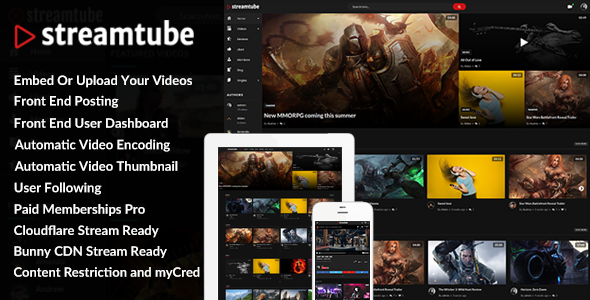
Stuck on your StreamTube WordPress theme? Let's fix it.
No endless back-and-forth. Just send us the details and we'll get it done.
No obligation · Replies within 1 hour · Quote within 1 day
Setup · Customization · Bug fixes · WooCommerce integration
About StreamTube WP Theme
StreamTube is a WordPress theme built by phpface, designed specifically for video content websites. It mimics the layout and feel of YouTube, making it a practical choice for creators who want to host their own video platform without relying on third-party services.
The theme supports Elementor, has built-in compatibility with the Video Membership and Monetization plugin (also by phpface), and includes features like video cards, channel pages, playlist support, and a dark/light mode toggle. It works with both self-hosted video and embedded content from YouTube or Vimeo.
StreamTube is sold on ThemeForest and has built a solid user base among content creators, course builders, and community platforms. It is actively maintained and receives regular updates to stay compatible with current versions of WordPress.
Get matched with a StreamTube developer in under one day
Tell us about your StreamTube project. Small fixes, StreamTube theme customization, or a full website build, whatever you need, we've got it covered.
We'll connect you to the right StreamTube developers, define the scope, and get everything 100% clear.
You'll get one estimate, hire your preferred developer, and start collaborating.
StreamTube is not a simple blog theme. It has its own plugin dependencies, custom post types, and a monetization layer that interacts with WordPress user roles and payment gateways. Getting everything connected correctly requires real experience with the phpface ecosystem.
Through Codeable, you get access to vetted WordPress developers who have worked with complex video themes and know how to configure StreamTube without breaking things. Whether you need a full site build or targeted fixes, the right developer makes the difference between a platform that works and one that frustrates your users.
Pros
- Built specifically for video platforms, not adapted from a generic theme
- Deep integration with phpface membership and monetization plugins
- Supports front-end video uploads by registered users via Video Manager
- Dark and light mode included out of the box
- Actively updated and compatible with current WordPress versions
Cons
- Heavy dependency on phpface plugins creates a locked-in ecosystem
- Customizer and Elementor settings overlap, making the editing experience inconsistent
- No built-in structured data markup for video SEO
- Documentation is functional but sparse on advanced configuration details
- Monetization setup requires significant time to configure correctly for multi-tier membership
Who is StreamTube for?
Independent Video Creators
Creators who want to own their audience without depending on YouTube can use StreamTube to host videos on their own domain. Combined with phpface’s monetization plugin, they can run subscriptions, accept tips, or charge per video. The familiar YouTube-style layout means visitors already know how to navigate the site.
Online Course Platforms
StreamTube works well as a course delivery platform when paired with a membership plugin. Videos can be organized into playlists, channels can represent course categories, and access can be restricted by membership tier. It is a lower-cost alternative to dedicated LMS themes for creators focused purely on video-based learning.
Video Membership Sites
Sites that charge monthly fees for access to video libraries are a natural fit for StreamTube. The phpface membership plugin handles payment processing, access control, and subscriber management. Setting up multiple membership tiers with different content access rules requires careful configuration but works reliably once done correctly.
Niche Video Communities
Niche communities built around topics like cooking, gaming, travel, or film benefit from StreamTube’s channel system, which lets different creators or contributors have their own branded space within the same site. Admins can moderate uploads, approve content, and manage contributor accounts from the WordPress dashboard.
Sports and Fitness Streaming
Fitness instructors and sports coaches use StreamTube to deliver workout videos, training programs, and live session recordings behind a paywall. The theme handles large video libraries cleanly, and playlists work well for organizing content into programs or training plans that members follow in sequence.

Customizing StreamTube
StreamTube offers a lot out of the box, but getting it to match your exact brand or workflow takes time. The theme uses a mix of WordPress Customizer settings and Elementor widgets, which means customization can feel inconsistent depending on which part of the site you are editing.
Channel layouts, video card styles, and homepage sections often need custom CSS or template overrides to move beyond the default appearance. A StreamTube expert can handle this work cleanly, avoiding conflicts with theme updates.
If you need custom membership tiers, monetization rules, subscription flows, or a unique player experience, working with someone who knows the phpface ecosystem inside out will save you significant time and prevent costly mistakes during setup.
Recommended plugins for StreamTube
StreamTube is built to work with phpface’s own plugin suite. The Video Membership and Monetization plugin adds pay-per-view, subscriptions, and channel monetization. The Video Manager plugin handles front-end video uploads from registered users.
For wider site performance, caching plugins like WP Rocket pair well with StreamTube, though video pages need careful cache rules. WooCommerce can be integrated for digital product sales alongside video content. If SEO matters to you, structured data for video content needs manual attention since the theme does not handle it automatically. You can explore WordPress performance optimization and WordPress SEO services to cover those gaps properly.
Not sure which plugins to use? This WordPress plugins directory covers the most popular options with reviews and setup guides.
StreamTube common issues
StreamTube video player not loading on mobile
Mobile video loading issues in StreamTube are usually caused by JavaScript conflicts with caching plugins or lazy load settings that interfere with the player script. Check whether your caching plugin is minifying or combining JS files, as this often breaks the phpface player. Disabling JS optimization for video pages is a common fix. You can also check if your hosting server’s PHP version matches phpface’s requirements. If the problem persists, a WordPress bug fixing service can diagnose it faster.
StreamTube membership plugin payment not working
Payment failures in the StreamTube membership plugin are almost always a configuration issue rather than a plugin bug. Double-check your payment gateway credentials, currency settings, and webhook URLs. PayPal and Stripe both require correctly configured return URLs and IPN or webhook endpoints. Also confirm SSL is active on your site, as payment gateways will reject insecure connections. If transactions are failing silently, enable debug logging in the plugin settings to capture the exact error response from the gateway.
StreamTube homepage layout broken after update
Homepage layout breaks after a StreamTube update are typically caused by changes to Elementor widget markup or Customizer settings being reset. Before updating the theme, always back up your site and note your Customizer settings. After an update, check the changelog for any widget or template changes. Rebuilding affected Elementor sections is often faster than trying to reverse-engineer what changed. A staging environment makes this process safe and reversible.
StreamTube slow page speed on video pages
Video pages in StreamTube load slowly because they carry large assets including player scripts, thumbnail images, and sidebar content. Start by enabling lazy loading for thumbnails and deferring non-critical scripts. Use a CDN for video embeds and static assets. Avoid loading the full phpface membership plugin assets on pages that do not require them. For persistent speed issues, a dedicated WordPress performance review will identify the specific bottlenecks on your setup.
StreamTube FAQ
Yes, StreamTube includes Elementor support and comes with custom widgets for video cards, channel lists, and playlists. However, not every part of the theme is controlled through Elementor. Some sections use the WordPress Customizer instead, so you will switch between both tools depending on what you are editing. For complex page designs, a developer familiar with StreamTube can help keep things consistent.
Yes, but you need the separate Video Manager plugin from phpface to enable front-end uploads. Once installed, registered users can submit videos from their account dashboard without accessing the WordPress admin. You can set upload permissions by user role and require admin approval before videos go live. This makes StreamTube a viable option for community video platforms with multiple contributors.
StreamTube does not have deep native WooCommerce integration, but they can run on the same WordPress installation. You can link WooCommerce products from video pages or use WooCommerce for digital downloads alongside StreamTube’s own membership system. Combining both payment systems on one site requires careful planning to avoid confusing users with duplicate checkout flows.
Migrating an existing video site to StreamTube depends heavily on where your content currently lives. If videos are hosted on YouTube or Vimeo, the migration is mostly about importing post data and reconfiguring embeds. Self-hosted video files need to be moved to your new server or a CDN. User accounts and membership data from other platforms rarely import cleanly. A WordPress migration service can handle the technical side safely.
StreamTube does not include built-in live streaming infrastructure. You can embed live streams from YouTube Live, Vimeo Live, or other platforms into StreamTube video posts, which gives you the StreamTube layout around external streams. For a fully integrated live streaming experience with chat and access control, you would need additional plugins or a third-party streaming service connected to your site.
Hire a StreamTube Developer
Need help setting up StreamTube, configuring memberships, or fixing a specific issue? Our WordPress developers have hands-on experience with phpface themes and plugins. You get a free estimate before any work begins, and there is no obligation to proceed.
Projects are handled through Codeable, a vetted network of WordPress professionals. Get your free estimate today and have a StreamTube expert review your project within 24 hours.
You'll need a free Codeable account so developers can ask questions and send their quotes.