StreamVid WordPress Theme
by jwsthemes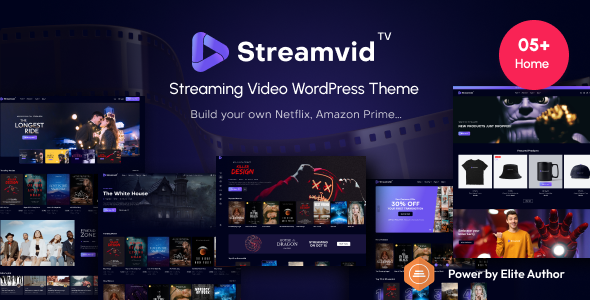
Stuck on your StreamVid WordPress theme? Let's fix it.
No endless back-and-forth. Just send us the details and we'll get it done.
No obligation · Replies within 1 hour · Quote within 1 day
Setup · Customization · Bug fixes · WooCommerce integration
About StreamVid WP Theme
StreamVid is a WordPress theme built by jwsthemes for video-focused websites. It ships with a layout designed around video content — think streaming platforms, video blogs, movie review sites, and media portals. The theme supports video embeds from YouTube, Vimeo, and self-hosted sources, with category filtering, a featured video slider, and a dark UI that keeps the focus on content.
jwsthemes built StreamVid with WPBakery integration and several custom post types for movies, series, and episodes. It also includes a built-in rating system and user watchlist features, which puts it ahead of generic magazine themes for anyone running a video-heavy site. It works with WooCommerce if you want to sell memberships or digital downloads alongside your content.
Get matched with a StreamVid developer in under one day
Tell us about your StreamVid project. Small fixes, StreamVid theme customization, or a full website build, whatever you need, we've got it covered.
We'll connect you to the right StreamVid developers, define the scope, and get everything 100% clear.
You'll get one estimate, hire your preferred developer, and start collaborating.
StreamVid is not a plug-and-play theme. The custom post types, episode management, and video-specific features give you a lot of power, but they also mean more ways for things to break or behave unexpectedly. Working through Codeable connects you with developers who have built and customised themes like StreamVid before. No guesswork, no forum rabbit holes. Just someone who knows what they are doing and can get your video site working the way you need it to.
Pros
- Built-in support for movies, series, and episode post types out of the box
- Dark-mode UI is well-suited to video content without needing custom CSS
- User watchlist and video rating system included without extra plugins
- WooCommerce compatible for selling memberships or digital content
- Supports YouTube, Vimeo, and self-hosted video with consistent embed handling
Cons
- WPBakery dependency makes the codebase heavier and harder to migrate from later
- Documentation from jwsthemes is thin in places, especially for advanced post type customisation
- Page load times can suffer on sites with large video libraries without performance tuning
- The built-in membership features are basic and may require a paid plugin for serious paywalling
- Theme updates from jwsthemes have been infrequent, which can create compatibility issues with newer WordPress versions
Who is StreamVid for?
Movie and TV Review Site
StreamVid’s built-in movie and series post types make it a natural fit for review sites. You can organise content by genre, add star ratings, and display cast metadata without custom development. Reviewers get a structured way to publish and audiences get a familiar browsing experience close to what they see on major streaming platforms.
Video Tutorial Platform
Course creators and educators can use StreamVid to organise tutorials by series and episode. Each lesson gets its own page with video embed, description, and user progress tracking. Pair it with a membership plugin to lock premium content. The category and tag filtering helps learners find specific topics quickly across a growing library.
Sports Highlights Portal
Sports sites publishing weekly highlights or match recaps benefit from StreamVid’s featured video slider and category archive layouts. You can separate content by sport, team, or competition using the built-in filtering. The dark theme and wide video layout work well for action footage and keep the visual focus on the clips themselves.
Indie Film Showcase
Independent filmmakers can use StreamVid to present short films, trailers, and behind-the-scenes content in a polished format. The theme’s movie post type supports custom fields for director, runtime, and genre. Combined with WooCommerce, you can sell digital downloads or screening tickets directly from the same site.
Church or Event Video Archive
Churches and event organisations with a back catalogue of sermons, talks, or recorded events can use StreamVid to build a searchable video library. The series and episode structure maps well to sermon series or event seasons. Visitors can browse by speaker, topic, or date, and the watchlist feature lets returning users pick up where they left off.

Customizing StreamVid
StreamVid has a lot of moving parts, which makes customization more involved than typical themes. The theme options panel controls the header, colors, fonts, and layout. But the more specific stuff — custom video post types, episode structures, rating logic, and sidebar configurations — often needs direct code edits or a solid understanding of WPBakery.
If you want to restructure how StreamVid presents series, add custom metadata to video posts, or build a subscription workflow on top of it, you will save time working with a StreamVid expert who knows the theme’s architecture. Small changes like tweaking the video card grid or adjusting the watch progress bar can get complicated without the right context.
Recommended plugins for StreamVid
StreamVid pairs well with several tools. MemberPress or Paid Memberships Pro can gate premium video content. WooCommerce handles digital sales. For SEO, the theme works with Yoast or Rank Math, though you will want to configure schema for video content separately. Check out our WordPress SEO service if that needs attention.
On the performance side, StreamVid sites can get heavy fast given video thumbnails and dynamic content. Caching, a CDN, and image optimisation make a real difference. Our WordPress performance service covers this in full.
Not sure which plugins to use? This WordPress plugins directory covers the most popular options with reviews and setup guides.
StreamVid common issues
StreamVid video not playing on mobile
This is usually caused by an autoplay restriction on iOS or Android, or a conflict between the theme’s video script and a caching plugin. Start by disabling autoplay in the theme settings. If using a caching plugin, exclude the video post pages from cache or disable JS minification. For self-hosted videos, confirm the file format is MP4 with H.264 encoding, which has the broadest mobile support. If the issue persists, check the browser console for blocked resource errors.
StreamVid homepage slider not showing correctly
Slider issues in StreamVid are often caused by a JavaScript conflict with another plugin or a missing image size. Go to Settings > Media and confirm thumbnail dimensions match what the theme expects. Then use a plugin like Regenerate Thumbnails to rebuild image sizes. If the slider still breaks, deactivate plugins one by one to find the conflict. Our bug fixing service can handle this quickly if you are stuck.
StreamVid episode post type not displaying in menu
StreamVid registers custom post types including episodes, but their archive and menu visibility depends on the post type settings. Go to the theme options and confirm episode post types are set to public. Then flush your permalinks by visiting Settings > Permalinks and clicking Save. If episodes still do not appear in the menu selector, check that the post type is registered with show_in_nav_menus set to true, which may require a code snippet.
StreamVid theme update broke the layout
Theme updates from jwsthemes occasionally change template files or CSS that you may have customised directly. If a recent update broke your layout, compare your active template files against the updated theme files using a diff tool. Ideally, customisations should live in a child theme to survive updates. If you do not have a child theme set up, a developer can help migrate your changes safely. See our maintenance service for ongoing protection.
StreamVid FAQ
jwsthemes has released updates for StreamVid, but the frequency has been inconsistent. Before purchasing or building on the theme, check the ThemeForest changelog for recent activity. If the theme has not been updated in over a year, you may face compatibility issues with newer WordPress or PHP versions. A developer can patch issues as they arise, but it is worth factoring this into your decision.
StreamVid was built around WPBakery, not Elementor. You can technically use Elementor alongside it, but you will likely run into styling conflicts, especially in header and post template areas. Most StreamVid developers recommend sticking with WPBakery for layout work and using the theme’s native options panel for everything else rather than introducing a second page builder.
Yes, but the theme’s built-in membership tools are basic. For a proper paid membership site with content gating, payment processing, and member management, you will need a plugin like MemberPress, Paid Memberships Pro, or WooCommerce Memberships. StreamVid provides the video structure and layout; the membership plugin handles access control and billing on top of it.
StreamVid does not have a native subtitle upload field in the video post editor. For self-hosted videos using the HTML5 player, you can add a VTT subtitle track via a code snippet or a plugin like VideoJS HTML5 Player. For YouTube or Vimeo embeds, subtitles are managed on those platforms directly and will carry through to the embed on your site automatically.
StreamVid has basic SEO foundations but does not handle video schema markup automatically. You will need a plugin like Yoast SEO or Rank Math to add structured data for video content, which helps Google index and display your videos in search results. Page speed is also a factor — video-heavy sites need caching and a CDN to perform well. Check our WordPress SEO service for more detail.
Hire a StreamVid Developer
Need help setting up StreamVid, fixing a layout issue, or adding custom functionality to your video site? FoxyConcept works through Codeable to match you with a vetted WordPress developer who knows the theme. Post your project and get a free estimate within 24 hours — no commitment required. Get your free estimate here and describe what you need. We will take it from there.
You'll need a free Codeable account so developers can ask questions and send their quotes.