Studio Box WordPress Theme
by imaginem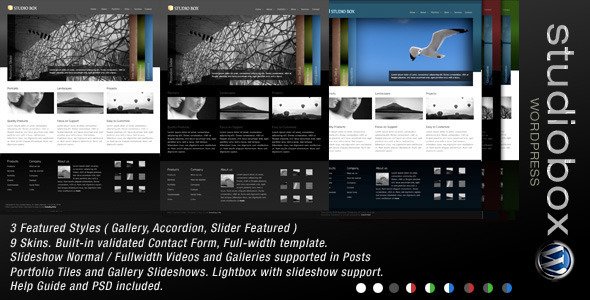
Stuck on your Studio Box WordPress theme? Let's fix it.
No endless back-and-forth. Just send us the details and we'll get it done.
No obligation · Replies within 1 hour · Quote within 1 day
Setup · Customization · Bug fixes · WooCommerce integration
About Studio Box WP Theme
Studio Box is a WordPress theme by Imaginem built for creative professionals and agencies. It ships with a drag-and-drop page builder, a clean portfolio grid layout, and a visual options panel that makes site-wide styling changes straightforward. The theme is built on a solid foundation with support for WooCommerce, WPML, and most major plugins.
It targets photographers, designers, and small creative studios who want a polished site without building from scratch. The grid-based portfolio system is one of its stronger features, letting you mix full-width headers with filterable project grids. Font options, color controls, and header styles are all handled in the customizer. It is a capable theme for creative work, though it does have a learning curve for non-technical users setting it up for the first time.
Get matched with a Studio Box developer in under one day
Tell us about your Studio Box project. Small fixes, Studio Box theme customization, or a full website build, whatever you need, we've got it covered.
We'll connect you to the right Studio Box developers, define the scope, and get everything 100% clear.
You'll get one estimate, hire your preferred developer, and start collaborating.
Getting Studio Box configured properly takes more than clicking through the demo import. A vetted Studio Box developer on Codeable can handle the build from scratch, fix an existing setup that is not working as expected, or extend the theme with custom functionality your project needs. Codeable matches you with experienced WordPress developers, not generalists. You post a project, get a free estimate, and only hire if it makes sense for you. No risk, no obligation.
Pros
- Well-structured portfolio grid with built-in filtering by category
- Visual customizer covers colors, fonts, and header styles without touching code
- WooCommerce and WPML compatibility confirmed by the developer
- Multiple header and footer layout options included out of the box
- Clean, minimal default styling that works as a starting point for creative brands
Cons
- Demo content import can be unreliable and often needs manual cleanup
- The built-in page builder is not Gutenberg-native, which creates long-term compatibility concerns
- Limited documentation for advanced customization or developer-level changes
- Mobile responsiveness on complex grid layouts sometimes needs manual CSS fixes
- Theme updates from Imaginem have slowed, raising questions about long-term support
Who is Studio Box for?
Photography Portfolio
Studio Box suits photographers well. The full-width image support and filterable project grid let you organize work by type or client without custom development. A Studio Box developer can extend this with password-protected client galleries, custom lightbox behavior, and optimized image loading for large portfolios that would otherwise slow the site down significantly.
Creative Agency Website
Agencies need more than a portfolio grid. Studio Box provides the visual foundation, and a Studio Box expert can build out case study templates, team pages, service landing pages, and lead capture forms. With the right structure, it works well as a lightweight agency site without requiring a heavier framework or page builder subscription.
Freelance Designer Site
Freelancers need a site that looks professional and loads fast. Studio Box delivers both when set up correctly. A Studio Box developer can configure a clean one-page layout, connect a contact form, and make sure the portfolio section presents work in a way that converts visitors into enquiries rather than just showcasing the projects.
Print and Digital Shop
With WooCommerce integration, Studio Box can support a shop for prints, presets, templates, or digital downloads. A Studio Box expert can wire up the product pages to match the overall site aesthetic, configure payment gateways, and set up automated delivery for digital products so the shop runs without ongoing manual work.
Architecture or Interior Design Firm
Architecture and interior design firms need visual impact and clear project organization. Studio Box handles both through its grid system and full-screen project pages. A Studio Box developer can build out project templates with custom fields for location, year, and category, making the portfolio filterable and easy to browse for potential clients.

Customizing Studio Box
Studio Box gives you a solid starting point, but most serious builds require custom work beyond what the options panel offers. A Studio Box expert can restructure the portfolio layouts, modify the header and footer templates, and build out custom post type integrations that the default setup does not support.
Common customization requests include custom filtering systems for portfolio items, client-specific landing pages, integration with booking or CRM tools, and performance tuning for image-heavy galleries. Child theme development is the right approach here so your changes survive theme updates. A Studio Box developer can also adjust the built-in page builder sections to match brand guidelines precisely, which is something the visual controls alone cannot always achieve. Custom CSS and PHP work is often needed for finer layout control.
Recommended plugins for Studio Box
Studio Box works well with a range of plugins that extend what the theme does out of the box. WooCommerce adds a shop layer for selling prints or digital downloads. WPML handles multilingual sites. Contact Form 7 and Gravity Forms both integrate cleanly for lead capture.
For site speed, especially on image-heavy portfolio sites, proper caching and image optimization setup matters. See our WordPress performance service for help there. If you are running a studio site that needs to rank in local or niche search results, pairing Studio Box with a solid SEO configuration is worth the investment. Check our WordPress SEO optimisation service for details.
Not sure which plugins to use? This WordPress plugins directory covers the most popular options with reviews and setup guides.
Studio Box common issues
Studio Box portfolio grid not displaying correctly after update
Grid display issues after an update usually point to a CSS conflict introduced by the update or a plugin that changed how assets load. First, check whether the issue appears with all plugins deactivated. If the grid recovers, re-enable plugins one at a time to find the conflict. If the problem persists, inspect the rendered HTML for missing wrapper classes. This often happens when the theme’s shortcode output changes between versions. A WordPress bug fixing service can trace and resolve this without risking further breakage.
Studio Box demo import not working or missing content
Demo import failures in Studio Box are common. The process depends on XML import, remote image fetching, and plugin activation all working in sequence. A PHP timeout during import is the most frequent cause. Increase max_execution_time and memory_limit in your PHP configuration and try again. If images are missing, you may need to regenerate thumbnails after import. For persistent failures, a WordPress bug fixing specialist can import the demo content manually and clean up the result.
Studio Box header menu disappearing on mobile
A disappearing mobile menu in Studio Box is typically a JavaScript conflict. The theme’s mobile toggle relies on a specific JS function that can break when another plugin loads a conflicting jQuery version or script. Open the browser console on mobile or in a narrow viewport and look for JS errors. Deactivating plugins one by one usually isolates the cause. If the conflict is with a plugin you need, the fix requires a small custom script to reinitialise the toggle after the conflicting script loads.
Studio Box page builder layouts broken in WordPress
Broken page builder layouts in Studio Box usually follow a WordPress core update or a switch to a newer PHP version. The theme’s bundled builder may rely on deprecated functions. Check the PHP error log first. If you see notices or fatal errors, the builder likely needs a compatibility patch. In some cases, migrating content to a supported builder like Elementor or the block editor is a better long-term fix than patching an unsupported one. A developer can assess which route makes more sense for your specific build.
Studio Box FAQ
Imaginem has slowed its release cadence for Studio Box. The theme still works on current WordPress versions, but active feature development appears to have paused. If you are planning a new build, factor in the long-term support risk. A developer can advise whether Studio Box suits your timeline or whether a more actively maintained theme would be a safer choice for your project.
Studio Box has its own bundled page builder, which is not Gutenberg-native. You can use it alongside Elementor, but layout conflicts can occur. Gutenberg compatibility is partial. Most developers working with Studio Box either stick to its own builder for consistency or migrate the layout work to Elementor with a child theme to avoid conflicts. Full Gutenberg adoption would require significant custom work.
Studio Box includes Google Fonts integration through the theme options panel. You can select from the full Google Fonts library in the customizer. For custom or self-hosted fonts, you would need to enqueue them via a child theme’s functions.php file and reference them in the theme options or custom CSS. A Studio Box developer can handle this if the built-in font options do not cover what you need.
Yes, Studio Box includes WooCommerce support. Basic shop pages inherit the theme’s styling, though you may need custom CSS to align product pages with your overall design. More advanced WooCommerce work, such as custom product templates or checkout customization, requires a developer. The integration is functional but not as polished as themes built specifically for ecommerce.
Studio Box developer rates on Codeable typically reflect the scope of the project rather than an hourly ceiling. A small customization or bug fix starts lower than a full site build. You post your project, describe what you need, and receive a scoped estimate before committing. There is no obligation to hire. See our free estimate page for more detail on how the process works.
Hire a Studio Box Developer or Expert
Whether you need a full Studio Box build, a specific customization, or help fixing something that has broken, working with a specialist saves time. Our developers have hands-on experience with Imaginem themes and know where Studio Box requires custom work versus configuration changes.
Post your project and get a scoped estimate at no cost. Get a Free Estimate and see what your Studio Box project would actually take.
You'll need a free Codeable account so developers can ask questions and send their quotes.