Studio Zen WordPress Theme
by imaginem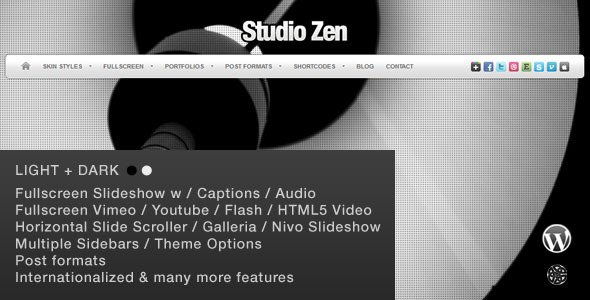
Stuck on your Studio Zen WordPress theme? Let's fix it.
No endless back-and-forth. Just send us the details and we'll get it done.
No obligation · Replies within 1 hour · Quote within 1 day
Setup · Customization · Bug fixes · WooCommerce integration
About Studio Zen WP Theme
Studio Zen is a WordPress theme by imaginem, built for creative professionals who want a clean, minimal aesthetic without sacrificing functionality. It suits photographers, designers, studios, and portfolio-driven businesses that need their work to speak for itself.
The theme ships with a visual page builder, multiple demo layouts, smooth scroll effects, and full-width image sections that make visual content the focus. Typography options are generous, and the overall design language leans toward whitespace and calm structure.
Studio Zen supports WooCommerce, making it a practical option for creatives who sell prints, services, or digital products directly from their site. It also integrates with popular plugins without major conflicts, and the responsive framework holds up well across devices.
Get matched with a Studio Zen developer in under one day
Tell us about your Studio Zen project. Small fixes, Studio Zen theme customization, or a full website build, whatever you need, we've got it covered.
We'll connect you to the right Studio Zen developers, define the scope, and get everything 100% clear.
You'll get one estimate, hire your preferred developer, and start collaborating.
Studio Zen looks straightforward until you need it to do something specific. Custom layout sections, portfolio filtering logic, WooCommerce styling, or third-party integrations all require someone who understands how imaginem structures its themes.
Through Codeable, you get matched with a vetted WordPress developer who has worked with themes like Studio Zen before. No job boards, no guessing. Post your project, get a free estimate within 24 hours, and only hire if you’re confident. Our WordPress development services cover everything from small fixes to full builds.
Pros
- Clean minimal design that puts visual content first without heavy styling overhead
- Bundled page builder with multiple pre-built demo layouts speeds up initial setup
- WooCommerce compatible out of the box with styled product and cart pages
- Strong typography controls with access to Google Fonts and custom sizing per element
- Smooth scroll and animation effects load without significant performance cost on optimized setups
Cons
- Demo import can bring in a large volume of placeholder content that needs manual cleanup
- Limited built-in portfolio filtering, more complex sorting requires custom code or a plugin
- Header customization options are somewhat restricted without editing theme files directly
- Documentation from imaginem is thin in places, particularly around advanced hooks and filters
- Some design sections feel tied to the demo style and need real effort to fully rebrand
Who is Studio Zen for?
Photography Studios
Studio Zen’s full-width image sections and minimal UI make it a strong fit for photographers. The theme gets out of the way and lets large images carry the page. Gallery integration is straightforward, and WooCommerce allows print sales directly from the portfolio.
Graphic Design Agencies
Design agencies need a portfolio that reflects their own taste. Studio Zen’s whitespace-heavy layout and flexible grid sections work well for case study presentations. Custom project pages can be built to showcase process and outcomes without a cluttered layout.
Wellness and Yoga Practitioners
The calm, minimal aesthetic of Studio Zen suits wellness brands and yoga instructors naturally. A booking plugin like Amelia or Simply Schedule Appointments drops in cleanly. Service pages, instructor bios, and class schedules can be structured without heavy customization.
Interior Designers
Interior designers need a theme that handles high-quality room photography and project breakdowns. Studio Zen’s grid and full-bleed sections handle both well. Project category filtering and before-and-after layouts are achievable with modest customization work.
Independent Artists Selling Prints
Artists selling original prints or digital downloads can combine Studio Zen’s portfolio layout with WooCommerce for a clean storefront. Product pages inherit the theme’s minimal styling. Payment, delivery options, and download management all work through standard WooCommerce setup.

Customizing Studio Zen
Out of the box, Studio Zen gives you solid control through the WordPress Customizer. You can adjust colors, fonts, header styles, and layout options without touching code. The bundled page builder lets you rearrange sections and swap demo content fairly quickly.
But most sites need more than defaults. A Studio Zen expert can strip out unused demo content, build custom portfolio filters, adjust the grid behavior, or wire up a booking system that matches your workflow. Custom post types, unique header layouts, and tailored mobile behavior are all common requests.
If you want the theme to reflect your brand precisely rather than look like a polished template, working with someone who knows Studio Zen’s structure saves a lot of back-and-forth and avoids breaking changes down the line.
Recommended plugins for Studio Zen
Studio Zen pairs well with several plugins that extend its core functionality. WooCommerce adds a full storefront. WPForms or Gravity Forms handles contact and booking forms. WPML covers multilingual needs for international studios.
For galleries, Envira Gallery or Modula integrates cleanly with the theme’s visual style. If you need better load times, pairing Studio Zen with a good caching setup and image optimization is worth doing early. You can explore specific options through our WordPress performance service.
For organic traffic, structured content and proper metadata matter. Our WordPress SEO service can handle that alongside your theme setup.
Not sure which plugins to use? This WordPress plugins directory covers the most popular options with reviews and setup guides.
Studio Zen common issues
Studio Zen page builder sections not saving correctly
This usually points to a JavaScript conflict with another plugin, or a PHP memory limit that cuts off save requests mid-process. First, raise your memory limit in wp-config.php to at least 256MB. Then deactivate plugins one by one to identify a conflict. If the issue persists after that, a cache plugin holding old page data is another common cause. If you can’t isolate it, our WordPress bug fixing service can diagnose and resolve it quickly.
Studio Zen demo import failing or incomplete
Demo imports fail for a few predictable reasons: server timeout limits, low PHP memory, or file size restrictions on the host. Increase max_execution_time, memory_limit, and upload_max_filesize via php.ini or your host’s control panel. Some hosts need this done at the server level. If you’re on shared hosting, importing in stages rather than all at once often works. A developer can also import demo content manually if automated tools keep failing.
Studio Zen mobile layout broken after update
Mobile layout issues after a theme update usually come from cached CSS that hasn’t refreshed. Clear all caches, including server-side, plugin, and browser cache. If the layout is still broken, check whether the update changed breakpoint values or removed CSS classes your customizations depend on. Custom CSS added via the Customizer sometimes conflicts with updated stylesheet rules. Compare your previous customizations against the changelog if imaginem published one.
Studio Zen WooCommerce product page styling not matching theme
WooCommerce adds its own stylesheet that often conflicts with theme styles on product pages. Studio Zen may not include full WooCommerce template overrides, meaning default WooCommerce templates render without theme styling. The fix is to copy the relevant WooCommerce templates into your child theme’s woocommerce folder and restyle them there. This keeps your changes update-safe. Our WordPress bug fixing service handles WooCommerce styling issues like this regularly.
Studio Zen FAQ
Yes. Studio Zen’s full-width image support, minimal interface, and clean grid layouts make it well suited to photography portfolios. It keeps the design out of the way so images take focus. For larger galleries or print sales, you’ll want to add a gallery plugin and WooCommerce, both of which integrate without major issues.
Studio Zen is WooCommerce compatible. Basic store functionality, cart, and checkout pages work out of the box. Product page styling may need some custom CSS to fully match the theme’s aesthetic, as Studio Zen’s WooCommerce template coverage is partial rather than complete. A developer can sort the visual gaps quickly.
Studio Zen includes a one-click demo importer, typically found under Appearance > Import Demo Data or through the theme options panel. Before importing, make sure your server’s PHP memory limit is at least 256MB and max execution time is set to 300 seconds or higher. Import on a fresh WordPress install to avoid content conflicts.
You can use Studio Zen with the standard WordPress block editor instead of the bundled page builder. Some pre-built demo sections are tied to the page builder shortcodes and won’t display correctly without it, but new pages built with blocks work fine. For a clean block-based setup, starting from scratch rather than editing demo pages is the better approach.
Before updating Studio Zen, back up your site including the database and all files. If you’ve added custom code directly to the theme files rather than a child theme, those changes will be overwritten. Always use a child theme for customizations. Test updates on a staging environment first if your site is live and active. Our WordPress maintenance service can manage updates safely on your behalf.
Hire a Studio Zen Developer
Whether you need a full Studio Zen setup, custom layout work, or help fixing something that broke, we can match you with a developer who knows this theme. Work is scoped clearly, delivered through Codeable, and backed by a satisfaction guarantee.
Get a free estimate with no obligation. You’ll hear back within 24 hours with a clear scope and price before any work begins.
You'll need a free Codeable account so developers can ask questions and send their quotes.