Styler WordPress Theme
by Ninetheme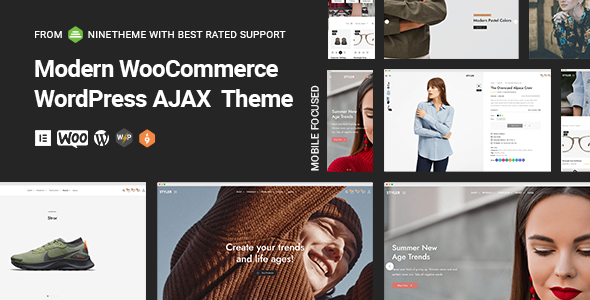
Stuck on your Styler WordPress theme? Let's fix it.
No endless back-and-forth. Just send us the details and we'll get it done.
No obligation · Replies within 1 hour · Quote within 1 day
Setup · Customization · Bug fixes · WooCommerce integration
About Styler WP Theme
Styler is a multipurpose WordPress theme built by Ninetheme. It ships with a drag-and-drop page builder, a large library of pre-built demo sites, and a visual header and footer builder. The theme targets agencies, freelancers, and businesses that want full control over layout without writing code.
Ninetheme built Styler around WPBakery and Elementor compatibility, so you can switch builders without rebuilding your site from scratch. The demo importer is one-click, which makes initial setup fast. Performance is reasonable out of the box, though image-heavy demos need optimisation before going live.
It sells on ThemeForest and holds a solid rating across hundreds of reviews. Regular updates keep it compatible with current WordPress and WooCommerce versions, which matters if you run an online store alongside your main site.
Get matched with a Styler developer in under one day
Tell us about your Styler project. Small fixes, Styler theme customization, or a full website build, whatever you need, we've got it covered.
We'll connect you to the right Styler developers, define the scope, and get everything 100% clear.
You'll get one estimate, hire your preferred developer, and start collaborating.
Styler gives you a lot of tools, but those tools require configuration to deliver a professional result. Misconfigured headers, broken mobile layouts, slow demo imports, and WooCommerce styling conflicts are common problems that cost time to fix without theme experience.
Through Codeable, you get matched with a vetted WordPress developer who knows Styler specifically. No agencies, no bidding, no risk. Post your project, get an estimate within 24 hours, and only pay if you decide to move forward. That is a straightforward way to get expert work done on a fixed scope.
Pros
- One-click demo importer with 40+ pre-built site templates covering multiple industries
- Visual header and footer builder with sticky, transparent, and split header options built in
- Compatible with both Elementor and WPBakery, giving flexibility without a full rebuild
- Bundled premium plugins including Revolution Slider add real value at the theme price
- Active ThemeForest support with regular updates maintaining WooCommerce and WordPress compatibility
Cons
- Demo content imports can be slow and occasionally incomplete, requiring manual cleanup
- Bundled WPBakery shortcodes create page builder lock-in that complicates future migrations
- Theme Options panel is large and can be overwhelming for non-technical site owners
- Some demo designs rely on heavy image sliders that hurt Core Web Vitals scores without optimisation
- Support response times on ThemeForest can be slow during high-volume periods
Who is Styler for?
Creative Agency Website
Styler’s agency-focused demos include portfolio grids, team sections, and service pages with icon boxes and counters. The header builder handles transparent overlays on hero sections cleanly. A developer can strip the demo down to a lean base and rebuild it around the agency’s actual brand without starting from a blank theme.
WooCommerce Fashion Store
The WooCommerce integration in Styler covers product grids, quick view, custom product pages, and cart styling. Fashion stores benefit from the lookbook-style demo layouts. Getting the product card hover effects and category page filters configured correctly usually requires developer input to match the store’s specific catalogue structure.
Freelance Portfolio
Styler includes several portfolio-focused demos with filterable grids and full-screen project pages. Freelancers can use these as a starting point without buying additional plugins. The challenge is keeping the site fast when showcasing high-resolution work samples, which means intentional image optimisation and lazy loading configuration.
Corporate Business Site
Corporate demos in Styler include team pages, service breakdowns, case study layouts, and contact sections with map integration. The mega menu builder handles complex navigation structures that larger organisations need. These sites often require WPML integration for multilingual content, which Styler supports without major workarounds.
Restaurant or Cafe Website
Styler’s restaurant demos include full-width hero images, menu sections with pricing, reservation form integration, and gallery layouts. The visual style options let owners match colours and fonts to their physical branding. Online ordering can be added through WooCommerce or third-party booking plugins that integrate cleanly with the theme.

Customizing Styler
Styler’s customisation options go deeper than most themes at its price point. The built-in Theme Options panel covers typography, colours, header layouts, blog styles, and WooCommerce settings without touching a stylesheet. The header builder supports sticky headers, transparent overlays, mega menus, and multiple mobile breakpoints.
For anything more specific, a Styler expert can save you significant time. Custom post type layouts, advanced Elementor widget styling, WooCommerce product page restructuring, and performance tuning all require knowledge of how Ninetheme structured the theme’s template hierarchy. Getting those details wrong breaks layouts on theme updates.
Working with a specialist means your customisations are done cleanly, with child theme separation, so future Styler updates do not overwrite your work.
Recommended plugins for Styler
Styler works with the major plugin ecosystem without conflicts in most configurations. WooCommerce, WPML, Yoast SEO, Rank Math, and WP Rocket are all tested and supported. The theme includes bundled plugins: Revolution Slider, WPBakery Page Builder, and several Ninetheme-specific shortcode packs.
For stores, the WooCommerce integration supports quick view, wishlist, and custom product card layouts. If you need faster load times, pairing Styler with a caching layer and image optimisation plugin makes a measurable difference. For organic traffic, structured on-page SEO work helps the theme’s clean markup perform better in search. See our WordPress performance service and SEO optimisation service for details.
Not sure which plugins to use? This WordPress plugins directory covers the most popular options with reviews and setup guides.
Styler common issues
Styler theme header not showing correctly on mobile
Mobile header issues in Styler usually come from conflicting breakpoint settings in the header builder. Open the header builder, check the mobile header tab, and confirm a separate mobile layout is assigned. If the hamburger menu is not triggering, check for JavaScript conflicts with other plugins using your browser console. Deactivate plugins one by one to isolate the source. If the conflict is inside a bundled plugin, a developer can patch it without removing functionality. See our WordPress bug fixing service for fast turnaround.
Styler demo import failed or missing content
Failed demo imports in Styler are usually caused by PHP memory limits, execution time limits, or server restrictions on XML file uploads. Increase memory_limit to at least 256MB and max_execution_time to 300 in your php.ini or wp-config.php. If the import runs but content is missing, import XML and widgets separately using the WordPress native importer. Persistent failures on managed hosting often need a developer to import content manually via WP-CLI.
Styler WooCommerce product page layout broken
Broken WooCommerce product pages after a WooCommerce update usually mean Styler’s template overrides are out of date. Check /wp-content/themes/styler/woocommerce/ for outdated template files. WooCommerce flags these in the status panel under WooCommerce > Status > System Status. Updating those templates to match the current WooCommerce version resolves most layout breaks. Do this in a child theme so the fix survives the next Styler update.
Styler theme update broke my page builder layouts
Theme updates breaking page builder layouts almost always means customisations were made in the parent theme files rather than a child theme. Styler updates overwrite those files. The fix is to rebuild affected customisations inside a child theme going forward. For recovery, compare the previous theme version with the new one using a diff tool to identify what changed and re-apply your modifications correctly. This is worth doing once to prevent the same problem repeating.
Styler FAQ
Yes. Styler supports both Elementor and WPBakery Page Builder. You can activate your preferred builder through the theme settings. Ninetheme provides demo content built for each builder separately, so pick your builder before importing a demo to avoid mixed shortcode content that is harder to clean up later.
Styler has full WooCommerce support including custom product pages, category layouts, cart and checkout styling, and quick view functionality. The theme is tested against current WooCommerce versions. Complex store builds, custom product types, or subscription products may need developer configuration to work correctly within Styler’s template structure.
After activating Styler, navigate to Styler Demo Importer in your WordPress dashboard. Select a demo, click import, and wait for the process to complete. Make sure your server meets the PHP requirements beforehand. A stable hosting environment with adequate memory and execution time limits makes the difference between a clean import and a partial one.
Styler is sold as a regular ThemeForest licence, which allows use on one site only. For multiple sites you need to purchase a licence per site. Extended licences exist for products sold to end users. Check Envato’s licence terms on the ThemeForest product page for the full breakdown before deploying to additional domains.
Styler outputs clean HTML and supports schema-friendly structure, which gives it a reasonable baseline for SEO. Pairing it with Rank Math or Yoast covers meta and structured data. The bigger SEO factor is page speed. Some Styler demos load slowly due to bundled sliders and scripts that need trimming before the site is ready for competitive search.
Hire a Styler WordPress Developer
Need a Styler developer to build, customise, or fix your site? FoxyConcept delivers WordPress work through Codeable, where every developer is vetted and reviewed. Whether you need a full site build from a Styler demo, a custom header layout, WooCommerce integration, or a performance audit, you can get a free estimate with no obligation to hire. Projects are scoped clearly and delivered without surprises.
You'll need a free Codeable account so developers can ask questions and send their quotes.