Tana Multipurpose WordPress Theme
by themeton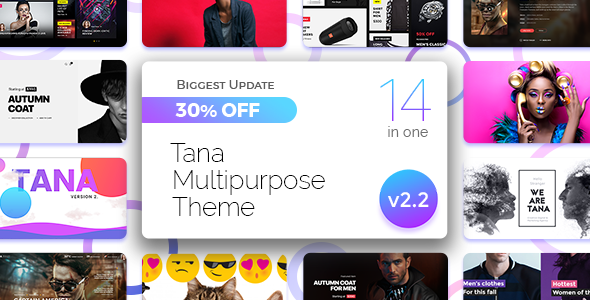
Stuck on your Tana Multipurpose WordPress theme? Let's fix it.
No endless back-and-forth. Just send us the details and we'll get it done.
No obligation · Replies within 1 hour · Quote within 1 day
Setup · Customization · Bug fixes · WooCommerce integration
About Tana Multipurpose WP Theme
Tana Multipurpose is a WordPress theme by Themeton built for businesses, agencies, and creatives who need a flexible, multi-layout site without writing custom code. It ships with a large library of pre-built demos covering corporate, portfolio, shop, and landing page layouts. You import a demo in a few clicks, then adjust colors, fonts, and sections through the live customizer.
The theme is built on a drag-and-drop page builder, so rearranging sections is straightforward. It supports WooCommerce, making it usable for product-based businesses as well as service sites. Performance is decent out of the box, though heavily demo-loaded installations will need some cleanup. Tana suits small to medium projects where design variety matters more than lightweight code.
Get matched with a Tana Multipurpose developer in under one day
Tell us about your Tana Multipurpose project. Small fixes, Tana Multipurpose theme customization, or a full website build, whatever you need, we've got it covered.
We'll connect you to the right Tana Multipurpose developers, define the scope, and get everything 100% clear.
You'll get one estimate, hire your preferred developer, and start collaborating.
Tana Multipurpose looks straightforward until something breaks or a client wants a layout the demo doesn’t cover. That’s where a vetted developer saves time. FoxyConcept works through Codeable, a platform of hand-screened WordPress specialists. Every developer on Codeable has passed a technical vetting process, so you’re not rolling the dice on quality. Whether you need a full Tana build, a customization, or a fix, you get matched with someone who knows what they’re doing.
Pros
- Large library of pre-built demos covers most business and creative niches
- Live customizer gives real-time control over colors, fonts, and layout options
- WooCommerce-ready out of the box with compatible shop templates
- One-click demo import speeds up initial setup significantly
- Responsive layouts that work across desktop, tablet, and mobile without extra configuration
Cons
- Demo imports pull in a lot of placeholder content and plugins that need manual cleanup
- Custom builder elements can conflict with third-party Elementor widgets
- Theme updates from Themeton are infrequent, which raises long-term compatibility concerns
- Page weight is high on demo-based builds, requiring optimization work before launch
- Support from Themeton is limited to forums and ticket-based help with slow response times
Who is Tana Multipurpose for?
Creative Agency
Tana’s portfolio and agency demos include grid galleries, service section layouts, and team member displays. An agency can import a demo, swap in brand colors and copy, and have a presentable site live quickly. A developer can extend this with custom project post types and filtered portfolio grids if the built-in layouts aren’t enough.
WooCommerce Store
Tana includes WooCommerce-compatible templates for shop pages, product listings, and cart flows. Small to medium stores fit well within the theme’s defaults. A developer can customize product page layouts, add upsell sections, or integrate payment and shipping plugins without starting from scratch.
Corporate Business Site
The corporate demos include service pages, about sections, testimonials, and call-to-action blocks. Tana handles this use case well for companies that need a clean, professional web presence without a large budget. Custom contact forms and CRM integrations are easy additions for a developer to layer on top.
Freelance Portfolio
Freelancers in design, photography, or development can use Tana’s portfolio layouts to showcase work. The theme supports project detail pages with image galleries and case study-style content. A developer can add a custom inquiry form or booking integration to turn a portfolio into a lead generation tool.
Event or Conference Site
Tana includes countdown timers, speaker sections, and schedule layouts suited to event and conference pages. These are useful for one-off product launches or annual events. A developer can integrate ticket booking plugins or connect the site to an external event management platform if needed.

Customizing Tana Multipurpose
Tana Multipurpose gives you a live customizer panel where you control global typography, color schemes, header layouts, and footer structure without touching code. Most sections have dedicated options, so you can adjust padding, toggle elements, and switch layouts visually.
For anything beyond those built-in controls — custom post type displays, advanced WooCommerce layouts, bespoke header behaviors, or performance-tuned child themes — you need a Tana Multipurpose expert who knows the theme’s structure. Themeton uses a combination of Elementor or a custom builder depending on version, so a developer familiar with both will move faster and avoid layout conflicts. Custom CSS overrides are common with Tana, and getting them right without breaking responsiveness takes experience.
Recommended plugins for Tana Multipurpose
Tana Multipurpose works with WooCommerce for store functionality, and most Elementor-compatible plugins drop in without issues. Common additions include WPForms, WPML for multilingual sites, and slider plugins already bundled with the theme.
If you’re stacking extensions, watch your page speed. Plugin-heavy Tana installs can get slow quickly. A developer can audit what’s loading, remove redundant scripts, and apply caching and minification properly. For deeper optimization, see our WordPress performance service. If your site also needs search visibility, our WordPress SEO service pairs well with any Tana build.
Not sure which plugins to use? This WordPress plugins directory covers the most popular options with reviews and setup guides.
Tana Multipurpose common issues
Tana Multipurpose demo import not working
Demo import failures in Tana usually come down to server timeout limits or PHP memory being too low. Check that your host allows at least 256MB memory and a 300-second max execution time. Also confirm the required plugins — Revolution Slider and bundled Themeton plugins — are active before importing. If XML import stalls, try importing in sections rather than the full package at once. A developer can also do a manual demo setup if automated import keeps failing.
Tana Multipurpose header not displaying correctly on mobile
Tana’s mobile header behavior is controlled through the customizer under header settings, but CSS conflicts with custom styles often override those settings on smaller screens. Start by checking if a custom CSS rule is overriding the mobile menu display. Clear all caches after any change. If the header stacks incorrectly or the hamburger menu doesn’t trigger, inspect the z-index and position values. Our WordPress bug fixing service handles exactly this type of layout issue.
Tana Multipurpose page builder content not saving
If Tana’s page builder isn’t saving content, the most common causes are a JavaScript conflict with another plugin, a nonce expiration due to session timeout, or a memory limit being hit mid-save. Deactivate plugins one by one to isolate a JS conflict. Increase PHP memory in wp-config.php. Also check browser console errors during the save attempt — they usually point directly at the failing script. Switching to a default WordPress theme temporarily helps confirm whether the issue is theme-specific.
Tana Multipurpose site slow after demo import
Demo imports bring in full-size images, multiple sliders, and several bundled plugins, all of which add load time. After import, delete unused demo pages and images, deactivate plugins you aren’t using, and run an image compression pass. Add a caching plugin and configure lazy loading for images. A CDN helps with asset delivery. For a full audit and fix, our WordPress performance service covers all of this systematically.
Tana Multipurpose FAQ
Tana Multipurpose was last actively updated by Themeton a while back, so compatibility with the most recent WordPress releases is not guaranteed. Before using it on a new project, test it on a staging environment with the latest WordPress core. If you hit compatibility issues, a developer can patch conflicts or help you migrate to a more actively maintained theme.
Tana Multipurpose versions vary — some use a custom bundled builder while others are designed around Elementor. If your version includes Elementor support, most Elementor widgets will work, though conflicts with Tana’s own page elements do occur. A developer familiar with both can resolve widget conflicts and extend your layouts using Elementor’s full feature set.
Yes, Tana Multipurpose includes WooCommerce-compatible templates for shop, product, cart, and checkout pages. The built-in shop demos cover standard store layouts. For custom product pages, advanced filtering, or checkout modifications, you’ll want a developer to extend the WooCommerce integration beyond the theme defaults.
Tana Multipurpose updates through the Envato marketplace or via the Themeton license key depending on how you purchased it. Go to Appearance, then Themes, and check for an update notification. Always back up before updating. If auto-updates aren’t available, you can manually upload the new version via FTP. Our WordPress maintenance service handles safe theme updates as part of ongoing care.
Tana uses standard HTML heading structures and outputs reasonably clean markup, which gives it a decent SEO baseline. That said, theme SEO alone isn’t enough. You still need an SEO plugin, optimized meta data, fast load times, and a solid content strategy. A bloated demo-based install will hurt Core Web Vitals scores, so performance cleanup is essential before focusing on rankings.
Hire a Tana Multipurpose Developer
Need a Tana Multipurpose expert to build, customize, or fix your site? FoxyConcept delivers WordPress work through Codeable, so every developer is vetted before they touch your project. Post your project, get a free estimate within 24 hours, and only hire if you’re happy with the scope. No risk, no pressure. Get your free estimate here and tell us what you need.
You'll need a free Codeable account so developers can ask questions and send their quotes.