Tastyc WordPress Theme
by bslthemes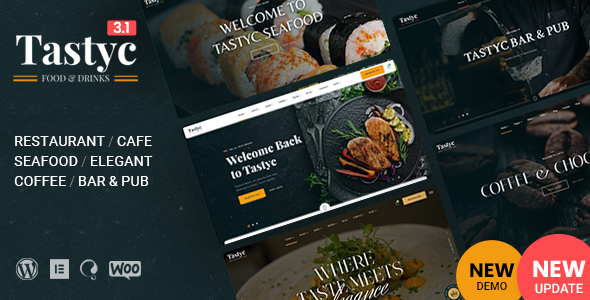
Stuck on your Tastyc WordPress theme? Let's fix it.
No endless back-and-forth. Just send us the details and we'll get it done.
No obligation · Replies within 1 hour · Quote within 1 day
Setup · Customization · Bug fixes · WooCommerce integration
About Tastyc WP Theme
Tastyc is a food and restaurant WordPress theme built by bslthemes. It targets restaurants, cafes, food bloggers, and recipe sites that need a polished, menu-driven layout without starting from scratch.
The theme ships with multiple homepage demos, a built-in menu section, reservation integration support, and WooCommerce compatibility for online ordering. Page layouts are built with Elementor, so editing happens visually without touching code.
bslthemes has a solid track record on ThemeForest with consistent updates and responsive support. Tastyc follows that pattern. It handles retina displays, loads reasonably fast out of the box, and works with most popular plugins. If your site revolves around food content, Tastyc gives you a strong visual foundation to work from.
Get matched with a Tastyc developer in under one day
Tell us about your Tastyc project. Small fixes, Tastyc theme customization, or a full website build, whatever you need, we've got it covered.
We'll connect you to the right Tastyc developers, define the scope, and get everything 100% clear.
You'll get one estimate, hire your preferred developer, and start collaborating.
Most Tastyc issues come down to customization attempts that break the layout or plugin conflicts that nobody catches until something stops working in production. That is where having an experienced developer matters.
Through Codeable, every developer is vetted before they take on a project. No bidding wars, no junior freelancers, no guesswork. You describe what you need, get a clear estimate, and work with someone who has done this before. Get a free estimate with no obligation to hire.
Pros
- Multiple pre-built demo sites tailored specifically to food and restaurant niches
- Native Elementor integration means layout changes don't require code
- Built-in menu section with food categories, pricing, and item descriptions
- WooCommerce ready for online ordering and delivery setups
- bslthemes provides regular updates and active ThemeForest support
Cons
- Heavy demo content with large images slows initial load without optimization
- Deep customization often requires child theme work, not just Elementor edits
- Reservation functionality relies on third-party plugins rather than anything built-in
- Some layout sections have hardcoded spacing that overrides panel settings
- Mobile menu styling can be inconsistent when heavily customized from the default
Who is Tastyc for?
Independent Restaurants
Tastyc suits single-location restaurants that need a full site fast. The menu section, hours display, and reservation integration cover the core needs. A developer can wire in OpenTable or a custom booking form and have a functional restaurant site live within days rather than weeks.
Food Bloggers and Recipe Sites
The theme handles image-heavy recipe layouts well. Combined with WP Recipe Maker and proper structured data, recipe posts become eligible for Google’s rich results. Food bloggers benefit from the visual hierarchy Tastyc provides without needing a custom theme build from scratch.
Cafes and Coffee Shops
Cafes need something lighter than a full restaurant site. Tastyc’s simpler demo layouts work for this. A focused build with a menu, location map, Instagram feed integration, and a contact form covers what most cafe sites actually need from a WordPress theme.
Food Delivery Businesses
WooCommerce integration makes Tastyc viable for food delivery. Products become menu items, categories map to cuisine types, and checkout handles the order flow. A developer needs to configure delivery zones and payment properly, but the theme supports the structure without fighting you on it.
Catering Companies
Catering companies need to showcase event packages, menus, and a clear inquiry path. Tastyc’s portfolio-style sections adapt well for this. A custom quote form replacing the standard reservation widget makes the site function as a proper lead generation tool for event catering businesses.

Customizing Tastyc
Tastyc gives you a decent starting point, but most serious builds require customization beyond what the default demos offer. That means adjusting layouts, tweaking typography, modifying the reservation flow, or integrating third-party booking and delivery plugins.
Elementor handles the surface-level changes well. For anything deeper, like custom post types for recipes, conditional menu displays, or performance tuning, you need someone who knows how the theme is structured.
A Tastyc expert can save you hours of trial and error. They know where bslthemes has hardcoded styles, how the theme handles mobile breakpoints, and which customizations require child theme work rather than just panel settings. Getting this right from the start avoids messy fixes later.
Recommended plugins for Tastyc
Tastyc works well with a focused plugin stack. For online ordering, WooCommerce is the standard choice and the theme supports it natively. For reservations, OpenTable or WPForms with custom fields both integrate cleanly.
For recipe content, WP Recipe Maker adds structured data that feeds directly into Google’s rich results. Pair that with proper WordPress SEO setup and food content starts ranking faster.
If your restaurant site gets real traffic, WordPress performance optimization matters. Tastyc’s image-heavy layouts need caching, CDN delivery, and image compression to stay fast. These are not optional on a production site.
Not sure which plugins to use? This WordPress plugins directory covers the most popular options with reviews and setup guides.
Tastyc common issues
Tastyc theme mobile menu not working after update
Mobile menu failures after a Tastyc update usually come from a script conflict or a cached asset that hasn’t cleared. Start by purging all caches including server, plugin, and browser. If the issue persists, check for JavaScript errors in the browser console. A conflict with a caching or minification plugin blocking the theme’s menu script is the most common cause. A WordPress bug fix can isolate the conflict quickly.
Tastyc Elementor sections overlapping on tablet view
Tablet layout overlaps in Tastyc almost always trace back to custom Elementor column widths that weren’t set for the tablet breakpoint separately. Elementor treats desktop, tablet, and mobile as independent breakpoints. Open the affected section in the Elementor editor, switch to tablet view, and reset or explicitly set column widths and padding at that breakpoint. Don’t assume desktop values carry over automatically.
Tastyc WooCommerce shop page layout broken
A broken WooCommerce shop layout in Tastyc usually means the theme’s WooCommerce template files are out of sync with the current WooCommerce version. Check the System Status inside WooCommerce for template override warnings. If Tastyc’s templates are flagged as outdated, they need manual updating or replacement in a child theme. Running a theme update or rebuilding the shop template in a child theme resolves this in most cases.
Tastyc theme slowing down site with large images
Tastyc demo images are large and unoptimized by default. Install ShortPixel or Imagify to compress existing and future uploads. Enable lazy loading for images below the fold. Add a CDN through Cloudflare or BunnyCDN to serve images faster. For a more complete fix, a full WordPress performance optimization audit will identify every bottleneck specific to your Tastyc setup.
Tastyc FAQ
Yes, Tastyc is built specifically for food and restaurant sites. It includes menu sections, reservation support, and food-focused demo layouts. It works well for single restaurants, cafes, and food businesses that want a visual site without building from scratch. For more complex setups, a developer familiar with Tastyc will get you further faster.
Yes. Tastyc is built on Elementor as its primary page builder. All demo layouts are constructed with Elementor widgets and sections. This means you can edit content visually without code. For structural changes or custom widgets, you will need developer input, but standard page editing and content updates are fully handled through Elementor.
Yes, through WooCommerce. Tastyc supports WooCommerce natively. You configure your menu items as products and use WooCommerce’s checkout for orders. For delivery zones, payment gateways, and order management, additional WooCommerce extensions are needed. A developer can configure the full ordering flow to match how your restaurant actually operates.
After activating Tastyc, the theme prompts you to install required plugins including Elementor and the bslthemes core plugin. Once those are active, go to the theme’s demo importer panel and select the demo you want. The importer pulls in content, images, and settings. Full import can take a few minutes depending on your server speed.
Yes. Tastyc handles recipe and food blog content well. The layouts support image-heavy posts and the theme is compatible with WP Recipe Maker for structured recipe content. If ranking recipe content in search matters to you, pair the theme with proper WordPress SEO optimization to get the most from the structured data markup.
Hire a Tastyc WordPress Developer
Whether you need a full Tastyc build from a demo, custom layout work, plugin integration, or fixes to an existing site, the right developer makes a real difference. Work is handled through Codeable, where all developers are pre-vetted and specialize in WordPress.
There is no risk involved. You post your project, get matched within 24 hours, and receive a clear estimate before committing to anything. Get your free estimate today and get the project moving.
You'll need a free Codeable account so developers can ask questions and send their quotes.