Technologia WordPress Theme
by vamtam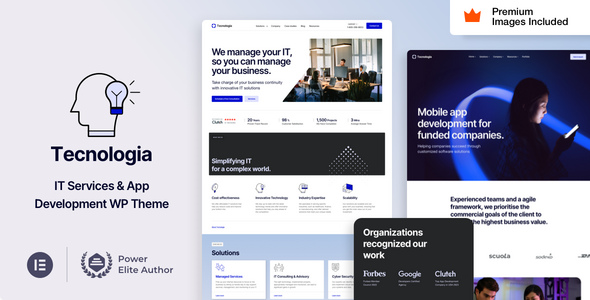
Stuck on your Technologia WordPress theme? Let's fix it.
No endless back-and-forth. Just send us the details and we'll get it done.
No obligation · Replies within 1 hour · Quote within 1 day
Setup · Customization · Bug fixes · WooCommerce integration
About Technologia WP Theme
Technologia is a premium WordPress theme built by VamTam, a well-established theme studio known for clean code and solid Elementor integration. The theme targets tech companies, SaaS products, IT agencies, and digital service providers looking for a polished, professional look without starting from scratch.
It ships with a solid collection of pre-built demos, full Elementor Page Builder support, and VamTam’s own element library. The design is structured around conversion-focused layouts: clear service sections, pricing tables, team grids, and portfolio displays. It handles WooCommerce out of the box, which makes it viable for software or digital product sales. Performance-wise, it follows modern standards, though real-world results depend heavily on how it’s configured and what plugins are running alongside it.
Get matched with a Technologia developer in under one day
Tell us about your Technologia project. Small fixes, Technologia theme customization, or a full website build, whatever you need, we've got it covered.
We'll connect you to the right Technologia developers, define the scope, and get everything 100% clear.
You'll get one estimate, hire your preferred developer, and start collaborating.
Most Technologia issues come down to one thing: the theme does a lot, but making it do exactly what your business needs takes someone who knows its structure well. VamTam’s codebase is clean, but customizing templates, resolving plugin conflicts, or building custom functionality on top of it requires real WordPress development experience. Through Codeable, you can connect with a vetted Technologia developer who has worked with the theme before, get a clear scope, and move forward without guessing. No junior developers, no offshore lottery.
Pros
- VamTam's Elementor widget library adds tech-specific blocks not available in the standard Elementor free version
- Multiple pre-built demo sites covering SaaS, IT services, and digital agencies, all importable in one click
- Built-in WooCommerce compatibility makes it practical for selling software, licenses, or digital downloads
- Clean, well-structured code from a theme studio with a long track record of updates and support
- Header and footer builder included, giving layout control without needing a separate plugin
Cons
- Elementor dependency means the theme's full feature set only works properly with Elementor installed and active
- Demo content import can be slow and occasionally incomplete, requiring manual cleanup afterward
- VamTam's custom widgets add functionality but also add page weight if not managed carefully
- Limited flexibility for non-Elementor workflows, making it a poor fit if you prefer Gutenberg-only development
- Advanced customization beyond the provided templates requires CSS or PHP knowledge to execute properly
Who is Technologia for?
SaaS and Software Products
Technologia’s pricing table layouts, feature comparison blocks, and call-to-action sections are built with SaaS in mind. A Technologia developer can extend these with custom pricing logic, trial signup flows, or integration with tools like Stripe or Paddle to support a full product landing page setup.
IT Services and Managed Hosting
IT service companies benefit from the theme’s service grid layouts, trust-building elements, and structured contact flows. The theme supports clear service categorization and case study displays. A Technologia specialist can wire up lead capture forms, CRM integrations, or quote request systems to turn visits into inquiries.
Digital Agencies
Agencies need portfolio displays, team sections, and case study layouts that don’t look templated. Technologia’s demo range covers this well as a starting point. A Technologia expert can push the design further, building a site that reflects the agency’s brand rather than VamTam’s default aesthetic.
Tech Startups
Startups often need to move fast without sacrificing credibility. Technologia’s pre-built layouts cover the standard startup page structure: hero, features, social proof, pricing, and contact. A developer familiar with the theme can have a polished site live quickly, with room to expand as the product grows.
Software and Digital Product Sales
The built-in WooCommerce support makes Technologia a practical choice for selling plugins, themes, software licenses, or digital downloads. A Technologia developer can customize product pages, configure license delivery, and integrate payment gateways to match how your product is actually sold.

Customizing Technologia
Technologia gives you a reasonable amount of control through Elementor and the WordPress Customizer. You can swap colors, typography, header layouts, and footer structures without touching code. VamTam also includes their own Elementor widget pack, which adds tech-specific blocks like icon boxes, feature comparisons, and animated counters.
That said, customization has limits. Importing a demo and adjusting it is straightforward, but building something significantly different from the provided templates often requires custom CSS or PHP work. A Technologia expert can help you push past those limits, restructuring page templates, creating custom post type layouts, or integrating third-party tools that don’t slot in cleanly by default. If your project needs more than surface-level changes, working with a Technologia specialist from the start saves considerable time.
Recommended plugins for Technologia
Technologia works cleanly with most major plugins. WooCommerce integration is solid for selling digital products or software licenses. Contact Form 7 and WPForms both work without conflicts in standard setups.
Where it gets more involved is performance and SEO. Elementor-heavy pages can accumulate bloat quickly, so pairing the theme with proper caching, image optimization, and script management matters. A developer familiar with WordPress performance optimization can make a significant difference to load times. On the SEO side, structured data, schema markup, and clean heading hierarchies need deliberate configuration. If that’s a priority, dedicated WordPress SEO optimization work alongside the theme setup is worth planning for.
Not sure which plugins to use? This WordPress plugins directory covers the most popular options with reviews and setup guides.
Technologia common issues
Technologia theme Elementor widgets not showing after update
This usually happens when the VamTam Elements plugin and Technologia theme are on mismatched versions. After a theme or plugin update, clear all caches first, then deactivate and reactivate the VamTam Elements plugin. If widgets still don’t appear in the Elementor panel, regenerate Elementor’s CSS via Elementor > Tools > Regenerate Files. Persistent issues often point to a plugin conflict. A WordPress bug fixing specialist can isolate the cause quickly without guesswork.
Technologia demo import fails or imports incomplete content
Demo imports in Technologia fail most often due to server memory limits, PHP execution timeouts, or a weak internet connection during import. Raise your PHP memory limit to at least 256MB and set max_execution_time to 300 seconds in your php.ini or via wp-config.php. Try importing with all non-essential plugins disabled. If content imports but images are missing, run the media import step separately. Repeated failures on managed hosts may need server-level changes. A WordPress bug fixing service can handle this cleanly if the standard steps don’t resolve it.
Technologia header layout broken on mobile
Technologia’s header builder allows complex layouts that don’t always translate cleanly to smaller screens without manual breakpoint adjustments. Open the header builder and check each element’s responsive visibility settings. Navigation menus, logos, and action buttons each have separate mobile settings in Elementor. If the burger menu isn’t triggering correctly, check for JavaScript conflicts with other plugins by testing in a clean environment with non-essential plugins disabled.
Technologia theme slow page load speed with Elementor
Elementor-built pages in Technologia can get heavy fast, especially with VamTam’s custom widgets and multiple sections loading animations. Start with a caching plugin, optimize all images, and enable lazy loading. Disable unused Elementor experiments and VamTam widget animations where they’re not adding value. Use a tool like GTmetrix or WebPageTest to identify the specific bottlenecks before making changes. A developer focused on WordPress performance can prioritize the fixes that actually move the needle.
Technologia FAQ
Yes. Technologia is built around Elementor and works with both the free and Pro versions. VamTam’s own element library extends Elementor’s widget set with tech-specific blocks. Elementor Pro adds features like custom popups, forms, and theme builder templates, which integrate well with Technologia’s layout structure.
Yes, Technologia includes WooCommerce support out of the box. Product pages, shop archives, and cart and checkout pages inherit the theme’s styling. It’s a practical choice for selling software, digital downloads, or subscriptions. More complex store configurations, like custom product types or checkout flows, may need developer work to set up correctly.
Technologia is developed by VamTam, a theme studio that has been building premium WordPress themes since 2011. They maintain a catalog of niche-specific themes and have a track record of regular updates and active support. The theme is sold through ThemeForest under the VamTam label.
Technically you can, but the theme is designed around Elementor. Without it, you lose access to VamTam’s custom widget library and the pre-built demo layouts. Gutenberg will work for basic content editing, but the full design system relies on Elementor being active. If you prefer a block-editor-first workflow, Technologia is not the right fit.
Before updating, back up your site including the database and all files. Update the VamTam Elements plugin and Technologia theme together, as version mismatches cause the most common post-update issues. After updating, clear all caches and check key pages visually. If you’re on a live site, test the update on a staging environment first. If you need help managing updates safely, WordPress maintenance support covers this as an ongoing service.
Hire a Technologia Expert Developer
If your Technologia site needs custom development, a tricky fix, or a build from scratch, the fastest route is a developer who already knows the theme. Through Codeable, projects are matched with vetted WordPress specialists within 24 hours. You get a free estimate before committing to anything. Get a Free Estimate and describe what you need. No obligation, no risk.
You'll need a free Codeable account so developers can ask questions and send their quotes.