TeeSpace WordPress Theme
by HaruTheme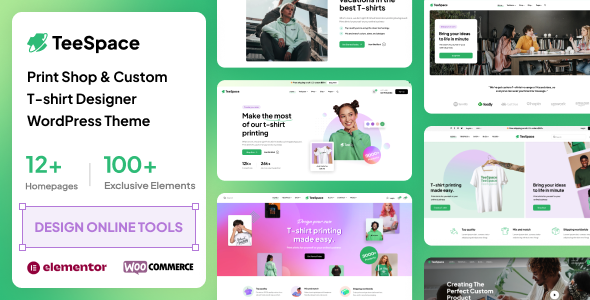
Stuck on your TeeSpace WordPress theme? Let's fix it.
No endless back-and-forth. Just send us the details and we'll get it done.
No obligation · Replies within 1 hour · Quote within 1 day
Setup · Customization · Bug fixes · WooCommerce integration
About TeeSpace WP Theme
TeeSpace is a WooCommerce theme built by HaruTheme, aimed at print-on-demand and apparel stores. It ships with a clean product layout, multiple homepage demos, and tight WooCommerce integration that keeps the shopping experience fast and focused.
The theme supports product variation swatches, a sticky header, and AJAX cart functionality out of the box. These are practical features for any store selling customisable products like t-shirts, hoodies, or mugs. HaruTheme also includes a visual page builder with pre-built sections, so you can assemble pages without writing code.
TeeSpace is built on Elementor compatibility, making it accessible to most WordPress users. Regular updates from HaruTheme keep it compatible with current WooCommerce releases. If you run a print-on-demand business or an online clothing brand, TeeSpace gives you a solid starting point without overcomplicating the setup.
Get matched with a TeeSpace developer in under one day
Tell us about your TeeSpace project. Small fixes, TeeSpace theme customization, or a full website build, whatever you need, we've got it covered.
We'll connect you to the right TeeSpace developers, define the scope, and get everything 100% clear.
You'll get one estimate, hire your preferred developer, and start collaborating.
Most WooCommerce issues look simple until they are not. A TeeSpace developer who knows HaruTheme’s architecture will fix problems faster and build features that hold up under real traffic. Through Codeable, every developer is vetted and rated, so you are not hiring blind. You get a qualified expert matched to your specific project, with a fixed estimate upfront and no obligation to proceed. For stores where downtime costs money, that reliability matters.
Pros
- Ships with multiple print-on-demand focused demo layouts ready to import
- Includes variation swatches and AJAX cart natively, no extra plugin needed
- Built for Elementor, giving non-developers page-building flexibility
- Active updates from HaruTheme maintain WooCommerce compatibility
- Sticky header and mobile-optimised product pages improve conversion on mobile
Cons
- Demo import can overwrite existing settings if not handled carefully
- Deep customisation beyond Elementor requires PHP knowledge and a child theme
- Some bundled plugins are premium and require separate licences to unlock full features
- HaruTheme support response times can be slow on complex technical queries
- Limited third-party documentation makes troubleshooting less straightforward than major themes
Who is TeeSpace for?
Print-on-Demand Stores
TeeSpace is purpose-built for print-on-demand. Its product layout handles variation-heavy listings well, and it integrates cleanly with Printful and Printify. Product pages load with the right structure to display multiple colour and size options without cluttering the design. For stores using automated fulfilment, TeeSpace keeps the front end clean while the plugins handle the backend.
Custom Apparel Brands
Independent clothing brands benefit from TeeSpace’s brand-forward layouts. The theme supports lookbook-style sections alongside standard product grids. You can build collection pages, highlight seasonal drops, and use the sticky header to keep cart access visible during browsing. Pair it with a child theme for brand-specific typography and colour systems that hold across all pages.
Merchandise Shops for Creators
YouTubers, streamers, and artists launching merchandise stores find TeeSpace practical. The demo layouts are quick to adapt, and the WooCommerce setup does not require extensive configuration to start selling. Product variation swatches make it easy for fans to pick sizes and colours. A developer can add a custom front page section to feature a creator’s content alongside the shop.
Dropshipping Fashion Stores
Dropshipping stores focused on fashion and casualwear fit TeeSpace’s layout assumptions well. The theme’s AJAX cart and product filtering work with WooCommerce’s default toolset. For stores importing products via AliDropship or WooDropship, TeeSpace’s grid adapts to varied catalogue sizes. Page speed optimisation matters here since paid traffic has zero tolerance for slow load times.
Promotional Products Retailers
Businesses selling branded pens, tote bags, mugs, or workwear can use TeeSpace’s WooCommerce foundation with product add-on plugins to handle custom text or logo upload requests. The theme’s clean product page structure gives you space to explain customisation options. A developer can wire up a file upload field and connect it to your production workflow without changing the core theme files.

Customizing TeeSpace
TeeSpace offers a reasonable degree of customisation through the WordPress Customizer and Elementor. You can adjust typography, color schemes, header layouts, and footer structure without touching code. The bundled demo content makes it easier to swap in your own branding quickly.
Where it gets more involved is when you need to modify WooCommerce templates, add custom product filters, or create a checkout flow that matches a specific brand experience. That is where a TeeSpace expert adds real value. A developer familiar with HaruTheme’s code structure can extend the theme cleanly without breaking future updates.
Custom child themes are the safest way to manage deeper changes. A TeeSpace expert will set that up properly, keep your modifications separate from core files, and ensure updates do not overwrite your work. This is especially important for growing stores that cannot afford downtime or unexpected layout breakage after an update.
Recommended plugins for TeeSpace
TeeSpace works well with popular WooCommerce extensions like WooCommerce Subscriptions, Product Add-Ons, and print-on-demand plugins such as Printful or Printify. These integrations expand what the theme can do without requiring a rebuild.
For stores focused on search visibility, pairing TeeSpace with an SEO setup ensures your product pages are indexed correctly and structured for ranking. Speed is equally important for conversion rates, and a proper WordPress performance optimisation will tighten Core Web Vitals scores on image-heavy apparel pages.
Adding a wishlist plugin or advanced filtering via FacetWP are also common upgrades for TeeSpace stores.
Not sure which plugins to use? This WordPress plugins directory covers the most popular options with reviews and setup guides.
TeeSpace common issues
TeeSpace demo import not working
Demo import failures in TeeSpace are usually caused by server memory limits or PHP timeout settings. Your host needs at least 256MB of memory and a PHP max execution time of 300 seconds. Check those values in wp-admin under Tools > Site Health. If they are too low, contact your host or update the php.ini file. Also confirm that the required plugins listed in the importer are activated before running the import. Incomplete plugin activation is the most common reason the process stalls or imports without images.
TeeSpace variation swatches not displaying correctly
If variation swatches are not showing on product pages, the first thing to check is whether the HaruTheme swatches plugin is activated and up to date. Then verify that your product attributes are set to the correct display type inside WooCommerce > Attributes. If swatches show in the backend but not the front end, a caching plugin is likely serving a stale version of the page. Clear all cache layers including server-side cache, CDN cache, and any object cache before testing again. A WordPress bug fixing service can isolate the conflict faster.
TeeSpace Elementor sections broken after update
Elementor sections breaking after a TeeSpace update typically means the theme introduced changes to its CSS or template files that conflict with saved Elementor data. Regenerate the CSS files inside Elementor > Tools > Regenerate CSS and Data. If sections are still broken, check whether you are running the theme directly without a child theme. Updates to the parent theme can overwrite custom CSS or template overrides. Going forward, use a child theme to protect your customisations from future updates.
TeeSpace WooCommerce product page layout issues
Product page layout problems in TeeSpace often trace back to conflicting WooCommerce template files. HaruTheme overrides several default WooCommerce templates. If you have also customised those templates in a child theme, version mismatches between the theme and WooCommerce can cause layout shifts or missing elements. Go to WooCommerce > Status > System Status and look for outdated template warnings. Update or re-copy the relevant templates to fix the mismatch. If the issue persists, a bug fixing specialist can trace the exact conflict.
TeeSpace FAQ
Yes. TeeSpace is built specifically for WooCommerce and handles apparel and print-on-demand catalogues well. It includes variation swatches, AJAX cart, and product-focused layouts that most general themes do not offer without extra plugins. It works best for stores where the product is the main focus and the catalogue is variation-heavy, such as clothing or custom merchandise.
TeeSpace works alongside Printful and Printify since both connect to WooCommerce directly. The theme handles the front-end display while the print-on-demand plugin manages inventory and fulfilment. No special configuration is required. You may want a developer to adjust product page templates to surface fulfilment details or custom mockup images in a cleaner way.
TeeSpace is designed with Elementor as its primary page builder, but the theme’s WooCommerce templates and Customizer settings function independently of Elementor. You can run a basic store without using Elementor at all. However, the demo layouts and most of the visual flexibility the theme offers are tied to Elementor, so skipping it limits what you can build on static pages.
Always use a child theme before customising TeeSpace. Any changes made to the parent theme files will be overwritten when HaruTheme releases an update. With a child theme in place, your CSS and template overrides stay separate. Back up the site before updating, test on a staging environment first, and check for WooCommerce template conflicts after each update using the WooCommerce system status screen.
Switching an existing WooCommerce store to TeeSpace is possible but requires planning. Product data, orders, and customer records stay in the database, but your existing page layouts will not transfer. You will need to rebuild pages using TeeSpace’s Elementor templates. A WordPress migration service can handle the transition safely, preserve your data, and rebuild key pages without losing SEO or order history.
Hire a TeeSpace Developer
Whether you need a TeeSpace developer for a full store build, a specific WooCommerce feature, or an ongoing fix, FoxyConcept connects you with vetted experts through Codeable. Work is scoped clearly, priced fairly, and delivered by developers who know WooCommerce inside out. Get a free estimate today with no obligation to hire. Your project is reviewed within 24 hours and matched with the right developer for your store’s needs.
You'll need a free Codeable account so developers can ask questions and send their quotes.