THE CAPPA WordPress Theme
by shtheme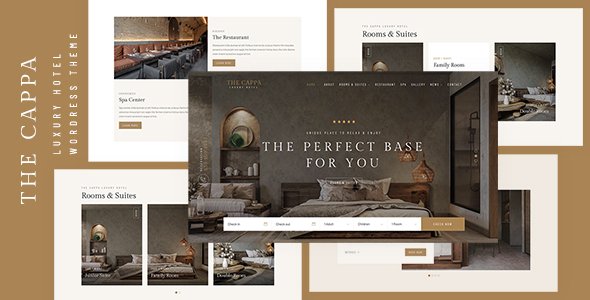
Stuck on your THE CAPPA WordPress theme? Let's fix it.
No endless back-and-forth. Just send us the details and we'll get it done.
No obligation · Replies within 1 hour · Quote within 1 day
Setup · Customization · Bug fixes · WooCommerce integration
About THE CAPPA WP Theme
THE CAPPA is a WordPress theme by shtheme, built for creative professionals who need a clean, portfolio-focused layout without a lot of setup friction. It targets photographers, designers, architects, and agencies that want their visual work front and center.
The theme ships with multiple homepage layouts, a fullscreen slider, and project-based portfolio sections. Typography is well-considered, and the overall aesthetic leans minimal without feeling bare. It works with most major page builders, and the demo content can be imported quickly to get a working site in place fast.
Built on a responsive framework, THE CAPPA handles mobile views without much extra configuration. It supports WooCommerce if you need a shop, and integrates with common contact form plugins. For creative studios or freelancers building their first serious portfolio site, it covers the basics well.
Get matched with a THE CAPPA developer in under one day
Tell us about your THE CAPPA project. Small fixes, THE CAPPA theme customization, or a full website build, whatever you need, we've got it covered.
We'll connect you to the right THE CAPPA developers, define the scope, and get everything 100% clear.
You'll get one estimate, hire your preferred developer, and start collaborating.
Most WordPress developers know the platform. Fewer know specific themes well enough to modify them cleanly. On Codeable, you get access to vetted WordPress professionals who have worked with portfolio themes like THE CAPPA and understand shtheme’s structure, hooks, and template files.
That means less time explaining what you want and more time seeing it built. Post your project, get a free estimate within 24 hours, and only hire if the scope and price make sense. No commitment required to get started.
Pros
- Clean minimal design that puts portfolio work first without visual clutter
- Multiple pre-built homepage layouts included, reducing initial setup time
- Fullscreen slider with smooth transitions suited to photography and architecture portfolios
- WooCommerce compatible for selling prints, services, or digital products
- Responsive out of the box with reasonable mobile layout defaults
Cons
- Theme options panel can feel limited when you need layout changes beyond presets
- Documentation from shtheme is sparse in places, making advanced customization harder without a developer
- Portfolio filtering relies on basic category logic with no built-in AJAX by default
- Font and color controls do not cover every element, requiring CSS overrides for full consistency
- Updates have been infrequent, which raises questions about long-term compatibility with newer WordPress versions
Who is THE CAPPA for?
Photography Portfolio
THE CAPPA’s fullscreen slider and grid-based portfolio sections work well for photographers who need images to fill the viewport without distraction. The minimal chrome keeps the focus on the photos themselves. With some CSS adjustment, gallery layouts can be tailored to portrait or landscape-heavy collections without rebuilding the template.
Architecture Studio
Architecture firms need projects presented at scale. THE CAPPA handles large imagery cleanly and supports project detail pages that can hold drawings, descriptions, and photo sets. The typography choices suit professional studio branding, and the layout adapts to both desktop presentations and mobile browsing from prospective clients.
Graphic Design Freelancer
Freelance designers typically need a simple, credible portfolio without a lot of maintenance overhead. THE CAPPA installs quickly with demo content and requires minimal configuration to look professional. A developer can add a services section or a contact form with inquiry routing without major structural changes to the theme.
Creative Agency
Agencies with multiple team members and case studies need more from a theme than a single portfolio grid. THE CAPPA can be extended with custom post types for team profiles and client work categories. A THE CAPPA developer can build out those structures cleanly while keeping the theme’s visual consistency intact across every section.
Print and Art Shop
With WooCommerce integrated, THE CAPPA becomes a functional shop for artists selling prints or digital files. Product pages inherit the theme’s clean aesthetic, and the checkout flow works without major styling conflicts. Adding a shop to an existing THE CAPPA portfolio site is a common request that a developer can handle in a focused engagement.

Customizing THE CAPPA
Out of the box, THE CAPPA gives you a solid starting point, but most clients need it pushed further. That means custom color schemes, adjusted typography scales, modified portfolio grid layouts, or homepage sections that do not exist in the default demo.
Working with a THE CAPPA expert makes that process much faster. Rather than reverse-engineering the theme’s structure or fighting with override CSS, a developer who knows shtheme’s codebase can make targeted changes without breaking the template hierarchy.
Common customization requests include adding filterable portfolio categories, adjusting the fullscreen slider timing and transitions, building custom archive templates for project types, and restructuring the header for sticky or transparent behavior on scroll. If you want results that look intentional rather than patched together, bring in someone who has worked inside this theme before.
Recommended plugins for THE CAPPA
THE CAPPA can do more with the right plugins added. WooCommerce turns it into a shop for selling prints, design services, or digital downloads. WPML adds multilingual support for studios with international clients.
For performance, pairing the theme with a caching solution and an image optimization plugin matters more than most people realize. A slow portfolio site loses visitors before the first image loads. You can read more about this on our WordPress performance page.
If organic traffic is part of your plan, Yoast or Rank Math slots in cleanly. For deeper SEO work beyond plugin setup, see our WordPress SEO service.
Not sure which plugins to use? This WordPress plugins directory covers the most popular options with reviews and setup guides.
THE CAPPA common issues
THE CAPPA portfolio grid not displaying correctly after update
Grid display issues after a theme update usually point to a conflict between the theme’s layout scripts and a recently changed plugin or WordPress core version. Start by disabling plugins one at a time to isolate the conflict. Clear your cache before each test. If the grid uses a masonry or isotope library, check the browser console for JavaScript errors. A persistent issue often requires inspecting the theme’s portfolio template file directly. Our WordPress bug fixing service can handle this quickly.
THE CAPPA fullscreen slider broken or not loading on mobile
Slider failures on mobile are frequently caused by touch library conflicts or viewport meta tag issues. Check that no other plugin is loading a conflicting version of jQuery or a slider script. Test in a private browser window with plugins disabled. If the slider uses a CSS transform for fullscreen sizing, some mobile browsers clip it unexpectedly. You may need to adjust the slider’s height calculation in the theme’s CSS or JavaScript file. A developer can pinpoint the exact cause faster than trial and error.
THE CAPPA demo content import failing or incomplete
Demo import failures in THE CAPPA usually come from PHP memory limits or upload size restrictions on the server. Check your host’s php.ini settings and increase max_execution_time and memory_limit if they are below 256MB and 60 seconds respectively. If the import completes but images are missing, the demo images may need to be fetched from shtheme’s server, which sometimes throttles external requests. A manual import using WordPress’s built-in importer with the XML file can work as a fallback.
THE CAPPA custom fonts not applying in header or navigation
Custom fonts not applying to the header or navigation in THE CAPPA almost always means the font selector in the theme options is overridden by a more specific CSS rule. Open your browser’s inspector, click the affected text, and check which rule is winning in the styles panel. You will likely need a small CSS override targeting the exact selector. If you are using a Google Font loaded through the theme, confirm the font name matches the exact string used in the theme options field, including weight suffixes.
THE CAPPA FAQ
shtheme has not maintained a consistent update schedule for THE CAPPA. The theme functions on current WordPress versions, but compatibility with future releases is not guaranteed. If long-term support matters for your project, factor in the cost of developer maintenance to keep things running. Our WordPress maintenance service covers this kind of ongoing upkeep.
THE CAPPA is compatible with WPBakery in most configurations. Elementor can be used alongside it, but some fullwidth layout features may conflict with Elementor’s canvas mode. Testing on a staging environment before applying to a live site is recommended. A developer familiar with the theme can resolve template hierarchy conflicts if they come up during setup.
Yes. THE CAPPA includes WooCommerce support, and the shop and product pages inherit the theme’s styling without major conflicts. You may need some CSS adjustments to get cart and checkout pages looking consistent with the rest of the design. Adding a shop to a portfolio built on THE CAPPA is a common and manageable project for an experienced developer.
Portfolio categories in THE CAPPA use WordPress’s built-in taxonomy system. You add categories through the Portfolio section in the WordPress admin, then assign them to individual projects. The theme’s portfolio shortcode or template block will display filter buttons automatically once categories are assigned. If you need AJAX-based filtering or custom taxonomy structures, that requires a developer to modify the template.
Switching an existing site to THE CAPPA means rebuilding page layouts to match the new theme’s structure. Content like posts and pages transfers automatically, but design work does not. If your current site has custom functionality, a developer should assess what carries over and what needs rebuilding. See our WordPress migration service for help with this process.
Hire a THE CAPPA Developer
If you need changes made to THE CAPPA that go beyond the theme options panel, working with a specialist is the fastest path to getting it done right. Our developers know shtheme’s codebase and can handle layout modifications, custom portfolio features, plugin integrations, and performance work without touching things that do not need touching.
Get a free estimate and describe what you need. You will hear back within 24 hours with a clear scope and price. No obligation to hire.
You'll need a free Codeable account so developers can ask questions and send their quotes.