The Fox WordPress Theme
by withemes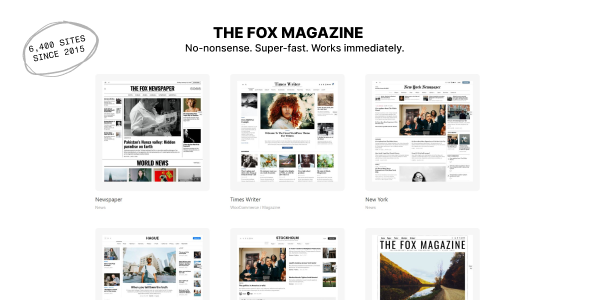
Stuck on your The Fox WordPress theme? Let's fix it.
No endless back-and-forth. Just send us the details and we'll get it done.
No obligation · Replies within 1 hour · Quote within 1 day
Setup · Customization · Bug fixes · WooCommerce integration
About The Fox WP Theme
The Fox is a multipurpose WordPress theme by WiThemes, built around a clean visual style and flexible layout engine. It targets bloggers, creatives, and small businesses who want a polished site without writing custom code from scratch.
The theme ships with multiple homepage layouts, a built-in mega menu, sticky header options, and deep WooCommerce support. The Fox works with Elementor and the classic editor, giving you layout control without locking you into one page builder.
WiThemes keeps The Fox updated regularly, which means compatibility with current WordPress and PHP versions holds up well. If you need a theme that handles both editorial content and light e-commerce without feeling bloated, The Fox is a practical starting point.
Get matched with a The Fox developer in under one day
Tell us about your The Fox project. Small fixes, The Fox theme customization, or a full website build, whatever you need, we've got it covered.
We'll connect you to the right The Fox developers, define the scope, and get everything 100% clear.
You'll get one estimate, hire your preferred developer, and start collaborating.
Most The Fox customization problems come down to one thing: modifying the theme directly instead of using a child theme, then losing everything on the next update. A specialist avoids that from the start.
Through Codeable, you get matched with a vetted The Fox developer who has solved these problems before. No guesswork, no offshore lottery. Post a project, get an estimate within 24 hours, and only proceed if the scope and price make sense. There is no obligation to hire.
Pros
- Multiple homepage layouts included out of the box, reducing setup time
- Solid WooCommerce integration with product page customization options
- Built-in mega menu handles complex navigation without a plugin
- Elementor compatible, so layout editing is visual and flexible
- Regular WiThemes updates keep compatibility with current WordPress versions
Cons
- The Customizer options panel is dense and can be hard to navigate for new users
- Some demo layouts require the full demo import, which can bloat the database with placeholder content
- Child theme is not included, so updates can overwrite direct customizations
- Limited documentation for advanced developer use cases like custom post types
- Default font loading can slow first paint on shared hosting without optimization
Who is The Fox for?
Lifestyle Blog
The Fox handles editorial content well. Its blog layouts support featured images, category labels, and reading time. A The Fox specialist can configure category templates and archive pages to match a consistent editorial brand without custom plugin dependencies.
Photography Portfolio
The clean whitespace and full-width layout options make The Fox a workable base for photographer portfolios. A The Fox developer can build gallery templates using ACF and custom post types, giving the site a structured portfolio section beyond what the default theme provides.
WooCommerce Store
WooCommerce support in The Fox covers product pages, cart, and checkout styling. A The Fox expert can extend this with custom product templates, upsell sections, and checkout field adjustments that match the store’s brand without requiring a separate WooCommerce theme.
Digital Magazine
The mega menu and category-driven layouts make The Fox a solid base for content-heavy magazine sites. A The Fox developer can set up custom homepage blocks per category, implement ad slot placements, and configure reading flow for high-volume publishing schedules.
Agency or Freelancer Site
Agencies and freelancers use The Fox for client-facing sites with service pages, case studies, and contact forms. A The Fox specialist can build reusable Elementor templates, configure the theme for multi-page service structures, and set up lead capture without third-party builders.

Customizing The Fox
The Fox gives you a lot of customization surface inside the WordPress Customizer: typography controls, color palettes, header layouts, sidebar positions, and widget areas. That is enough for basic brand alignment without touching code.
Where things get more involved is custom post templates, child theme development, and Elementor widget styling that matches your design system. A The Fox expert can build a child theme that protects your changes across updates, add custom post types, and wire up ACF field groups to dynamic templates.
If you want the theme to behave differently from its default patterns, or need pixel-accurate layouts for a client project, hiring a The Fox developer saves significant time and avoids the common mistakes that come from overriding core theme files directly.
Recommended plugins for The Fox
The Fox pairs well with performance and SEO plugins that extend what the theme does out of the box. For speed, combining The Fox with a caching layer, image optimization, and a CDN makes a measurable difference, especially on image-heavy editorial sites. See our WordPress performance service for a full optimization approach.
On the SEO side, The Fox outputs clean semantic HTML, which gives Yoast SEO and Rank Math solid markup to work with. Schema, breadcrumbs, and open graph tags layer in without conflicts. If you need deeper SEO work done alongside your theme setup, our WordPress SEO service covers that end to end.
Not sure which plugins to use? This WordPress plugins directory covers the most popular options with reviews and setup guides.
The Fox common issues
The Fox mega menu not showing on mobile
Mobile menu display issues in The Fox usually come from a JavaScript conflict with another plugin, or from a CSS breakpoint override in a child theme. Open the browser console on mobile viewport and check for JS errors first. If the mega menu markup is present in the DOM but hidden, the problem is CSS specificity. A targeted media query fix in your child theme stylesheet resolves this cleanly.
The Fox header overlapping page content after update
Header overlap after a The Fox update typically means a sticky header offset value has reset, or a page template has changed. Go to Customizer, check the Header settings, and look at the top padding value on your page content wrapper. If the overlap is consistent across pages, add a CSS rule targeting the main content area top margin. For persistent layout problems, our WordPress bug fixing service can diagnose and resolve the issue.
The Fox demo import not working
The Fox demo import fails most often due to server timeout limits or max file upload size restrictions. Increase max_execution_time, upload_max_filesize, and post_max_size in your PHP config or wp-config.php. Also make sure the One Click Demo Import plugin is active and updated. If the import still hangs, import XML content manually and set up widgets separately.
WooCommerce product grid layout broken in The Fox
WooCommerce grid layout breaks in The Fox usually follow a WooCommerce major version update that changes its default template structure. Check whether The Fox has updated its WooCommerce template overrides in the theme folder. If you are running a child theme, compare your overridden templates against the new WooCommerce versions and update accordingly. If this is causing sales impact, use our WordPress bug fixing service for a fast fix.
The Fox slider not loading images correctly
Slider image loading problems in The Fox often trace back to lazy loading conflicts or image size mismatches. Check whether your lazy loading plugin is deferring slider images before they initialize. Exclude slider images from lazy loading in the plugin settings. Also verify that the image sizes defined in The Fox match the uploaded image dimensions in your media library.
The Fox custom CSS not applying after theme update
If custom CSS stops applying after a The Fox update, you have likely been adding CSS to the parent theme’s style.css or a theme-specific file that gets overwritten. Move all custom CSS to the Additional CSS section in the Customizer, or better, into a child theme stylesheet. Child themes preserve your changes across updates. This is the correct long-term approach for any The Fox developer working on a live site.
The Fox Elementor sections showing white space gaps
White space gaps between Elementor sections in The Fox come from conflicting default margins set by the theme and Elementor’s section padding defaults. In Elementor, set section padding to zero and control spacing explicitly per section. Also check the theme’s content width setting in the Customizer, as a narrow content width combined with Elementor’s full-width sections can create inconsistent spacing.
The Fox site logo not displaying in header
Logo not displaying usually means the image was uploaded but not set as the active logo in Appearance, Customize, Site Identity. Double-check this first. If the logo is set but invisible, it may be a CSS conflict where the header background color matches the logo color, or a max-height value is collapsing the image. Inspect the logo element and adjust the CSS rule in your child theme.
The Fox blog page showing 404 error
A 404 on the blog page after setting it in Settings, Reading almost always means the permalink structure needs refreshing. Go to Settings, Permalinks and click Save Changes without changing anything. If the 404 persists, check that the page assigned as the Posts page has no custom template set, as some The Fox page templates override the posts loop behavior. Our WordPress bug fixing service can resolve persistent permalink issues.
The Fox footer widgets not saving
Footer widgets not saving in The Fox is typically a widget area registration issue or a browser caching problem. Hard refresh the Customizer after saving. If widgets disappear on reload, check whether a caching plugin is serving a stale Customizer output. Disable caching temporarily, save the widgets again, then clear all caches. If the problem persists, check for JavaScript errors in the Customizer console that might be blocking the save request.
The Fox FAQ
Yes, The Fox is compatible with Elementor. You can use Elementor’s page builder on any page or post while keeping The Fox’s global header, footer, and sidebar options active. Some The Fox demo layouts are built with the native editor, so mixing builder types on the same site requires some CSS attention to keep spacing consistent.
The Fox includes WooCommerce support covering shop pages, product archives, single product layouts, cart, and checkout. It is not a dedicated WooCommerce theme, but it handles standard store setups without major conflicts. For heavily customized stores, a The Fox developer can extend the WooCommerce templates within a child theme.
Create a new folder in wp-content/themes, add a style.css file with a Template header pointing to the-fox, and a functions.php that enqueues the parent stylesheet. Activate the child theme in Appearance, Themes. All customizations go into the child theme files. This protects your work when WiThemes releases The Fox updates.
WiThemes continues to update The Fox. The theme receives compatibility updates for new WordPress and WooCommerce versions. Check the changelog on ThemeForest for the update history. Regular updates are one of the more reliable aspects of The Fox compared to abandoned multipurpose themes on the market.
The Fox suits magazine and news sites well. It has category-based layout options, a mega menu for large navigation structures, and homepage widgets designed for editorial content. A The Fox specialist can configure category templates and archive pages to support high-frequency publishing workflows.
Install the One Click Demo Import plugin, then go to Appearance, Import Demo Data in your WordPress dashboard. Select the demo layout you want and run the import. Make sure your server’s PHP limits allow for large file uploads and longer execution times before starting. Some demos also require specific plugins to be active first.
The Fox works with Elementor and the WordPress block editor. It was originally built around the classic editor and its own Customizer controls. Elementor is the most commonly used page builder with The Fox. WPBakery has been used with it but requires more CSS work to align with the theme’s native styles.
Start by enabling a caching plugin, optimizing images, and deferring non-critical scripts. The Fox loads some fonts and sliders by default that add to initial page weight. Disabling unused homepage sections and using a CDN makes a measurable difference. For a full audit, see our WordPress performance service.
Migrating an existing site to The Fox involves switching the active theme, then rebuilding or adjusting page templates to match The Fox’s layout system. Content and data carry over, but visual layouts need manual adjustment. For complex migrations, it is safer to build the new theme setup on a staging site first. Our WordPress migration service can handle the full process.
The Fox developer rates through Codeable typically range based on project scope. Small fixes like layout bugs or CSS adjustments cost less than full child theme builds or custom feature development. Post your project to get a scoped estimate with no obligation. Rates reflect vetted expertise, not offshore pricing.
Hire a The Fox WordPress Expert
Whether you need a The Fox developer to build a child theme, fix a layout bug, or extend the theme with custom functionality, we can match you with the right person fast. Work is scoped clearly and delivered through Codeable’s vetted network.
Get a Free Estimate and describe your project. No commitment required.
You'll need a free Codeable account so developers can ask questions and send their quotes.