The Ken WordPress Theme
by artbees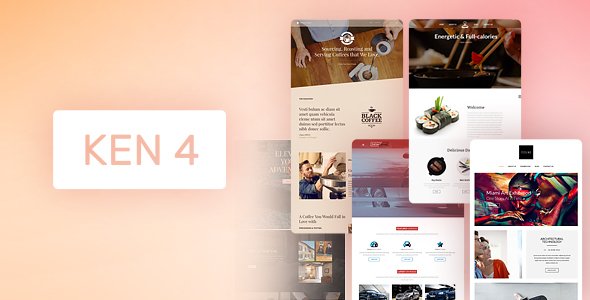
Stuck on your The Ken WordPress theme? Let's fix it.
No endless back-and-forth. Just send us the details and we'll get it done.
No obligation · Replies within 1 hour · Quote within 1 day
Setup · Customization · Bug fixes · WooCommerce integration
About The Ken WP Theme
The Ken is a multi-concept WordPress theme built by Artbees, the same studio behind Jupiter X. It targets creative agencies, portfolios, and corporate businesses that need a polished site without starting from scratch. The theme ships with over 60 pre-built demos, a drag-and-drop page builder, and tight WooCommerce integration for those who need a shop layer on top of a branding site.
Under the hood, The Ken relies on WPBakery Page Builder and a custom Artbees options panel. It supports WPML for multilingual setups, Revolution Slider for hero sections, and Essential Grid for portfolio layouts. Performance out of the box is decent but depends heavily on which demo you import and how many bundled plugins you activate. It suits teams who want visual control without writing code, though deeper customizations often require a developer familiar with Artbees theme architecture.
Get matched with a The Ken developer in under one day
Tell us about your The Ken project. Small fixes, The Ken theme customization, or a full website build, whatever you need, we've got it covered.
We'll connect you to the right The Ken developers, define the scope, and get everything 100% clear.
You'll get one estimate, hire your preferred developer, and start collaborating.
Artbees themes have their own conventions. Modifications that seem simple in a generic theme can behave unexpectedly in The Ken due to how its options panel interacts with WPBakery and custom post meta. Hiring through Codeable connects you with vetted WordPress developers who know Artbees theme architecture specifically. You post a project, get matched within 24 hours, and receive a free estimate before committing. No guesswork, no junior freelancers.
Pros
- 60+ pre-built demo sites cover a wide range of industries and can be imported in one click
- WPBakery, Revolution Slider, and Essential Grid are bundled, saving over $100 in plugin costs
- Granular per-page header and layout controls without touching code
- WPML compatibility makes multilingual builds straightforward
- Active Artbees support team with detailed documentation and video tutorials
Cons
- WPBakery shortcode lock-in makes migrating to another theme or builder messy
- Bundled plugins load on all pages by default, which hurts Core Web Vitals scores
- The options panel has a steep learning curve for clients managing sites themselves
- Full demo imports can pull in unwanted content, images, and plugin dependencies
- Update conflicts between The Ken and bundled plugin versions occur occasionally
Who is The Ken for?
Creative Agency Portfolio
The Ken’s Essential Grid and full-screen hero options make it a solid fit for agencies showcasing client work. Case study layouts, animated project grids, and custom team sections are all achievable without custom development. A The Ken specialist can extend these to match your exact brand presentation and add filtering or AJAX-loaded portfolio entries.
Corporate Business Website
Corporate sites need clear navigation, consistent branding, and fast load times. The Ken’s mega menu builder and per-page layout controls handle structural requirements well. A The Ken developer can strip out unused demo assets, tighten the header behavior, and configure a professional service or team directory that scales as the company grows.
WooCommerce Store with Branding Focus
The Ken layers cleanly over WooCommerce, giving product pages branded styling rather than generic storefront defaults. Shop header layouts, product grid spacing, and cart page design all sit inside the theme options. A The Ken expert can push further with custom product tabs, upsell layouts, and checkout modifications that standard WooCommerce templates don’t support out of the box.
Freelance Designer or Photographer Portfolio
Photographers and designers get full-screen image support, scroll animations, and clean whitespace layouts that work well with visual work. The Ken’s demo library includes specific portfolio styles for single creatives. A The Ken specialist can configure password-protected client galleries, lazy-loaded image grids, and contact form integrations without slowing the site down.
Digital Marketing or SEO Agency
Marketing agencies often need landing page flexibility alongside a standard site structure. The Ken supports full-width WPBakery layouts with custom sections for lead forms, testimonials, and pricing tables. A The Ken developer can build reusable landing page templates within the theme, keeping campaigns consistent without rebuilding from scratch each time.

Customizing The Ken
Customizing The Ken goes well beyond swapping colors and fonts. The theme’s options panel controls header layouts, footer builders, mega menus, and sticky navigation behavior. Page-level overrides let you set different sidebars, full-width layouts, or custom header styles per post type. WPBakery shortcodes handle most content areas, so layouts are built visually but can become hard to maintain at scale.
For anything beyond surface-level changes, a The Ken expert saves significant time. Child theme setup, custom post type registration, hook-based modifications, and WooCommerce template overrides all require PHP and WordPress knowledge specific to Artbees theme structure. A The Ken developer can also clean up WPBakery bloat, implement custom CSS without breaking future updates, and extend the theme’s built-in shortcode library to match your exact design requirements.
Recommended plugins for The Ken
The Ken bundles Revolution Slider, Essential Grid, and WPBakery at no extra cost, covering most layout and animation needs. For ecommerce, WooCommerce slots in cleanly. Where the theme falls short is in raw speed. Loading all bundled plugins on every page adds weight. A proper WordPress performance setup including caching, lazy loading, and script deferral is often needed after import.
SEO-wise, The Ken is compatible with Yoast and Rank Math, but schema markup and crawlability depend on your configuration. A structured WordPress SEO optimisation pass after build is a smart step before launch.
Not sure which plugins to use? This WordPress plugins directory covers the most popular options with reviews and setup guides.
The Ken common issues
The Ken demo import getting stuck or failing
Demo import failures in The Ken are almost always caused by PHP memory limits, execution time caps, or missing required plugins. Set memory_limit to at least 256M and max_execution_time to 300 in your php.ini or wp-config.php. Make sure Revolution Slider and Essential Grid are activated before importing. If the process still stalls, import XML content manually through the WordPress importer and configure widgets separately.
The Ken Revolution Slider not showing on mobile
Revolution Slider hiding on mobile in The Ken is usually a visibility setting inside the slider itself, not a theme bug. Open the slider editor, go to the slide’s Layer settings, and check the Device Visibility toggles for tablet and mobile. Also check the slider’s Module General Options for mobile height settings. If the slider disappears entirely, inspect for a CSS rule in The Ken’s custom styles that sets display: none on small viewports.
WPBakery front-end editor broken in The Ken
A broken WPBakery front-end editor inside The Ken is often a JavaScript conflict with another plugin or a caching plugin serving stale assets. Disable caching temporarily and test in an incognito window. If the editor loads, clear your cache and purge CDN files. If it still fails, deactivate plugins one by one to find the conflict. A plugin with its own jQuery version is the most common cause. If this persists across configurations, the WordPress bug fixing service can diagnose it quickly.
The Ken header overlapping page content
Header overlap in The Ken happens when a page is set to full-width or transparent header mode but the first section has no top padding to compensate for the fixed header height. Go to the page’s Ken options panel, check the header style setting, and either switch to a non-transparent header or add top padding equal to your header height to the first row in WPBakery. For sticky headers, the offset needs to match the sticky header height, not the default one.
The Ken portfolio grid not loading images
Essential Grid image loading failures in The Ken are usually tied to thumbnail regeneration or grid source configuration. If images show broken or blank, regenerate thumbnails using a plugin like Regenerate Thumbnails. If the grid pulls from a custom post type and returns empty, check that the source is correctly set to that post type inside Essential Grid settings. Also confirm the grid’s image crop settings match available thumbnail sizes registered by the theme.
The Ken update breaking layout or styles
The Ken updates can reset customizer settings or cause WPBakery version mismatches if you’re running the bundled plugin rather than a standalone license. Always back up before updating. If a layout breaks post-update, check the browser console for JS errors first. CSS issues usually come from cached stylesheets. Clear all caches and test. If custom CSS was added to the theme directly rather than a child theme, it will be overwritten on update. Use a child theme for all custom code. For persistent issues, the WordPress bug fixing service can restore functionality fast.
The Ken WooCommerce shop page showing wrong layout
WooCommerce shop layout problems in The Ken usually stem from a mismatch between the theme’s shop template and your WooCommerce version. Check if The Ken has a WooCommerce compatibility update available in your ThemeForest downloads. If the shop page uses a custom WPBakery layout instead of the default WooCommerce template, make sure the shortcode [woocommerce_shop] or the native WooCommerce block is present. A missing shop page assignment in WooCommerce settings also causes blank or incorrect shop pages.
The Ken WPML language switcher not appearing
The WPML language switcher not appearing in The Ken is typically a widget placement or menu assignment issue. In WPML’s language settings, ensure you’ve selected to display the switcher as a widget or inside a menu. The Ken’s header builder needs the language switcher module added explicitly if you’re using a custom header layout. If using the default header, add the WPML widget to the correct widget area assigned to that header. Also confirm WPML’s String Translation has scanned The Ken’s strings.
The Ken page loading slowly after demo import
Slow page speed after a full demo import in The Ken is common because demo sites load every bundled plugin and render multiple sliders, grids, and custom fonts on a single page. Start by deactivating plugins you’re not using. Replace Revolution Slider on the homepage with a lighter alternative if animation isn’t critical. Implement a caching plugin, optimize images from the demo, and defer non-critical JavaScript. For a structured speed fix, see the WordPress bug fixing service for a full audit.
The Ken mega menu not working on mobile
The Ken’s mega menu failing on mobile is almost always a touch event conflict or a CSS display issue on small screens. The theme’s built-in mobile menu is separate from the mega menu, so check that mobile menu behavior is configured in the theme options panel under Header. If the mega menu is showing instead of collapsing into the mobile hamburger, check the breakpoint setting in The Ken’s header options. Setting the correct mobile breakpoint pixel value forces the switch to the mobile navigation at the right screen width.
The Ken FAQ
Artbees has continued releasing updates for The Ken, though the pace has slowed compared to their newer Jupiter X theme. Core compatibility updates for current WordPress and WooCommerce versions are still being pushed. Check your ThemeForest downloads or the Artbees changelog for the latest version. If you need active long-term support, factor this into your decision before committing to a full build.
The Ken is built around WPBakery, not Elementor. You can technically install Elementor alongside it, but the two builders conflict at the template level. Pages built with Elementor won’t inherit Ken’s styling automatically, and mixing both builders on the same site creates maintenance issues. If you prefer Elementor, Jupiter X from the same developer is the better-suited Artbees theme.
Not practically. The Ken’s demo layouts, shortcodes, and many of its layout features are tied directly to WPBakery. Removing it leaves most pages broken. If you want to move away from WPBakery, a rebuild using blocks or another builder is the cleaner path rather than trying to strip WPBakery from an existing Ken site.
The Ken is compatible with Yoast SEO and Rank Math and outputs standard semantic HTML. However, its demo pages often include heavy scripts and unoptimized assets that hurt Core Web Vitals scores. SEO performance depends on how the site is built and optimized post-launch. Schema markup, page speed, and clean heading structure all need deliberate attention beyond what the theme handles automatically.
Create a child theme folder in /wp-content/themes/, add a style.css with a Template: theken header line, and create a functions.php that enqueues the parent stylesheet. Activate the child theme from the WordPress dashboard. All custom CSS and template overrides go into the child theme so updates to The Ken don’t wipe your changes.
Yes. The Ken has built-in WooCommerce support with styled shop pages, product grids, cart, and checkout templates. The integration covers most standard WooCommerce features. Custom product page layouts, filtered shop pages, and checkout modifications may need a The Ken developer to implement cleanly within the theme’s template structure.
Rates for a The Ken developer vary based on the scope. Simple fixes or single-feature additions typically run $100 to $300. Full site builds or complex custom development range from $1,000 upward. Through Codeable, you post your project and receive a scoped estimate before paying anything. There’s no obligation to hire after getting the estimate.
Yes, The Ken migrates without layout issues as long as the database, files, and wp-config.php are moved correctly. WPBakery content is stored in the database, so it moves with a standard migration. Update the site URL in settings post-migration and flush permalinks. If sliders or grids reference absolute URLs, you may need a search-and-replace on the database. See our WordPress migration service for a managed move.
The Ken uses WPBakery Page Builder, formerly known as Visual Composer. It’s included in the theme license at no extra cost. WPBakery operates in both front-end and back-end editing modes. The Ken adds custom shortcodes and elements on top of the standard WPBakery library to match its own design components.
Artbees has released updates to address PHP 8 compatibility, but support can vary depending on which version of The Ken you’re running. If you’re on an older version, upgrade the theme first before switching your server to PHP 8. Test in a staging environment. Some bundled plugin versions may need separate updates for full PHP 8 compatibility.
Hire a The Ken Developer for Your Project
Whether you need a full site build, a specific feature added, or a layout that won’t behave, a The Ken expert can get it done cleanly. Work is scoped upfront, delivered by a vetted developer, and backed by Codeable’s satisfaction guarantee. Get a Free Estimate and describe your project. No obligation to hire, and you’ll hear back within 24 hours.
You'll need a free Codeable account so developers can ask questions and send their quotes.